Cleaning up Detached Backups
-
@DustinB I assume your XO is up-to-date, correct?
-
@Danp said in Cleaning up Detached Backups:
@DustinB I assume your XO is up-to-date, correct?
Yes, this is the latest version.
-
Strange... You were deleting them from the
Backup > Healthtab, correct? I just deleted two backups from this screen without issue. Here's the entry from the audit log --{ "data": { "callId": "3hjev38y0dp", "method": "backupNg.deleteVmBackups", "params": { "ids": [ "remote-2//xo-vm-backups/0f81bbd1-b855-da01-939c-bf3be067b01e/20240108T060508Z.json", "remote-2//xo-vm-backups/0c98cb17-cb9e-5795-7a7c-76da5e8ae94b/20230515T050411Z.json" ] }, "timestamp": 1705501583541, "duration": 929, "result": true }, "event": "apiCall", "previousId": "$5$$e363727d765b422551ceecda66a3e19464b9e1e9d8b59174d1799898bd999084", "subject": { "userId": "2", "userIp": "::ffff:192.168.1.104", "userName": "dan@xxxxx.com" }, "time": 1705501583542, "id": "$5$$c09e919bc110d7f2dee3cdfb077e9948f49ae3d276442f1ca1a0e0a409804fde" }Note: My VM was updated yesterday, so I'm a few commits behind at this point.
-
@Danp said in Cleaning up Detached Backups:
Strange... You were deleting them from the
Backup > Healthtab, correct? I just deleted two backups from this screen without issue. Here's the entry from the audit log --{ "data": { "callId": "3hjev38y0dp", "method": "backupNg.deleteVmBackups", "params": { "ids": [ "remote-2//xo-vm-backups/0f81bbd1-b855-da01-939c-bf3be067b01e/20240108T060508Z.json", "remote-2//xo-vm-backups/0c98cb17-cb9e-5795-7a7c-76da5e8ae94b/20230515T050411Z.json" ] }, "timestamp": 1705501583541, "duration": 929, "result": true }, "event": "apiCall", "previousId": "$5$$e363727d765b422551ceecda66a3e19464b9e1e9d8b59174d1799898bd999084", "subject": { "userId": "2", "userIp": "::ffff:192.168.1.104", "userName": "dan@xxxxx.com" }, "time": 1705501583542, "id": "$5$$c09e919bc110d7f2dee3cdfb077e9948f49ae3d276442f1ca1a0e0a409804fde" }Note: My VM was updated yesterday, so I'm a few commits behind at this point.
Correct, from Backup > Health > Detached Backups - these are really in case the job or VM gets restored from backup at some point, which while possible is unlikely.
I did update just the other day, but maybe there is another XO update.
The errors seem to be sporadic as well, as I can delete individual jobs (though I haven't found a rhyme or reason).
-
So for good measure I updated to the latest XO just moments ago and am still getting this when attempting to remove a detached backup.

backupNg.deleteVmBackups
{
  "ids": [
    "a2e9e355-58c1-4642-acfa-c8724cfe9604//xo-vm-backups/41148fd1-02d3-a38b-6657-b93110ccfdf7/20231219T082655Z.json"
  ]
}
{
  "errno": -2,
  "code": "ENOENT",
  "syscall": "open",
  "path": "/run/xo-server/mounts/a2e9e355-58c1-4642-acfa-c8724cfe9604/xo-vm-backups/41148fd1-02d3-a38b-6657-b93110ccfdf7/20231219T082655Z.json",
  "message": "ENOENT: no such file or directory, open '/run/xo-server/mounts/a2e9e355-58c1-4642-acfa-c8724cfe9604/xo-vm-backups/41148fd1-02d3-a38b-6657-b93110ccfdf7/20231219T082655Z.json'",
  "name": "Error",
  "stack": "Error: ENOENT: no such file or directory, open '/run/xo-server/mounts/a2e9e355-58c1-4642-acfa-c8724cfe9604/xo-vm-backups/41148fd1-02d3-a38b-6657-b93110ccfdf7/20231219T082655Z.json'
From:
    at NfsHandler.addSyncStackTrace (/opt/xen-orchestra/@xen-orchestra/fs/src/local.js:18:26)
    at NfsHandler._readFile (/opt/xen-orchestra/@xen-orchestra/fs/src/local.js:176:41)
    at NfsHandler.apply [as __readFile] (/opt/xen-orchestra/@xen-orchestra/fs/src/abstract.js:284:29)
    at NfsHandler.readFile (/opt/xen-orchestra/node_modules/limit-concurrency-decorator/src/index.js:85:24)
    at RemoteAdapter.readVmBackupMetadata (file:///opt/xen-orchestra/@xen-orchestra/backups/RemoteAdapter.mjs:755:58)
    at Array.<anonymous> (file:///opt/xen-orchestra/@xen-orchestra/backups/RemoteAdapter.mjs:295:58)
    at Function.from (<anonymous>)
    at asyncMap (/opt/xen-orchestra/@xen-orchestra/async-map/index.js:23:28)
    at RemoteAdapter.deleteVmBackups (file:///opt/xen-orchestra/@xen-orchestra/backups/RemoteAdapter.mjs:295:29)
    at Function.<anonymous> (file:///opt/xen-orchestra/packages/xo-server/src/xo-mixins/backups-ng/index.mjs:453:86)
    at wrapApply (/opt/xen-orchestra/node_modules/promise-toolbox/wrapApply.js:7:23)
    at /opt/xen-orchestra/node_modules/promise-toolbox/Disposable.js:143:91
    at AsyncResource.runInAsyncScope (node:async_hooks:203:9)
    at cb (/opt/xen-orchestra/node_modules/bluebird/js/release/util.js:355:42)
    at tryCatcher (/opt/xen-orchestra/node_modules/bluebird/js/release/util.js:16:23)
    at Promise._settlePromiseFromHandler (/opt/xen-orchestra/node_modules/bluebird/js/release/promise.js:547:31)
    at Promise._settlePromise (/opt/xen-orchestra/node_modules/bluebird/js/release/promise.js:604:18)
    at Promise._settlePromise0 (/opt/xen-orchestra/node_modules/bluebird/js/release/promise.js:649:10)
    at Promise._settlePromises (/opt/xen-orchestra/node_modules/bluebird/js/release/promise.js:729:18)
    at Promise._fulfill (/opt/xen-orchestra/node_modules/bluebird/js/release/promise.js:673:18)
    at Promise._resolveCallback (/opt/xen-orchestra/node_modules/bluebird/js/release/promise.js:466:57)
    at Promise._settlePromiseFromHandler (/opt/xen-orchestra/node_modules/bluebird/js/release/promise.js:559:17)"
}
This really feels like a bug, that I can't cleanup these detached Backups, but maybe I need to do it manually? Which the only way to do that would be to search my backup repo and purge anything with a matching UUID.
-
@DustinB said in Cleaning up Detached Backups:
"path": "/run/xo-server/mounts/a2e9e355-58c1-4642-acfa-c8724cfe9604/xo-vm-backups/41148fd1-02d3-a38b-6657-b93110ccfdf7/20231219T082655Z.json"
There was a recent issue related to an incorrect path when attempting to restore an XO config backup. I'm wondering if this could be a similar issue. Can you compare this path to the actual path on the NFS device?
-
@Danp said in Cleaning up Detached Backups:
@DustinB said in Cleaning up Detached Backups:
"path": "/run/xo-server/mounts/a2e9e355-58c1-4642-acfa-c8724cfe9604/xo-vm-backups/41148fd1-02d3-a38b-6657-b93110ccfdf7/20231219T082655Z.json"
There was a recent issue related to an incorrect path when attempting to restore an XO config backup. I'm wondering if this could be a similar issue. Can you compare this path to the actual path on the NFS device?
The path on the Synology is correct, and I can find the corresponding UUID for the "missing VM" there-in.
-
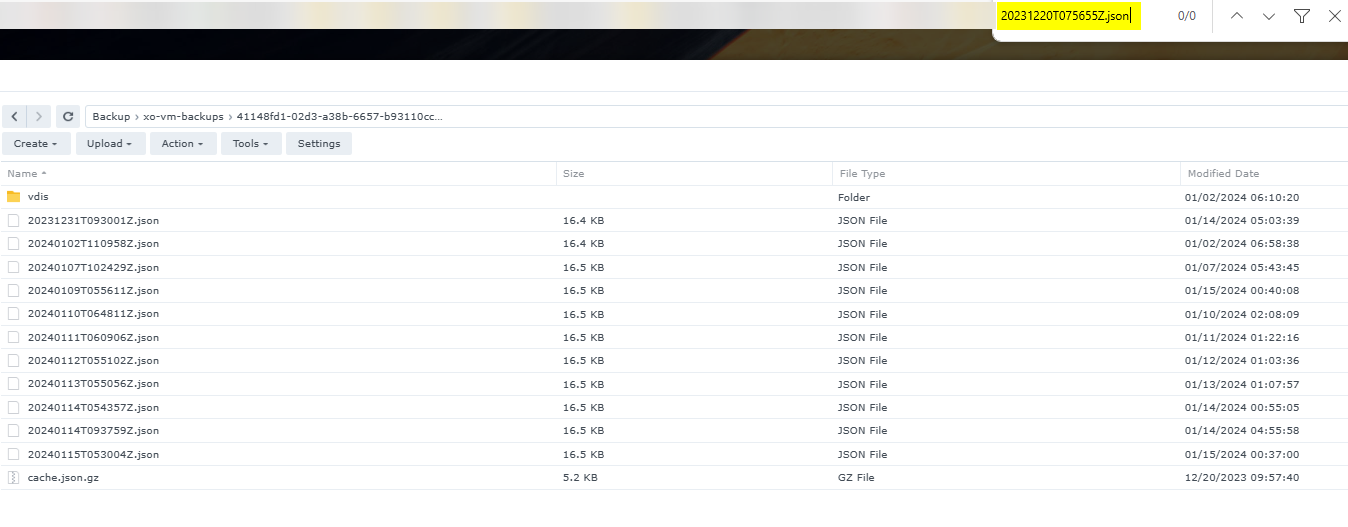
@DustinB The mount UUID has likely been the thing that has changed since this pool has been rebuilt.
Within the NFS path on the backup target, the files are there.
-
The only thing that doesn't exist (for this particular backup) is that the json file listed doesn't exist.
-
Any ideas on how I can clean up these logs?

Hello! It looks like you're interested in this conversation, but you don't have an account yet.
Getting fed up of having to scroll through the same posts each visit? When you register for an account, you'll always come back to exactly where you were before, and choose to be notified of new replies (either via email, or push notification). You'll also be able to save bookmarks and upvote posts to show your appreciation to other community members.
With your input, this post could be even better 💗
Register Login