Getting errors when migrating 4 out 5 VMGuest
-
As you know that I am using XenOrchestraInstallerUpdater script so I will be dependent on its config file. Base on the config file the installation is located at /opt/xo
# Base dir for installation and future updates
INSTALLDIR="/opt/xo"
so I assume that is the directory where XO is running and if I go to /opt directory there is only one folder in there which is "xo"
admin@xen-orchestra:/opt$ ls -ltrh
total 4.0K
drwxr-xr-x 4 root root 4.0K Feb  9 06:25 xo
If I check the status of "xo-server.service" it is pointing to the "/opt/xo" where it is running
admin@xen-orchestra:/opt$ systemctl status xo-server.service ● xo-server.service - XO Server Loaded: loaded (/etc/systemd/system/xo-server.service; enabled; vendor preset: enabled) Active: active (running) since Fri 2024-02-09 06:25:48 ACDT; 4h 51min ago Main PID: 4769 (node) Tasks: 11 (limit: 9359) Memory: 163.9M CPU: 7min 13.551s CGroup: /system.slice/xo-server.service └─4769 node /opt/xo/xo-server/dist/cli.mjs Feb 09 08:45:48 xen-orchestra xo-server[4769]: network: 'PrivateNetwork2', Feb 09 08:45:48 xen-orchestra xo-server[4769]: host: 'xcp-ng-Server2', Feb 09 08:45:48 xen-orchestra xo-server[4769]: pool: '' Feb 09 08:45:48 xen-orchestra xo-server[4769]: } Feb 09 08:45:48 xen-orchestra xo-server[4769]: 2024-02-08T22:15:48.527Z xo:xo-server:sdn-controller:private-network INFO Host added { Feb 09 08:45:48 xen-orchestra xo-server[4769]: privateNetwork: '0ad66652-81c9-4c67-b484-286a1621c23e', Feb 09 08:45:48 xen-orchestra xo-server[4769]: network: 'PrivateNetwork1', Feb 09 08:45:48 xen-orchestra xo-server[4769]: host: 'xcp-ng-Server2', Feb 09 08:45:48 xen-orchestra xo-server[4769]: pool: '' Feb 09 08:45:48 xen-orchestra xo-server[4769]: } -
@ashinobi That all looks fine. Probably just need to pull the source with
git pull.Also, I just took at look at that script and it seems that you can edit the BRANCH line in the config file to select a different branch for the script to use.
-
do I change "Branch=MASTER" to "Branch=xo5/fix-bulk-migration"? to make it work?
-
@ashinobi I believe so

-
-
@ashinobi That commit is still from the wrong branch, so I'm not sure what isn't working correctly on your end.

I just rebuilt my XO VM on that branch using these commands --
sudo bash
cd /opt/xen-orchestra/
git checkout xo5/fix-bulk-migration
git pull
yarn; yarn build
sudo systemctl restart xo-server.service
This is my About screen now, which matches the values I would expect for this branch --

-
That is weird, if that is still from the wrong branch because when I ran the script it showed it is trying to download from the branch I specified:
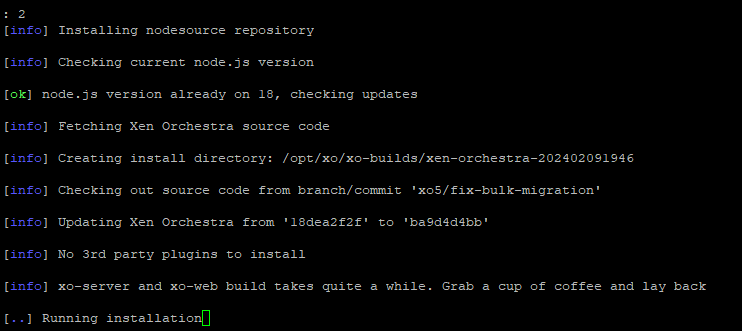
I will try your method, unfortunately my backups for my VM Guest just kicked in so I'll update you once the backup has finished and I was able to run the command you have provided
Regards
-
This post is deleted! -
@Danp said in Getting errors when migrating 4 out 5 VMGuest:
checkout xo5/fix-bulk-migration
When I did "git pull" I get the following:
root@xen-orchestra:/opt/xo/xo-src/xen-orchestra# git pull
hint: You have divergent branches and need to specify how to reconcile them.
hint: You can do so by running one of the following commands sometime before
hint: your next pull:
hint:
hint:   git config pull.rebase false  # merge (the default strategy)
hint:   git config pull.rebase true   # rebase
hint:   git config pull.ff only       # fast-forward only
hint:
hint: You can replace "git config" with "git config --global" to set a default
hint: preference for all repositories. You can also pass --rebase, --no-rebase,
hint: or --ff-only on the command line to override the configured default per
hint: invocation.
fatal: Need to specify how to reconcile divergent branches.
Do I need to merge any repository or ignore this?
-
Sorry, but I'm not sure what you should do at this point. Maybe you could reach out to the XenOrchestraInstallerUpdater
folks. -
That's fine, thank you for the help. I still have the migrate option when I go to the vm settings itself. Thanks for trying to help with my small issue and the information you shared about the use of git command
-
Hi @ashinobi.
We have just pushed all the migration fixes from thexo5/fix-bulk-migrationbranch to themasterbranch. You should now be able to test it. -
Thanks for doing the fix, I have tested this and I confirm it is working. I am able to migrate VMGuest to a different host by ticking the check box in the vmlist.






Hello! It looks like you're interested in this conversation, but you don't have an account yet.
Getting fed up of having to scroll through the same posts each visit? When you register for an account, you'll always come back to exactly where you were before, and choose to be notified of new replies (either via email, or push notification). You'll also be able to save bookmarks and upvote posts to show your appreciation to other community members.
With your input, this post could be even better 💗
Register Login