Intel iGPU passthough
-
In my testing of this, iGPU passthru works fine in Linux but in Windows the device will show an error in the device manager, disable/enabling the drive in the device manager will allow it to work, until next reboot.
-
@bullerwins @xerxist @flakpyro
What are you using for display output on the host since you're passing the iGPU to the VM?
-
@CJ Im running server grade hardware that has remote lights out management with iKVM support. Otherwise yeah you would lose access to the display output.
-
No output just need the Intel quick sync.
-
@xerxist Yes, QS for the VM but there are times when having a local display of the console comes in handy. That's why I haven't done mine.
-
This post is deleted! -
@bullerwins said in Intel iGPU passthough:
@olivierlambert I tried but getting this error when turning on the VM
INTERNAL_ERROR(xenopsd internal error: (Failure
"Error from xenguesthelper: Populate on Demand and PCI Passthrough are mutually exclusive"))Not sure what it means
EDIT: after googleing it seems that static and dynamic memory has to be the same:
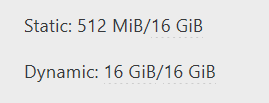
@bullerwins thanks for this. I had to restore a VM from a backup and while it was down changed the dynamic value. This certainly saved me some time. I was positive it had to do with remapping the UID on the VM or something on the host side of it. anyways, thanks.
-
 G gskger referenced this topic on
-
I followed this post and it worked for me.
One thing to note in my testing, if I had a monitor / HDMI dummy plug hooked up the transcoding worked reliably.
When I unplugged it I found activity would be present on the iGPU but the video in plex would play/pause constantly then eventually stop. -
@scawtydont Thanks for keeping us posted. Dummy plug is still a thing it seems

-
I'm also trying to pass through my Intel iGPU to a VM, but running into issues. It does work on Debian, however not on Fedora Server which I'd like to use. I have tried changing to BIOS mode, even plugged in a dummy HDMI plug, but nothing helped. SELinux is disabled on Fedora to rule out any issues related to that. I even tried using XCP-NG Center which was suggested in an older post, but that didn't help either: https://xcp-ng.org/forum/topic/6211/intel-gpu-passthrough-question/3
I also posted this on the Fedora forum with further details: https://discussion.fedoraproject.org/t/intel-igpu-in-containers/176029
Are there any other things I could try to investigate this further?