XCP-ng 8.3 updates announcements and testing
-
@dinhngtu The output of that command seems to result in the output of "Scanningn every UUID in my pool", most of which do not use SB. Im guessing that normal and i do not have any affected VMs any longer?
-
I opened a support ticket #7746470
I get the following from different host...
Pool1 Master host: [09:48 xcp-ng-vyadytkn ~]# xe vm-list --minimal | xargs -d, -Ix sh -c "echo Scanning x 1>&2; varstore-ls x" > /dev/null Scanning ab9e8cde-fad8-5089-29c8-c904a810857a Scanning d2025b59-6268-6bb9-28cd-e4812395563c Scanning 4567b8da-3a3c-00a4-cf6b-ccdae302a645 Scanning 291f9d05-88c8-fc37-107a-368a55c649be Scanning 88d7ba09-e65a-dd82-8d45-ec3df3e3f9d4 Scanning bcc182c6-dbb7-33c4-3e8b-c7db9b246e7b Scanning 5a2c18ca-e9ce-abfc-8bd7-2794f94c6c3a Scanning f4a4669a-2baf-47f2-b16a-08f60963e922 Scanning d4352870-d73c-5cda-9470-ffd7cd01e251 Scanning b0c21701-7309-dd9c-fa2a-bdc84a24565e Scanning 342b470e-fac9-6579-f82d-2517b8de6112 Scanning 2c21c005-9230-f3f3-cdf6-2d39407b3456 Scanning 102a5ac2-ab7f-68ca-9fa1-b549d64ec4a9 Scanning c9dadc90-6fb8-eee7-d3e5-e1ae1024a77f Scanning 5703adef-d804-6b15-ba2f-7b3357a711bb Scanning a8858f86-ceab-2d5d-5d46-1b083c3fa399 Scanning 82b191df-a63c-4357-b618-4467f714008a Pool 2 Master host (Problem VM) [10:02 localhost ~]# xe vm-list --minimal | xargs -d, -Ix sh -c "echo Scanning x 1>&2; varstore-ls x" > /dev/null Scanning ece6db75-533b-5359-1a99-28d5dc1a6912 Scanning c81f1f1b-9f95-38ec-f96e-5ce8fea073e6 unserialize_variables: Tolerating oversized data 60440 > 57344 Scanning 4fb6dee8-c251-93e6-0c20-b1c1c67351ba Scanning 8a570993-6522-c837-0931-6fd1812dbd96 Scanning b31749b8-bc1a-0e8a-a864-50a06391592e Scanning bf1b61d5-14ca-9f0e-7040-24c177693cea Scanning af6eeff7-5640-28a9-dbdb-87f094a04665 Scanning 43ba924b-8bf7-4a50-b258-2e977f6f2f0c Scanning 5a625c92-3702-2ce6-1790-39497745e83c Scanning 9f36a8c5-c988-8546-b0f9-30ac9d0a5015 Scanning a7f5b1bb-7fe2-d0b5-5187-f29e5d4d15d7 -
My production pool upgraded fine as far as I can tell, but not so good with the windows drivers, I'll make a thread on the drivers.
-
@flakpyro said in XCP-ng 8.3 updates announcements and testing:
@dinhngtu The output of that command seems to result in the output of "Scanningn every UUID in my pool", most of which do not use SB. Im guessing that normal and i do not have any affected VMs any longer?
Yes, it'll produce an error message in
unserialize_variableswhen there's a problem.@acebmxer Scanning on 1 host will scan the whole pool at once.
In the output you posted, there's only
c81f1f1b-9f95-38ec-f96e-5ce8fea073e6which needs fixing. -
@acebmxer Scanning on 1 host will scan the whole pool at once.
In the output you posted, there's only
c81f1f1b-9f95-38ec-f96e-5ce8fea073e6which needs fixing.That is the same pool/host i ran the following command on.
wget https://koji.xcp-ng.org/repos/user/8/8.3/xcpng-users.repo -O /etc/yum.repos.d/xcpng-users.repo
yum update --enablerepo=xcp-ng-ndinh1 varstored varstored-tools
secureboot-certs clear
The vm being called out is the vm that would not boot that is booting now after running the above command.
Is this the command i need to run?
varstore-rm c81f1f1b-9f95-38ec-f96e-5ce8fea073e6 d719b2cb-3d3a-4596-a3bc-dad00e67656f dbx -
@acebmxer Yes, that'll fix the situation.
Note that we're discussing a different approach for the official update, which will involve using a manual repair tool.
-
@dinhngtu
Thank you for all the help. See output below. Please let me know if you would like for me to test anything from my side.[10:02 localhost ~]# xe vm-list --minimal | xargs -d, -Ix sh -c "echo Scanning x 1>&2; varstore-ls x" > /dev/null Scanning ece6db75-533b-5359-1a99-28d5dc1a6912 Scanning c81f1f1b-9f95-38ec-f96e-5ce8fea073e6 unserialize_variables: Tolerating oversized data 60440 > 57344 Scanning 4fb6dee8-c251-93e6-0c20-b1c1c67351ba Scanning 8a570993-6522-c837-0931-6fd1812dbd96 Scanning b31749b8-bc1a-0e8a-a864-50a06391592e Scanning bf1b61d5-14ca-9f0e-7040-24c177693cea Scanning af6eeff7-5640-28a9-dbdb-87f094a04665 Scanning 43ba924b-8bf7-4a50-b258-2e977f6f2f0c Scanning 5a625c92-3702-2ce6-1790-39497745e83c Scanning 9f36a8c5-c988-8546-b0f9-30ac9d0a5015 Scanning a7f5b1bb-7fe2-d0b5-5187-f29e5d4d15d7 [10:23 localhost ~]# varstore-rm c81f1f1b-9f95-38ec-f96e-5ce8fea073e6 d719b2cb-3d3a-4596-a3bc-dad00e67656f dbx unserialize_variables: Tolerating oversized data 60440 > 57344 [11:40 localhost ~]# xe vm-list --minimal | xargs -d, -Ix sh -c "echo Scanning x 1>&2; varstore-ls x" > /dev/null Scanning ece6db75-533b-5359-1a99-28d5dc1a6912 Scanning c81f1f1b-9f95-38ec-f96e-5ce8fea073e6 Scanning 4fb6dee8-c251-93e6-0c20-b1c1c67351ba Scanning 8a570993-6522-c837-0931-6fd1812dbd96 Scanning b31749b8-bc1a-0e8a-a864-50a06391592e Scanning bf1b61d5-14ca-9f0e-7040-24c177693cea Scanning af6eeff7-5640-28a9-dbdb-87f094a04665 Scanning 43ba924b-8bf7-4a50-b258-2e977f6f2f0c Scanning 5a625c92-3702-2ce6-1790-39497745e83c Scanning 9f36a8c5-c988-8546-b0f9-30ac9d0a5015 Scanning a7f5b1bb-7fe2-d0b5-5187-f29e5d4d15d7 [11:40 localhost ~]# -
@acebmxer All looks good from the output. There might be some VMs that need fixes for Windows dbx updates to work properly, I'll try to add that in the official version.
-
@stormi said in XCP-ng 8.3 updates announcements and testing:
 IMPORTANT NOTICE!
After publishing the updates, we discovered a very nasty bug when using the UEFI certificates that we distribute. Long story short, they're too big, and there's only limited space (57K), and combined to a preexisting bug in varstored, this will cause the VM to stop booting after Windows or any other OS attempts to append to the DBX (revocation database).
We pulled the
varstoredupdate, but those who updated can be affected.There are conditions for the issue:
- Existing VMs are not affected, unless you propagated the new certs to them
- New VMs are affected only if you never installed UEFI certs to the pool yourself (through XOA or
secureboot-certs install), or cleared them usingsecureboot-certs clearin order to use our default certificates.
If you have the affected version of
varstored(rpm -q varstoredyieldsvarstored-1.2.0-3.1.xcpng8.3) :- on every host, downgrade it with
yum downgrade varstored-1.2.0-2.3.xcpng8.3. No reboot or toolstack restart required. - if you have affected UEFI VMs, that is VMs that meet the conditions above but are not broken yet, don't install updates, turn them off, and fix them by deleting their DBX database: https://docs.xcp-ng.org/guides/guest-UEFI-Secure-Boot/#remove-certificates-from-a-vm. This has to be done when the VM is off. Your OS will add its own DBX afterwards.
- If you already have broken VMs (this warning reaching you too late), revert to a snapshot or backup. Other ways to fix them will require a patched
varstoredcurrently in the making.
@dinhngtu A little trick for the future when determining whether a user’s system, is affected by a bad update based on version, as well as remediation checks.
You can use “yum history list <packagename>”, to retrieve transaction IDs. The script can then iterate over the transaction IDs retrieving the package versions.
The specific transaction info can be retrieved with “yum history info <transaction_id>”. This will enable you to go back much further, thus seeing if remediation is required more easily!!
-
New security and maintenance update candidate for you to test!
A hardware issue was found in AMD Zen 5 CPU devices, related to how random numbers are generated. It's best fixed via a firmware update, but we also provide updated microcode to mitigate it, and Xen is updated to support loading the newer microcode. We also publish other non-urgent updates which we had in the pipe for the next update release.
Security updates:
amd-microcode: This release fixes vulnerability CVE-2025-62626 in AMD Zen 5 CPUs microcode that may generate excessive number of zeros in random outputs, potentially compromising cryptographic security.xen:- Introduce support for the new Linux AMD microcode container format (multiple blobs per CPU),
- Address the XSA-476 vulnerability (CVE-2025-58149), low severity on XCP-ng (affects an unsupported feature of Xen)
- Enable passthrough of devices on non-zero PCI segments.
- Improve performance of resumed or migrated VMs by supporting superpage restoration
- Fix detection of the Self Snooping feature on capable Intel CPUs
gpumon,xcp-featured: rebuilt for updated XAPIqemu:- Synchronize with XenServer's fix for the Windows Server 2025 NVMe write cache issue that we fixed previously
- Fix device passthrough with devices in a PCI segment different from 0
sm:- Upstream changes:
- Robustify CBT enable/disable calls to prevent errors.
- Various fixes regarding SCSI commands/functions.
- Add tolerance in the GC during leaf coalesce.
- Improves GC logging and corrects rare race conditions.
- Our changes
- Use serial instead of SCSI ID for SR on USB devices to prevent bad match.
- Explicit error message during LVM metadata generation when VDI type is missing.
- Correct and robustify LINSTOR deletion algorithm to manage in-use volumes.
- Avoid throwing LINSTOR exceptions in case of impossible temporary volume deletion in order to properly terminate higher-level API calls.
- Prevent XOSTOR operations if LINSTOR versions mismatches on a pool.
- Upstream changes:
varstored:- Restore and update the default dbx for new VMs. That's the main change for users: we now embed the latest UEFI certificates with XCP-ng, making pools ready for secure boot out of the box. We'll update the documentation to explain how to handle the transition for existing pools (ranging from "nothing to do" to "do something to ensure that future certificate updates become automatically the pool's default).
- Fix the format of the default included KEK/db/dbx to ensure safe updates
- Fix an issue with UEFI variable length limit
xapi:- Support up to 16 VIFs (virtual network interfaces) per VM (previously: 7)
- Runnable metrics:
- runnable_any
- runnable_vcpus
- Various fixes, optimizations, small improvements, and foundational changes (such as getting prepared for a newer version of ocaml)
gpumonxcp-featured: rebuild for updated XAPI.xcp-ng-pv-tools:- Properly detect Red Hat 10 and its derivatives, when installing the Linux guest agent
- Update Windows Tools to 9.1.100
xcp-ng-release: fix benign "unary operator expected" error, displayed when connecting from some terminal softwarexha: Nothing of note, minor changes such as logging typos...xo-lite: version 0.17.0- [VM/New] Fix the default topology by setting the platform:cores-per-socket value correctly (PR #9136)
- [Host/HostSystemResourceManagement] Fix display when control domain memory is undefined (PR [#9197])
xsconsole: Prepare for a future feature.
Optional packages updated:
qlogic-netxtreme2-alt: alternate driver for NetXtreme2 updated to version 7.15.24.qlogic-qla2xxx-alt: alternate driverqla2xxxupdated to version 10.02.14.01_k
Test on XCP-ng 8.3
yum clean metadata --enablerepo=xcp-ng-testing,xcp-ng-candidates
yum update --enablerepo=xcp-ng-testing,xcp-ng-candidates
reboot
The usual update rules apply: pool coordinator first, etc.
 Do not apply these updates if you are using the QCOW2 disk format. QCOW2 testing requires specific update repositories. Updating via the normal test channels would render your disks invisible, and even once the necessary packages are restored, their metadata (which disk is attached to what VM, etc.) will be lost.
For QCOW2 testers, update with:
yum update --enablerepo=xcp-ng-testing,xcp-ng-candidates,xcp-ng-qcow2For others who'd like to start testing with the QCOW2 format, please head towards the dedicated thread: https://xcp-ng.org/forum/topic/10308/dedicated-thread-removing-the-2tib-limit-with-qcow2-volumes
Versions:
amd-microcode: 20251203-1.1.xcpng8.3gpumon: 24.1.0-71.1.xcpng8.3qemu: 4.2.1-5.2.15.1.xcpng8.3sm: 3.2.12-16.1.xcpng8.3varstored: 1.2.0-3.4.xcpng8.3xapi: 25.33.1-2.1.xcpng8.3xcp-featured: 1.1.8-3.xcpng8.3xcp-ng-pv-tools: 8.3-15.xcpng8.3xcp-ng-release: 8.3.0-35xen: 4.17.5-23.1.xcpng8.3xha: 25.2.0-1.1.xcpng8.3xo-lite: 0.17.0-1.xcpng8.3xsconsole: 11.0.9.1-1.1.xcpng8.3.3
Optional packages:
qlogic-netxtreme2-alt: 7.15.24-1.xcpng8.3qlogic-qla2xxx-alt: 10.02.14.01_k-1.xcpng8.3
What to test
Normal use and anything else you want to test.
Test window before official release of the updates
2 days.
-
Updated to testing. Now all the VM's I have boot into the uefi shell.
Something is broken with this update.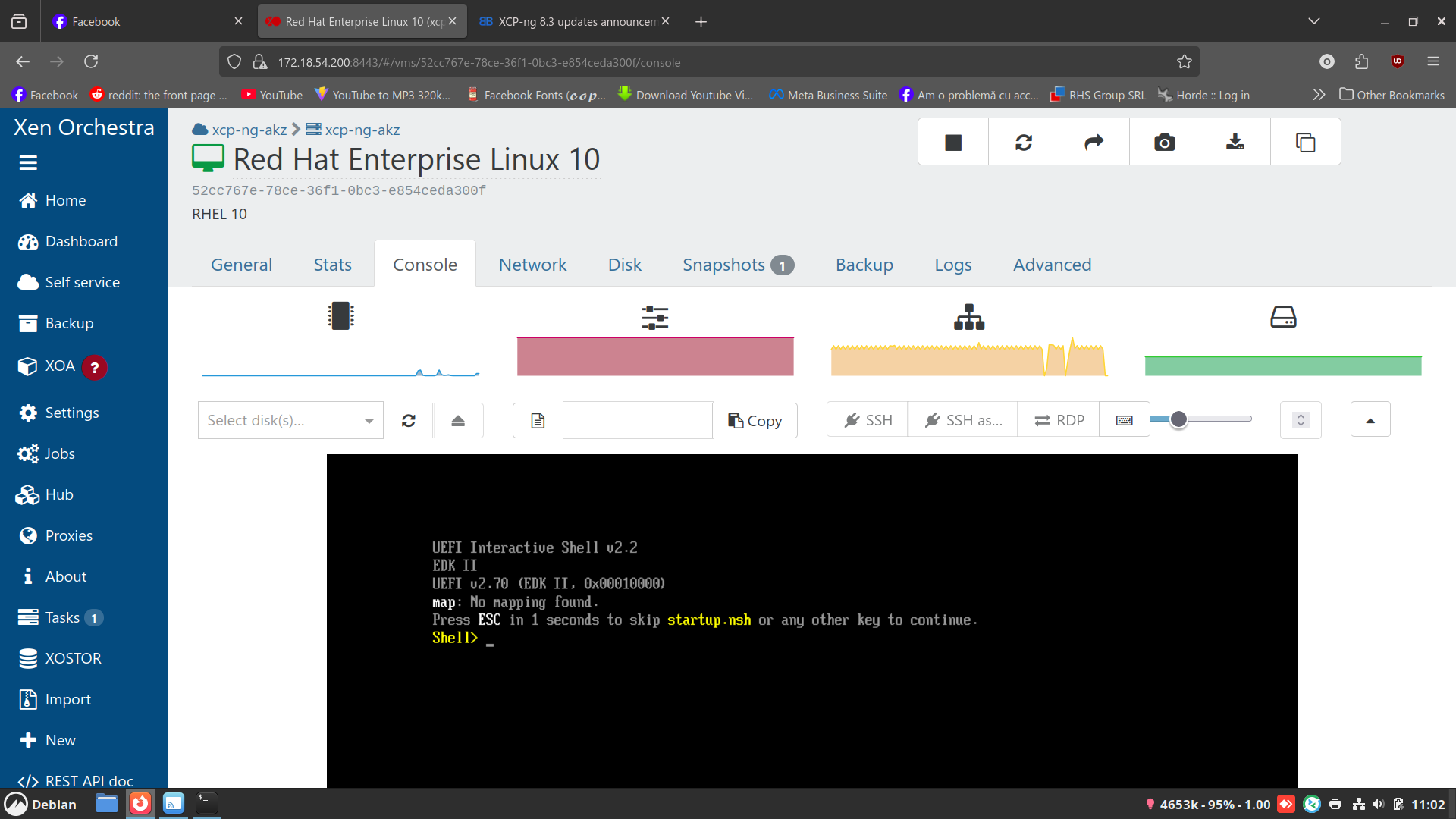
-
@ovicz Is Secure Boot enabled on these VMs?
-
@stormi on some yes on some no...I did enabled on one but no go.
They used to work before the update, no matter if secure boot was enabled or not. -
@stormi Installed on my usual test hosts probably an hour after your initial post and let them run thoughout the day (Intel Minisforum MS-01, and Supermicro running a Xeon E-2336 CPU). Also installed onto a 2 host AMD epyc pool. Updates went smooth, backups continue to function as before.
A couple of windows VMs had secure boot enabled on our test pool. After the initial reboot i ran " secureboot-certs clear" on the pool master, then In XOA i clicked "Copy pool's default UEFI certificates to the VM" after that. The VMs continued to reboot without issue after. Strange to see someone else having issues with VMs not booting.
-
@flakpyro I did what you said about clearing certs and reinstall them, still no go.
-
@ovicz No UEFI mapping displayed in the shell suggests that the VM couldn't detect its disks. Is your SR doing OK?
-
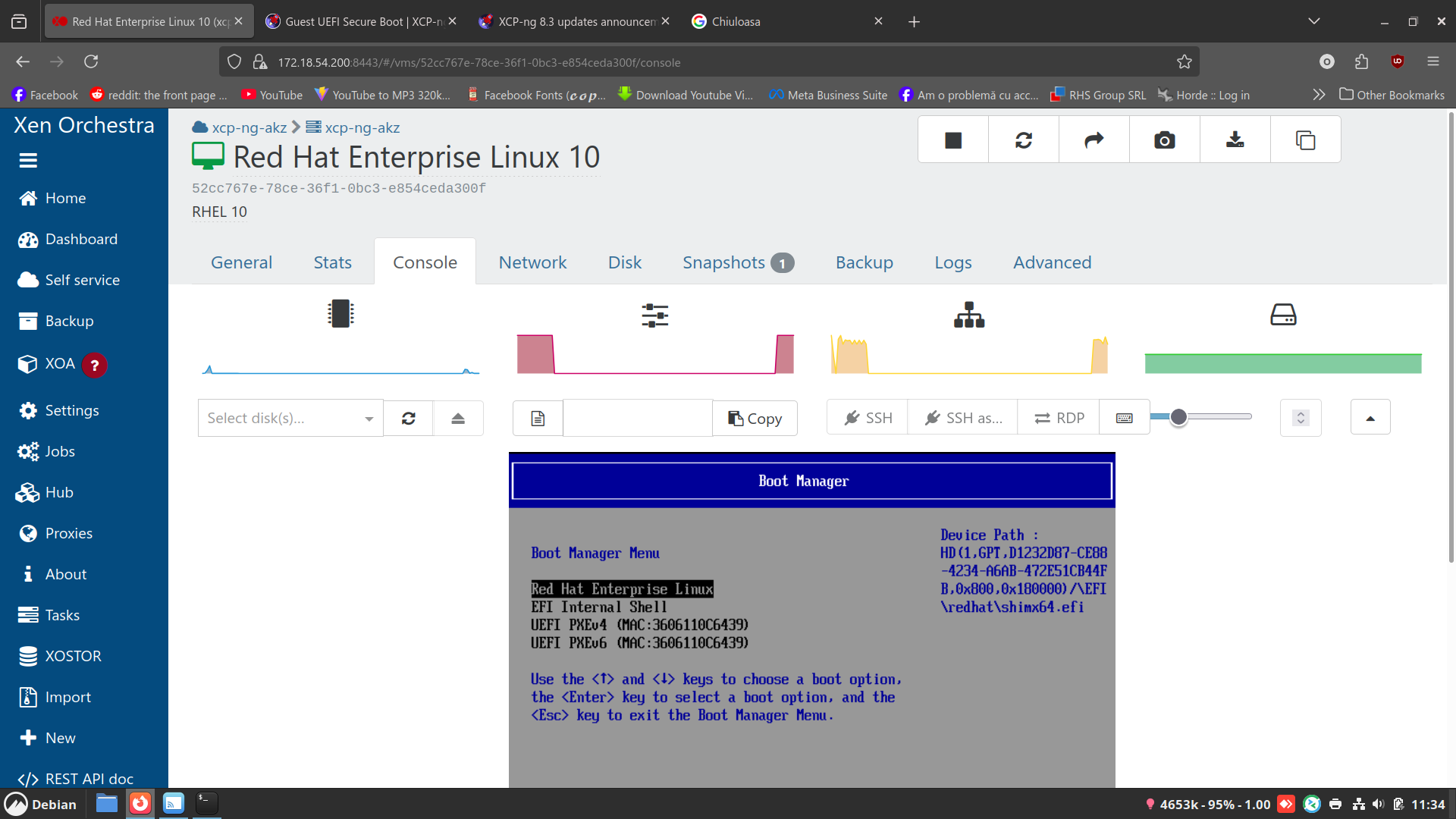
@dinhngtu [11:31 xcp-ng-akz ~]# zpool status
pool: ZFS_Pool
state: ONLINE
config:NAME STATE READ WRITE CKSUM ZFS_Pool ONLINE 0 0 0 sda ONLINE 0 0 0errors: No known data errors
I guess so...
-
@ovicz How is your SR connected to the host, via NFS or something else?
-
@dinhngtu No. It's a local SSD mounted with the zfs pool. Everything worked before the update. I don't see other errors in the host.
-



Hello! It looks like you're interested in this conversation, but you don't have an account yet.
Getting fed up of having to scroll through the same posts each visit? When you register for an account, you'll always come back to exactly where you were before, and choose to be notified of new replies (either via email, or push notification). You'll also be able to save bookmarks and upvote posts to show your appreciation to other community members.
With your input, this post could be even better 💗
Register Login