XCP-ng
    • Categories
    • Recent
    • Tags
    • Popular
    • Users
    • Groups
    • Register
    • Login
    1. Home
    2. kent
    K
    Offline
    • Profile
    • Following 1
    • Followers 0
    • Topics 7
    • Posts 22
    • Groups 0

    kent

    @kent

    7
    Reputation
    10
    Profile views
    22
    Posts
    0
    Followers
    1
    Following
    Joined
    Last Online

    kent Unfollow Follow

    Best posts made by kent

    • RE: Filtering multiple hosts by name

      @olivierlambert

      Thanks, I had read this guide earlier but hadn't processed it properly.

      XenCenter: star hamil bream

      XOA: |(star hamil bream)

      I've set up a saved filter as |( ) and made this my default, so hopefully this will get me to what I'm used to.

      Cheers
      Kent.

      posted in Xen Orchestra
      K
      kent
    • RE: VDIS not showing in XO5, but are in XO6 and on the VM itself ?

      @Danp

      Thanks - not just me then. I've found that fast cloning the VMSeems like the easiest option to get the VHD's to show again.

      But the best option for now may be to revert back to the previous XO where this wasn't happening.

      Since posting this, I found further VMs (though not all) where the OS VHD was showing but none of the others.

      Cheers
      Kent.

      posted in Xen Orchestra
      K
      kent

    Latest posts made by kent

    • RE: VDIS not showing in XO5, but are in XO6 and on the VM itself ?

      @Danp

      Thanks - not just me then. I've found that fast cloning the VMSeems like the easiest option to get the VHD's to show again.

      But the best option for now may be to revert back to the previous XO where this wasn't happening.

      Since posting this, I found further VMs (though not all) where the OS VHD was showing but none of the others.

      Cheers
      Kent.

      posted in Xen Orchestra
      K
      kent
    • VDIS not showing in XO5, but are in XO6 and on the VM itself ?

      Hi,

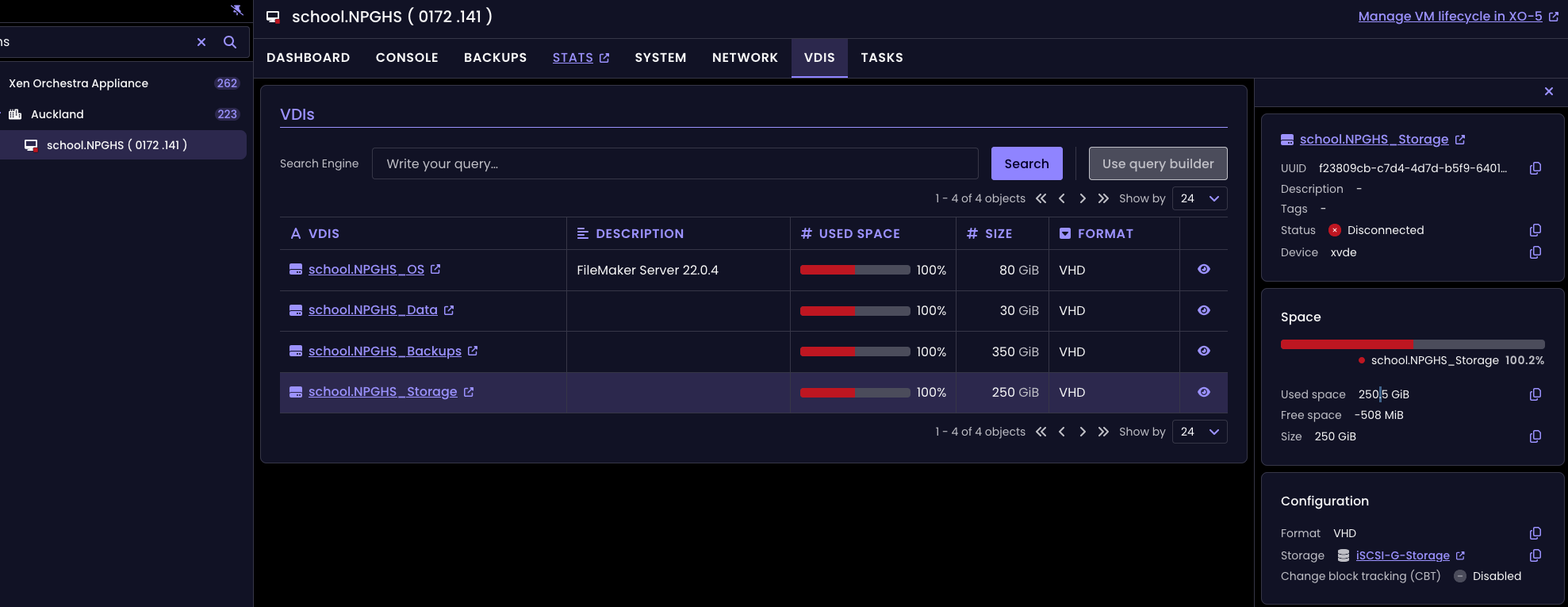
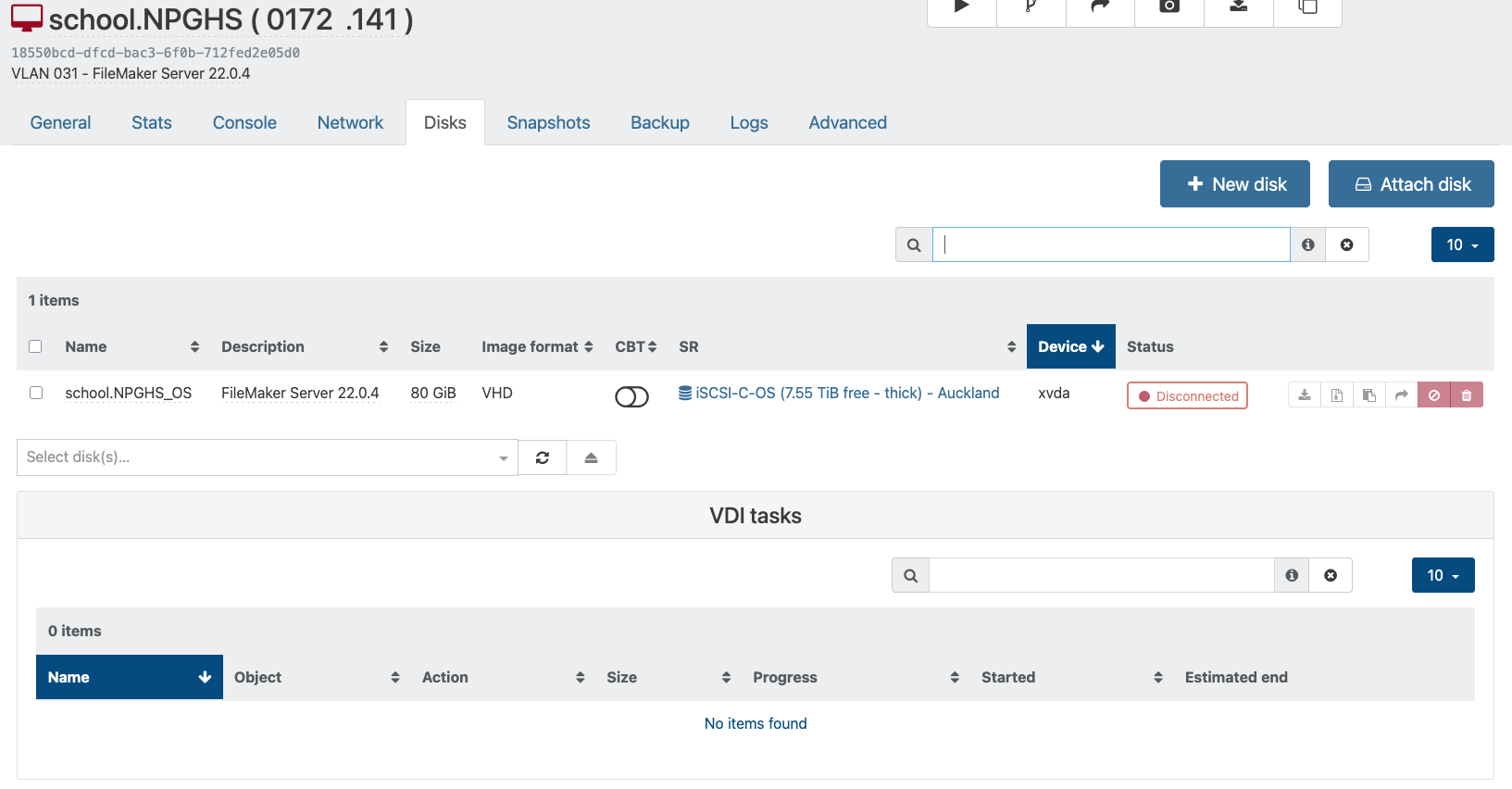
      I have an issue where the VDIS are not listed in the X05 console for a VM, but they are still mounted in the host itself and are showing in XO6 (but you can't edit them there).

      I made a copy (Fast) and they are showing against the copy - so initial panic over. But what would cause this to happen ?

      Also, what does the 'Used Space' represent ? I thought it was the used space on the drive by the machine itself, but the reason I was looking at this VM was the Storage drive is currently using 95% (according to Windows) and I was wanting to resize it larger.

      Cheers
      Kent.

      ed192918-b50f-49c2-a508-a405a3bac3e2-image.png

      314db461-87b1-4a6d-b416-bd2a68ce6f96-image.png

      posted in Xen Orchestra
      K
      kent
    • RE: Purge snapshot data when using CBT - Why wouldn't I enable this ?

      Hi @olivierlambert,

      No performance gain to keep the snapshot. It's more the opposite. Leaving the snapshot means it will be only removed in the next job, meaning you'll have more to coalesce. However, it's very stable, CBT tends to have some quirks from time to time, so worth trying on few VMs first.

      Thanks - perhaps the backup documentation could have a page that covers each of these options and the pro's / con's of enabling / disabling each of them.
      They seem to be newer options added as they weren't even shown in the webinar video and I couldn't find any mention of them anywhere.

      Also, if it's better to have this option enabled, then perhaps it could be enabled by default ?

      I don't think it's possible now. I can ask internally if it's something that's planned already or doable in the future

      Thanks - that'll be good. Either option will be good. The ability to set the 'Full Backup Interval' against the individual schedule instead of the whole backup task may be all that needs to change.
      I'll submit a ticket to get this feature request started.

      Thanks
      Kent.

      posted in Backup
      K
      kent
    • Purge snapshot data when using CBT - Why wouldn't I enable this ?

      I've been unable to find documentation on the toggle options when setting up a backup schedule (I've watched the video and read the documentation a couple of times - but acknowledge it could be documented and I've read over it / completely missed it.

      Note:
      • I'm backing up using continuous replication to another XCP server over a private LAN connection in another city, so bandwidth is less than local backups.
      • It took 2.5 days to complete the first full backup
      • I have (currently) 168 VMs to back up, all with drives between 80 and 500GB in size. Total backup size is 15TiB.
      • My 15TiB has somehow ballooned and completely filled the 32TiB drive (I've now resized it to 40TiB).
      • I'm using 'Use NBD + CBT to transfer disk if available' for backups.

      Questions:

      1. Purge snapshot data when using CBT
        I note that there is also a 'base copy' that I assume has been created as well. I'm assuming that this is used for the CBT tracking between each backup.
        The tooltip says they won't use any notable space on disk, not visible in the UI and cannot be restored from.

      Question: Are there any performance gains for keeping the last backup snapshot between backups ?

      1. Force full Backup
        I am doing a Mon-Fri backup (keep 6) and a Sat Backup (keep 4).
        I currently have the Sat backup set to 'Force Full Backup'

      With 168+ VM's, I'd like to instead rotate the Full backup so that only a subset (say 40) are done each Saturday on a rotating basis.
      I did look at doing a full backup on the first Saturday of each month, but this doesn't seem possible either.
      I also considered doing the backups by physical host, but you can't use the smart filters to a host, just a pool.

      Question: Any way to stagger the Full Backup of VM's within a schedule ?

      Thanks
      Kent.
      posted in Backup
      K
      kent
    • RE: Speed Limit - Overall, per VM or NBD connection ?

      @olivierlambert

      Dou! Thanks for clarifying the speed limit - I've adjust to 100MiB, which should use about 80% of my available bandwidth.

      Resolving the VDIs' appears to have worked as backups going now.

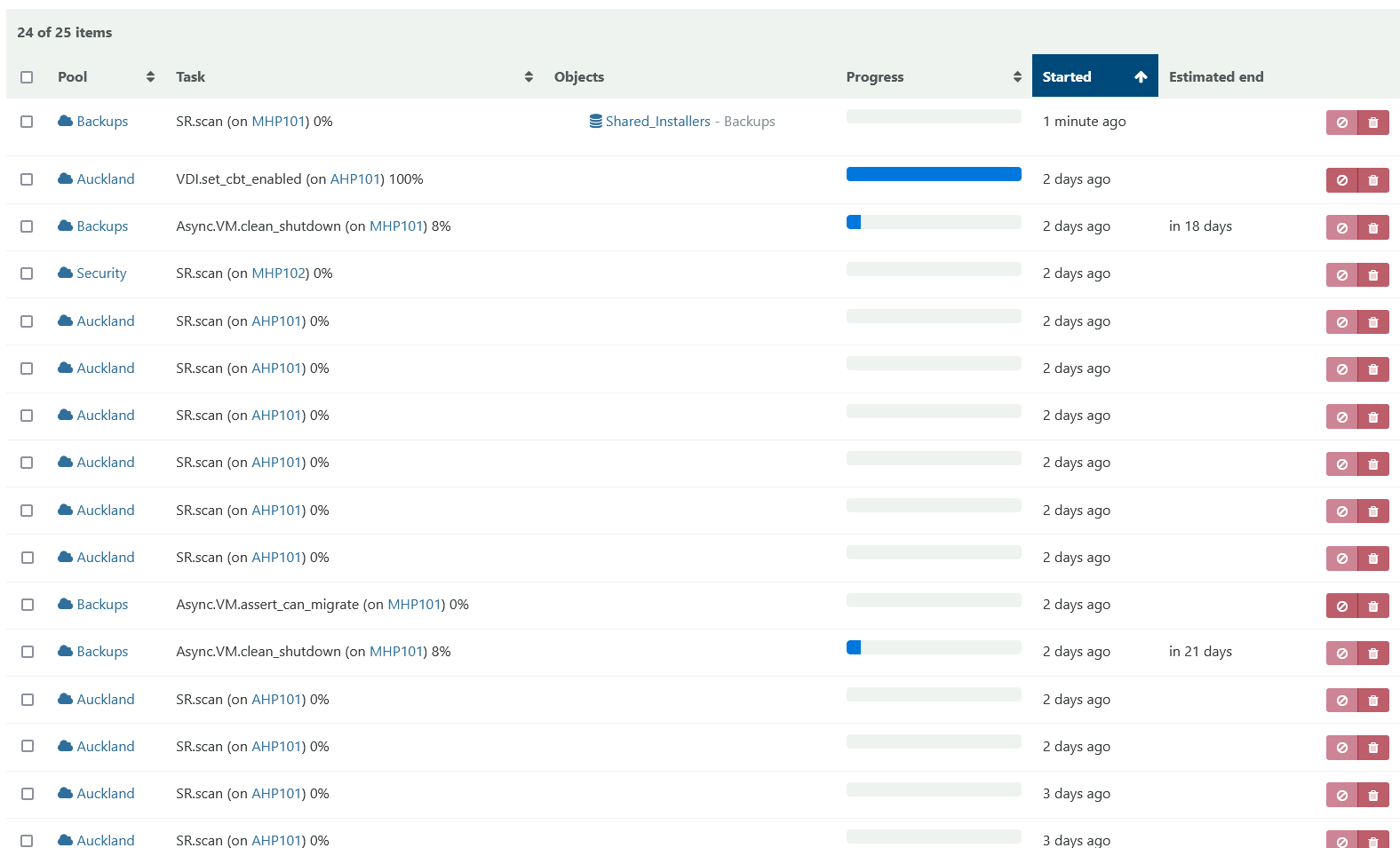
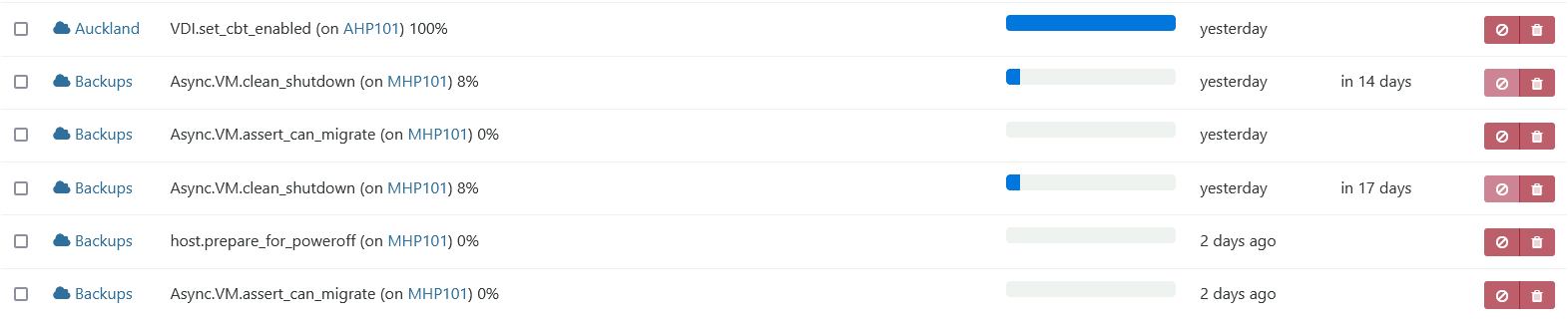
      I just have these long running tasks which have been going multiple days with no end in sight that I can't resolve. I suspect they may be related to why I can't migrate VM's between hosts now.

      Cheers
      Kent.

      Screenshot 2025-01-09 at 7.59.46 AM.png

      posted in Backup
      K
      kent
    • RE: Speed Limit - Overall, per VM or NBD connection ?

      @olivierlambert

      VDI in use is something else, it means the VDI is still mounted somewhere. It's very hard to tell you exactly where, maybe stuck attached to the Dom0.

      I tracked down these - in once case the same VDI was linked to three different hosts. Restarting the toolstack on the master and these hosts didn't release the vdi, in the end the only way I was able to do so was to restart the physical host. I ended up having to do this on 7 of my 12 separate hosts to release all the VM's that were in this state.

      The latest issue I'm having is I can't migrate VM's between different pools since I enabled backups (at least I believe it's since I enabled the backups). I do not that there are jobs still running after 2+ days and say they have days left to run. Again, I've restarted the toolstack and physical host (at least twice) of MHP101 but they keep coming back after the restart. It's been over a day since I last restarted and they appear stuck.

      What's going on here and how do I get rid of these tasks ?

      Screenshot 2025-01-08 at 9.26.22 PM.png

      Cheers
      Kent.

      posted in Backup
      K
      kent
    • RE: Speed Limit - Overall, per VM or NBD connection ?

      @olivierlambert

      Another issue I have, is I have two VM's which fail to back up despite multiple 'full' attempts. After a couple of failed attempts, I have deleted the snapshot that's left behind, the backup VM that's created (basically anything that has the VM name in it other than the original machine itself) and tried again (twice).
      The other VM's in this schedule all backed up fine.

      What am I looking for to resolve this issue ?

      UUID: ccb53826-eb4a-4b42-b397-2882ad92e17f
      Start time: Monday, January 6th 2025, 9:35:17 pm
      End time: Monday, January 6th 2025, 10:33:56 pm
      Duration: an hour
      ℹ️ Transfer data using NBD
      Error: VDI_IN_USE(OpaqueRef:90cc2a1e-4480-318c-a791-32536f9aad02, destroy)

      UUID: a826a1d8-9bc1-87a0-0225-f5e7c27c4d84
      Start time: Monday, January 6th 2025, 9:40:13 pm
      End time: Monday, January 6th 2025, 10:48:00 pm
      Duration: an hour
      ℹ️ Transfer data using NBD
      Error: VDI_IN_USE(OpaqueRef:61fc3b2b-fe6b-a6e0-a9ed-5f1f18676b98, destroy)

      Transfer data using NBD
      Snapshot
      Start: 2025-01-06 21:35
      End: 2025-01-06 21:35
      Local storage (179.85 TiB free - thin) - MHP101
      transfer
      Start: 2025-01-06 21:36
      End: 2025-01-06 22:14
      Duration: 38 minutes
      Size: 74 GiB
      Speed: 32.92 MiB/s
      Start: 2025-01-06 21:35
      End: 2025-01-06 22:14
      Duration: 39 minutes

      Start: 2025-01-06 21:35
      End: 2025-01-06 22:33
      Duration: an hour
      Error: VDI_IN_USE(OpaqueRef:90cc2a1e-4480-318c-a791-32536f9aad02, destroy)This is a XenServer/XCP-ng error
      Type: full

      posted in Backup
      K
      kent
    • RE: Speed Limit - Overall, per VM or NBD connection ?

      @olivierlambert

      Thanks - the other question I have is regarding the "Full backup interval" option.

      The documentation suggests doing this periodically (eg. 20) in case the backup Delta itself gets corrupt.

      I have (currently) 168 servers totalling ~65TB storage. I'm using the [NOBAK] option on OS and local backups, reducing this down to ~22Tb that I'm using Continuous Replication on.

      I'm trying to figure out the best way to spread this so that only say 10 servers are reset each time on a rotating basis.

      Open to ideas ?

      Thanks
      Kent.

      posted in Backup
      K
      kent
    • Speed Limit - Overall, per VM or NBD connection ?

      Hi,

      We have a 1GiB backhaul connection between our DC and office, which is where I have our backup server (running XMP8.3).

      So that we don't flood our available bandwidth, I've enabled a 'Speed limit' of 800MiB/s, which should be well below our 1000MiB/s backhaul, however I see our connection is at capacity and our provider is reporting they are seeing significant dropped packets occurring on our backhaul.

      This is how I've configured the backup schedule:

      Concurrency: 6
      NBD connections: 4
      Purge snapshot data when using CBT: Enabled
      Full backup interval: 8
      Speed limit: 800 MiB/s

      So my question is, is the 'Speed limit' intended to be overall, per VM or per NDB connection ?

      posted in Backup
      K
      kent
    • RE: Filtering multiple hosts by name

      @olivierlambert

      Thanks, I had read this guide earlier but hadn't processed it properly.

      XenCenter: star hamil bream

      XOA: |(star hamil bream)

      I've set up a saved filter as |( ) and made this my default, so hopefully this will get me to what I'm used to.

      Cheers
      Kent.

      posted in Xen Orchestra
      K
      kent