Migrate windows VM from Xenserver 8.4 to XCP-ng 8.3.0 (GPLv2)
-
VM with Windows Server 2022
HVM mode on XenCenter (XenServer)
Shutdown the VM
Exported into xva
Imported into XOA (XCP-NG)
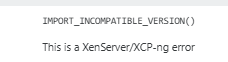
Getting the error"
-
Use "warm migration" then. VM/advanced view/warm migration button.
-
Hi,
It's possible your XenServer 8.4 has slightly more recent packages so it won't work. You can use continuous replication or warm migration to achieve the goal of migrating to XCP-ng.
-
Hello olivierlambert, Thanks for reply
continuous replication : Can you explain more, i mean how can i do that ?or warm migration : If you are referring live migration then here is the update
i have added my xenserver pool to XOA where i have already added my XCP-ng pool
tried to migrate the VM (in power off state) from xenserver to xcp-ng but got the same error. -
Use "warm migration" then. VM/advanced view/warm migration button.
-
Thanks @olivierlambert , really appreciate quick help.
VM migrated successfully.
-
 O olivierlambert marked this topic as a question on
-
O olivierlambert has marked this topic as solved on
Hello! It looks like you're interested in this conversation, but you don't have an account yet.
Getting fed up of having to scroll through the same posts each visit? When you register for an account, you'll always come back to exactly where you were before, and choose to be notified of new replies (either via email, or push notification). You'll also be able to save bookmarks and upvote posts to show your appreciation to other community members.
With your input, this post could be even better 💗
Register Login