Can't restart stopped VMs; unclear error message
-
I have an XCP-NG 8.3.0 installation, on just a single host, that has been extremely stable for some time, usually running 5–6 VMs. I needed to restart one VM to update some packages, and it shut down cleanly but did not restart. When I tried to do it manually, I got:
[19:38 xcpng2 ~]# xe vm-start uuid=[FOO]
The server failed to handle your request, due to an internal error. The given message may give details useful for debugging the problem.
message: xenopsd internal error: Unix.Unix_error(Unix.ENOENT, "open", "/dev/net/tun")
Subsequently, it seems that another VM stopped on its own, and trying to restart that gives the same message. I tried to create a new VM out of curiosity, and that also won't start, with the same message.
Meanwhile there are three existing VMs that are running just fine; two of them are very active and are dealing with a lot of load and network traffic without a problem. I'd prefer not to restart the host, since I don't want to interrupt these VMs just for the hope that a power-cycle will do anything.
How can I evaluate this problem? Searching for this error message hasn't led me to anything useful.
-
Have you tried restarting the toolstack?
To investigate further, you can review the host's log files https://docs.xcp-ng.org/troubleshooting/log-files/
-
@Danp
Yes, I did restart the toolstack; sorry for not saying this. It successfully restarted, but did not resolve the problem. Meanwhile the existing VMs do continue to work.I also updated all the patches (which I do semi-regularly as well).
I have tried to look at the log files, but there's nothing obvious there that makes sense to me. I'm happy to share this here or elsewhere as appropriate; also happy to try anything else.
Thank you for the attention.
-
If you haven't rebooted after patching, then that could be a contributing factor.
-
@Danp
Grr. OK I'll reboot later today (after some other tasks are finished) and report back.I am worried about nuking the currently-working VMs. It would obviously be good to have another host for exactly such purposes. Thank you.
-
@the_jest According to my own tests not rebooting after patching XCP-ng hosts can cause several issues. Thats why Xen Orchestra GUI notes to reboot after updating. Documentation has further explanation for this and explains whole update procedure.
-
I have not seen warnings to reboot after previous patchings (nor this one, that I recall).
In any case, I did reboot, and everything is fine, and I'm sorry to have wasted time and attention on this! Thank you.
-
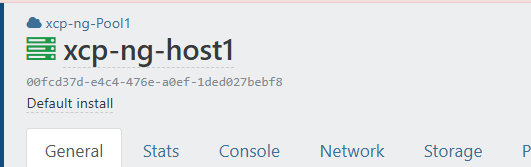
Not showen in this picutre but this is where the message would be displayed. Next to the name of the host...


Hello! It looks like you're interested in this conversation, but you don't have an account yet.
Getting fed up of having to scroll through the same posts each visit? When you register for an account, you'll always come back to exactly where you were before, and choose to be notified of new replies (either via email, or push notification). You'll also be able to save bookmarks and upvote posts to show your appreciation to other community members.
With your input, this post could be even better 💗
Register Login