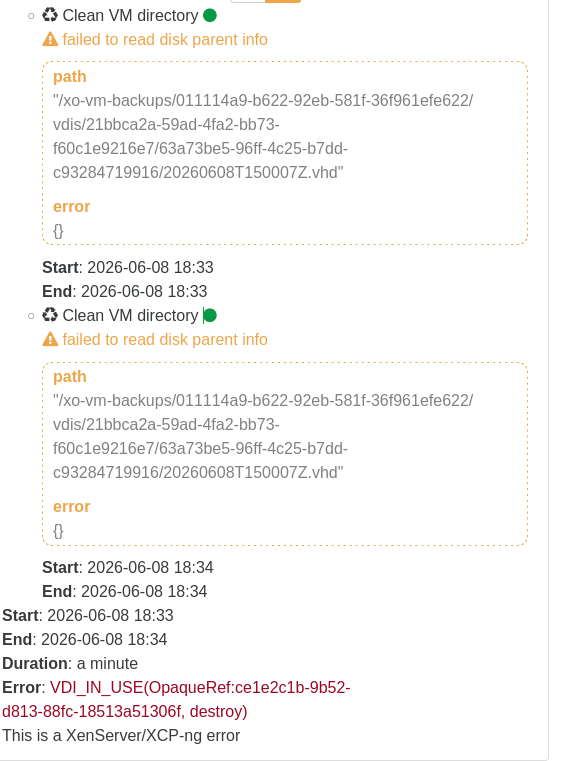
XO Backup Error: VDI_IN_USE(OpaqueRef:.., destroy)
-
Quick Update:
Was looking good with commit cf26d.
After the transfer completed the VDI of that particular VM was still in use, according to XO.
So still failure on the job.
Regards,
Marc -
With commit caa17 the transfer did not happen again and fails the with the known message.
Regards,
Marc -
@itservices
Can you export your logs withxen-bugtool --yestoallplease? If you prefer to avoid exporting everything, we especially need/var/log/xensource.logand/var/log/SMlog
@Team-Storage do you have an idea about the source of the issue? -
With commit c74a8 the problem is still present but the transfer was completed again.
Unfortunately my installation does not recognize the "xen-bugtool" command. And both log files are not present.
Is this something that needs enabling after install of XCP-NG?
Unfortunately and unnoticed my syslog-server did not receive any messages from XCP-NG in the last 30 days.
Other inputs work

**Edit:
I have deleted and re-added the syslog-server with port and now logs are being send to Graylog.**
Thanks for your assistance y'all.
Regards,
Marc -
@itservices Hi, xen-bugtools is in xcp-ng hosts. You can directly get the logs from the hosts if you don't have the command.
-
Evening @pierrebrunet
My bad.
I am now on commit b440f and the issue persist.
I have written you a message with the link to the file.
Regards,
Marc -
Just to give an update.
I still am having the issue with current commit 090ce.
Regards,
Marc -
@itservices Hello,
I'm taking this issue from Pierre.
Did you perform a full restart of the XCP-ng host since the issue occured ? Or just restarted the toolstask ?
-
Hi @simonp
The host was restarted regularly. After every update I restart the host and consequently all VMs running on it. The XOA VM is also running on that host.
Regards,
Marc -
Hi @simonp.
The problem is gone with commit 44e5b!!!
Up-to-date XCP-NG host and XenOrchestra VM were restarted after updating XenOrchestra.
I just initiated a full backup and all VMs - including my problematic machine - were backed up successfully without error.
Awesome! I will wait with closing until the scheduled delta backup is completed successfully, too.
Edit:
Scheduled backup ran without issue. The problem seems to have been resolved! Thanks for all your work and assistance
 Regards,
Marc -
@itservices Great news.
Don't hesitate to post here again if you encounter a similar issue in the future.
-
@simonp , thank you very much and all of your team ! ! !
Keep up the outstanding work.
Regards,
Marc


Hello! It looks like you're interested in this conversation, but you don't have an account yet.
Getting fed up of having to scroll through the same posts each visit? When you register for an account, you'll always come back to exactly where you were before, and choose to be notified of new replies (either via email, or push notification). You'll also be able to save bookmarks and upvote posts to show your appreciation to other community members.
With your input, this post could be even better 💗
Register Login