XCP-ng
    • Categories
    • Recent
    • Tags
    • Popular
    • Users
    • Groups
    • Register
    • Login

    VDI export to VMDK results in a corrupted disk

    Scheduled Pinned Locked Moved Solved Xen Orchestra
    15 Posts 3 Posters 640 Views 2 Watching
    Loading More Posts
    • Oldest to Newest
    • Newest to Oldest
    • Most Votes
    Reply
    • Reply as topic
    Log in to reply
    This topic has been deleted. Only users with topic management privileges can see it.
    • A
      abudef
      last edited by

      Hi,
      I want to ask if anyone has encountered this issue. If I use XO to download VDI directly in VMDK format, the content is corrupted. VMware Workstation does not see the NTFS partition on the disk; instead it shows it as a RAW partition and the disk is unreadable.

      I tried downloading the same VDI as VHD and then converting it to VMDK using qemu-img, and this disk worked in VMware WS without any problems.

      Could there be an issue somewhere in the export process when exporting directly to VMDK?

      XO 99312 and 280c0 tested.

      DanpD 1 Reply Last reply
      Reply Quote 0
      • DanpD
        Danp Pro Support Team @abudef
        last edited by

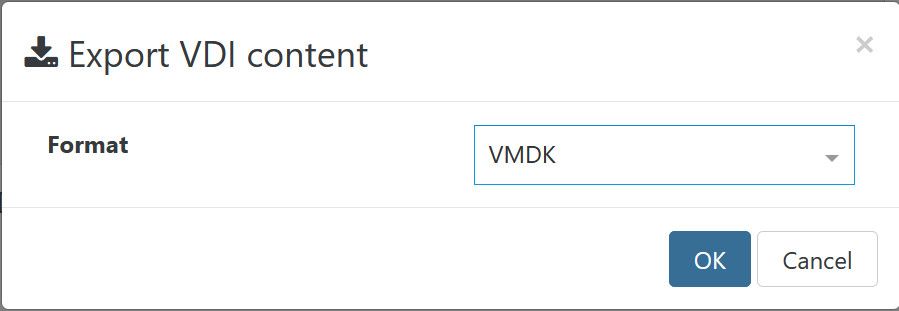
        @abudef What steps are you performing to export the VDI as a VMDK?

        1 Reply Last reply
        Reply Quote 0
        • A
          abudef
          last edited by

          c4865325-800d-4095-a884-9cf635c3e7c6-image.jpeg

          1 Reply Last reply
          Reply Quote 0
          • DanpD
            Danp Pro Support Team
            last edited by

            Ah... ok. I think I originally checked the VM export.

            This could be a bug. Does it occur with all VDIs? What happens if you try to import the file back into XO?

            1 Reply Last reply
            Reply Quote 0
            • A
              abudef
              last edited by abudef

              I tried to export 3 VDIs from 2 different XCP-ng pools. 2 VDIs from Windows Server 2025 VMs and 1 from Windows Server 2022 VM. All 3 VMDKs seem to be corrupted when I try to use them in VMware Workstation.

              I also tried reimporting 1 of the exported VMDKs back into the XCP-ng repository and the VM booted without any issue using the reimported VDI.

              Maybe there is either an issue with this VMDK format in VMware Workstation or the XO´s export/import method creates VMDK files that can be exported and reimport back into XCP-ng repository while preserving the original state of the VDI in the XCP-ng repository even if it´s unusable in VMware WS.

              1 Reply Last reply
              Reply Quote 0
              • poddingueP poddingue marked this topic as a question
              • A
                abudef
                last edited by

                2a23be37-665b-4827-896a-a20545061b00-image.jpeg

                1 Reply Last reply
                Reply Quote 0
                • DanpD
                  Danp Pro Support Team
                  last edited by

                  Have you attempted to analyze the exported file using qemu-img?
                  For example:

                  qemu-img info file.vmdk
                  qemu-img check file.vmdk
                  
                  1 Reply Last reply
                  Reply Quote 0
                  • A
                    abudef
                    last edited by abudef

                    qemu-img.exe info Windows Server 2025.vmdk
                    image: Windows Server 2025.vmdk
                    file format: vmdk
                    virtual size: 64G (68719476736 bytes)
                    disk size: 64G
                    cluster_size: 65536
                    Format specific information:
                        cid: 2849992906
                        parent cid: 4294967295
                        create type: streamOptimized
                        extents:
                            [0]:
                                compressed: true
                                virtual size: 68719476736
                                filename: Windows Server 2025.vmdk
                                cluster size: 65536
                                format:
                    
                    qemu-img.exe check Windows Server 2025.vmdk
                    No errors were found on the image.
                    

                    It seems that the disk itself is formally OK, but the content is somehow corrupted.

                    1 Reply Last reply
                    Reply Quote 0
                    • DanpD
                      Danp Pro Support Team
                      last edited by

                      It's possible that the issue lies within VMware Workstation. 🤷

                      1 Reply Last reply
                      Reply Quote 0
                      • A
                        abudef
                        last edited by

                        I don't think it's a VMware issue. If the XO export created a VMDK with incorrect data block contents, qemu-img check can still complete without reporting any errors. It only means that it did not find any problems with the VMDK structure.

                        1 Reply Last reply
                        Reply Quote 0
                        • A
                          abudef
                          last edited by

                          I´m not a developer so I asked Ai what it "thinks" about it...

                          ┌─────────────┐
                          │  XCP-ng VDI │
                          └──────┬──────┘
                                 │
                                 │ VDI_exportContent()
                                 │ format = VDI_FORMAT_VHD
                                 ▼
                          ┌──────────────────┐
                          │    VHD stream    │
                          └────────┬─────────┘
                                   │
                                   │ vhdToVMDK()
                                   ▼
                          ┌─────────────────────────┐
                          │  vhdToVMDKIterator()    │
                          └───────────┬─────────────┘
                                      │
                                      │ parseVhdToBlocks()
                                      ▼
                          ┌─────────────────────────┐
                          │    parseVhdStream()     │
                          │                         │
                          │    VHD blocks           │
                          │    { id, data }         │
                          └───────────┬─────────────┘
                                      │
                                      │ onlyBlocks()
                                      │
                                      │ lba = id * blockSize
                                      ▼
                          ══════════════════════════════════════════
                               POSSIBLE ERROR HERE
                               Incorrect mapping of id ↔ data
                               or incorrect block ordering
                          ══════════════════════════════════════════
                                      │
                                      ▼
                          ┌─────────────────────────┐
                          │   generateVmdkData()    │
                          │                         │
                          │   VHD block             │
                          │      ↓                  │
                          │   grainData             │
                          │      ↓                  │
                          │   createMarkedGrain()   │
                          │      ↓                  │
                          │   tableBuffer           │
                          └───────────┬─────────────┘
                                      │
                                      ▼
                          ┌──────────────────┐
                          │   VMDK stream    │
                          └────────┬─────────┘
                                   │
                                   ▼
                          ┌──────────────────┐
                          │    VMDK file     │
                          └──────────────────┘
                          
                          1 Reply Last reply
                          Reply Quote 0
                          • A
                            abudef
                            last edited by abudef

                            Ah, I see it now. What XO exports is the streamOptimized format, which is used in OVAs for transfer. Such a standalone VMDK cannot be used directly and needs to be converted for both VMware Workstation and ESXi 🤦 , or you can use the OVA import, which performs the conversion automatically.

                            So before such a VMDK can be attached to a VMware VM, it needs to be converted to monolithicSparse e.g.:

                            qemu-img.exe convert -p -f vmdk -O vmdk -o subformat=monolithicSparse WS25.vmdk WS25-2.vmdk
                            
                            Emmanuel VE 1 Reply Last reply
                            Reply Quote 0
                            • A abudef has marked this topic as solved
                            • A
                              abudef
                              last edited by

                              So in the end, I think the best approach is to export the VHD and convert it, because the conversion has to be done anyway, and the native VHD export is faster.

                              1 Reply Last reply
                              Reply Quote 0
                              • Emmanuel VE
                                Emmanuel V Vates 🪐 XCP-ng Team @abudef
                                last edited by

                                It might be worth adding a message in XO at export, or in the documentation ?

                                A 1 Reply Last reply
                                Reply Quote 0
                                • A
                                  abudef @Emmanuel V
                                  last edited by

                                  @Emmanuel-V In my opinion, it would make more sense if a standalone disk exported in VMDK format were exported directly as monolithicSparse, so that it would not need to be converted. This makes more sense to me because when only the disk is exported, rather than the entire VM (OVA), it can be assumed that the disk will be attached directly to some VM.


                                  1 Reply Last reply
                                  Reply Quote 0

                                  Hello! It looks like you're interested in this conversation, but you don't have an account yet.

                                  Getting fed up of having to scroll through the same posts each visit? When you register for an account, you'll always come back to exactly where you were before, and choose to be notified of new replies (either via email, or push notification). You'll also be able to save bookmarks and upvote posts to show your appreciation to other community members.

                                  With your input, this post could be even better 💗

                                  Register Login
                                  • First post
                                    Last post