Can not recover /dev/xvda2
-
Not sure where to start here.
I'm running xcp-ng 8.2.1 on a Proctetli box.
My actual partitions on the hardware are as follows:
NAME                       MAJ:MIN RM   SIZE RO TYPE MOUNTPOINT
sdb                          8:16   0 931.5G  0 disk
└─XSLocalEXT--99f0de78--37cb--ead5--0c56--bd5e341416aa-99f0de78--37cb--ead5--0c56--bd5e341416aa
                           253:0    0   1.8T  0 lvm  /run/sr-mount/99f0de78-37cb-ead5-0c56-bd5e341416aa
tdc                        254:2    0    10G  0 disk
tda                        254:0    0   100G  0 disk
sda                          8:0    0 931.5G  0 disk
├─sda4                       8:4    0   512M  0 part
├─sda2                       8:2    0    18G  0 part
├─sda5                       8:5    0     4G  0 part /var/log
├─sda3                       8:3    0   890G  0 part
│ └─XSLocalEXT--99f0de78--37cb--ead5--0c56--bd5e341416aa-99f0de78--37cb--ead5--0c56--bd5e341416aa
                           253:0    0   1.8T  0 lvm  /run/sr-mount/99f0de78-37cb-ead5-0c56-bd5e341416aa
├─sda1                       8:1    0    18G  0 part /
└─sda6                       8:6    0     1G  0 part [SWAP]
tdd                        254:3    0 834.2M  1 disk
tdb                        254:1    0   721M  1 disk
Within the actual xcp-ng host I'm using local storage which is the LVM 1.8T partition.
I have a number of VMs on the host, however at the most I had either 4/5 running.
VMs on the host are either Arch Linux, Ubuntu Linux or pfsense. Currently I'm having a problem with all the Ubuntu and Arch VMs.I believe most of the VMs that were created were created with partition scheme of /dev/xvda1 --> boot partition, /dev/xvda2 ---> root partition, /dev/xvda3 ---> swap partition.
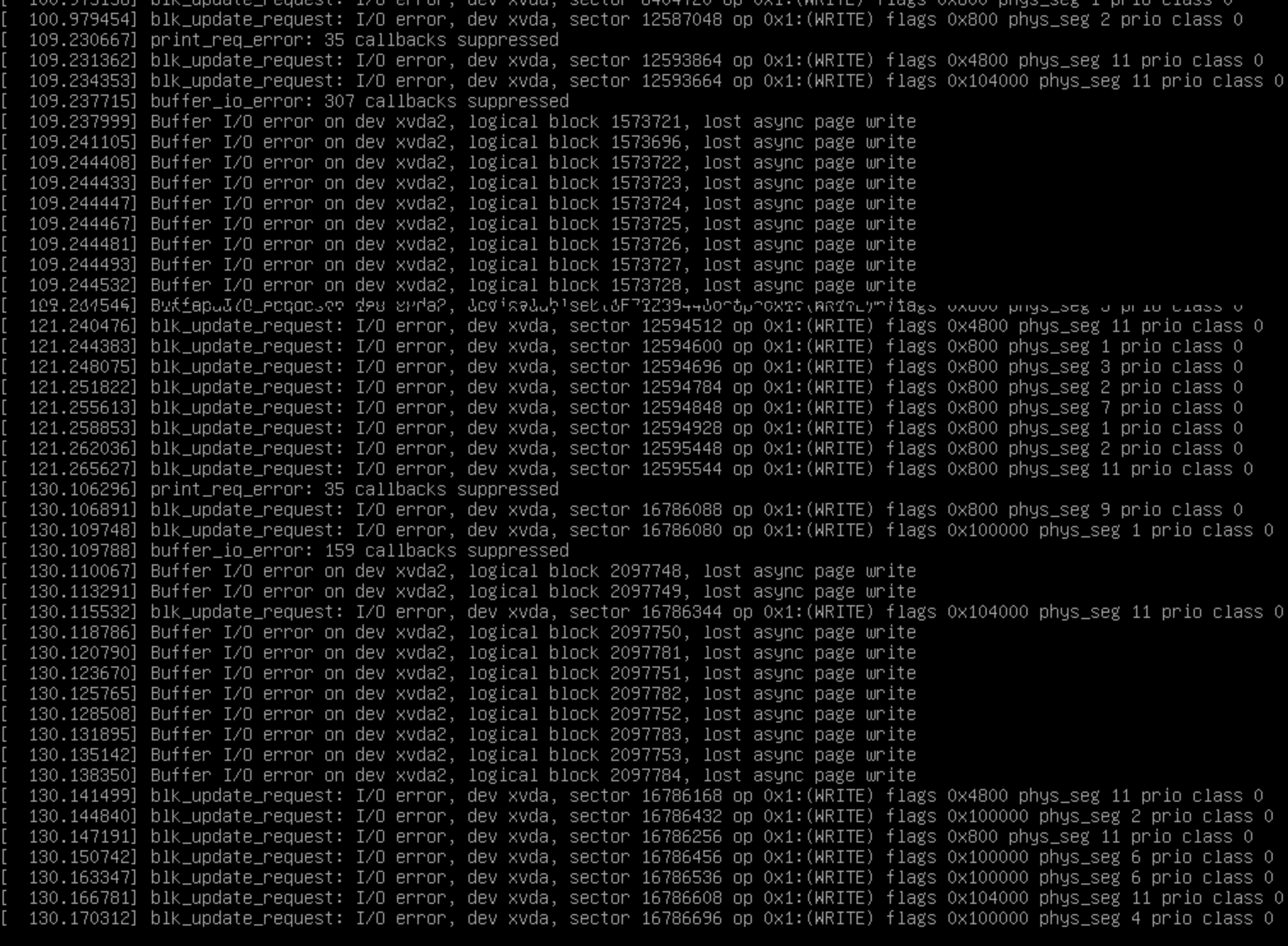
When attempting to boot the Arch or Ubuntu VM's, I'm getting i/o errors when trying to mount the /dev/xvda2 or the root partition.
Although I haven't troubleshooted every VM, I've tried the following:
- VM boots to recovery or busybox shell, try fsck /dev/xvda2 however process doesn't work
- Boot a rescue CD (such as an Arch Install Disk), and then try fsck /dev/xvda2.
When trying such an approach I'm seeing the following:
# lsblk                                                                                                  :(
NAME    MAJ:MIN RM   SIZE RO TYPE MOUNTPOINT
loop0     7:0    0 607.1M  1 loop /run/archiso/sfs/airootfs
sr0      11:0    1   721M  0 rom  /run/archiso/bootmnt
xvda    202:0    0   100G  0 disk
├─xvda1 202:1    0     1M  0 part
└─xvda2 202:2    0   100G  0 part

# fsck -yv /dev/xvda2
fsck from util-linux 2.34
e2fsck 1.45.4 (23-Sep-2019)
/dev/xvda2: recovering journal
Superblock needs_recovery flag is clear, but journal has data.
Run journal anyway? yes

fsck.ext4: Input/output error while recovering journal of /dev/xvda2
fsck.ext4: unable to set superblock flags on /dev/xvda2


/dev/xvda2: ********** WARNING: Filesystem still has errors **********
I've seen similar error when working with physical disk, however xvda represents virtual partitions.
I'm I just totally hosed here in terms of recovery?? I'm a little stumped how to recover.
-
You might have a problem with your physical disk underneath. Take a look in the Dom0, with (for example), a
dmesg. Hopefully, you have XO backups nearby
-
@olivierlambert Hey thanks for the suggestion. I'm pretty sure it's probably a problem with the underlying lvm hardware, but its funny, taking a look at Dom0, I don't see anything mentioning any disk related problem.
Sample of dmesg log below
[805638.417594] block tde: sector-size: 512/512 capacity: 419430400
[805641.656976] vif vif-30-1 vif30.1: Guest Rx ready
[805649.655582] vif vif-30-1 vif30.1: Guest Rx stalled
[805651.179897] device vif32.0 entered promiscuous mode
[805655.092408] device tap32.0 entered promiscuous mode
[805658.494363] device tap32.0 left promiscuous mode
[805659.661403] vif vif-30-1 vif30.1: Guest Rx ready
[805692.482092] device vif32.0 left promiscuous mode
[805702.199871] vif vif-30-1 vif30.1: Guest Rx stalled
[805711.543432] vif vif-30-1 vif30.1: Guest Rx ready
[805719.664229] vif vif-30-1 vif30.1: Guest Rx stalled
[805729.659247] vif vif-30-1 vif30.1: Guest Rx ready
[805745.392833] block tde: sector-size: 512/512 capacity: 419430400
[805749.905041] device vif30.1 left promiscuous mode
[805752.496307] device vif33.0 entered promiscuous mode
[805755.222166] device vif30.0 left promiscuous mode
[805756.847363] device tap33.0 entered promiscuous mode
[805799.443948] device tap33.0 left promiscuous mode
[805804.852848] vif vif-33-0 vif33.0: Guest Rx ready
[830198.036797] device vif33.0 left promiscuous mode
In terms of backups --- kind of a sticky issue. Yes I have delta backups on a FreeNAS partition. Is there documentation on how to actually restore these backups if starting from scratch? By scratch I mean lets say no hardware disks with a new XO installation?
Here is my backup directory structure BTW in case things aren't exactly clear:
freenas% pwd /mnt/tank/backups/Xen freenas% ls 1632582667671.test encryption.json 1633705775069.test metadata.json 1668267335259.test xo-config-backups 1f5adaf3-7631-d478-3c74-468c48079177 xo-pool-metadata-backups 66efa31e-5595-dda6-5ce9-dc2a1bb26cb9 xo-vm-backups c514822f-74bb-bfde-77d8-8f2b0c0b844b -
There's no issue to restore everything from scratch, as long as your backup repo (BR/remote) is available.
For example, fresh XCP-ng install, deploy XO, connect to the BR and it will find all your previous backups. Then restore, that's it!

Hello! It looks like you're interested in this conversation, but you don't have an account yet.
Getting fed up of having to scroll through the same posts each visit? When you register for an account, you'll always come back to exactly where you were before, and choose to be notified of new replies (either via email, or push notification). You'll also be able to save bookmarks and upvote posts to show your appreciation to other community members.
With your input, this post could be even better 💗
Register Login