Sample fields for Amazon S3 remote setup?
-
Can anyone shed light on what is supposed to go in the diff fields when setting up and Amazon S3 remote?
I opened the storage at Amazon S3 and click on "Copy S3 uri" and then pasted it in the directory field. The directory field starts with "s3://"
When I try to save theremote, it gives this error.
remote.test { "id": "c7b8699a-447e-4fbf-850c-04546ce9a5eb" } { "message": "Cannot read properties of undefined (reading 'httpStatusCode')", "name": "TypeError", "stack": "TypeError: Cannot read properties of undefined (reading 'httpStatusCode') at S3Handler._sync (/opt/xo/xo-builds/xen-orchestra-202405231838/@xen-orchestra/fs/src/s3.js:462:27)" } -
Hi,
First time I'm hearing about this, could you provide more details so we can help? We can't guess what version of XO you are using.
Ping @florent
-
Oops..forgot to post that: "Xen Orchestra, commit 990c2"
Lets say this is the info for the account:
Bucket name : mybucket123456-789-0123-4567-890123
Region is US West (Oregon) us-west-2
s3 info = s3://mybucket123456-789-0123-4567-890123/mystuff/my-backups/When setting up the remote, I set the fields as follows:
Type = "Amazon Webservices S3"
Name="Amazon Stuff"
Use HTTPS=yes
Allow unauthorized="no"
AW s3 endpoint= "s3express-control.us-west-2.amazonaws.com"
Region=<blank>
AWS3 bucket name="mybucket123456-789-0123-4567-890123"
Directory="s3://mybucket123456-789-0123-4567-890123/mystuff/my-backups/"
Set access key ID and secret key.Since I posted the error last night, I noticed that I had the AW s3 endpoint field was incorrectly set to "US West (Oregon) us-west-2" and corrected it to "s3express-control.us-west-2.amazonaws.com"
When I finished it, I clicked ok and got a new error message that says "AccessDenied":
remote.test
{
  "id": "c7b8699a-447e-4fbf-850c-04546ce9a5eb"
}
{
  "name": "AccessDenied",
  "$fault": "client",
  "$metadata": {
    "httpStatusCode": 403,
    "requestId": "0299B4704E01018FBA850D1B040020ECDCE58C02",
    "extendedRequestId": "JM7bWZAg",
    "attempts": 1,
    "totalRetryDelay": 0
  },
  "Code": "AccessDenied",
  "RequestId": "0299B4704E01018FBA850D1B040020ECDCE58C02",
  "HostId": "JM7bWZAg",
  "message": "Access Denied",
  "stack": "AccessDenied: Access Denied
    at throwDefaultError (/opt/xo/xo-builds/xen-orchestra-202405231838/node_modules/@smithy/smithy-client/dist-cjs/index.js:838:20)
    at /opt/xo/xo-builds/xen-orchestra-202405231838/node_modules/@smithy/smithy-client/dist-cjs/index.js:847:5
    at de_CommandError (/opt/xo/xo-builds/xen-orchestra-202405231838/node_modules/@aws-sdk/client-s3/dist-cjs/index.js:4748:14)
    at /opt/xo/xo-builds/xen-orchestra-202405231838/node_modules/@smithy/middleware-serde/dist-cjs/index.js:35:20
    at /opt/xo/xo-builds/xen-orchestra-202405231838/node_modules/@aws-sdk/middleware-signing/dist-cjs/index.js:226:18
    at /opt/xo/xo-builds/xen-orchestra-202405231838/node_modules/@smithy/middleware-retry/dist-cjs/index.js:320:38
    at /opt/xo/xo-builds/xen-orchestra-202405231838/node_modules/@aws-sdk/middleware-flexible-checksums/dist-cjs/index.js:174:18
    at /opt/xo/xo-builds/xen-orchestra-202405231838/node_modules/@aws-sdk/middleware-sdk-s3/dist-cjs/index.js:98:20
    at /opt/xo/xo-builds/xen-orchestra-202405231838/node_modules/@aws-sdk/middleware-sdk-s3/dist-cjs/index.js:121:14
    at /opt/xo/xo-builds/xen-orchestra-202405231838/node_modules/@aws-sdk/middleware-logger/dist-cjs/index.js:34:22
    at S3Handler._createReadStream (/opt/xo/xo-builds/xen-orchestra-202405231838/@xen-orchestra/fs/src/s3.js:289:15)"
}
I also tried changing the Directory to:
Directory="//mybucket123456-789-0123-4567-890123/mystuff/my-backups/"
Directory="/mystuff/my-backups/"
But neither worked
-
@archw i was testing this today, i have had the same error and it was related to the fact i had the bucket name incorrect, changed it to the correct name and it worked correctly, pretty straightforward. what have u used for the field so far?
-
I called it the same bucket name that shows up on the S3 log in page (this is the fake name but "mybucket123456-789-0123-4567-890123" but I used the actual name of the bucket).
-
@archw ok, i just used a simple name like bucket123 for it, and that worked, did u set the AIM correct?
-
@rtjdamen
Whats an "AIM"? -
@archw inside amazon console u navigate to AIM, u can create a new user, give the user access to s3 storage.
Then u need to go into this user and create an access key
-
@rtjdamen
Oh...that...yeah...I've got another piece of software that pushes the info to S3 however it doesn't use a "user name". Instead it uses the S3 access key ID and secret key. Is that what you meant? -
@archw yes, u need to create a new user and then create the access key id and secret key to connect, if u need to check your credentials use winscp to check if everything is set up correctly
-
@rtjdamen
Boom - that worked!I opened up an SCP session and let it take the defaults and it immediately connected. I noticed that WINSCP calls it "s3.amazonaws.com" so I changed :
AW s3 endpoint= "s3express-control.us-west-2.amazonaws.com"
-to-
AW s3 endpoint= "s3.amazonaws.com"I also changed:
Directory="s3://mybucket123456-789-0123-4567-890123/mystuff/my-backups/"
-to-
Directory="mystuff/my-backups/"Thanks!!
-
@archw glad i could help!
-
@rtjdamen
You rock! -
 O olivierlambert marked this topic as a question on
-
O olivierlambert has marked this topic as solved on
-
Is there anything we could add to our doc to make it better for new users?
-
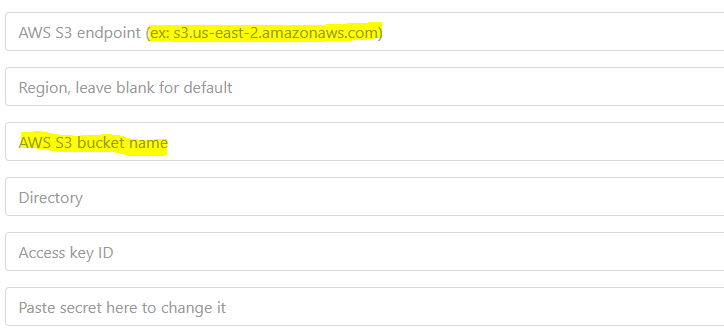
Example of what a successful screen look like (even though it has fake work in it). Sort of like the shadow y'all put in the fields.
-
Can you write exactly what you would expect to be written as a "pre written" text?
Hello! It looks like you're interested in this conversation, but you don't have an account yet.
Getting fed up of having to scroll through the same posts each visit? When you register for an account, you'll always come back to exactly where you were before, and choose to be notified of new replies (either via email, or push notification). You'll also be able to save bookmarks and upvote posts to show your appreciation to other community members.
With your input, this post could be even better 💗
Register Login