XCP-ng
    • Categories
    • Recent
    • Tags
    • Popular
    • Users
    • Groups
    • Register
    • Login

    User specific data

    Scheduled Pinned Locked Moved Solved REST API
    19 Posts 4 Posters 4.1k Views 4 Watching
    Loading More Posts
    • Oldest to Newest
    • Newest to Oldest
    • Most Votes
    Reply
    • Reply as topic
    Log in to reply
    This topic has been deleted. Only users with topic management privileges can see it.
    • I
      irtaza9 @Danp
      last edited by

      @Danp yes we are testing self service.

      Can you elaborate on this? What specific API is the user calling to retrieve this information?

      we want to retrieve and perform these > vm list, vm stats, console, actions etc

      we do not want to using each user token to access their objects. we want a single point to get the data

      DanpD 1 Reply Last reply
      Reply Quote 0
      • DanpD
        Danp Pro Support Team @irtaza9
        last edited by

        @irtaza9 I'm not sure if this is currently possible with the REST API.

        I 1 Reply Last reply
        Reply Quote 0
        • I
          irtaza9 @Danp
          last edited by

          @Danp said in User specific data:

          currently possible with the REST API.

          can we do this using JSON-RPC?

          DanpD 1 Reply Last reply
          Reply Quote 0
          • DanpD
            Danp Pro Support Team @irtaza9
            last edited by

            @irtaza9 Yes, I imagine that is what XO is using. Calling resourceSet.get will return an array of objects associated with the resource set as well as an array of subjects (users / groups).

            I 1 Reply Last reply
            Reply Quote 0
            • I
              irtaza9 @Danp
              last edited by

              @Danp

              I have two users test.irtaza, testirtaza1 in a resource set named customer. And when login any of the account this is the output of resourceSet.getAll

              login via test.irtaza

              {
                  "id": -9007199254740984,
                  "jsonrpc": "2.0",
                  "result": [
                      {
                          "id": "V7Gr0uoqGwE",
                          "ipPools": [],
                          "limits": {
                              "cpus": {
                                  "usage": 1
                              },
                              "disk": {
                                  "usage": 10737418240
                              },
                              "memory": {
                                  "usage": 4294967296
                              },
                              "vms": {
                                  "usage": 1
                              }
                          },
                          "name": "customer",
                          "objects": [
                              "d4515c45-71ca-7675-ea70-0fe0a8f7dbe4-7aa32be8-a06c-4ade-8a1d-49e51e03e9d2",
                              "d4515c45-71ca-7675-ea70-0fe0a8f7dbe4-09d6b4cc-dd4b-4619-aacb-01576ccd5b0f",
                              "20e6d987-f8cb-d1b6-2b49-744a87358ae3",
                              "ca780b00-fd77-4a2a-fbb2-6f2859e6b4a7"
                          ],
                          "subjects": [
                              "78f3286b-f4a1-4ba5-80a4-bda4967d47a8"
                          ],
                          "shareByDefault": false,
                          "tags": []
                      }
                  ]
              }
              

              login via testirtaza1

              {
                  "id": -9007199254740984,
                  "jsonrpc": "2.0",
                  "result": [
                      {
                          "id": "V7Gr0uoqGwE",
                          "ipPools": [],
                          "limits": {
                              "cpus": {
                                  "usage": 2
                              },
                              "disk": {
                                  "usage": 21474836480
                              },
                              "memory": {
                                  "usage": 8589934592
                              },
                              "vms": {
                                  "usage": 2
                              }
                          },
                          "name": "customer",
                          "objects": [
                              "d4515c45-71ca-7675-ea70-0fe0a8f7dbe4-7aa32be8-a06c-4ade-8a1d-49e51e03e9d2",
                              "d4515c45-71ca-7675-ea70-0fe0a8f7dbe4-09d6b4cc-dd4b-4619-aacb-01576ccd5b0f",
                              "20e6d987-f8cb-d1b6-2b49-744a87358ae3",
                              "ca780b00-fd77-4a2a-fbb2-6f2859e6b4a7"
                          ],
                          "subjects": [
                              "78f3286b-f4a1-4ba5-80a4-bda4967d47a8",
                              "f2858952-b02a-403a-98ca-d94e4cdaa57e"
                          ],
                          "shareByDefault": false,
                          "tags": []
                      }
                  ]
              }
              

              is the array of subjects are the users and array of objects are those things which these subjects have access on?

              Also

              session.signIn method returns the id of user

              {
                  "id": -9007199254740991,
                  "jsonrpc": "2.0",
                  "result": {
                      "id": "f2858952-b02a-403a-98ca-d94e4cdaa57e",
                      "email": "testirtaza1",
                      "groups": [],
                      "permission": "none",
                      "preferences": {}
                  }
              }


              and, acl.getCurrentPermissions method returns those things which belongs to the current loggedIn user?

              to call acl.getCurrentPermissions method we have signin by the user credentials(username,password/token)

              {
                  "id": -9007199254740711,
                  "jsonrpc": "2.0",
                  "result": {
                      "58fdee6c-ed56-8a83-31d5-505748165658": {
                          "view": 1,
                          "operate": 1,
                          "administrate": 1
                      },
                      "89fd8cc9-6fa1-a7cb-a492-19eefd689631": {
                          "view": 1,
                          "operate": 1,
                          "administrate": 1
                      }
                  }
              }
              

              means I have to create the user first then store these credentials at my space so that I can call acl.getCurrentPermissions method and get his VM's and then list those vm's to my portal and allow him to manage their vms from my custom built portal? Is my thinking is correct?

              DanpD 1 Reply Last reply
              Reply Quote 0
              • DanpD
                Danp Pro Support Team @irtaza9
                last edited by

                @irtaza9 IDK. Maybe @julien-f will have some ideas on the best way to do this.

                1 Reply Last reply
                Reply Quote 0
                • MathieuRAM
                  MathieuRA Vates 🪐 XO Team @irtaza9
                  last edited by MathieuRA

                  Hi @irtaza9
                  FYI, for about 2 years, VMs expose a creation field:

                  "creation": {
                      "date": string,
                      "template": string,
                      "user": string
                    },
                  

                  With this you can filter VMs by creation.user to list only VMs created by a user.
                  /rest/v0/vms?filter=creation:user:<user-id>

                  I 1 Reply Last reply
                  Reply Quote 2
                  • I
                    irtaza9 @MathieuRA
                    last edited by

                    @MathieuRA

                    you saved my life bro, thank you so much. I got the right way.

                    I 1 Reply Last reply
                    Reply Quote 1
                    • olivierlambertO
                      olivierlambert Vates 🪐 Co-Founder CEO
                      last edited by

                      Is your issue solved @irtaza9 ?

                      1 Reply Last reply
                      Reply Quote 0
                      • I
                        irtaza9 @irtaza9
                        last edited by

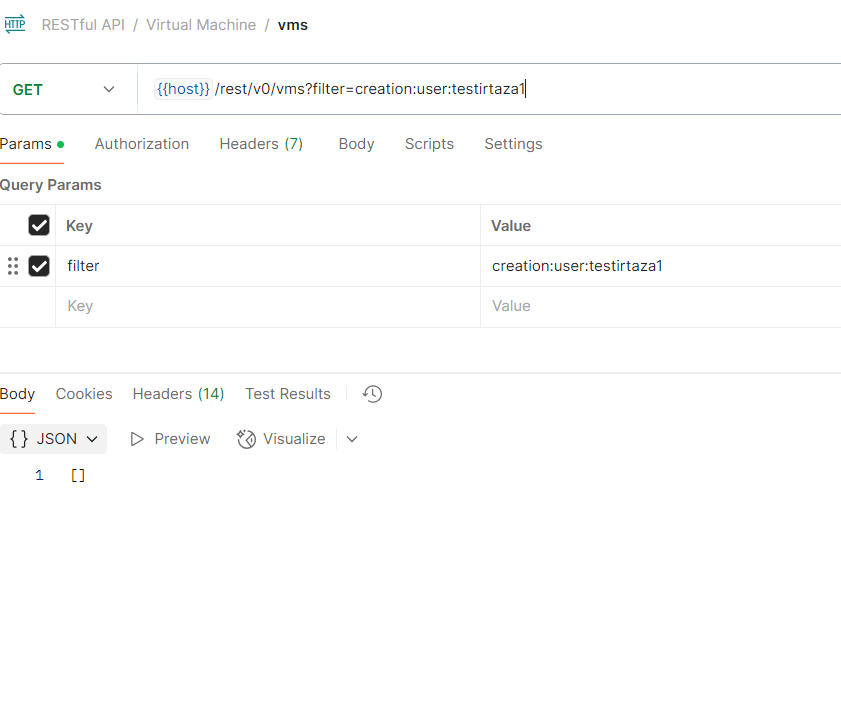
                        @MathieuRA endpoint is not returning vms created by user but that user have vms and it's shown in XO when login by testirtaza1 user.
                        08cd4e4a-30a1-4c79-97d6-a0c6ab75fd22-image.png

                        MathieuRAM 1 Reply Last reply
                        Reply Quote 0
                        • MathieuRAM
                          MathieuRA Vates 🪐 XO Team @irtaza9
                          last edited by

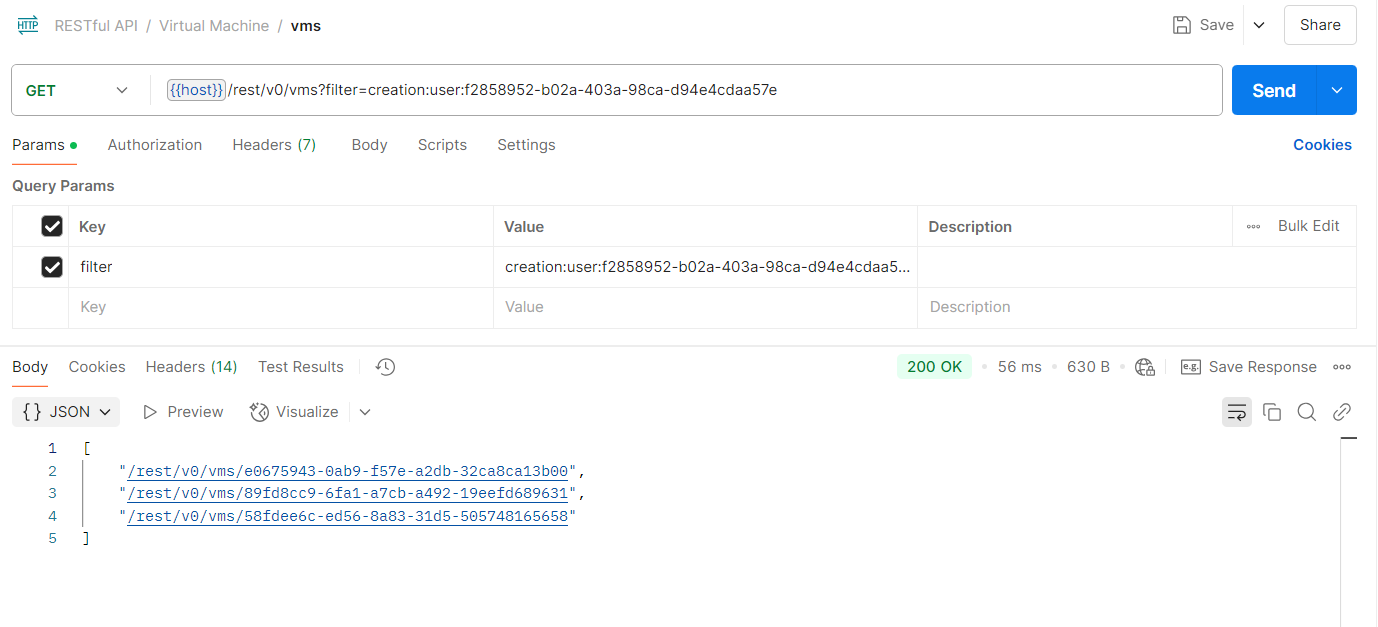
                          @irtaza9 you need to use the user-id, not the username

                          I 1 Reply Last reply
                          Reply Quote 1
                          • I
                            irtaza9 @MathieuRA
                            last edited by

                            @MathieuRA

                            user-id

                            bg: when you call session.signIn you get the user-id and that id is used to fetch user specific vms.

                            {
                                "id": -9007199254740991,
                                "jsonrpc": "2.0",
                                "result": {
                                    "id": "f2858952-b02a-403a-98ca-d94e4cdaa57e",
                                    "email": "testirtaza1",
                                    "groups": [],
                                    "permission": "none",
                                    "preferences": {}
                                }
                            }
                            

                            f4b361d6-6944-4cf4-96c2-7f79c9735ebe-image.png

                            @olivierlambert yes, issue is resolved. Thanks to @MathieuRA and @Danp 😳

                            1 Reply Last reply
                            Reply Quote 0
                            • olivierlambertO olivierlambert marked this topic as a question on
                            • olivierlambertO olivierlambert has marked this topic as solved on

                            Hello! It looks like you're interested in this conversation, but you don't have an account yet.

                            Getting fed up of having to scroll through the same posts each visit? When you register for an account, you'll always come back to exactly where you were before, and choose to be notified of new replies (either via email, or push notification). You'll also be able to save bookmarks and upvote posts to show your appreciation to other community members.

                            With your input, this post could be even better 💗

                            Register Login
                            • First post
                              Last post
