PCI device doesn't show in XO or xe pci-list
-
@andriy.sultanov is there a way to allow all devices (even if we blow up the system lol)
For example in the docs there a usb filter list you can edit
/etc/xensource/usb-policy.confanything similar for pcie? Can something be added with disclaimer you break it on you etc?
Maybe make it a command line option to disable the pci device filters for users that want to pass through special devices. -
@marcoi Right now it's hard coded. But we'll see what could be the best approach on this

-
@olivierlambert thanks for the update.
and just to confirm, if a device is not showing up in xe list with uuid, there is no way to pass it to a VM correct? -
No, you can pass it anyway, it's just not doable via XO. But the CLI method should work
-
@olivierlambert to confirm the steps
i can skip this step since it isnt showing up anyways- xe pci-disable-dom0-access uuid=<pci uuid>
then use
- xe vm-param-set other-config:pci=0/0000:04:01.0 uuid=<vm uuid> to add it to vm
-
That might work indeed. If it doesn't, you'll have to go via the old method:
/opt/xensource/libexec/xen-cmdline --set-dom0 "xen-pciback.hide=(0000:04:01.0)"Please let us know
(this way we could update the doc) -
xe vm-param-set other-config:pci=0/0000:c6:00.0 uuid=45d0f537-9076-b395-1fbd-850d2cc0cf68
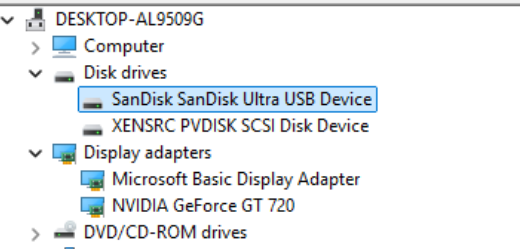
This command worked. I was able to pass through the usb and also pcie devices i can get to using XO.
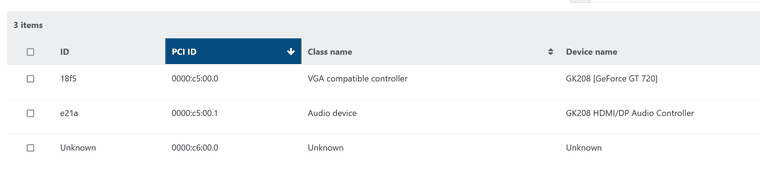
windows host showing usb drive plugged into usb3 card and graphics card.
-
Perfect! It's just a matter of stuff hidden for some reasons, at least it doesn't cause any problem, which is what matters
-
From LSPCI:
0a:00.0 Audio device: Intel Corporation DG2 Audio Controller
0b:00.0 VGA compatible controller: Intel Corporation DG2 [Arc A310] (rev 05)
With xl pci-assignable-list :
0000:01:00.6
0000:01:00.4
0000:0b:00.0
0000:01:00.0
0000:01:00.3
Here you go...hope this helps!
-
09:00.0 "Multimedia video controller [0400]" "Conexant Systems, Inc. [14f1]" "CX23887/8 PCIe Broadcast Audio and Video Decoder with 3D Comb [8880]" -r04 "Hauppauge computer works Inc. [0070]" "Device [6a28]"0a:00.0 "Multimedia video controller [0400]" "Conexant Systems, Inc. [14f1]" "CX23887/8 PCIe Broadcast Audio and Video Decoder with 3D Comb [8880]" -r04 "Hauppauge computer works Inc. [0070]" "Device [6b28]" -
is there anyway to block igpu from being used by xcp-ng during boot? I have it setup for pass through but it fails under the VM. I think it because xcp-ng still displaying the console screen and does not want to give it up.
-
so it seems like when i make the igpu pass through, i see the starting lines of xcp-ng but it never gets to the console screen. which is what i expect.
When I add the pcie devices (igpu/hdmi audio) to a vm and start it up, I get and update to the screen and it shows a red number counting which is part of the console.
So it seems that when the VM re-initializes the igpu, dom/xcp retakes it over.
I confirmed that by using the keyboard to move around and it reshowing the console and filling the missing details as i move around.
So why is the dom/xcp retaking the video device over again when it should be blocked from accessing it?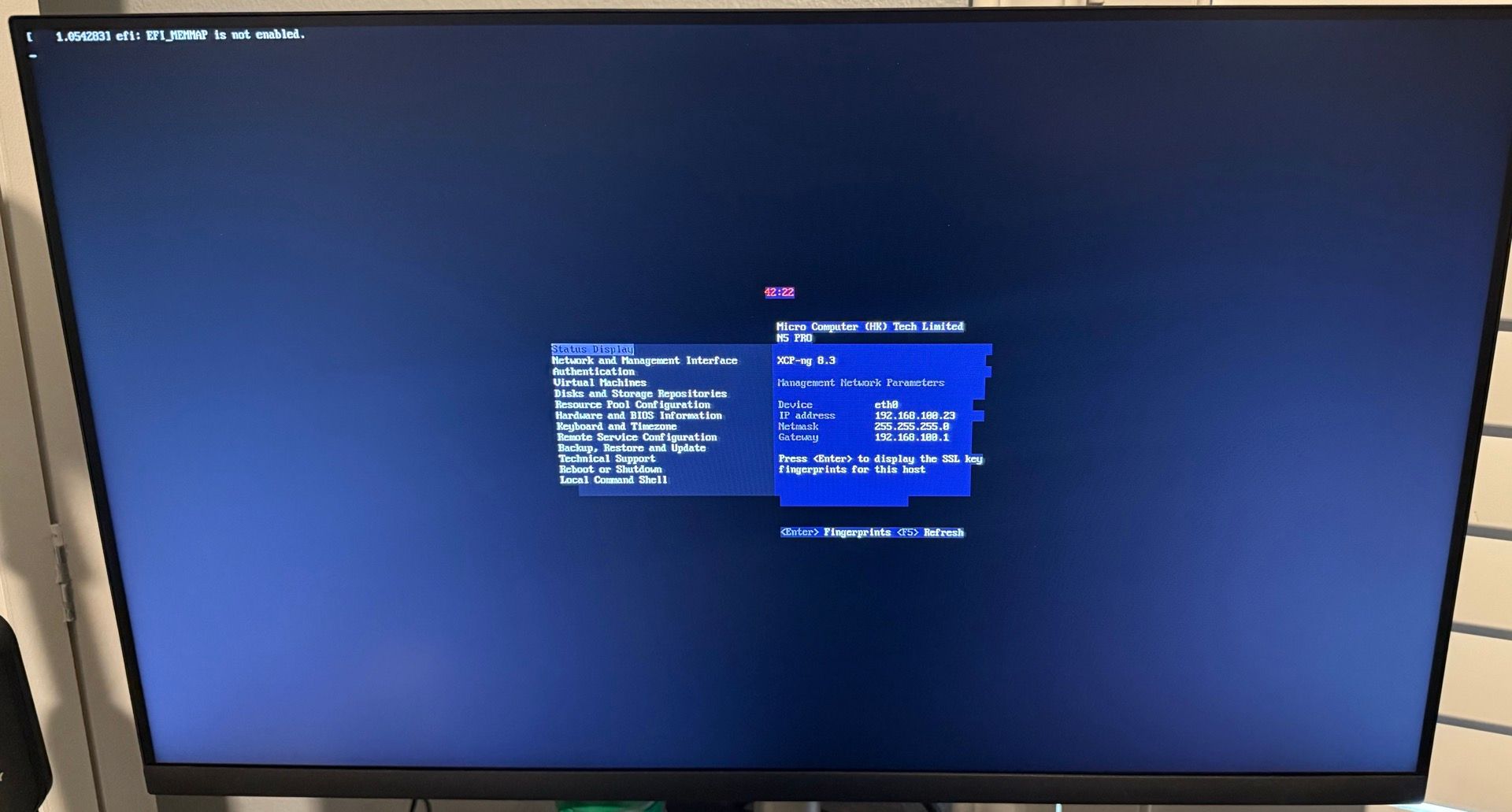
-
@andriy.sultanov Hi, I am having the same issue. Many PCIe USB cards aren't showing up in XO. Any updates if/when this might be fixed? Being able to configure PCIe passthough from the web UI is a really useful new feature and it would be really cool to be able to fully make use if it.
Below as requested my list of items that don't show up:
00:00.0 "Host bridge [0600]" "Advanced Micro Devices, Inc. [AMD] [1022]" "Starship/Matisse Root Complex [1480]" "ASUSTeK Computer Inc. [1043]" "Device [8808]"
00:00.2 "IOMMU [0806]" "Advanced Micro Devices, Inc. [AMD] [1022]" "Starship/Matisse IOMMU [1481]" "ASUSTeK Computer Inc. [1043]" "Device [8808]"
00:01.0 "Host bridge [0600]" "Advanced Micro Devices, Inc. [AMD] [1022]" "Starship/Matisse PCIe Dummy Host Bridge [1482]" "" ""
00:01.1 "PCI bridge [0604]" "Advanced Micro Devices, Inc. [AMD] [1022]" "Starship/Matisse GPP Bridge [1483]" "" ""
00:01.2 "PCI bridge [0604]" "Advanced Micro Devices, Inc. [AMD] [1022]" "Starship/Matisse GPP Bridge [1483]" "" ""
00:02.0 "Host bridge [0600]" "Advanced Micro Devices, Inc. [AMD] [1022]" "Starship/Matisse PCIe Dummy Host Bridge [1482]" "" ""
00:03.0 "Host bridge [0600]" "Advanced Micro Devices, Inc. [AMD] [1022]" "Starship/Matisse PCIe Dummy Host Bridge [1482]" "" ""
00:03.1 "PCI bridge [0604]" "Advanced Micro Devices, Inc. [AMD] [1022]" "Starship/Matisse GPP Bridge [1483]" "" ""
00:03.2 "PCI bridge [0604]" "Advanced Micro Devices, Inc. [AMD] [1022]" "Starship/Matisse GPP Bridge [1483]" "" ""
00:04.0 "Host bridge [0600]" "Advanced Micro Devices, Inc. [AMD] [1022]" "Starship/Matisse PCIe Dummy Host Bridge [1482]" "" ""
00:05.0 "Host bridge [0600]" "Advanced Micro Devices, Inc. [AMD] [1022]" "Starship/Matisse PCIe Dummy Host Bridge [1482]" "" ""
00:07.0 "Host bridge [0600]" "Advanced Micro Devices, Inc. [AMD] [1022]" "Starship/Matisse PCIe Dummy Host Bridge [1482]" "" ""
00:07.1 "PCI bridge [0604]" "Advanced Micro Devices, Inc. [AMD] [1022]" "Starship/Matisse Internal PCIe GPP Bridge 0 to bus[E:B] [1484]" "" ""
00:08.0 "Host bridge [0600]" "Advanced Micro Devices, Inc. [AMD] [1022]" "Starship/Matisse PCIe Dummy Host Bridge [1482]" "" ""
00:08.1 "PCI bridge [0604]" "Advanced Micro Devices, Inc. [AMD] [1022]" "Starship/Matisse Internal PCIe GPP Bridge 0 to bus[E:B] [1484]" "" ""
00:14.0 "SMBus [0c05]" "Advanced Micro Devices, Inc. [AMD] [1022]" "FCH SMBus Controller [790b]" -r61 "ASUSTeK Computer Inc. [1043]" "Device [87c0]"
00:14.3 "ISA bridge [0601]" "Advanced Micro Devices, Inc. [AMD] [1022]" "FCH LPC Bridge [790e]" -r51 "ASUSTeK Computer Inc. [1043]" "Device [87c0]"
00:18.0 "Host bridge [0600]" "Advanced Micro Devices, Inc. [AMD] [1022]" "Matisse/Vermeer Data Fabric: Device 18h; Function 0 [1440]" "" ""
00:18.1 "Host bridge [0600]" "Advanced Micro Devices, Inc. [AMD] [1022]" "Matisse/Vermeer Data Fabric: Device 18h; Function 1 [1441]" "" ""
00:18.2 "Host bridge [0600]" "Advanced Micro Devices, Inc. [AMD] [1022]" "Matisse/Vermeer Data Fabric: Device 18h; Function 2 [1442]" "" ""
00:18.3 "Host bridge [0600]" "Advanced Micro Devices, Inc. [AMD] [1022]" "Matisse/Vermeer Data Fabric: Device 18h; Function 3 [1443]" "" ""
00:18.4 "Host bridge [0600]" "Advanced Micro Devices, Inc. [AMD] [1022]" "Matisse/Vermeer Data Fabric: Device 18h; Function 4 [1444]" "" ""
00:18.5 "Host bridge [0600]" "Advanced Micro Devices, Inc. [AMD] [1022]" "Matisse/Vermeer Data Fabric: Device 18h; Function 5 [1445]" "" ""
00:18.6 "Host bridge [0600]" "Advanced Micro Devices, Inc. [AMD] [1022]" "Matisse/Vermeer Data Fabric: Device 18h; Function 6 [1446]" "" ""
00:18.7 "Host bridge [0600]" "Advanced Micro Devices, Inc. [AMD] [1022]" "Matisse/Vermeer Data Fabric: Device 18h; Function 7 [1447]" "" ""
02:00.0 "PCI bridge [0604]" "Advanced Micro Devices, Inc. [AMD] [1022]" "Matisse Switch Upstream [57ad]" "" ""
03:01.0 "PCI bridge [0604]" "Advanced Micro Devices, Inc. [AMD] [1022]" "Matisse PCIe GPP Bridge [57a3]" "" ""
03:02.0 "PCI bridge [0604]" "Advanced Micro Devices, Inc. [AMD] [1022]" "Matisse PCIe GPP Bridge [57a3]" "" ""
03:03.0 "PCI bridge [0604]" "Advanced Micro Devices, Inc. [AMD] [1022]" "Matisse PCIe GPP Bridge [57a3]" "" ""
03:04.0 "PCI bridge [0604]" "Advanced Micro Devices, Inc. [AMD] [1022]" "Matisse PCIe GPP Bridge [57a3]" "" ""
03:05.0 "PCI bridge [0604]" "Advanced Micro Devices, Inc. [AMD] [1022]" "Matisse PCIe GPP Bridge [57a3]" "" ""
03:06.0 "PCI bridge [0604]" "Advanced Micro Devices, Inc. [AMD] [1022]" "Matisse PCIe GPP Bridge [57a3]" "" ""
03:08.0 "PCI bridge [0604]" "Advanced Micro Devices, Inc. [AMD] [1022]" "Matisse PCIe GPP Bridge [57a4]" "" ""
03:09.0 "PCI bridge [0604]" "Advanced Micro Devices, Inc. [AMD] [1022]" "Matisse PCIe GPP Bridge [57a4]" "" ""
03:0a.0 "PCI bridge [0604]" "Advanced Micro Devices, Inc. [AMD] [1022]" "Matisse PCIe GPP Bridge [57a4]" "" ""
05:00.0 "USB controller [0c03]" "Renesas Technology Corp. [1912]" "uPD720201 USB 3.0 Host Controller [0014]" -r03 -p30 "Renesas Technology Corp. [1912]" "uPD720201 USB 3.0 Host Controller [0014]"
06:00.0 "USB controller [0c03]" "Renesas Technology Corp. [1912]" "uPD720201 USB 3.0 Host Controller [0014]" -r03 -p30 "Renesas Technology Corp. [1912]" "uPD720201 USB 3.0 Host Controller [0014]"
07:00.0 "USB controller [0c03]" "Renesas Technology Corp. [1912]" "uPD720201 USB 3.0 Host Controller [0014]" -r03 -p30 "Renesas Technology Corp. [1912]" "uPD720201 USB 3.0 Host Controller [0014]"
09:00.0 "USB controller [0c03]" "Renesas Technology Corp. [1912]" "uPD720201 USB 3.0 Host Controller [0014]" -r03 -p30 "Renesas Technology Corp. [1912]" "uPD720201 USB 3.0 Host Controller [0014]"
0a:00.0 "Non-Essential Instrumentation [1300]" "Advanced Micro Devices, Inc. [AMD] [1022]" "Starship/Matisse Reserved SPP [1485]" "ASUSTeK Computer Inc. [1043]" "Device [8808]"
0a:00.1 "USB controller [0c03]" "Advanced Micro Devices, Inc. [AMD] [1022]" "Matisse USB 3.0 Host Controller [149c]" -p30 "ASUSTeK Computer Inc. [1043]" "Device [8808]"
0a:00.3 "USB controller [0c03]" "Advanced Micro Devices, Inc. [AMD] [1022]" "Matisse USB 3.0 Host Controller [149c]" -p30 "Advanced Micro Devices, Inc. [AMD] [1022]" "Device [148c]"
10:00.0 "Non-Essential Instrumentation [1300]" "Advanced Micro Devices, Inc. [AMD] [1022]" "Starship/Matisse PCIe Dummy Function [148a]" "ASUSTeK Computer Inc. [1043]" "Device [8808]"
11:00.0 "Non-Essential Instrumentation [1300]" "Advanced Micro Devices, Inc. [AMD] [1022]" "Starship/Matisse Reserved SPP [1485]" "ASUSTeK Computer Inc. [1043]" "Device [8808]"
11:00.1 "Encryption controller [1080]" "Advanced Micro Devices, Inc. [AMD] [1022]" "Starship/Matisse Cryptographic Coprocessor PSPCPP [1486]" "ASUSTeK Computer Inc. [1043]" "Device [8808]"
11:00.3 "USB controller [0c03]" "Advanced Micro Devices, Inc. [AMD] [1022]" "Matisse USB 3.0 Host Controller [149c]" -p30 "ASUSTeK Computer Inc. [1043]" "Device [87c0]"
11:00.4 "Audio device [0403]" "Advanced Micro Devices, Inc. [AMD] [1022]" "Starship/Matisse HD Audio Controller [1487]" "ASUSTeK Computer Inc. [1043]" "Device [8733]"
Most important ones being the PCIe USB cards: 05:00.0, 06:00.0, 07:00.0, 09:00.0.
Thanks for looking into fixing this.
-
@andriy.sultanov I finally got around to fixing my capture card and I gotta say, it's a real pain to be using both methods and doesn't feel "correct" especially when there are warnings about possibly losing dom0 configurations after updates and the knowledge base saying that the old hide PCI from dom0 method is now considered obsolete.
Perhaps the best solution would just be to provide users with a CLI command that would add that particular device to the xl pci-assignable-list if it doesn't fall into classes 01XX, 02XX or 03XX.
Because I had added my GPU to my VM using the webUI, but then I also wanted to add the capture card through the console, but it appears that in the end you basically need to undo what's been done in the webUI and do it all through the console, otherwise you'd add the capture card manually with command line and then that would remove the GPUs...
So I think some sort of manual override is necessary, even if it's a CLI option and then once that's done we could go into the webUI to enable it once the device has been marked as safe to passthrough.


Hello! It looks like you're interested in this conversation, but you don't have an account yet.
Getting fed up of having to scroll through the same posts each visit? When you register for an account, you'll always come back to exactly where you were before, and choose to be notified of new replies (either via email, or push notification). You'll also be able to save bookmarks and upvote posts to show your appreciation to other community members.
With your input, this post could be even better 💗
Register Login