Potential bug with Windows VM backup: "Body Timeout Error"
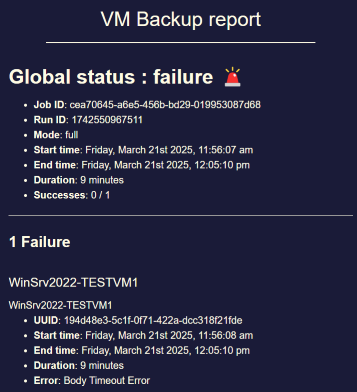
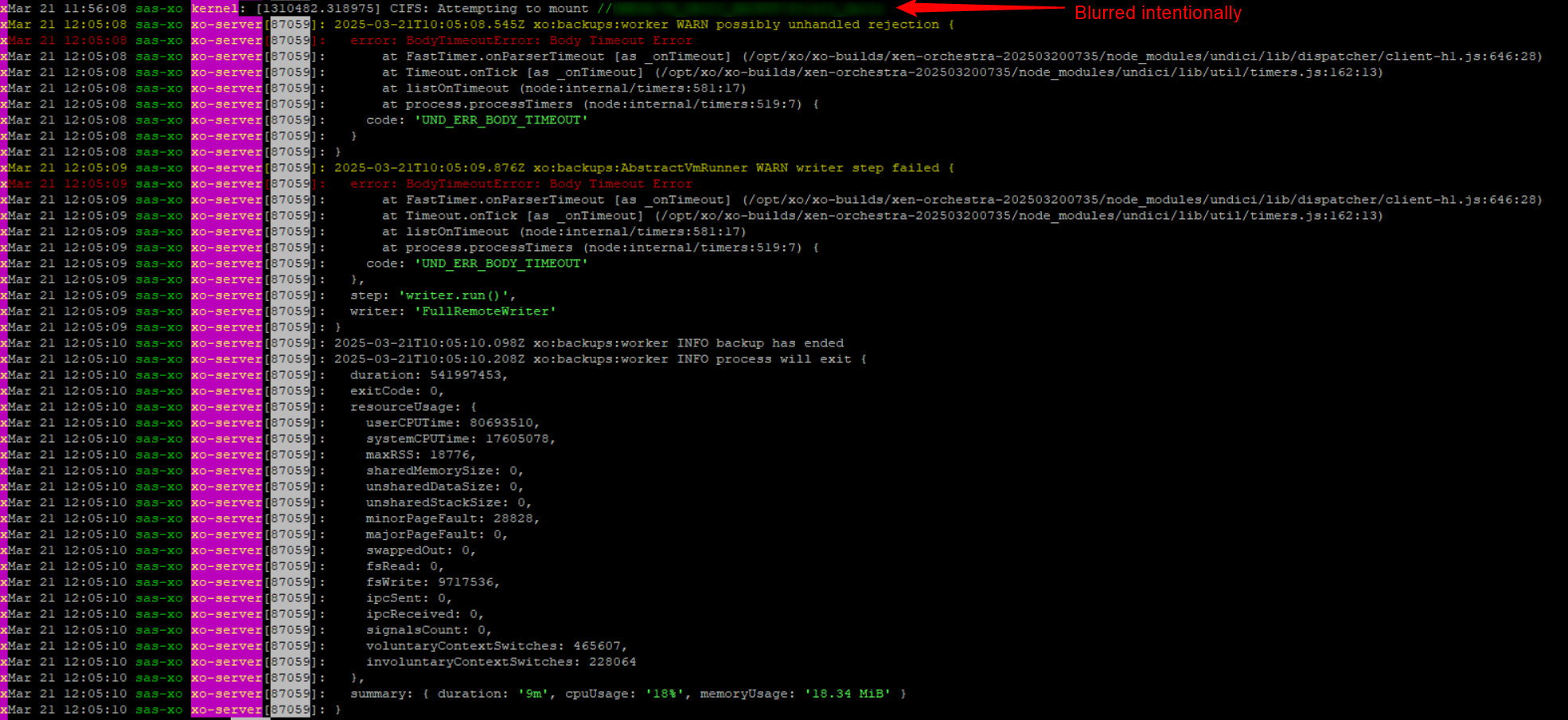
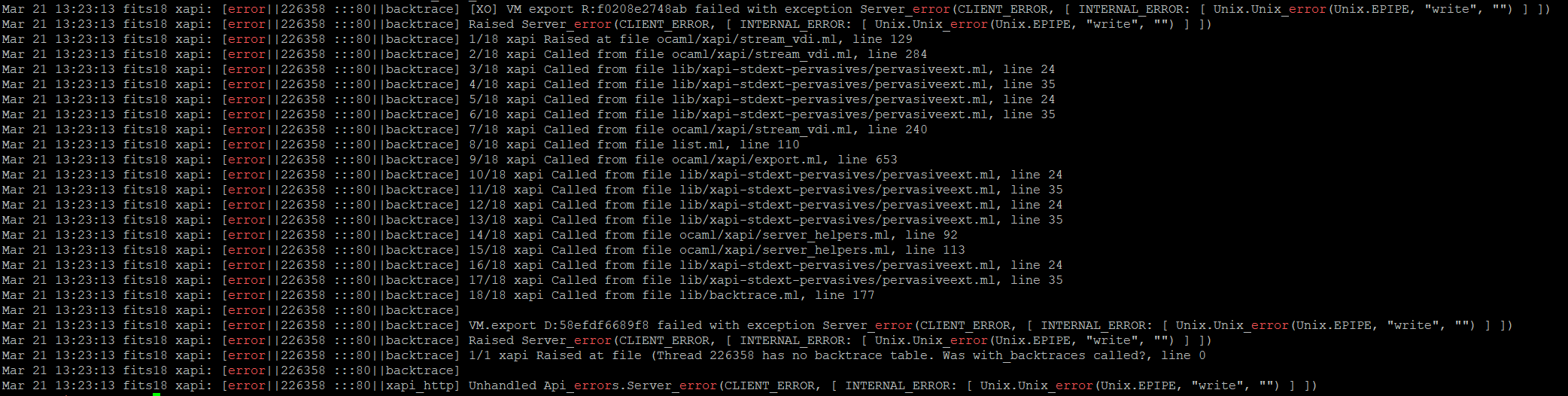
-
Happy to hear that there's a potential lead, im also happy I found this thread so I can kick back and wait for Vates to fix it

-
I can imagine that a fix could be to send "keepalive" packets in addition to the XCP-ng export-VM-data-stream so that the timeout on XO side does not occur

-
I worked around this issue by changing my full backup job to "delta backup" and enabling "force full backup" in the schedule options.
Delta backup seems more reliable as of now.
Looking forward to a fix as Zstd compression is an appealing feature of the full backup method.
-
I've got a fix for this issue in the pipeline and would really appreciate if anyone here could test to confirm if it resolves the problem for you.
You'd need to install a custom build (not production-ready, be careful, all the usual warnings apply here) according to these steps:
-
Before updating, preferably check that exporting a particular VM with compression on results in the timeout error consistently.
-
Write the following file to
/etc/yum.repos.d/xvatest.repo:
[xva-test-repo] name=xva-test-repo baseurl=https://koji.xcp-ng.org/repos/user/8/8.3/asultanov1/x86_64/ enabled=0 metadata_expire=1m gpgcheck=1 repo_gpgcheck=1 gpgkey=file:///etc/pki/rpm-gpg/RPM-GPG-KEY-xcpng- Make sure you're up to date on the rest of your packages with
yum upgrade --enablerepo=testing(reboot if necessary) - Install the fix (this should install
*.xvafix.1packages):
yum upgrade xapi-core qcow-stream-tool vhd-tool --enablerepo=xva-test-repo- Restart the toolstack:
xe-toolstack-restart -
-
@andriy.sultanov Thank you very much for working on this!
I can test your proposed fix in our lab during next week.
Best regards -
@andriy.sultanov I created a small test setup in our lab. I created a WIndows VM with a lot of free disk space (2 virtual disks, 2.5 TB free space in total). Hopefully that way I will be able to replicate the issue with full backup timeout for VMs with a lot of free space that occurred in our production environment.
The backup job is currently running. I will report back once it failed and once I had a chance to test if your fix solves the issue. -
@andriy.sultanov said in Potential bug with Windows VM backup: "Body Timeout Error":
xe-toolstack-restart
Okay I was able to replicate the issue.
This is the setup that I used and that resulted in the "body timeout error" previously discussed in this thread:OS: Windows Server 2019 Datacenter


The versions of the packages in question that were used in order to replicate the issue (XCP-ng 8.3, fully upgraded):
[11:58 dat-xcpng-test01 ~]# rpm -q xapi-core
xapi-core-25.27.0-2.2.xcpng8.3.x86_64
[11:59 dat-xcpng-test01 ~]# rpm -q qcow-stream-tool
qcow-stream-tool-25.27.0-2.2.xcpng8.3.x86_64
[11:59 dat-xcpng-test01 ~]# rpm -q vhd-tool
vhd-tool-25.27.0-2.2.xcpng8.3.x86_64
Result:
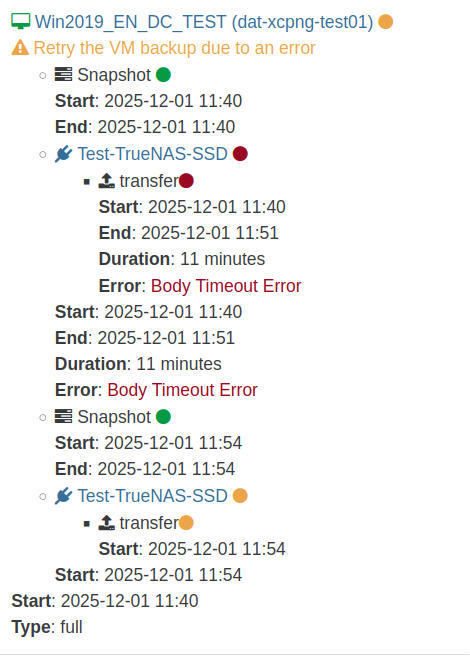
Backup log:{ "data": { "mode": "full", "reportWhen": "failure" }, "id": "1764585634255", "jobId": "b19ed05e-a34f-4fab-b267-1723a7195f4e", "jobName": "Full-Backup-Test", "message": "backup", "scheduleId": "579d937a-cf57-47b2-8cde-4e8325422b15", "start": 1764585634255, "status": "failure", "infos": [ { "data": { "vms": [ "36c492a8-e321-ef2b-94dc-a14e5757d711" ] }, "message": "vms" } ], "tasks": [ { "data": { "type": "VM", "id": "36c492a8-e321-ef2b-94dc-a14e5757d711", "name_label": "Win2019_EN_DC_TEST" }, "id": "1764585635692", "message": "backup VM", "start": 1764585635692, "status": "failure", "tasks": [ { "id": "1764585635919", "message": "snapshot", "start": 1764585635919, "status": "success", "end": 1764585644161, "result": "0f548c1f-ce5c-56e3-0259-9c59b7851a17" }, { "data": { "id": "f1bc8d14-10dd-4440-bb1d-409b91f3b550", "type": "remote", "isFull": true }, "id": "1764585644192", "message": "export", "start": 1764585644192, "status": "failure", "tasks": [ { "id": "1764585644201", "message": "transfer", "start": 1764585644201, "status": "failure", "end": 1764586308921, "result": { "name": "BodyTimeoutError", "code": "UND_ERR_BODY_TIMEOUT", "message": "Body Timeout Error", "stack": "BodyTimeoutError: Body Timeout Error\n at FastTimer.onParserTimeout [as _onTimeout] (/opt/xo/xo-builds/xen-orchestra-202511080402/node_modules/undici/lib/dispatcher/client-h1.js:646:28)\n at Timeout.onTick [as _onTimeout] (/opt/xo/xo-builds/xen-orchestra-202511080402/node_modules/undici/lib/util/timers.js:162:13)\n at listOnTimeout (node:internal/timers:588:17)\n at process.processTimers (node:internal/timers:523:7)" } } ], "end": 1764586308922, "result": { "name": "BodyTimeoutError", "code": "UND_ERR_BODY_TIMEOUT", "message": "Body Timeout Error", "stack": "BodyTimeoutError: Body Timeout Error\n at FastTimer.onParserTimeout [as _onTimeout] (/opt/xo/xo-builds/xen-orchestra-202511080402/node_modules/undici/lib/dispatcher/client-h1.js:646:28)\n at Timeout.onTick [as _onTimeout] (/opt/xo/xo-builds/xen-orchestra-202511080402/node_modules/undici/lib/util/timers.js:162:13)\n at listOnTimeout (node:internal/timers:588:17)\n at process.processTimers (node:internal/timers:523:7)" } }, { "id": "1764586443440", "message": "clean-vm", "start": 1764586443440, "status": "success", "end": 1764586443459, "result": { "merge": false } }, { "id": "1764586443624", "message": "snapshot", "start": 1764586443624, "status": "success", "end": 1764586451966, "result": "c3e9736e-d6eb-3669-c7b8-f603333a83bf" }, { "data": { "id": "f1bc8d14-10dd-4440-bb1d-409b91f3b550", "type": "remote", "isFull": true }, "id": "1764586452003", "message": "export", "start": 1764586452003, "status": "success", "tasks": [ { "id": "1764586452008", "message": "transfer", "start": 1764586452008, "status": "success", "end": 1764586686887, "result": { "size": 10464489322 } } ], "end": 1764586686900 }, { "id": "1764586690122", "message": "clean-vm", "start": 1764586690122, "status": "success", "end": 1764586690140, "result": { "merge": false } } ], "warnings": [ { "data": { "attempt": 1, "error": "Body Timeout Error" }, "message": "Retry the VM backup due to an error" } ], "end": 1764586690142 } ], "end": 1764586690143 }I then enabled your test repository and installed the packages that you mentioned:
[12:01 dat-xcpng-test01 ~]# rpm -q xapi-core
xapi-core-25.27.0-2.3.0.xvafix.1.xcpng8.3.x86_64
[12:08 dat-xcpng-test01 ~]# rpm -q vhd-tool
vhd-tool-25.27.0-2.3.0.xvafix.1.xcpng8.3.x86_64
[12:08 dat-xcpng-test01 ~]# rpm -q qcow-stream-tool
qcow-stream-tool-25.27.0-2.3.0.xvafix.1.xcpng8.3.x86_64
I restarted tool-stack and re-ran the backup job.
Unfortunately it did not solve the issue and made the backup behave very strangely:
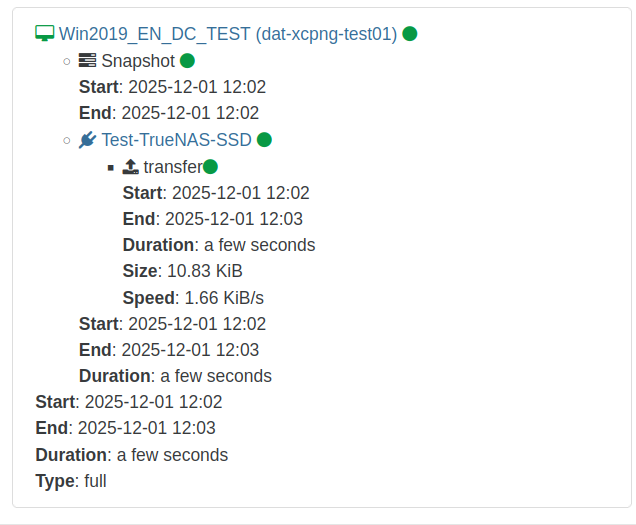
The backup job ran only a few seconds and reported that it was "successful". But only 10.83KiB were transferred. There are 18GB used space on this VM. So the data unfortunately was not transferred by the backup job.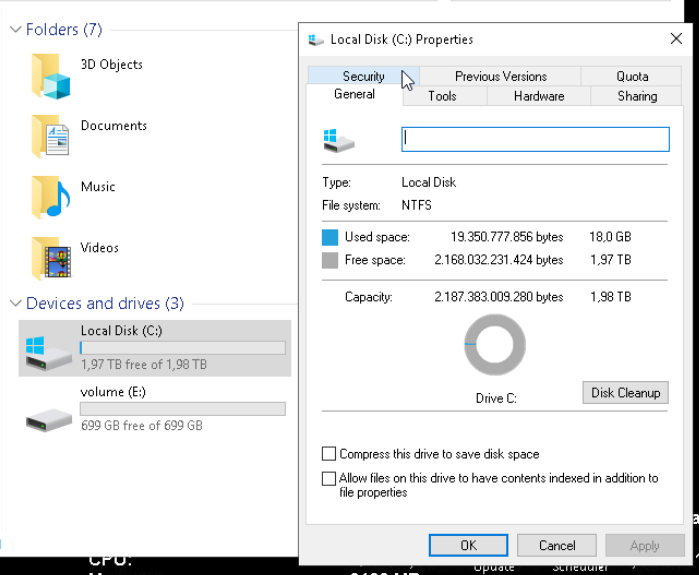
Here is the backup log:
{
  "data": {
    "mode": "full",
    "reportWhen": "failure"
  },
  "id": "1764586964999",
  "jobId": "b19ed05e-a34f-4fab-b267-1723a7195f4e",
  "jobName": "Full-Backup-Test",
  "message": "backup",
  "scheduleId": "579d937a-cf57-47b2-8cde-4e8325422b15",
  "start": 1764586964999,
  "status": "success",
  "infos": [
    {
      "data": {
        "vms": [
          "36c492a8-e321-ef2b-94dc-a14e5757d711"
        ]
      },
      "message": "vms"
    }
  ],
  "tasks": [
    {
      "data": {
        "type": "VM",
        "id": "36c492a8-e321-ef2b-94dc-a14e5757d711",
        "name_label": "Win2019_EN_DC_TEST"
      },
      "id": "1764586966983",
      "message": "backup VM",
      "start": 1764586966983,
      "status": "success",
      "tasks": [
        {
          "id": "1764586967194",
          "message": "snapshot",
          "start": 1764586967194,
          "status": "success",
          "end": 1764586975429,
          "result": "ebe5c4e2-5746-9cb3-7df6-701774a679b5"
        },
        {
          "data": {
            "id": "f1bc8d14-10dd-4440-bb1d-409b91f3b550",
            "type": "remote",
            "isFull": true
          },
          "id": "1764586975453",
          "message": "export",
          "start": 1764586975453,
          "status": "success",
          "tasks": [
            {
              "id": "1764586975473",
              "message": "transfer",
              "start": 1764586975473,
              "status": "success",
              "end": 1764586981992,
              "result": {
                "size": 11093
              }
            }
          ],
          "end": 1764586982054
        },
        {
          "id": "1764586985271",
          "message": "clean-vm",
          "start": 1764586985271,
          "status": "success",
          "end": 1764586985290,
          "result": {
            "merge": false
          }
        }
      ],
      "end": 1764586985291
    }
  ],
  "end": 1764586985292
}
If you need me to test something else or if I should provide some log file from the XCP-ng system please let me know.
Best regards
-
200gb free space was enough in my production system to cause this. The only thing I didn't try was filling it up until I found the point where it started working.
-
Hey @andriy.sultanov @olivierlambert
Any news on this?
If I recall correctly some work towards fixing the "compressed full backup of VMs with lots of free space" issue has been done but a fix was not (yet) pushed to the package repositories.Is there a new test build that I could test or similar?
I would love to be able to use full backup method again.Thanks!
-
Let me ask internally

-
This is the PR: https://github.com/xapi-project/xen-api/pull/6786
It's ready/reviewed, we are waiting for upstream merge. We'll make sure to re-ask for a merge ASAP.
Stay tuned!
-
@olivierlambert said in Potential bug with Windows VM backup: "Body Timeout Error":
This is the PR: https://github.com/xapi-project/xen-api/pull/6786
It's ready/reviewed, we are waiting for upstream merge. We'll make sure to re-ask for a merge ASAP.
Stay tuned!
Thank you very much for the update!
-
@olivierlambert @andriy.sultanov I saw that the linked PR got merged, which is awesome! I was wondering: do you plan to release this with the next round of patches or even before that as a hotfix?
In each case: if you have a test build I am happy to try it out.Thank you and best regards
-
Question for @stormi
-
Hey!
Any news in this regard?
Would be really interested in testing this fix in our lab environment if possible.
Thanks and best regards! -
Let me reping @stormi or @Team-XAPI-Network
-
@olivierlambert Because Andriy did quite a bit of work before this merge, xcp-ng depends on xenserver releasing the package to the clients before we can integrate it into xcp-ng. I'd say we can release the package February at the earliest
-
@psafont @olivierlambert As you previously mentioned february and we reached it as of now - I was wondering: do you have any update on when you plan to push the fix to XCP-ng repositories?
Thanks and best regards
-
@MajorP93 It's being packaged at the moment. between this and the testing that needs to be done it might take a couple of weeks to be released, but I can't promise anything yet
-
I had same problem, about last 2 weeks, but is is about Xen update, after apply last update, Backup of Windows VMs works again.



Hello! It looks like you're interested in this conversation, but you don't have an account yet.
Getting fed up of having to scroll through the same posts each visit? When you register for an account, you'll always come back to exactly where you were before, and choose to be notified of new replies (either via email, or push notification). You'll also be able to save bookmarks and upvote posts to show your appreciation to other community members.
With your input, this post could be even better 💗
Register Login