Install guest tools on Windows server 2019 VM
-
On my xcp-ng 8.3 hosts I've an old Windows server 2019 VM without guest tools installed (Virtualizzation mode is HVM).
Tried to install citrix tools 9.3.3 and 9.4.0 (drivers + management agent).
After tools setup and reboot the VM does not start anymore (stay indefinitely on rotating dots screen).
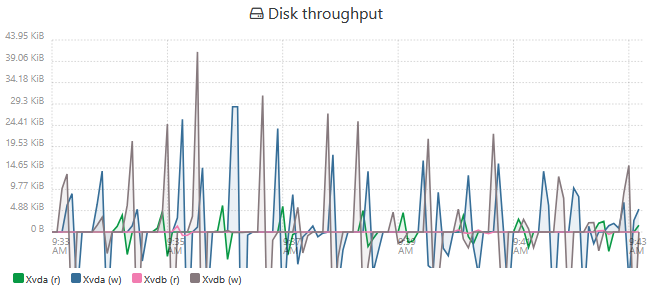
Am I missing or doing wrong something?For your knowledge, this VM has also strange "Disk throughput" stats with negative values (all other VMs on the host are ok). I don't know why...
Thanks
-
@Paolo Did you have any third-party storage drivers installed on your VM before installing the guest tools? The Xen driver doesn't like those.
-
@dinhngtu
In device manager disks are reported as "QEMU NVMe Ctrl".
Now i discover "Citrix Hypervisor PV Tools 9.0.42" are already installed (in App & Features), but in XOA i see "No Xen tools detected".Should i try to uninstall "Citrix Hypervisor PV Tools 9.0.42" and install 9.4.0 version?
-
-
@dinhngtu Thanks for your help.
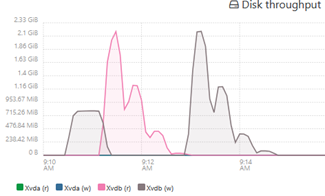
I solved to install XS Tools uninstalling old XS version 9.0, running XenClean and installing version 9.4.
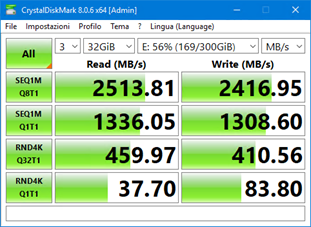
Also Disk stats now are correct.Now I get these good performances:
-
 O olivierlambert marked this topic as a question on
-
O olivierlambert has marked this topic as solved on
Hello! It looks like you're interested in this conversation, but you don't have an account yet.
Getting fed up of having to scroll through the same posts each visit? When you register for an account, you'll always come back to exactly where you were before, and choose to be notified of new replies (either via email, or push notification). You'll also be able to save bookmarks and upvote posts to show your appreciation to other community members.
With your input, this post could be even better 💗
Register Login