XCP-ng
    • Categories
    • Recent
    • Tags
    • Popular
    • Users
    • Groups
    • Register
    • Login

    VM failed and won't start. Displaying "An emulator required to run this VM failed to start"

    Scheduled Pinned Locked Moved XCP-ng
    35 Posts 2 Posters 10.0k Views 2 Watching
    Loading More Posts
    • Oldest to Newest
    • Newest to Oldest
    • Most Votes
    Reply
    • Reply as topic
    Log in to reply
    This topic has been deleted. Only users with topic management privileges can see it.
    • R
      rustylh @olivierlambert
      last edited by

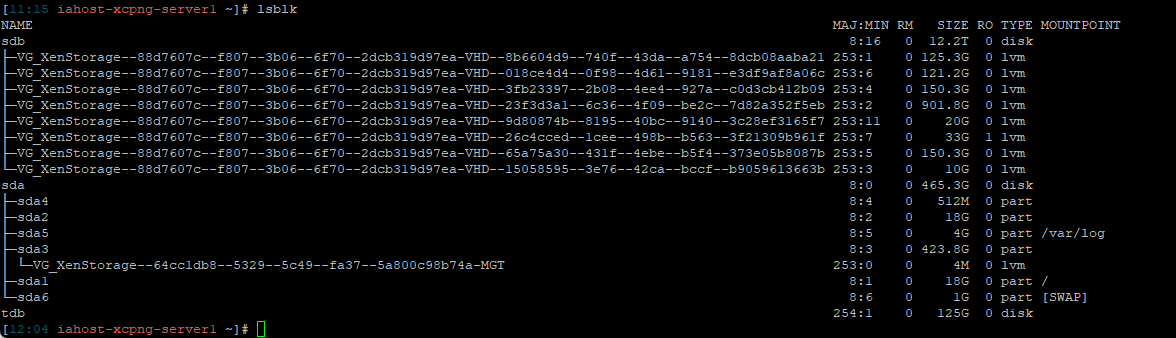
      @olivierlambert lsblk.png

      1 Reply Last reply
      Reply Quote 0
      • olivierlambertO
        olivierlambert Vates 🪐 Co-Founder CEO
        last edited by

        So first, how does "AlmaLinux8-Testing" appear in XO? Like started? If it's the case, you might do a state power reset to it. Then, check the dmesg on the host, I have a feeling there's a connection issue with it.

        R 1 Reply Last reply
        Reply Quote 0
        • R
          rustylh @olivierlambert
          last edited by

          @olivierlambert "Failed","Shutting down VM 'AlmaLinux8-Testing' on 'iahost-xcpng-server3'
          Internal error: Object with type VM and id dfcdcce6-b6e1-d865-6f2b-472a35b1fae7/config does not exist in xenopsd","iahost-xcpng-server3","Jun 9, 2025 12:28 PM"

          1 Reply Last reply
          Reply Quote 0
          • olivierlambertO
            olivierlambert Vates 🪐 Co-Founder CEO
            last edited by

            That's why you need to power reset it first.

            Also please check the host dmesg

            R 1 Reply Last reply
            Reply Quote 0
            • R
              rustylh @olivierlambert
              last edited by

              @olivierlambert Oh, I'm sorry. You mean power restart the host server?

              R 1 Reply Last reply
              Reply Quote 0
              • R
                rustylh @rustylh
                last edited by

                [12:52 iahost-xcpng-server3 ~]# xe vm-reset-powerstate vm=dfcdcce6-b6e1-d865-6f2b-472a35b1fae7 --force
                This operation cannot be completed because the server is still live.
                host: 6985c3a2-091d-488b-8de6-4bf40985987b (iahost-xcpng-server3)

                1 Reply Last reply
                Reply Quote 0
                • olivierlambertO
                  olivierlambert Vates 🪐 Co-Founder CEO
                  last edited by

                  On the pool master:

                  1. Restart the toolstack
                  2. Immediately after, run the vm reset powerstate command.
                  R 1 Reply Last reply
                  Reply Quote 0
                  • R
                    rustylh @olivierlambert
                    last edited by

                    @olivierlambert Ok. I was able to get that VM started on another Host. Now, I need to figure out what is going on with server1. I appreciate all your help! If you have any suggestions please let me know.

                    1 Reply Last reply
                    Reply Quote 0
                    • olivierlambertO
                      olivierlambert Vates 🪐 Co-Founder CEO
                      last edited by

                      My suggestion stands from previous messages, check the dmesg output from the problematic host 🙂

                      R 1 Reply Last reply
                      Reply Quote 0
                      • R
                        rustylh @olivierlambert
                        last edited by

                        @olivierlambert It is full of these:
                        43342477.643853] sd 7:0:0:1: rejecting I/O to offline device
                        [43342477.643861] print_req_error: I/O error, dev sdb, sector 0

                        1 Reply Last reply
                        Reply Quote 0
                        • olivierlambertO
                          olivierlambert Vates 🪐 Co-Founder CEO
                          last edited by

                          That's exactly what I suspected. You have a connectivity issue with your shared storage.

                          The device is considered offline because it cannot do any I/O on sector 0

                          R 1 Reply Last reply
                          Reply Quote 0
                          • R
                            rustylh
                            last edited by

                            said in VM failed and won't start. Displaying "An emulator required to run this VM failed to start":

                            rejecting I/O to offline device

                            I was able to reboot the host. Now things seam fine. Does that make sense? I mean have you seen this happen then a reboot of the host takes care of it?

                            1 Reply Last reply
                            Reply Quote 0
                            • R
                              rustylh @olivierlambert
                              last edited by

                              @olivierlambert I had the same issue this morning on one of the hosts I rebooted and was working fine. An emulator required to run this VM Failed to start. sd 7:0:0:1: rejecting I/O to offline device. I am not sure what to check next.

                              1 Reply Last reply
                              Reply Quote 0
                              • R
                                rustylh
                                last edited by

                                xcp-ng iscsiadm -m session -P 3 Attached scsi disk sdb State: offline

                                1 Reply Last reply
                                Reply Quote 0
                                • olivierlambertO
                                  olivierlambert Vates 🪐 Co-Founder CEO
                                  last edited by

                                  There's something fishy about the connectivity to your storage.

                                  R 1 Reply Last reply
                                  Reply Quote 0
                                  • R
                                    rustylh @olivierlambert
                                    last edited by

                                    @olivierlambert I am looking into that. I just do not have much experience with the networking.

                                    1 Reply Last reply
                                    Reply Quote 0
                                    • R
                                      rustylh
                                      last edited by

                                      I found that the SR has two NICs bonded to two different hardware switches on the iSCSI LUN. Then each host has a management network(Bonded NICS on hosts) and VM network (Bonded NICS). Should I break the SR bond and just go with one NIC? If so, I assume I would be best to shutdown the VMs until I have one NIC on SR reconfigured?

                                      1 Reply Last reply
                                      Reply Quote 0
                                      • R
                                        rustylh
                                        last edited by

                                        Additional finding. The two switches (LAG) are Cisco with STP enabled.

                                        1 Reply Last reply
                                        Reply Quote 0
                                        • R
                                          rustylh
                                          last edited by

                                          I am still getting " sd 7:0:0:1: rejecting I/O to offline device" taking all VMs on host down. I then shutdown the VM and power them on, on another Host. I have 4 host in a pool connected iSCSI to a Synology LUN. What is the best way to troubleshoot network issues on xcp-ng.
                                          Thank you

                                          1 Reply Last reply
                                          Reply Quote 0
                                          • R
                                            rustylh
                                            last edited by

                                            Just adding another note. When I reboot the host everything is fine then the issues pops back up. There doesn't seem to be any consistency as far as timeframe in between. It just happens randomly

                                            1 Reply Last reply
                                            Reply Quote 0

                                            Hello! It looks like you're interested in this conversation, but you don't have an account yet.

                                            Getting fed up of having to scroll through the same posts each visit? When you register for an account, you'll always come back to exactly where you were before, and choose to be notified of new replies (either via email, or push notification). You'll also be able to save bookmarks and upvote posts to show your appreciation to other community members.

                                            With your input, this post could be even better 💗

                                            Register Login
                                            • First post
                                              Last post