Expanded VM View Display Issue for Debian based VMs
-
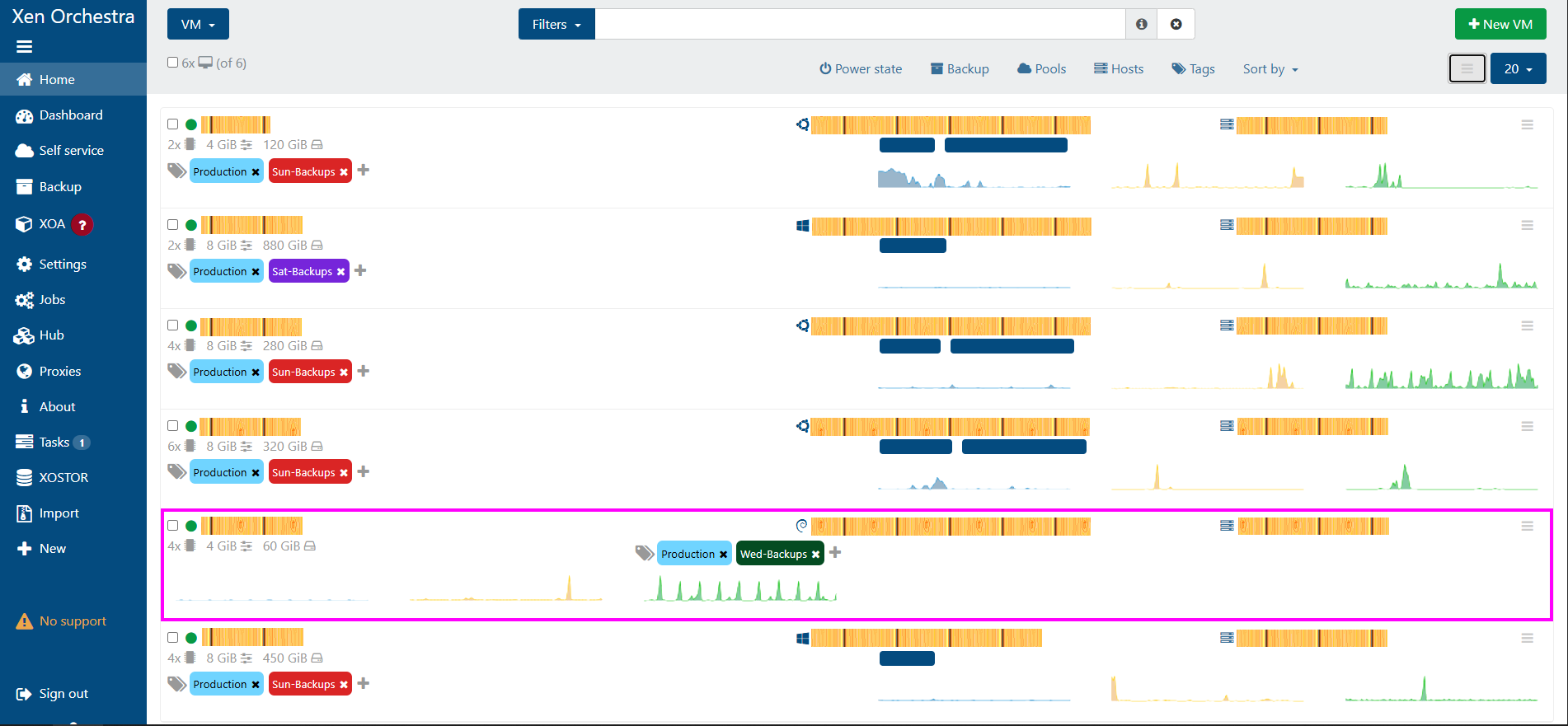
I have noticed that on the VM display page when expanded the Debian VM does not display correctly. My Ubuntu and Windows VMs display formatted the same. The Debian VM the formatting is off. This is a minor issue, but maybe a quick CSS fix for someone who knows what the issue is. Also noticed that the section is not showing the IP Address as well, so maybe that might be around where the display issue starts?
-
Hi,
Thanks for the feedback. We won't fix non-critical display issue on XO 5 because we are now invested in getting XO 6 as default for the end of the year

You can access the v6 interface by adding
/v6after your XOA URL -
@olivierlambert Thanks for the quick response. I did try to add the /v6 to the url and got a error page that says "Cannot GET /v6/". I am on latest commit. 6277a.
I have used the "xo-install.sh" script to install. My guess is that I am not on the right branch. -
It's not a branch question, you need to build XO 6:
yarn run turbo run build --filter @xen-orchestra/web


Hello! It looks like you're interested in this conversation, but you don't have an account yet.
Getting fed up of having to scroll through the same posts each visit? When you register for an account, you'll always come back to exactly where you were before, and choose to be notified of new replies (either via email, or push notification). You'll also be able to save bookmarks and upvote posts to show your appreciation to other community members.
With your input, this post could be even better 💗
Register Login