Every virtual machine I restart doesn't boot.
-
@Pilow
Please take a look at these:[09:08 xcp-ng ~]# df -h Filesystem Size Used Avail Use% Mounted on devtmpfs 2.8G 20K 2.8G 1% /dev tmpfs 2.8G 160K 2.8G 1% /dev/shm tmpfs 2.8G 11M 2.8G 1% /run tmpfs 2.8G 0 2.8G 0% /sys/fs/cgroup /dev/sda1 18G 2.0G 15G 12% / xenstore 2.8G 0 2.8G 0% /var/lib/xenstored /dev/sda5 3.9G 836M 2.8G 23% /var/log tmpfs 571M 0 571M 0% /run/user/0 [09:17 xcp-ng ~]# mount | grep -E "(\/var|\/opt)" xenstore on /var/lib/xenstored type tmpfs (rw,relatime,mode=755) /dev/sda5 on /var/log type ext3 (rw,relatime) sunrpc on /var/lib/nfs/rpc_pipefs type rpc_pipefs (rw,relatime) [09:18 xcp-ng ~]# dmesg | grep -iE "(error|fail|timeout|scsi|sd|hba)" | tail -20 [81734324.210688] Status code returned 0xc000006d NT_STATUS_LOGON_FAILURE [81734324.217399] Status code returned 0xc000006d NT_STATUS_LOGON_FAILURE [81734324.223994] Status code returned 0xc000006d NT_STATUS_LOGON_FAILURE [81734324.230647] Status code returned 0xc000006d NT_STATUS_LOGON_FAILURE [81734324.237867] Status code returned 0xc000006d NT_STATUS_LOGON_FAILURE [81734324.244529] Status code returned 0xc000006d NT_STATUS_LOGON_FAILURE [81734324.251239] Status code returned 0xc000006d NT_STATUS_LOGON_FAILURE [81734324.257781] Status code returned 0xc000006d NT_STATUS_LOGON_FAILURE [81734324.264466] Status code returned 0xc000006d NT_STATUS_LOGON_FAILURE [81734324.270941] Status code returned 0xc000006d NT_STATUS_LOGON_FAILURE [81734324.277574] Status code returned 0xc000006d NT_STATUS_LOGON_FAILURE [81734324.284149] Status code returned 0xc000006d NT_STATUS_LOGON_FAILURE [81734324.290576] Status code returned 0xc000006d NT_STATUS_LOGON_FAILURE [81734324.297118] Status code returned 0xc000006d NT_STATUS_LOGON_FAILURE [81734324.306270] Status code returned 0xc000006d NT_STATUS_LOGON_FAILURE [81734324.314061] Status code returned 0xc000006d NT_STATUS_LOGON_FAILURE [81734324.322632] Status code returned 0xc000006d NT_STATUS_LOGON_FAILURE [81734324.330717] Status code returned 0xc000006d NT_STATUS_LOGON_FAILURE [81734324.337242] Status code returned 0xc000006d NT_STATUS_LOGON_FAILURE [81734324.344686] Status code returned 0xc000006d NT_STATUS_LOGON_FAILURE [09:18 xcp-ng ~]# pvs PV VG Fmt Attr PSize PFree /dev/sda3 VG_XenStorage-00f82a18-a9f6-f7bc-9ca1-f42698d46b5f lvm2 a-- 95.18g <95.18g /dev/sdb VG_XenStorage-c5129868-a590-68ca-e587-db708ad61f38 lvm2 a-- <3.64t 3.09t [09:18 xcp-ng ~]# vgs VG #PV #LV #SN Attr VSize VFree VG_XenStorage-00f82a18-a9f6-f7bc-9ca1-f42698d46b5f 1 1 0 wz--n- 95.18g <95.18g VG_XenStorage-c5129868-a590-68ca-e587-db708ad61f38 1 8 0 wz--n- <3.64t 3.09t [09:18 xcp-ng ~]# lvs -o lv_name,vg_name,lv_size,lv_attr LV VG LSize Attr MGT VG_XenStorage-00f82a18-a9f6-f7bc-9ca1-f42698d46b5f 4.00m -wi-a----- MGT VG_XenStorage-c5129868-a590-68ca-e587-db708ad61f38 4.00m -wi-a----- VHD-1461c885-89c6-4e0e-8ee1-7d5be059f3dc VG_XenStorage-c5129868-a590-68ca-e587-db708ad61f38 <30.07g -wi------- VHD-2aaa4501-1c9b-48d6-8532-961ab8a3e627 VG_XenStorage-c5129868-a590-68ca-e587-db708ad61f38 <30.07g -wi-ao---- VHD-4de5831d-5a4d-4d2d-9f0a-ce4d1c2d8ef5 VG_XenStorage-c5129868-a590-68ca-e587-db708ad61f38 100.20g -wi-a----- VHD-6b1ea821-d677-4426-99e0-43314ef3c536 VG_XenStorage-c5129868-a590-68ca-e587-db708ad61f38 <250.50g -wi-ao---- VHD-6c08ae7f-71a7-4f97-a553-3c067dbbe243 VG_XenStorage-c5129868-a590-68ca-e587-db708ad61f38 <50.11g -wi-a----- VHD-bc8dd3e4-ea0e-4006-a918-817b18d65456 VG_XenStorage-c5129868-a590-68ca-e587-db708ad61f38 <50.11g -wi-ao---- VHD-ccaaabb0-b5ae-4e29-ab8d-c895af000550 VG_XenStorage-c5129868-a590-68ca-e587-db708ad61f38 <50.11g -wi-a----- [09:18 xcp-ng ~]# lvdisplay /dev/VG_XenStorage-c5129868-a590-68ca-e587-db708ad61f38/VHD-ccaaabb0-b5ae-4e29-ab8d-c895af000550 --- Logical volume --- LV Path /dev/VG_XenStorage-c5129868-a590-68ca-e587-db708ad61f38/VHD-ccaaabb0-b5ae-4e29-ab8d-c895af000550 LV Name VHD-ccaaabb0-b5ae-4e29-ab8d-c895af000550 VG Name VG_XenStorage-c5129868-a590-68ca-e587-db708ad61f38 LV UUID TggCle-7H7d-BN1o-KU5U-8oME-lckS-z0puvZ LV Write Access read/write LV Creation host, time xcp-ng, 2023-07-11 14:19:40 +0330 LV Status available # open 0 LV Size <50.11 GiB Current LE 12827 Segments 1 Allocation inherit Read ahead sectors auto - currently set to 256 Block device 253:2 -
@ohthisis I see nothing outstanding
you have two SRs, thick provisionned
one small 95Gb that is empty probably created on the install, and one big 3.64Tb on /dev/sdbVMs are on the big SR, same sized VDIs could indicate existing snapshots.
is your /dev/sdb a RAID5 array or a standlone disk ?
Can you create a new test VM, that is running normally on this SR ?
-
@Pilow
I guess my server using RAID5.
I created a VM with PXE as boot, but it is VM.start: 50%. -
-
I rebooted the server and now I got:
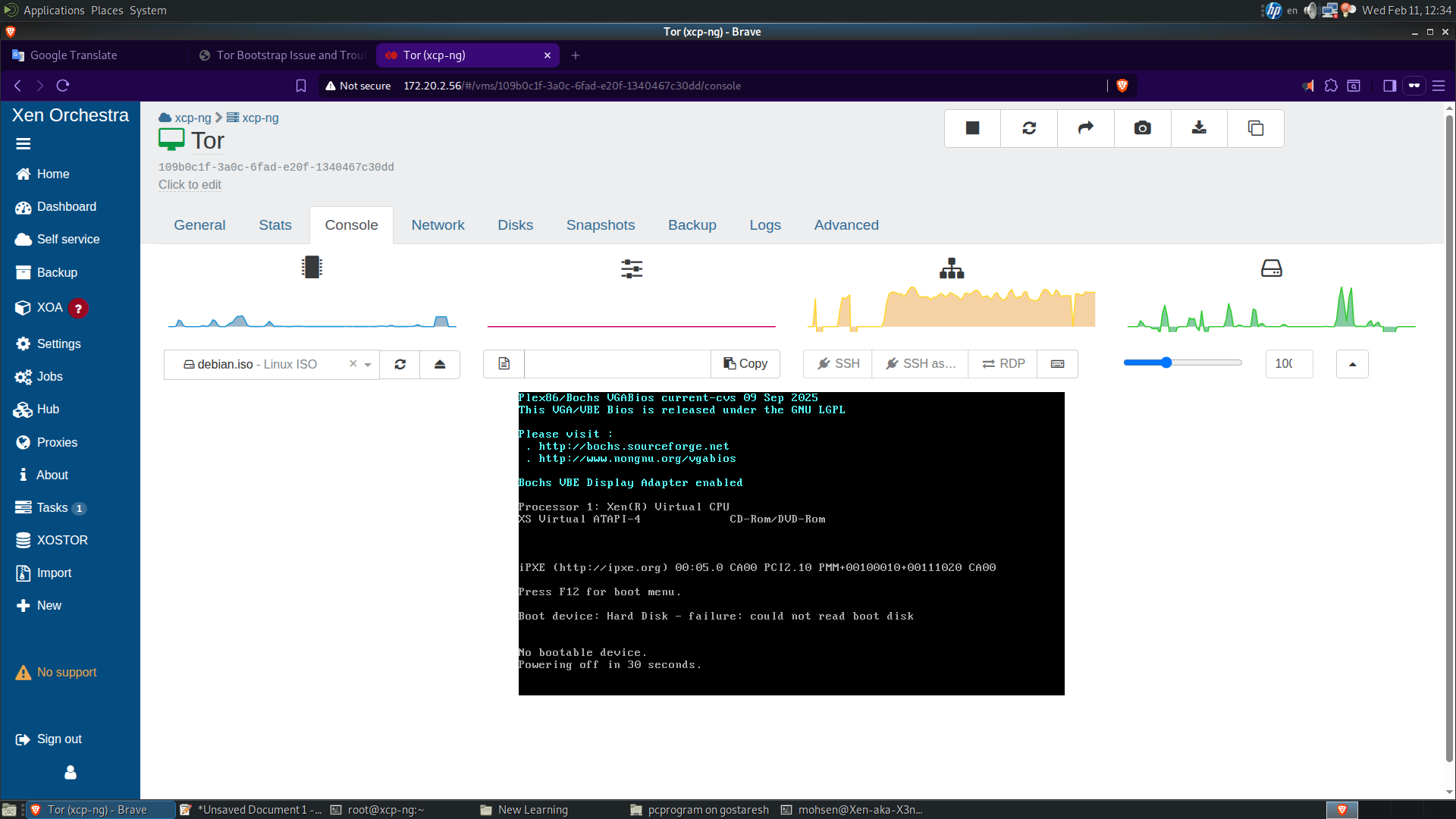
-
@ohthisis you have no bootable disk on this VM, or boot order is wrong.
could you screen the DISKS tab and the ADVANCED tab ? -
It is difficult to know the source of the problem without more details from your logs. Can you run the following commands on your XCP-ng host and then attach the generated files here?
grep -A 15 -B 15 -i error /var/log/xensource.log/xensource > xensource.txt grep -A 15 -B 15 -i exception /var/log/SMlog > smlog.txt dmesg -T|grep -Eiv 'guest|capacity|promiscuous' > dmesg.txt -
Hello,
This issue was related to XPC-ng and caused me to delete and recreate and configure one of the most important virtual machines I have. As I said, every virtual machine I create is only 33% complete, and when I try to turn on virtual machines that are already turned off, I get the message "VM state is halted but should be running".
I had to turn the server off and back on to fix the problem. To be honest, I'm afraid to test again to see if the problem is fixed, because I have a VPN server that has a number of users connected to it, and I also have a monitoring server.
If it is a hardware problem, the green lights on the hard drive should change to orange or red, but all the hard drive lights on the server are green. I think the problem is related to the stability of XCP-ng. -
XCP-ng is rock stable. We have (and Citrix does too) many many automated test for such basic operations. So you clearly have an issue somewhere triggering that problem.
-
@olivierlambert Where? How to find it? As you can see, I only have 4 virtual machines on the XCP-ng host.
-
Starting with the documentation is a good thing: https://docs.xcp-ng.org/troubleshooting/
This will give you (and us) hints on what's going on



