Install XO from sources.
-
I will make one suggestion that might be a problem for some users with really strict password requirements. Make the default password something more complex that doesn't contain the username or the word password.
One capital, one lower case, one number or special, and minimum 8 characters.Alternate would be a note calling our where in the script the default can be edited, this way you don't have to do much, and those that need the default more complex can change it themselves before they run the script.
I'll try this in the future when I move me lab up to XCP-ng version 9, no timeline on this since I wanted it done two weeks ago.
[edit] full of typos today, please excuse my mistakes
-
If you are referring to the login info admin@admin.net. That is per vates is documentation. It does prompt you to change that password.
There is a xo-config.cfg file where you can change most of the defaults but those that apply to install not for do itself.
https://docs.xen-orchestra.com/installation
First Login Once you have started the VM, you can access the web UI by putting the IP you configured during deployment into your web browser. If you did not configure an IP or are unsure, try one of the following methods to find it: Run xe vm-list params=name-label,networks | grep -A 1 XOA on your host Check your router's DHCP leases for an xoa lease tip Default Web UI credentials are admin@admin.net / admin Default console/SSH credentials are not set, you need to set them as described here. -
Maybe just semantics, but I have seen here on the boards people ask if they are running XOA or XO from sources. The A means appliance. I think it stops being an appliance if you are managing the OS and installing the app on top of it, so calling this XOA from sources is probably wrong and confusing.
Also, to get full features of XOA, you need to pay for it, so it seems like you are causing confusion with their paid service.
-
Yes I get what you say about the confusion with XO vs XOA. I know there is another person who maintains an install script calls it XO-CE but didnt want to call mine that specifically.
As for the feature set. You get full feature set when you install from sources. You just dont get paid support.
I have just not implemented the process of setting up a proxy via the script.
Edit - Updated title
-
@dcskinner @acebmxer I totally agree.... XOA is the Vates provided software appliance XO system.
Compiling XO yourself is XO from source or XO community edition or anything other than XOA. Calling it XOA adds confusion because it's not the same thing that Vates provides.
-
I appreciate the comments and they are all welcome. Do keep note that I did say this is not Production ready and use at your own risk. If you see anything that is wrong please provide suggest feedback to correct said issue.
I just started running my home lab from this version yesterday. I imported my config from previous XO. Today i saw 4 new commits and the update function updated to the latest commit. Backups have run with no issue.
As I can only test in my home lab I can only speak of my own experiences.
-
Just added the option for --proxy to deploy xo proxy.
https://github.com/acebmxer/install_xen_orchestra/tree/xo-proxy
Deploying a Proxy VM
The script supports deploying a Xen Orchestra Proxy VM directly to your XenServer/XCP-ng pool using the --proxy option:./install-xen-orchestra.sh --proxy
Important Limitations and Notes
 ️ Network Configuration:
The --proxy option does not allow you to specify which network the VIF is attached to
It will default to "Pool wide network associated with eth0"️ Production Use Warning:
Use at your own risk. Not advised for use in production environments.This feature is provided for testing and development purposes. For production deployments, it is recommended to manually configure proxy VMs with proper network planning and validation.
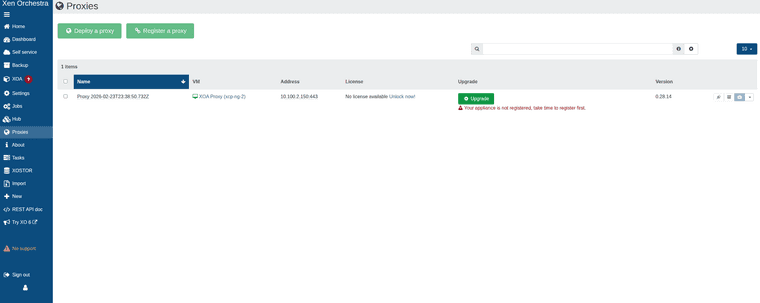


While can add host and remote via proxy. Backups will fail with the following error.
backupNg.runJob { "id": "95ac8089-69f3-404e-b902-21d0e878eec2", "schedule": "76989b41-8bcf-4438-833a-84ae80125367" } { "code": -32000, "data": { "stack": "TypeError: licenses.find is not a function at Function.<anonymous> (file:///usr/local/lib/node_modules/@xen-orchestra/proxy/app/mixins/appliance.mjs:168:23) at processTicksAndRejections (node:internal/process/task_queues:95:5) at file:///usr/local/lib/node_modules/@xen-orchestra/proxy/app/mixins/backups.mjs:110:25" }, "message": "licenses.find is not a function" } -
@acebmxer @ronivay stumbled upon this too
https://github.com/ronivay/XenOrchestraInstallerUpdater#backup-proxyBackup proxy
Proxy installation method is experimental, use at your own risk. Proxy installation from sources is not documented by Xen Orchestra team. Method used here is the outcome of trial and error.Proxy source code will be edited slightly to disable license check which only works with official XOA and there is no documented or working procedure to bypass it properly (there used to be but not anymore)
-
Yeah i was looking over his script to see how he worked around it but just states that.
I knew there would be limitations with it so i didnt add it to the main branch yet.
-
As I am completly new to this scripting and such I did reach out to Ai for assistance and believe the license check should be bypassed now.
Again not suggested to use in production. Use at your own risk.
still has its own branch for more testing before merging to main branch.