XCP-ng
    • Categories
    • Recent
    • Tags
    • Popular
    • Users
    • Groups
    • Register
    • Login

    Install XO from sources.

    Scheduled Pinned Locked Moved Xen Orchestra
    25 Posts 9 Posters 3.0k Views 8 Watching
    Loading More Posts
    • Oldest to Newest
    • Newest to Oldest
    • Most Votes
    Reply
    • Reply as topic
    Log in to reply
    This topic has been deleted. Only users with topic management privileges can see it.
    • acebmxerA Online
      acebmxer
      last edited by

      I appreciate the comments and they are all welcome. Do keep note that I did say this is not Production ready and use at your own risk. If you see anything that is wrong please provide suggest feedback to correct said issue.

      I just started running my home lab from this version yesterday. I imported my config from previous XO. Today i saw 4 new commits and the update function updated to the latest commit. Backups have run with no issue.

      As I can only test in my home lab I can only speak of my own experiences.

      1 Reply Last reply Reply Quote 0
      • acebmxerA Online
        acebmxer
        last edited by acebmxer

        Just added the option for --proxy to deploy xo proxy.

        https://github.com/acebmxer/install_xen_orchestra/tree/xo-proxy

        Deploying a Proxy VM
        The script supports deploying a Xen Orchestra Proxy VM directly to your XenServer/XCP-ng pool using the --proxy option:

        ./install-xen-orchestra.sh --proxy

        Important Limitations and Notes

        ⚠️ Network Configuration:
        The --proxy option does not allow you to specify which network the VIF is attached to
        It will default to "Pool wide network associated with eth0"

        ⚠️ Production Use Warning:
        Use at your own risk. Not advised for use in production environments.

        This feature is provided for testing and development purposes. For production deployments, it is recommended to manually configure proxy VMs with proper network planning and validation.
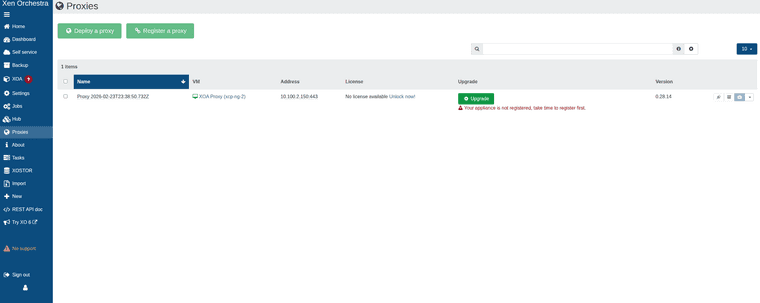

        Screenshot_20260223_184415.png

        Screenshot_20260223_185435.png

        Screenshot_20260223_190135-1.png

        While can add host and remote via proxy. Backups will fail with the following error.

        backupNg.runJob
        {
          "id": "95ac8089-69f3-404e-b902-21d0e878eec2",
          "schedule": "76989b41-8bcf-4438-833a-84ae80125367"
        }
        {
          "code": -32000,
          "data": {
            "stack": "TypeError: licenses.find is not a function
            at Function.<anonymous> (file:///usr/local/lib/node_modules/@xen-orchestra/proxy/app/mixins/appliance.mjs:168:23)
            at processTicksAndRejections (node:internal/process/task_queues:95:5)
            at file:///usr/local/lib/node_modules/@xen-orchestra/proxy/app/mixins/backups.mjs:110:25"
          },
          "message": "licenses.find is not a function"
        }
        
        P 1 Reply Last reply Reply Quote 0
        • P Offline
          Pilow @acebmxer
          last edited by

          @acebmxer @ronivay stumbled upon this too
          https://github.com/ronivay/XenOrchestraInstallerUpdater#backup-proxy

          Backup proxy
          Proxy installation method is experimental, use at your own risk. Proxy installation from sources is not documented by Xen Orchestra team. Method used here is the outcome of trial and error.

          Proxy source code will be edited slightly to disable license check which only works with official XOA and there is no documented or working procedure to bypass it properly (there used to be but not anymore)

          acebmxerA 1 Reply Last reply Reply Quote 0
          • acebmxerA Online
            acebmxer @Pilow
            last edited by acebmxer

            @Pilow

            Yeah i was looking over his script to see how he worked around it but just states that.

            I knew there would be limitations with it so i didnt add it to the main branch yet.

            acebmxerA 1 Reply Last reply Reply Quote 0
            • acebmxerA Online
              acebmxer @acebmxer
              last edited by acebmxer

              @pilow

              As I am completly new to this scripting and such I did reach out to Ai for assistance and believe the license check should be bypassed now.

              Again not suggested to use in production. Use at your own risk.

              still has its own branch for more testing before merging to main branch.

              1 Reply Last reply Reply Quote 0
              • acebmxerA Online
                acebmxer
                last edited by

                https://github.com/acebmxer/install_xen_orchestra

                Made some improvements to the script including a inter active menu that will show commit for the script itself compared to the master commit. (should relected which branch you run the script from) With Xen Orchestra Commit comparison and show the Node version installed. The script should self update on launch.

                Always review code before using. Use in production at your own risk.

                Always open to ideas and suggestions.

                  ╔══════════════════════════════════════════════════════════════════════════════════╗
                  ║              Install Xen Orchestra from Sources Setup and Update                 ║
                  ╚══════════════════════════════════════════════════════════════════════════════════╝
                
                                        Current Script Commit : 693f4
                                        Master Script Commit  : 693f4
                                        Current XO Commit     : a1b2c
                                        Master XO Commit      : d4e5f
                                        Current Node          : v24.1.0
                
                  ──────────────────────────────────────────────────────────────────────────────────
                
                  ▸ [✓] Install Xen Orchestra                   [ ] Reconfigure Xen Orchestra
                    [ ] Update Xen Orchestra                    [ ] Rebuild Xen Orchestra
                    [ ] Rename Sample-xo-config.cfg             [ ] Edit xo-config.cfg
                    [ ] Install XO Proxy
                
                  ──────────────────────────────────────────────────────────────────────────────────
                
                  Selected: 1
                
                  ↑↓←→ Navigate   SPACE Select/Deselect   ENTER Confirm   Q Quit
                
                G 1 Reply Last reply Reply Quote 2
                • G Offline
                  Greg_E @acebmxer
                  last edited by

                  @acebmxer

                  I haven't tried this yet, but liking the menu you just showed!

                  1 Reply Last reply Reply Quote 0
                  • AlexanderKA Offline
                    AlexanderK
                    last edited by

                    which is the difference with this?
                    https://github.com/ronivay/XenOrchestraInstallerUpdater

                    Using the above around 5-6 years with no issues at all

                    acebmxerA VertuxV 2 Replies Last reply Reply Quote 0
                    • acebmxerA Online
                      acebmxer @AlexanderK
                      last edited by acebmxer

                      @AlexanderK

                      I just wanted my own script to install Xen Orchestra from sources with a few additional features not found in Ranivays script. Mine is built completely from scratch but with inspiration form his script.

                      If you wanted to give my script a try I would appropriate any feedback to any improvements. I would suggest creating a new vm as i have not test my script against an installation done by Ronivays script.

                      AlexanderKA 1 Reply Last reply Reply Quote 0
                      • AlexanderKA Offline
                        AlexanderK @acebmxer
                        last edited by

                        @acebmxer
                        what have you added? what are the differences?
                        i will definetely try it.

                        acebmxerA 1 Reply Last reply Reply Quote 0
                        • acebmxerA Online
                          acebmxer @AlexanderK
                          last edited by acebmxer

                          @AlexanderK
                          The inter-active menu, The menu will show the running script commit against main commit along with showing Xen Orchestra installed commit vs master commit. The script should automatically self-update to latest version.

                          Just to name a few...

                          AlexanderKA 1 Reply Last reply Reply Quote 0
                          • AlexanderKA Offline
                            AlexanderK @acebmxer
                            last edited by

                            @acebmxer i think that only the menu. the "old" script also auto updates....

                            G 1 Reply Last reply Reply Quote 0
                            • G Offline
                              Greg_E @AlexanderK
                              last edited by

                              @AlexanderK

                              The ronivay script requires you to select an option (#2 to update).

                              I look at things this way, it's good to have more people working on scripts like this.

                              1 Reply Last reply Reply Quote 0
                              • F Offline
                                fatek
                                last edited by

                                Very nice job @acebmxer
                                Well done

                                1 Reply Last reply Reply Quote 1
                                • VertuxV Offline
                                  Vertux @AlexanderK
                                  last edited by

                                  @AlexanderK said:

                                  which is the difference with this?
                                  https://github.com/ronivay/XenOrchestraInstallerUpdater

                                  Using the above around 5-6 years with no issues at all

                                  e.g. XenOrchestraInstallerUpdater does not support Debian 13 yet.

                                  1 Reply Last reply Reply Quote 0
                                  • acebmxerA Online
                                    acebmxer
                                    last edited by acebmxer

                                    Made some updates to this project. Any existing users please see note. I have also updated the initial post.

                                    ⚠️ Upgrading from an earlier version of this script? Read this first.
                                    This version bumps the config schema to v2 (adds PUBLIC_URL and ENCRYPT_REDIS_CREDENTIALS) and corrects two config.toml generation bugs. Your xo-config.cfg is migrated automatically and non-destructively, but the corrected /etc/xo-server/config.toml is only written by --reconfigure.

                                    Run --reconfigure once before resuming normal updates:

                                    ./install-xen-orchestra.sh --reconfigure
                                    This regenerates config.toml with the fixes (your old file is backed up first; data in /var/lib/xo-server is untouched). It is strongly recommended if you set both REDIRECT_TO_HTTPS=true and REVERSE_PROXY_TRUST — that combination previously produced a duplicate [http] section and silently dropped one of the settings.

                                    Afterwards, run --update as normal for routine XO updates — --update does not need to be preceded by --reconfigure again.

                                    Also added option to adjust Xen Orchestras memory allocation. Useful if you are getting out of memory errors or added more memory to XO.

                                    Update - Previous info was incorrect. I have removed and updated.
                                    On fresh install Debian 13 with 8gb ram node -v 24.15.0.

                                    ==============================================
                                      Xen Orchestra Memory Allocation
                                    ==============================================
                                    
                                      Setting                       Value
                                      ----------------------------- -----------------------------------
                                      Total system RAM              7943 MB
                                      Current xo-server heap limit  ~2240 MB (node default, no --max-old-space-size set)
                                      Recommended heap limit        7431 MB
                                    
                                    poddingueP 1 Reply Last reply Reply Quote 0
                                    • poddingueP Online
                                      poddingue Vates 🪐 @acebmxer
                                      last edited by poddingue

                                      This is a nice bit of community tooling, and thanks for keeping it updated and being upfront about the "use at your own risk" part. 👍
                                      On the naming point a few people raised, I think the distinction folks are drawing is fair: XOA is the Vates-built appliance, and anything you compile yourself is XO from sources. 🤷
                                      The official docs cover that path at https://docs.xen-orchestra.com/xo5/installation#from-the-sources, including the note that there is no pro support for that method.
                                      Hope the project keeps going well!

                                      1 Reply Last reply Reply Quote 1

                                      Hello! It looks like you're interested in this conversation, but you don't have an account yet.

                                      Getting fed up of having to scroll through the same posts each visit? When you register for an account, you'll always come back to exactly where you were before, and choose to be notified of new replies (either via email, or push notification). You'll also be able to save bookmarks and upvote posts to show your appreciation to other community members.

                                      With your input, this post could be even better 💗

                                      Register Login
                                      • First post
                                        Last post
