Install XO from sources.
-
Maybe just semantics, but I have seen here on the boards people ask if they are running XOA or XO from sources. The A means appliance. I think it stops being an appliance if you are managing the OS and installing the app on top of it, so calling this XOA from sources is probably wrong and confusing.
Also, to get full features of XOA, you need to pay for it, so it seems like you are causing confusion with their paid service.
-
Yes I get what you say about the confusion with XO vs XOA. I know there is another person who maintains an install script calls it XO-CE but didnt want to call mine that specifically.
As for the feature set. You get full feature set when you install from sources. You just dont get paid support.
I have just not implemented the process of setting up a proxy via the script.
Edit - Updated title
-
@dcskinner @acebmxer I totally agree.... XOA is the Vates provided software appliance XO system.
Compiling XO yourself is XO from source or XO community edition or anything other than XOA. Calling it XOA adds confusion because it's not the same thing that Vates provides.
-
I appreciate the comments and they are all welcome. Do keep note that I did say this is not Production ready and use at your own risk. If you see anything that is wrong please provide suggest feedback to correct said issue.
I just started running my home lab from this version yesterday. I imported my config from previous XO. Today i saw 4 new commits and the update function updated to the latest commit. Backups have run with no issue.
As I can only test in my home lab I can only speak of my own experiences.
-
Just added the option for --proxy to deploy xo proxy.
https://github.com/acebmxer/install_xen_orchestra/tree/xo-proxy
Deploying a Proxy VM
The script supports deploying a Xen Orchestra Proxy VM directly to your XenServer/XCP-ng pool using the --proxy option:./install-xen-orchestra.sh --proxy
Important Limitations and Notes
 ️ Network Configuration:
The --proxy option does not allow you to specify which network the VIF is attached to
It will default to "Pool wide network associated with eth0"️ Production Use Warning:
Use at your own risk. Not advised for use in production environments.This feature is provided for testing and development purposes. For production deployments, it is recommended to manually configure proxy VMs with proper network planning and validation.
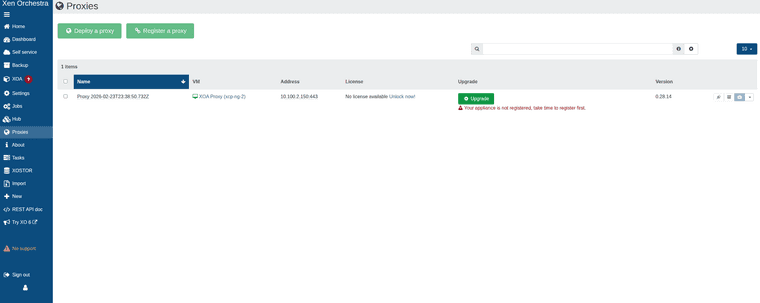


While can add host and remote via proxy. Backups will fail with the following error.
backupNg.runJob { "id": "95ac8089-69f3-404e-b902-21d0e878eec2", "schedule": "76989b41-8bcf-4438-833a-84ae80125367" } { "code": -32000, "data": { "stack": "TypeError: licenses.find is not a function at Function.<anonymous> (file:///usr/local/lib/node_modules/@xen-orchestra/proxy/app/mixins/appliance.mjs:168:23) at processTicksAndRejections (node:internal/process/task_queues:95:5) at file:///usr/local/lib/node_modules/@xen-orchestra/proxy/app/mixins/backups.mjs:110:25" }, "message": "licenses.find is not a function" } -
@acebmxer @ronivay stumbled upon this too
https://github.com/ronivay/XenOrchestraInstallerUpdater#backup-proxyBackup proxy
Proxy installation method is experimental, use at your own risk. Proxy installation from sources is not documented by Xen Orchestra team. Method used here is the outcome of trial and error.Proxy source code will be edited slightly to disable license check which only works with official XOA and there is no documented or working procedure to bypass it properly (there used to be but not anymore)
-
Yeah i was looking over his script to see how he worked around it but just states that.
I knew there would be limitations with it so i didnt add it to the main branch yet.
-
As I am completly new to this scripting and such I did reach out to Ai for assistance and believe the license check should be bypassed now.
Again not suggested to use in production. Use at your own risk.
still has its own branch for more testing before merging to main branch.
-
https://github.com/acebmxer/install_xen_orchestra
Made some improvements to the script including a inter active menu that will show commit for the script itself compared to the master commit. (should relected which branch you run the script from) With Xen Orchestra Commit comparison and show the Node version installed. The script should self update on launch.
Always review code before using. Use in production at your own risk.
Always open to ideas and suggestions.
╔══════════════════════════════════════════════════════════════════════════════════╗ ║ Install Xen Orchestra from Sources Setup and Update ║ ╚══════════════════════════════════════════════════════════════════════════════════╝ Current Script Commit : 693f4 Master Script Commit : 693f4 Current XO Commit : a1b2c Master XO Commit : d4e5f Current Node : v24.1.0 ────────────────────────────────────────────────────────────────────────────────── ▸ [✓] Install Xen Orchestra [ ] Reconfigure Xen Orchestra [ ] Update Xen Orchestra [ ] Rebuild Xen Orchestra [ ] Rename Sample-xo-config.cfg [ ] Edit xo-config.cfg [ ] Install XO Proxy ────────────────────────────────────────────────────────────────────────────────── Selected: 1 ↑↓←→ Navigate SPACE Select/Deselect ENTER Confirm Q Quit -
I haven't tried this yet, but liking the menu you just showed!
-
which is the difference with this?
https://github.com/ronivay/XenOrchestraInstallerUpdaterUsing the above around 5-6 years with no issues at all
-
I just wanted my own script to install Xen Orchestra from sources with a few additional features not found in Ranivays script. Mine is built completely from scratch but with inspiration form his script.
If you wanted to give my script a try I would appropriate any feedback to any improvements. I would suggest creating a new vm as i have not test my script against an installation done by Ronivays script.
-
@acebmxer
what have you added? what are the differences?
i will definetely try it. -
@AlexanderK
The inter-active menu, The menu will show the running script commit against main commit along with showing Xen Orchestra installed commit vs master commit. The script should automatically self-update to latest version.Just to name a few...
-
@acebmxer i think that only the menu. the "old" script also auto updates....
-
The ronivay script requires you to select an option (#2 to update).
I look at things this way, it's good to have more people working on scripts like this.
-
Very nice job @acebmxer
Well done -
which is the difference with this?
https://github.com/ronivay/XenOrchestraInstallerUpdaterUsing the above around 5-6 years with no issues at all
e.g. XenOrchestraInstallerUpdater does not support Debian 13 yet.
-
Made some updates to this project. Any existing users please see note. I have also updated the initial post.
️ Upgrading from an earlier version of this script? Read this first.
This version bumps the config schema to v2 (adds PUBLIC_URL and ENCRYPT_REDIS_CREDENTIALS) and corrects two config.toml generation bugs. Your xo-config.cfg is migrated automatically and non-destructively, but the corrected /etc/xo-server/config.toml is only written by --reconfigure.Run --reconfigure once before resuming normal updates:
./install-xen-orchestra.sh --reconfigure
This regenerates config.toml with the fixes (your old file is backed up first; data in /var/lib/xo-server is untouched). It is strongly recommended if you set both REDIRECT_TO_HTTPS=true and REVERSE_PROXY_TRUST — that combination previously produced a duplicate [http] section and silently dropped one of the settings.Afterwards, run --update as normal for routine XO updates — --update does not need to be preceded by --reconfigure again.
Also added option to adjust Xen Orchestras memory allocation. Useful if you are getting out of memory errors or added more memory to XO.
Update - Previous info was incorrect. I have removed and updated.
On fresh install Debian 13 with 8gb ram node -v 24.15.0.============================================== Xen Orchestra Memory Allocation ============================================== Setting Value ----------------------------- ----------------------------------- Total system RAM 7943 MB Current xo-server heap limit ~2240 MB (node default, no --max-old-space-size set) Recommended heap limit 7431 MB -
This is a nice bit of community tooling, and thanks for keeping it updated and being upfront about the "use at your own risk" part.

On the naming point a few people raised, I think the distinction folks are drawing is fair: XOA is the Vates-built appliance, and anything you compile yourself is XO from sources.
The official docs cover that path at https://docs.xen-orchestra.com/xo5/installation#from-the-sources, including the note that there is no pro support for that method.
Hope the project keeps going well! -
 A acebmxer referenced this topic on



Hello! It looks like you're interested in this conversation, but you don't have an account yet.
Getting fed up of having to scroll through the same posts each visit? When you register for an account, you'll always come back to exactly where you were before, and choose to be notified of new replies (either via email, or push notification). You'll also be able to save bookmarks and upvote posts to show your appreciation to other community members.
With your input, this post could be even better 💗
Register Login