Install XO from sources.
-
I appreciate the comments and they are all welcome. Do keep note that I did say this is not Production ready and use at your own risk. If you see anything that is wrong please provide suggest feedback to correct said issue.
I just started running my home lab from this version yesterday. I imported my config from previous XO. Today i saw 4 new commits and the update function updated to the latest commit. Backups have run with no issue.
As I can only test in my home lab I can only speak of my own experiences.
-
Just added the option for --proxy to deploy xo proxy.
https://github.com/acebmxer/install_xen_orchestra/tree/xo-proxy
Deploying a Proxy VM
The script supports deploying a Xen Orchestra Proxy VM directly to your XenServer/XCP-ng pool using the --proxy option:./install-xen-orchestra.sh --proxy
Important Limitations and Notes
 ️ Network Configuration:
The --proxy option does not allow you to specify which network the VIF is attached to
It will default to "Pool wide network associated with eth0"️ Production Use Warning:
Use at your own risk. Not advised for use in production environments.This feature is provided for testing and development purposes. For production deployments, it is recommended to manually configure proxy VMs with proper network planning and validation.
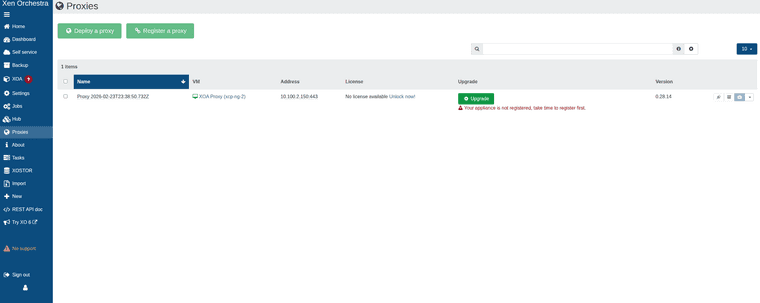


While can add host and remote via proxy. Backups will fail with the following error.
backupNg.runJob { "id": "95ac8089-69f3-404e-b902-21d0e878eec2", "schedule": "76989b41-8bcf-4438-833a-84ae80125367" } { "code": -32000, "data": { "stack": "TypeError: licenses.find is not a function at Function.<anonymous> (file:///usr/local/lib/node_modules/@xen-orchestra/proxy/app/mixins/appliance.mjs:168:23) at processTicksAndRejections (node:internal/process/task_queues:95:5) at file:///usr/local/lib/node_modules/@xen-orchestra/proxy/app/mixins/backups.mjs:110:25" }, "message": "licenses.find is not a function" } -
@acebmxer @ronivay stumbled upon this too
https://github.com/ronivay/XenOrchestraInstallerUpdater#backup-proxyBackup proxy
Proxy installation method is experimental, use at your own risk. Proxy installation from sources is not documented by Xen Orchestra team. Method used here is the outcome of trial and error.Proxy source code will be edited slightly to disable license check which only works with official XOA and there is no documented or working procedure to bypass it properly (there used to be but not anymore)
-
Yeah i was looking over his script to see how he worked around it but just states that.
I knew there would be limitations with it so i didnt add it to the main branch yet.
-
As I am completly new to this scripting and such I did reach out to Ai for assistance and believe the license check should be bypassed now.
Again not suggested to use in production. Use at your own risk.
still has its own branch for more testing before merging to main branch.
-
https://github.com/acebmxer/install_xen_orchestra
Made some improvements to the script including a inter active menu that will show commit for the script itself compared to the master commit. (should relected which branch you run the script from) With Xen Orchestra Commit comparison and show the Node version installed. The script should self update on launch.
Always review code before using. Use in production at your own risk.
Always open to ideas and suggestions.
╔══════════════════════════════════════════════════════════════════════════════════╗ ║ Install Xen Orchestra from Sources Setup and Update ║ ╚══════════════════════════════════════════════════════════════════════════════════╝ Current Script Commit : 693f4 Master Script Commit : 693f4 Current XO Commit : a1b2c Master XO Commit : d4e5f Current Node : v24.1.0 ────────────────────────────────────────────────────────────────────────────────── ▸ [✓] Install Xen Orchestra [ ] Reconfigure Xen Orchestra [ ] Update Xen Orchestra [ ] Rebuild Xen Orchestra [ ] Rename Sample-xo-config.cfg [ ] Edit xo-config.cfg [ ] Install XO Proxy ────────────────────────────────────────────────────────────────────────────────── Selected: 1 ↑↓←→ Navigate SPACE Select/Deselect ENTER Confirm Q Quit -
I haven't tried this yet, but liking the menu you just showed!
-
which is the difference with this?
https://github.com/ronivay/XenOrchestraInstallerUpdaterUsing the above around 5-6 years with no issues at all
-
I just wanted my own script to install Xen Orchestra from sources with a few additional features not found in Ranivays script. Mine is built completely from scratch but with inspiration form his script.
If you wanted to give my script a try I would appropriate any feedback to any improvements. I would suggest creating a new vm as i have not test my script against an installation done by Ronivays script.
-
@acebmxer
what have you added? what are the differences?
i will definetely try it. -
@AlexanderK
The inter-active menu, The menu will show the running script commit against main commit along with showing Xen Orchestra installed commit vs master commit. The script should automatically self-update to latest version.Just to name a few...
-
@acebmxer i think that only the menu. the "old" script also auto updates....
-
The ronivay script requires you to select an option (#2 to update).
I look at things this way, it's good to have more people working on scripts like this.
-
Very nice job @acebmxer
Well done -
which is the difference with this?
https://github.com/ronivay/XenOrchestraInstallerUpdaterUsing the above around 5-6 years with no issues at all
e.g. XenOrchestraInstallerUpdater does not support Debian 13 yet.
-
Made some updates to this project. Any existing users please see note. I have also updated the initial post.
️ Upgrading from an earlier version of this script? Read this first.
This version bumps the config schema to v2 (adds PUBLIC_URL and ENCRYPT_REDIS_CREDENTIALS) and corrects two config.toml generation bugs. Your xo-config.cfg is migrated automatically and non-destructively, but the corrected /etc/xo-server/config.toml is only written by --reconfigure.Run --reconfigure once before resuming normal updates:
./install-xen-orchestra.sh --reconfigure
This regenerates config.toml with the fixes (your old file is backed up first; data in /var/lib/xo-server is untouched). It is strongly recommended if you set both REDIRECT_TO_HTTPS=true and REVERSE_PROXY_TRUST — that combination previously produced a duplicate [http] section and silently dropped one of the settings.Afterwards, run --update as normal for routine XO updates — --update does not need to be preceded by --reconfigure again.
Also added option to adjust Xen Orchestras memory allocation. Useful if you are getting out of memory errors or added more memory to XO.
Update - Previous info was incorrect. I have removed and updated.
On fresh install Debian 13 with 8gb ram node -v 24.15.0.============================================== Xen Orchestra Memory Allocation ============================================== Setting Value ----------------------------- ----------------------------------- Total system RAM 7943 MB Current xo-server heap limit ~2240 MB (node default, no --max-old-space-size set) Recommended heap limit 7431 MB -
This is a nice bit of community tooling, and thanks for keeping it updated and being upfront about the "use at your own risk" part.

On the naming point a few people raised, I think the distinction folks are drawing is fair: XOA is the Vates-built appliance, and anything you compile yourself is XO from sources.
The official docs cover that path at https://docs.xen-orchestra.com/xo5/installation#from-the-sources, including the note that there is no pro support for that method.
Hope the project keeps going well! -
 A acebmxer referenced this topic on
-
While looking into the following issue - https://xcp-ng.org/forum/topic/11976/trying-to-enable-v2v-and-difficulty-adding-nbdinfo-on-xo-6/10
I found a few issues with my install script... Looking for recommendations on the fix approach.
I am noticing that are some confusion or inconsistencies with the documentation. Areas it suggest to use root and/or a non root account. Part of these issues would not be if the account used was root or with root access.
The two failures
Reason 1 — privileges (SERVICE_USER=xo-service, non-root):
XO's button runs apt-get install ..., make install, and ldconfig with no sudo (confirmed in esxi.mjs source). As xo-service, those commands are permission-denied: it can't apt-install, can't write to /usr/local/..., can't run ldconfig. XO's own dependency checker even says V2V requires root (UID 0) — which is why your sample-xo-config.cfg:56 already warns "V2V import requires root."So yes — your instinct is correct. With SERVICE_USER=xo-service, the button cannot succeed no matter what.
But Reason 2 — build tools absent:
Even if you set SERVICE_USER=root and click the button, it will then try apt-get install -y git dh-autoreconf pkg-config make libxml2-dev ocaml libc-bin and compile from GitLab. That will work if the box has internet and apt is healthy — but it's a multi-minute source compile pulling ~hundreds of MB (ocaml!) every time, done live inside the web request. Pre-staging those packages via the installer makes the button fast and reliable instead of a long live compile.So, is the fix "just set SERVICE_USER=root"?
To make the button function: yes, that is the necessary fix. Pre-installing build deps is an optional reliability/speed improvement on top.Given your answers, here's my refined proposal — minimal, docs-aligned:
Proposed changes
-
Add INSTALL_V2V_DEPS=false opt-in to sample-xo-config.cfg. When true, the installer pre-stages XO's exact build-dep list (git dh-autoreconf pkg-config make libxml2-dev ocaml libc-bin) on apt systems only, so the button compiles quickly instead of installing them live. Default false → no ocaml bloat on normal installs.
-
Root guard (your "Warn only" preference): When INSTALL_V2V_DEPS=true and SERVICE_USER is non-root, print a prominent warning:
"VMware V2V import requires xo-server to run as root (per XO docs). The in-XO 'install nbdinfo' button runs apt-get/make install without sudo and will fail as user '$SERVICE_USER'. Set SERVICE_USER=root to use V2V import."
…and continue (don't abort).-
RHEL/dnf: if INSTALL_V2V_DEPS=true on a non-apt system, log "VMware V2V import is only officially supported on Debian 12/13 per XO docs — skipping V2V dependency setup." and do nothing.
-
Keep the existing /usr/local/lib/vddk dir creation (it's correct — XO untars VDDK there), and don't touch APT contrib/multiverse or pre-compile nbdkit (XO compiles from source itself; distro packages are never used by the button).
-
Docs: README row for INSTALL_V2V_DEPS + a sharpened note in sample-config that V2V needs SERVICE_USER=root, linking the official guide.
This stays strictly within what XO's own code does, scopes the heavy deps behind opt-in, and surfaces the real root-user requirement you correctly identified.
Shall I implement this? If yes, I'll make the edits and run shellcheck/bats afterward to verify nothing breaks. (I have not edited anything yet.)
Prior to looking into this issue. I was trying to work on switching from standard user to root but that broke alot of things and will need rework. Dont belive it would be an issue if root was used to initially deploy xo.
-
-
After building new xo with root and more testing, I have come to this conclusion...
Both things are true, and they're in tension
The official docs prefer non-root for the long-running service — that's a least-privilege hardening recommendation for the daemon. Normal XO (UI, backups, hosts, VMs, NFS/CIFS remotes) works fine non-root.
But several XO features assume root anyway. The ESXi/VMware import "install from source" buttons are hard-coded to refuse unless id -u == 0. You already hit this same pattern once before — the credential-encryption/XenStore work (commit 5e8b7fd) existed precisely because non-root broke that too.
So "everything fails non-root" isn't quite it — what fails is the specific subset of features XO wrote assuming it runs as root. Each one needs a separate workaround. The import button is one that cannot be worked around for a non-root process: it's a uid check on the running daemon, full stop.The honest trade-off
You can pick at most two of these three:Service runs non-root (docs' preference)
In-app "install nbd from source" button works
Script doesn't pre-install packages
The button (#2) requires the daemon to be uid 0. So:Want the button to work → run that box as SERVICE_USER=root. Simplest, everything XO ships just works, zero manual steps. You give up the non-root hardening.
Want to stay non-root → the button is permanently dead; the only way to get import working is the binaries being placed by root once (script or by hand). The binaries run fine as non-root — only their installation needs root.
My recommendation
Use SERVICE_USER=root on this box. XO's own codebase keeps assuming root (import, and you already saw it with encryption/XenStore), so non-root is a recurring fight against upstream for marginal hardening. Root is fully supported, it's what the official XO appliance ships, and it makes the buttons you want work with no manual package steps. Keep non-root only if hardening that box is a hard requirement and you're fine never using the in-app import installer. -
Version 0.2.0 has been release - https://github.com/acebmxer/install_xen_orchestra/blob/main/CHANGELOG.md
Last changes has been about 1 month ago. I have been using it daily, mostly on Ubuntu server but have done some basic test on the other distros that it installs and you can log in with the default credentials. Just need some more feedback from other users, who would be willing to try the project out.
Also some other useful projects I have been working on



Hello! It looks like you're interested in this conversation, but you don't have an account yet.
Getting fed up of having to scroll through the same posts each visit? When you register for an account, you'll always come back to exactly where you were before, and choose to be notified of new replies (either via email, or push notification). You'll also be able to save bookmarks and upvote posts to show your appreciation to other community members.
With your input, this post could be even better 💗
Register Login