Veeam for Xen Orchestra has been release today 13.1
-
For those who have been waiting for Veeam support it has finally came - https://forums.veeam.com/viewtopic.php?f=62&t=103938&start=0 Release today
-
Just incase anyone else has any issue I am unable to get this installer to boot correctly. Will also reach out to Veeam support. Just want to share here as well...
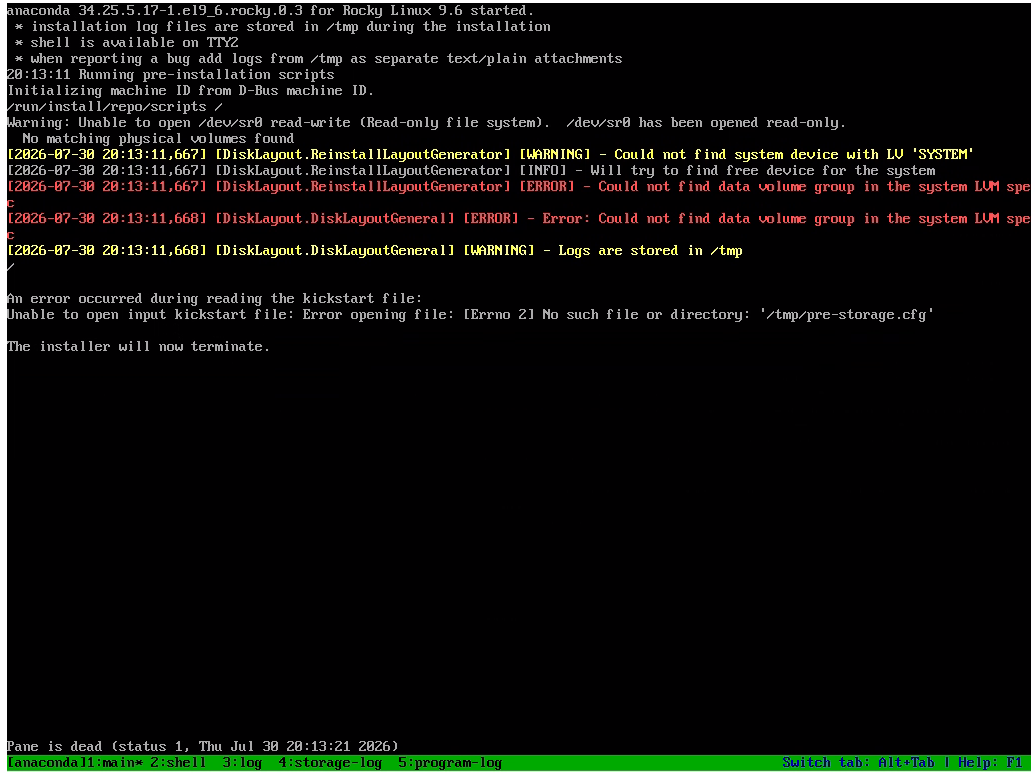
vm has 2 vdi's both over 240gb. Tried Generic UEFI template and also Rocky 9 same issue.
-
Thanks for the screenshot, that's a lot more useful than just telling us it failed. Reading it, I'm not sure it's failing to boot at all: anaconda starts fine, then Veeam's own pre-installation disk layout script gives up with "Could not find data volume group in the system LVM spec" and never writes the /tmp/pre-storage.cfg it then tries to read.
That would at least explain why Generic UEFI and Rocky 9 behave the same way. Your screen says there's a shell on TTY2, and if you run lsblk there I'd be curious whether the disks show up as xvda and xvdb rather than sda and sdb, which is how they usually turn up under XCP-ng.
That's a wild guess and I don't know their installer at all, but it might be worth putting in the Veeam ticket either way.
-
@poddingue The installer appeared to be stuck trying to do a reinstall or restore vs installation. Gonna try redownloading the iso just in the off chance something wrong with it. If i still have issues, yeah I will open support ticket with veeam.
-
Installer working.. Multple RPD layers broke arrow keys. Now access via home pc to home lab arrow keys work and installer is going....
-
Well after getting the Veeam Appliance installed does not support xcp-ng. Veeam Backup and Replication on a windows server does support xcp-ng.
-
@acebmxer Looks like xen drivers missing (as usual with appliance...)
Does the Veeam Appliance can be downloaded for free ? I would like to take a look at it
I found the community version (but it looks like the one running on windows), but didn't found the appliance based on rocky -
(Edit, found the iso once i created a account, i'm taking a look)
-
@acebmxer Looks like it worked on my side
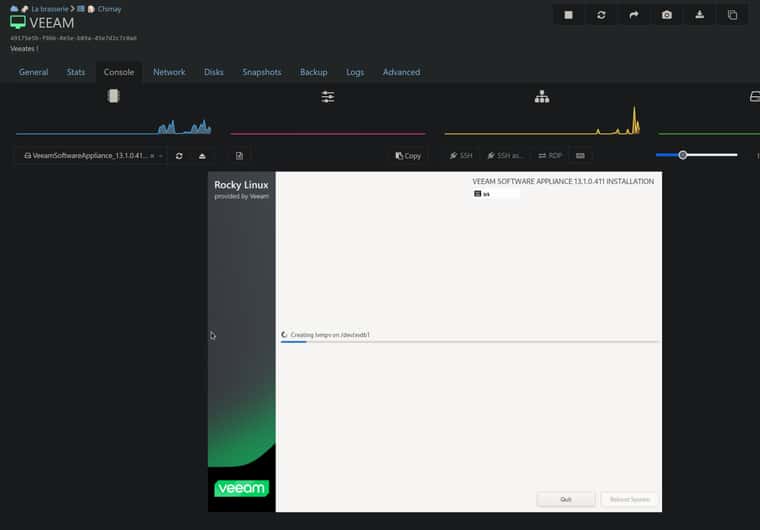
4VCPU 8G RAM 2x256G of disk
(the default choice is reinstall, not install, did you "force" select install ?)
-
@acebmxer Hello, thanks for sharing this here!

Me and my team have been waiting for this release!
I signed up for the Veeam newsletter hoping I would get notified once Veeam 13.1 (an XCP-ng plugin) gets released but they seem to be a bit slow.
So I found out about this release due to your post.
Will start testing!
-
Yeah I was succuesfull getting the appliance to install but did not see any xen or xcp-ng support. On the Windows version of B&R Xen or xcp-ng is support and backups worked. Just sucks to eat up MS license for it.
Also the Appliance does not seem to support other storage repos aside from local, where the Windows version you can setup smb, nfs, etc... Also the Xcp-ng plug in itself is windows exe file. So unless the plugin can be deployed to the appliance via a windows system.
-
This post is deleted! -
Nested RDP eating the arrow keys is not something I'd have guessed, and @AtaxyaNetwork's post probably explains why I went the wrong way too.

If the default selection is reinstall rather than install, that fits your log better than my disk-naming guess did, since the thing that aborted wasReinstallLayoutGeneratorlooking for an existingSYSTEMvolume a fresh disk wouldn't have.
So the LVM error was probably the installer doing the right thing in the wrong mode, and my xvda theory was, at best, misleading.
I'm less sure about the other part, that the appliance doesn't support XCP-ng while B&R on Windows does, since AtaxyaNetwork seems to have the appliance running.
Where did that one come from, the Veeam docs or your support case?Worth pinning down before it gets repeated.
-
Nothing reported yes since i was able to get the installer working, still in testing mode. I believe in beta only worked in B&R on windows but not in the appliance. I thought i read that support would come to the appliance in 13.1 that is why i was supporised when i did not see the option for it once it got it installed.
If i overlooked something in the appliance please share the details.



Hello! It looks like you're interested in this conversation, but you don't have an account yet.
Getting fed up of having to scroll through the same posts each visit? When you register for an account, you'll always come back to exactly where you were before, and choose to be notified of new replies (either via email, or push notification). You'll also be able to save bookmarks and upvote posts to show your appreciation to other community members.
With your input, this post could be even better 💗
Register Login