Suggestion: Restore VM Backup filter functionality when using jobs/sequences for backup
-
Hello,
Since I started using sequences for backing up (very usefull feature to avoid having to manually stack up backup schedules) I lost another another feature to know if some VM is not being scheduled for backups..
This filter does not work when using scheduled sequences...
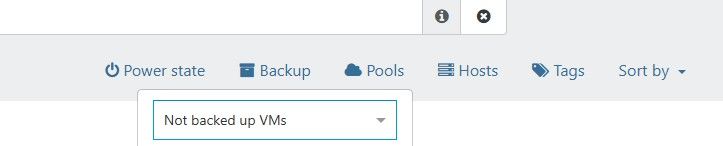
It would be nice to restore this... maybe not as a filter though. Perhaps on the future equivalent of XO 5 dashboard -> overview or dashboard->health .
Regards,
Pedro -
I think I may have found why, though someone on the XO side should check me on this.
The filter builds its list from backup jobs that have at least one enabled schedule of their own, right?
A sequence works the other way round: it gets its own timer and runs the member schedules from there.So once those member schedules are switched off, their jobs drop out of the filter and every VM they cover reads as not backed up.
If that's right, it's a wrong answer rather than a missing feature, which matters because it changes who needs to look at it.I got there by reading the code with bad glasses, not by reproducing it on a real install, so treat that last step as my wild guess.
Might be worth a mention to @Team-XO-Backend.
Your dashboard idea could well be the better home for it anyway. -
@poddingue Hi,
That was also my guess, withou looking into the code, that the filters look into enable backup schedules, and do not take into account that those schedules are being called by a sequence.
Being able to filter is nice, but I think this info woul be better suited on the health dashboard, being able to drill down to see which VMs are not being scheduled for backup.
On this regard, it would also be good to have in this dashboard, which VMs don't have any backup depiste being schedule for it - this can happen if a job has failed or, for some reason, did not run. For this XO would need to check all the backup remotes (like the restore page does).
Tks,
Pedro -
The same assumption was already fixed once on the dashboard side: https://github.com/vatesfr/xen-orchestra/pull/9997 counts sequence schedules in the backup computation, merged back in June.
So the home filter looks like that same fix never made it across, which is a better argument than "it would be nice".On your second point, XO 6 may already have part of it: there's a Backed up VMs tab that lists from what's actually on the remotes rather than from the job config, which is the "like the restore page does" bit you were after, and https://github.com/vatesfr/xen-orchestra/pull/10277 is an open fix for a caching bug in it.
I haven't used that tab myself, and since it's built around VMs that do have backups, I don't know if it gives you the negative view you want. If it doesn't, https://feedback.vates.tech is where that gets counted.
-
I haven't used that tab myself, and since it's built around VMs that do have backups, I don't know if it gives you the negative view you want. If it doesn't, https://feedback.vates.tech is where that gets counted.
Maybe you can build some sort of filter but I don't think so.
I'll use https://feedback.vates.tech for future suggestions.Tks

Hello! It looks like you're interested in this conversation, but you don't have an account yet.
Getting fed up of having to scroll through the same posts each visit? When you register for an account, you'll always come back to exactly where you were before, and choose to be notified of new replies (either via email, or push notification). You'll also be able to save bookmarks and upvote posts to show your appreciation to other community members.
With your input, this post could be even better 💗
Register Login