XCP-ng
    • Categories
    • Recent
    • Tags
    • Popular
    • Users
    • Groups
    • Register
    • Login
    • Profile
    • Following 0
    • Followers 0
    • Topics 4
    • Posts 31
    • Groups 0
    P Offline
    1. Home
    2. pedro

    pedro

    @pedro

    5
    Reputation
    1
    Profile views
    31
    Posts
    0
    Followers
    0
    Following
    Joined
    Last Online
    Age 55
    Location Lisbon

    pedro Unfollow Follow
    • RE: Error mirroring full backups to backblaze b2

      @florent said:

      fix_s3_nonencrypted_to_encrypted_xva

      Hello Florent,

      Branch built and testing
      Test procedure: removed the minPartSize=100000000 from remote definition, deleted the b2 backup and restarted the mirror backup. There are some other VMs that will also be uploaded to B2 so it will take a while. Expect feedback tomorrow.

      Thank you,
      Pedro

      posted in Backup
      P
      pedro
    • RE: Error mirroring full backups to backblaze b2

      Hello,

      To wrap up this last issue: the 500 errors backing up to S3 B2 are network contention related. There is some kind of contention with my link to B2 and having 8 VMs backing up simultaneously sometimes triggers these errors. Last weekend I reduced concurrency to 3 and every VM was successfully backed up - no VM level retries. I can't tell if some file parts were retried since these are only logged when the AWS_MAX_ATTEMPS are exhausted and the VM backup fails.
      So, these are not B2 issues and the default AWS_MAX_ATTEMPS is probably fine for most scenarios. I'll leave my at 10 following rclone defaults.

      Thank you,
      Pedro

      posted in Backup
      P
      pedro
    • RE: Full backups: Why is it not possible to use NBD on full backups ?

      That should be it, tks @poddingue

      posted in Backup
      P
      pedro
    • RE: Error mirroring full backups to backblaze b2

      Hello again!

      c5189e53-c2d1-4de5-a26d-243ddd41e5db-image.jpeg

      Here are the logs:
      b2_mirror_error.txt

      Hope it helps!

      posted in Backup
      P
      pedro
    • RE: Suggestion: Restore VM Backup filter functionality when using jobs/sequences for backup

      @poddingue said:

      I haven't used that tab myself, and since it's built around VMs that do have backups, I don't know if it gives you the negative view you want. If it doesn't, https://feedback.vates.tech is where that gets counted.

      Maybe you can build some sort of filter but I don't think so.
      I'll use https://feedback.vates.tech for future suggestions.

      Tks

      posted in Backup
      P
      pedro
    • RE: Suggestion: Restore VM Backup filter functionality when using jobs/sequences for backup

      @poddingue Hi,

      That was also my guess, withou looking into the code, that the filters look into enable backup schedules, and do not take into account that those schedules are being called by a sequence.

      Being able to filter is nice, but I think this info woul be better suited on the health dashboard, being able to drill down to see which VMs are not being scheduled for backup.

      On this regard, it would also be good to have in this dashboard, which VMs don't have any backup depiste being schedule for it - this can happen if a job has failed or, for some reason, did not run. For this XO would need to check all the backup remotes (like the restore page does).

      Tks,
      Pedro

      posted in Backup
      P
      pedro
    • Suggestion: Restore VM Backup filter functionality when using jobs/sequences for backup

      Hello,

      Since I started using sequences for backing up (very usefull feature to avoid having to manually stack up backup schedules) I lost another another feature to know if some VM is not being scheduled for backups..

      This filter does not work when using scheduled sequences...
      c73578fd-717d-4206-b43a-3e61372f1425-image.jpeg

      It would be nice to restore this... maybe not as a filter though. Perhaps on the future equivalent of XO 5 dashboard -> overview or dashboard->health .

      Regards,
      Pedro

      posted in Backup
      P
      pedro
    • RE: Error mirroring full backups to backblaze b2

      Hello,

      To wrap up this last issue: the 500 errors backing up to S3 B2 are network contention related. There is some kind of contention with my link to B2 and having 8 VMs backing up simultaneously sometimes triggers these errors. Last weekend I reduced concurrency to 3 and every VM was successfully backed up - no VM level retries. I can't tell if some file parts were retried since these are only logged when the AWS_MAX_ATTEMPS are exhausted and the VM backup fails.
      So, these are not B2 issues and the default AWS_MAX_ATTEMPS is probably fine for most scenarios. I'll leave my at 10 following rclone defaults.

      Thank you,
      Pedro

      posted in Backup
      P
      pedro
    • RE: Full backups: Why is it not possible to use NBD on full backups ?

      That should be it, tks @poddingue

      posted in Backup
      P
      pedro
    • RE: Error mirroring full backups to backblaze b2

      @pierrebrunet

      This week I only got 500 errors affecting 5 VMs. These 5 VMs were retried at VM-level and one fo these failed again (it failed to backup since I only have set 1 retry).

      I'm now looking into connection and bandwitdh to B2.
      I'm only reaching 200 Mbps to B2 with my current ISP so I'll tune concurrency so I reach those 200 Mbps with fewer VMs in parallel, making each single VM transfer faster.
      Concurrency was set to 8, I'll try with 3 VMs in parallel this weekend.

      Tks,
      Pedro

      posted in Backup
      P
      pedro
    • Full backups: Why is it not possible to use NBD on full backups ?

      Hello forum...

      On delta backups we can use CBT and NBD to speed backups. Why is it not possible to use NBD on full backups ?
      just curious...

      Thank you,
      Pedro

      posted in Backup
      P
      pedro
    • RE: Error mirroring full backups to backblaze b2

      Hello,

      The initial issue, non encrypred to encrypted mirroring is now working.

      The second issue was about general errors when sending backups to S3. I've tried and was able to increase AWS_MAX_ATTEMPTS to 10 but I'm still having errors and VMs that fail the first backup and have to be retried. So these do not seem to be transient errors that can be fixed by increasing AWS_MAX_ATTEMPTS.

      Thank you,
      Pedro

      posted in Backup
      P
      pedro
    • RE: Error mirroring full backups to backblaze b2

      @pierrebrunet Hi!

      I'm on vacation now, so sorry for the delay. In the meantime I've been analyzing these issues and it seems these are somewhat expected and still happen with minpartsize set to 100M.

      My next step is to increase the AWS_MAX_ATTEMPTS from the default 3 attempts to 10. This might reduce the number of failed VMs and avoid the need to retry the full VM backup.

      From AI research, it seems rclone uses 10 attempts instead of the AWS SDK default.

      Here are some stats of my weekly full backup to B2:
      "00 Weekly Full Backblaze" ran xxxx → xxxxx — 34.1 hours total, moving ~2.86 TiB across 89 VMs. Final status: failure (more on that below, because it's misleading) -> this is related to XO reporting the backup as a failure even though the follow up retry succeded which is a known issue.

      Every one of the 7 first-attempt errors shows attempts: 3 in the SDK metadata — the default budget was exhausted in all cases -> 7 of 89 VMs failed on the initial attempt.

      Error mix: 5× Backblaze InternalError 500, 1× ECONNRESET, 1× EPIPE

      The 7 failed first attempts burned ~7.1 hours of cumulative transfer time

      Even though XO does not expose AWS_MAX_ATTEMPTS parameter I might be able to set it using an environment variable. I'll give a try when I'm back at the office.

      Tks,
      Pedro
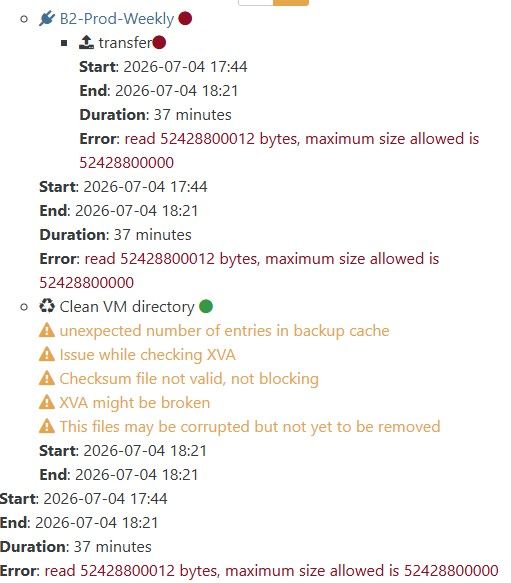
      posted in Backup
      P
      pedro
    • RE: Error mirroring full backups to backblaze b2

      @pierrebrunet

      Large VMs still fail with the same error (internal incident), the process is not reliable - don't know if it's a B2 problem or XO.
      When I have some time, I'll do another run setting minPartSize=100000000 and see if it helps.

      posted in Backup
      P
      pedro