Xen Orchestra web UI becomes unresponsive when an NFS backup remote goes offline
-
Yes if I recall (I may not have stated on the forum) that I still ended up with issues and just abounded the idea. Not sure on the time line when they attempted a patch to when i stopped disabling the remote.
-
@acebmxer So what are you doing now? Given the manual, NFS is the way, but i can't have the remote available h24 and also i would like to have a functioning XO

-
Just leaving it on 24/7
 winter is here now or so we thought (its 75f outside today) . If there is any update on this i would try again. but as it seems you are having the same issue i did then, it does not appear to be fixed.
-
 P poddingue marked this topic as a question
-
If you have the time, an issue on https://github.com/vatesfr/xen-orchestra/issues with your build date and that
ps -Toutput would make the case better than I can. -
@poddingue Taking the time to do this it's the bare minium! Here you go: https://github.com/vatesfr/xen-orchestra/issues/10741
-
when a NFS munt in hard mount mode fails, it is quite tricky to handle on user land, and falling back to a soft mount means we accept to loose data without knowing
To unstuck a XO with a brken NFS , we added a cli tool that allow you to disable a remote here https://github.com/vatesfr/xen-orchestra/pull/10587
-
I performed another test to reproduce the issue and evaluate the recovery mechanism introduced in PR #10587.
Unfortunately, I encountered a limitation that may prevent the new
disable-remotecommand from being used in the exact failure scenario it is intended to address.1. Reproducing the issue
With the NFS remote enabled, I shut down the NAS.
Initially, Xen Orchestra remained accessible, but one libuv worker became blocked in
rpc_wait_bit_killable.After some time, all four libuv workers were blocked:
TID  STAT  WCHAN                    COMMAND
863  Dsl   rpc_wait_bit_killable    libuv-worker
864  Dsl   rpc_wait_bit_killable    libuv-worker
865  Dsl   rpc_wait_bit_killable    libuv-worker
866  Dsl   rpc_wait_bit_killable    libuv-worker
The
xo-serverprocess was still running, but the libuv worker pool was completely blocked.I also observed multiple
df -kPprocesses attempting to access the unavailable NFS mount.2. Attempting to stop xo-server
I then executed:
systemctl stop xo-serverHowever, systemd was unable to terminate the service, even after sending SIGKILL.
The final status was:
Active: failed (Result: timeout)
Main PID: 738

Processes still around after SIGKILL. Ignoring.
State 'final-sigterm' timed out. Killing.
Killing process 738 (MainThread) with signal SIGKILL.
Processes still around after final SIGKILL. Entering failed mode.
Unit process 738 (MainThread) remains running after unit stopped.
Checking the remaining process:
ps -p 738 -o pid,ppid,stat,wchan:32,commReturned:
PID  PPID  STAT  WCHAN                    COMMAND
738     1  Ds    rpc_wait_bit_killable    MainThread
All other Node.js threads had disappeared, but the main thread remained stuck in an uninterruptible kernel wait.
3. Attempting a lazy unmount
I then tried:
umount -l /run/xo-server/mounts/9fc232df-4d0c-4a15-93b5-c0585c1dd9c9The command completed successfully, and
findmnt -t nfs,nfs4no longer showed the NFS mount.However, the Node.js process remained blocked:
PID  STAT  WCHAN                    COMMAND
738  Ds    rpc_wait_bit_killable    MainThread
Therefore, detaching the NFS mount did not release the already pending kernel operation.
4. Implications for PR #10587
As I understand it, the new
xo-server-db disable-remote <id>command is intended to be executed whilexo-serveris stopped.However, this test shows that when an NFS
hardremote becomes unavailable:- All four libuv workers can become blocked.
xo-serverbecomes unresponsive.systemctl stop xo-servercan fail, even after SIGKILL.- The Node.js process can remain stuck in an uninterruptible kernel wait.
- Even
umount -ldoes not necessarily release the blocked process.
5. Question about the intended recovery procedure
If
xo-servercannot be fully stopped because its process remains stuck in stateD, how is the newdisable-remotecommand expected to be used safely?Is the intended procedure to execute the database command while the old Node.js process is still present but systemd reports the service as failed?
Or is a VM reboot / restoration of NFS connectivity still required before the recovery command can be used?
I have not executed
disable-remotein this condition yet, because the original Node.js process is still present and I wanted to avoid modifying the database while it might still be in use.My concern is that the new CLI provides a way to prevent the problematic remote from being accessed on the next startup, but does not necessarily provide a complete recovery path when the existing
xo-serverprocess cannot terminate.I would appreciate clarification on the intended recovery procedure for this specific scenario.
-
I really do not want to look like i'm not appreciating the platform. I am a sysadmin currently evaluating XCP-ng and Xen Orchestra as a replacement for VMware, and I have to say this issue is making me a bit concerned. Of course for now it's my homelab, but it is already a show stopper for me.
I understand that NFS hard mounts can block when the server goes offline, but I really wouldn't expect an unavailable backup repository to make the entire XO Web UI unresponsive, especially when no backup jobs are running.
To me, this feels like vCenter becoming unusable just because one of the backup repositories is down. That's a pretty big deal in a production environment. Also, i have not yet tested what happens to vms running on local SR and management plane of a host when the main NFS SR may become unavailable.
What worries me even more is that, as my tests showed, once XO gets stuck, even SIGKILL can't terminate the process, so recovering isn't straightforward either.
Am I missing something here? Is there something wrong with my setup, or is this actually expected behavior?
I really like XCP-ng and XO so far, but I'm trying to understand how companies handle this kind of situation in production. Surely a failed backup destination shouldn't take down the whole management interface?
-
just to confirm you are disabling the Backup NFS SR? Before it goes off line? I can try this again in my setup just not sure if i still kept the script i created that the synology would used to send the disable the remote before shutdown.
-
@acebmxer Hello, no. Let me describe my setup.
Esxi + vcenter + veeam. Vcenter wakes up veaam at 9am. Veeam sends wol packet to the synology nas at 9.15. At 9.30 the backup starts and ends more or less at 10.00
Due to inactivity synology stops the hard disks, then after some time it shut itself off. Veeam just see the repo as unavailable. At 12.00 veeam auto shuts down.Migrating to xcpng + xo, veeam is retired. At first i added the remote to XO, believing it's like veeam. If the backend goes down it simply shows unavailable. Then i discovered is not at all like that when i found an inaccessible XO. After some chatgpt-ing i found out this "bug". I thought that the script would be sufficient, but it's not. Waiting for ping to fail and then disable the remote (cron every 5mins) still ends up in
ps -T -p 738 -o pid,tid,stat,wchan:32,comm
    PID     TID STAT WCHAN                            COMMAND
    738     738 Ssl  do_epoll_wait                    MainThread
    738     753 Ssl  do_epoll_wait                    DelayedTaskSche
    738     754 Ssl  futex_wait_queue                 V8Worker
    738     755 Ssl  futex_wait_queue                 V8Worker
    738     756 Ssl  futex_wait_queue                 V8Worker
    738     757 Ssl  futex_wait_queue                 V8Worker
    738     758 Ssl  futex_wait_queue                 SignalInspector
    738     863 Dsl  rpc_wait_bit_killable            libuv-worker
    738     864 Dsl  rpc_wait_bit_killable            libuv-worker
    738     865 Dsl  rpc_wait_bit_killable            libuv-worker
    738     866 Dsl  rpc_wait_bit_killable            libuv-worker
And it's even worse because not only XO becomes unavailable, but even if i disable manually (or via script) the remote as soon as the backup ends, with the synology still ON, the linux os does not unmount the nfs.
Today the remote was disabled before the nas shutdown and correctly XO kept working. But if at this point i want to restart the XO vm i must do this before shutdownumount -l /run/xo-server/mounts/9fc232df-4d0c-4a15-93b5-c0585c1dd9c9otherwise it stays like this for at least 15 minutes, then finally reboots
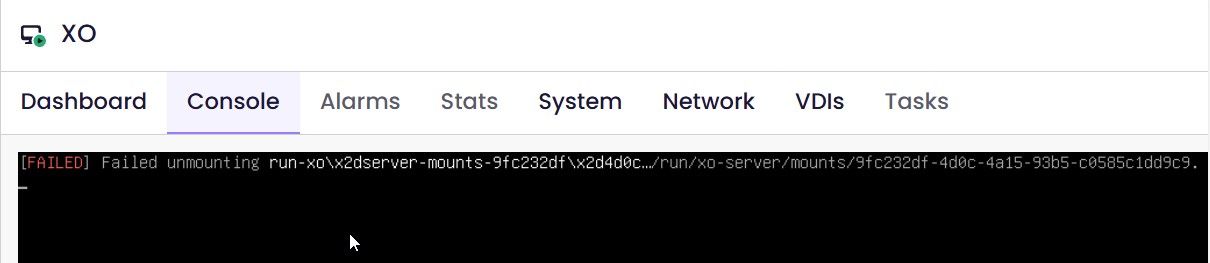
The ideal behaviour would be that XO does all by itself, but since we can't have it all, the closest thing i have in mind is
- Script that sends WOL to the nas, when it pings than enables the remote
- Script that monitors the backup acrivity. when the last job is done, it must disable the remote and also umount the linux os nfs mount.
Then the nas could shut down automatically without issue.
Since i'm not a dev i need to take my time with chatgpt and see i what i can do.
Having said that, my concern is not about my homelab, it's about production. In my environment i can and want to simulate all kinds of malfuncions. In the previous message i said i still need to try to shut down the main vm nfs SR and see how the host behaves.
But if i decide to deploy XEN at my company, i cant have 1 remote unavailability cause the whole XO (or XOA in that case) fall apart.Hope it helps!!


Hello! It looks like you're interested in this conversation, but you don't have an account yet.
Getting fed up of having to scroll through the same posts each visit? When you register for an account, you'll always come back to exactly where you were before, and choose to be notified of new replies (either via email, or push notification). You'll also be able to save bookmarks and upvote posts to show your appreciation to other community members.
With your input, this post could be even better 💗
Register Login