Unable to display files in File Restore (failed to setup loop device)
-
I get here and immediately get that exclamation mark and the below log error:
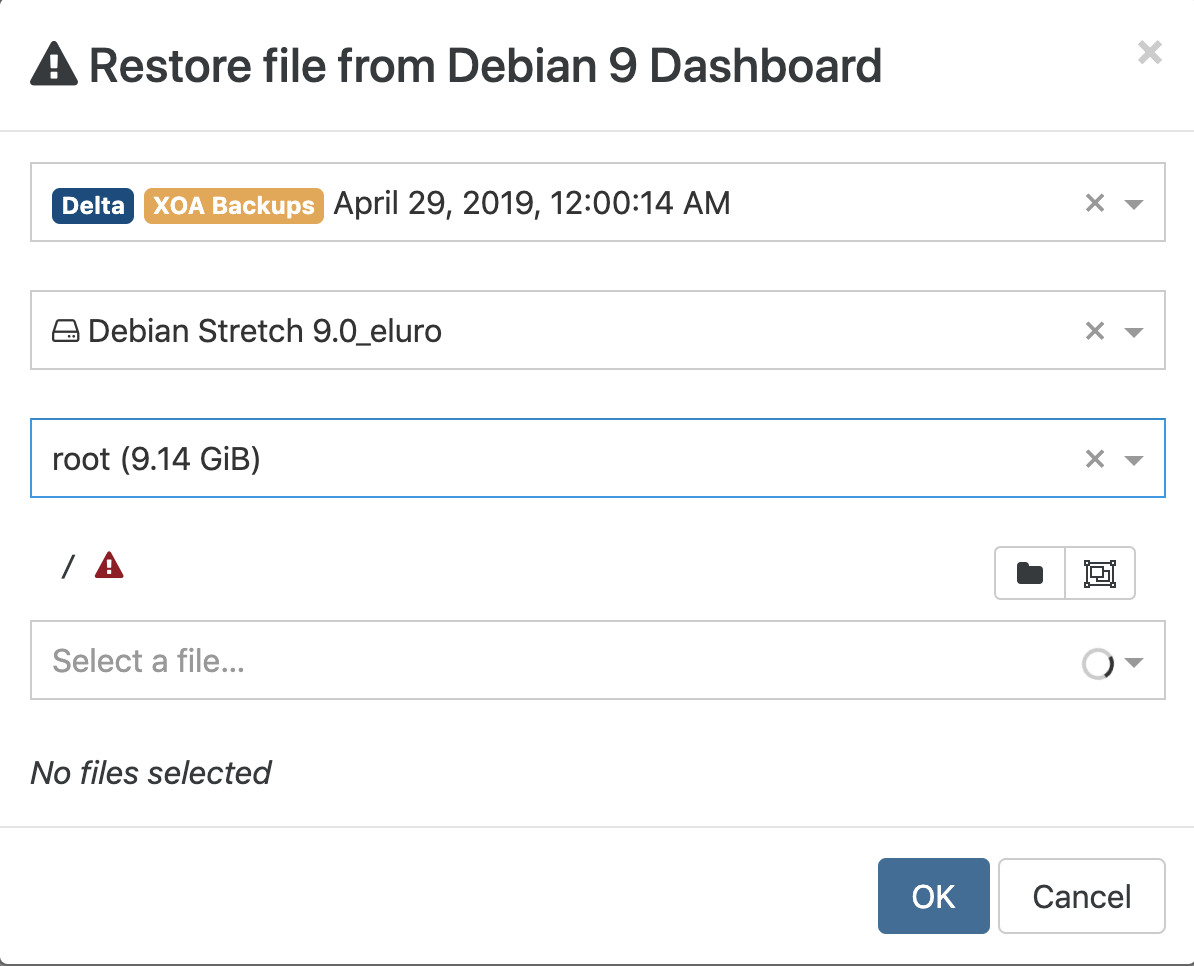
backupNg.listFiles
{
  "remote": "c7ae17c6-c7da-4ce5-a149-389257118aa1",
  "disk": "xo-vm-backups/9033182f-7a99-26c4-9f0c-f38c97438d3c/vdis/ea7fc1f6-bdb1-42af-8865-044767cf1340/6fd842c3-c025-4fee-80ad-fe2b3c33f6cc/20190427T140014Z.vhd",
  "path": "/",
  "partition": "7887b518-05/debian-vg/root"
}
{
  "code": 32,
  "stdout": "",
  "stderr": "mount: /tmp/tmp-751kkoSeZpmwHMt: failed to setup loop device for /dev/debian-vg/root.
",
  "failed": true,
  "signal": null,
  "cmd": "mount --options=loop,ro --source=/dev/debian-vg/root --target=/tmp/tmp-751kkoSeZpmwHMt",
  "timedOut": false,
  "killed": false,
  "message": "Command failed: mount --options=loop,ro --source=/dev/debian-vg/root --target=/tmp/tmp-751kkoSeZpmwHMt
mount: /tmp/tmp-751kkoSeZpmwHMt: failed to setup loop device for /dev/debian-vg/root.

",
  "name": "Error",
  "stack": "Error: Command failed: mount --options=loop,ro --source=/dev/debian-vg/root --target=/tmp/tmp-751kkoSeZpmwHMt
mount: /tmp/tmp-751kkoSeZpmwHMt: failed to setup loop device for /dev/debian-vg/root.


    at makeError (/opt/xen-orchestra/node_modules/execa/index.js:174:9)
    at Promise.all.then.arr (/opt/xen-orchestra/node_modules/execa/index.js:278:16)
    at tryCatcher (/opt/xen-orchestra/node_modules/bluebird/js/release/util.js:16:23)
    at Promise._settlePromiseFromHandler (/opt/xen-orchestra/node_modules/bluebird/js/release/promise.js:512:31)
    at Promise._settlePromise (/opt/xen-orchestra/node_modules/bluebird/js/release/promise.js:569:18)
    at Promise._settlePromise0 (/opt/xen-orchestra/node_modules/bluebird/js/release/promise.js:614:10)
    at Promise._settlePromises (/opt/xen-orchestra/node_modules/bluebird/js/release/promise.js:694:18)
    at Promise._fulfill (/opt/xen-orchestra/node_modules/bluebird/js/release/promise.js:638:18)
    at PromiseArray._resolve (/opt/xen-orchestra/node_modules/bluebird/js/release/promise_array.js:126:19)
    at PromiseArray._promiseFulfilled (/opt/xen-orchestra/node_modules/bluebird/js/release/promise_array.js:144:14)
    at Promise._settlePromise (/opt/xen-orchestra/node_modules/bluebird/js/release/promise.js:574:26)
    at Promise._settlePromise0 (/opt/xen-orchestra/node_modules/bluebird/js/release/promise.js:614:10)
    at Promise._settlePromises (/opt/xen-orchestra/node_modules/bluebird/js/release/promise.js:694:18)
    at _drainQueueStep (/opt/xen-orchestra/node_modules/bluebird/js/release/async.js:138:12)
    at _drainQueue (/opt/xen-orchestra/node_modules/bluebird/js/release/async.js:131:9)
    at Async._drainQueues (/opt/xen-orchestra/node_modules/bluebird/js/release/async.js:147:5)
    at Immediate.Async.drainQueues (/opt/xen-orchestra/node_modules/bluebird/js/release/async.js:17:14)
    at runCallback (timers.js:810:20)
    at tryOnImmediate (timers.js:768:5)
    at processImmediate [as _immediateCallback] (timers.js:745:5)"
}
It seems to be just this VM, my others are OK...
-
We need more context:
- Are you using XOA or XO from the sources? If from the sources, did you install it following the official documentation?
- Are you up to date?
- On what kind of remote are stored your VMs?
-
No worries:
-
Yep I'm using the community version. I've set it up via this script and keep it updated via this script.
-
I just ran the update script and am on 5.40.0, but I tried it with 5.35 before I updated and it didn't work (that's why I tried updating).
-
My VM's are stored on internal SSD's in raid
-
-
So you are using "local" remote right?
Anyway, because you are using a 3rd party installer, I'm not really able to assist (because we can't "validate" those installer/updater while we are adding/removing stuff on our side).
- If you can't see the files for all your backup VMs, I would suggest to create an issue on the installer GitHub repo because it's mainly an "environment" issue
- If you can't see files only for this VM, then it's maybe your VM is not "like" the others
-
@olivierlambert Yep fair enough.
It's only that one VM so I guess it's that, I'll have a dig around.
-
Sorry, quick question just because it'll probably save me hours of googling

The log says
failed to setup loop device for /dev/debian-vg/rootIf I run lsblk -fs in the VM I get:
 lsblk -fs
NAME              FSTYPE      LABEL UUID                                   MOUNTPOINT
xvda1             ext2              728f3ff5-b4e4-4c49-8440-1afca3bedffb   /boot
└─xvda
xvda2
└─xvda
debian--vg-root   ext4              e91dbbbe-5fc8-4631-8693-00fdea49cfcf   /
└─xvda5           LVM2_member       0IfZhR-hixh-FPMO-nvSc-EdMa-l3Fh-JCFyC3
  └─xvda
debian--vg-swap_1 swap              3e7fab19-8bb2-47da-bb16-a829010e1d51   [SWAP]
└─xvda5           LVM2_member       0IfZhR-hixh-FPMO-nvSc-EdMa-l3Fh-JCFyC3
  └─xvda
So is it that XO is trying to mount /dev/debian-vg/root but it's actually /dev/debian--vg/root ??
EDIT: Nope, never mind:
simon@dashboard:/dev/debian-vg$ ls
root  swap_1
Hmm.
EDIT2: If I run the same command in the VM I get:
simon@dashboard:/$ sudo mount --options=loop,ro --source=/dev/debian-vg/root --target=/tmp/tmp-751rBsQbj6YN1TI
mount: mount point /tmp/tmp-751rBsQbj6YN1TI does not exist
So is XO failing to create that first? I guess not as the error would probably indicate such
-
You other VMs also have LVM with a "--" in the LV name?
-
@olivierlambert One does, but that seems fine with the file restore...
-
To rule out a environment issue, you can try to same restore with XOA. If you have the issue too, it means there is a bug in XO. Otherwise, it's your install

-
@olivierlambert Well... I was just typing out a response about how I can select the smaller partition called Linux just fine but not the bigger partition called root, but when I clicked on root this time it loaded just fine....
Can't really explain that. I did reboot the VM again a bit ago, but I tried it straight after that and it still didn't work. Now a couple of hours later with no changes at my end it's fine. Odd!
-
Okay, well
 We don't have a known issue with that on our support so I suppose it was "env" related
 -
@olivierlambert said in Unable to display files in File Restore (failed to setup loop device):
Okay, well
We don't have a known issue with that on our support so I suppose it was "env" related Aaaand now it's broken again haha. I'll try what you said and give it a go in XOA when I get a chance, see if it's the same there.
-
Okay, let us know. You can use the trial to unlock all features for 15 days, which is enough to test this
-
@olivierlambert Ohh I think I've already used it actually. I'll boot up the VM and check.
-
Let me know I can re-extend it
-
@olivierlambert Ah thanks, it has indeed expired. Is there any issue having both XO's running at the same time by the way?
-
No problem
I'll extend your trial -
Extended!
-
@olivierlambert Thanks for that. Well it seems fine in the main XO so I guess it's a problem with the community version, or at least my install of it (plus something to do with that single VM). Who maintains the community version?
-
There is no "maintenance" but community support if you follow how it's installed from our official documentation: https://xen-orchestra.com/docs/from_the_sources.html
If you use something else (like a 3rd party script), then create an issue on the GH repo where you found the script

Hello! It looks like you're interested in this conversation, but you don't have an account yet.
Getting fed up of having to scroll through the same posts each visit? When you register for an account, you'll always come back to exactly where you were before, and choose to be notified of new replies (either via email, or push notification). You'll also be able to save bookmarks and upvote posts to show your appreciation to other community members.
With your input, this post could be even better 💗
Register Login