XCP-ng
    • Categories
    • Recent
    • Tags
    • Popular
    • Users
    • Groups
    • Register
    • Login

    XCP-ng Windows PV Drivers 8.2.2

    Scheduled Pinned Locked Moved Development
    48 Posts 11 Posters 55.1k Views 6 Watching
    Loading More Posts
    • Oldest to Newest
    • Newest to Oldest
    • Most Votes
    Reply
    • Reply as topic
    Log in to reply
    This topic has been deleted. Only users with topic management privileges can see it.
    • stormiS
      stormi Vates πŸͺ XCP-ng Team
      last edited by

      Could building them with VS 2017 cause incompatibility issues with older versions of Windows, or is there no risk of that at all?

      borzelB 1 Reply Last reply
      Reply Quote 0
      • borzelB
        borzel XCP-ng Center Team @stormi
        last edited by borzel

        @stormi I dont think so. Its build to fit at least Windows 7 drivers.

        1 Reply Last reply
        Reply Quote 0
        • borzelB
          borzel XCP-ng Center Team
          last edited by

          I found maybe the main issue with the PV Driver installer, here you can follow: https://github.com/xcp-ng/xcp/issues/181

          It's related to Certificate Issues πŸ˜•

          1 Reply Last reply
          Reply Quote 0
          • borzelB
            borzel XCP-ng Center Team
            last edited by

            Release Candidate has arrived (see first post!) Please test and report back!

            1 Reply Last reply
            Reply Quote 1
            • ruskofdR
              ruskofd
              last edited by

              I will give a roll of tests during the next week and I will report here πŸ˜‰

              1 Reply Last reply
              Reply Quote 1
              • ruskofdR
                ruskofd
                last edited by

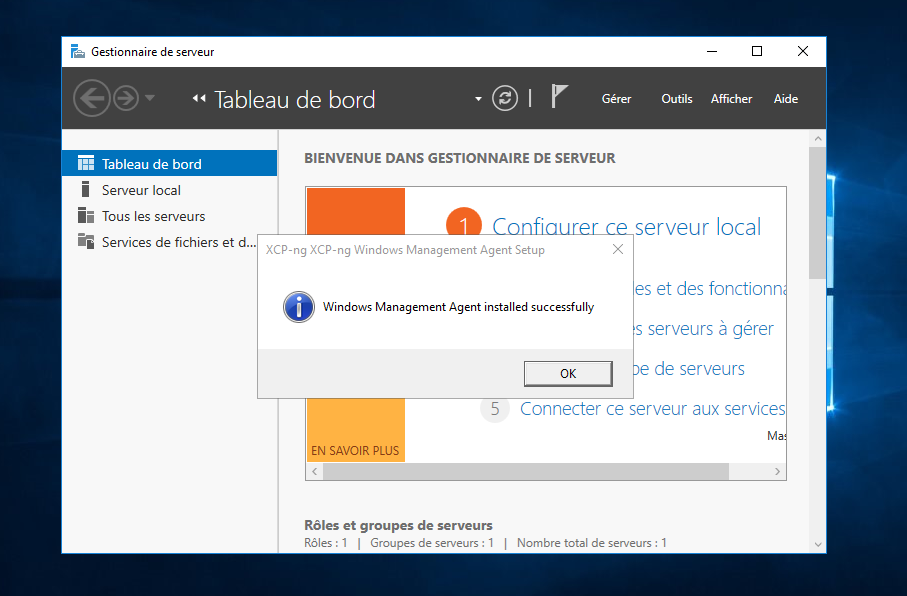
                Some tests results on Windows Server 2016 and 2019 :
                08505479-e679-4a5a-9329-f46e18812186-image.png

                09d8f561-3d8f-410f-ba76-3dbf475bc732-image.png

                One shot installation, one reboot and that's it ! Perfect captain πŸ˜‰

                olivierlambertO 1 Reply Last reply
                Reply Quote 1
                • borzelB
                  borzel XCP-ng Center Team
                  last edited by

                  πŸŽ† πŸš€ πŸ‘

                  1 Reply Last reply
                  Reply Quote 0
                  • J
                    janm
                    last edited by

                    Can the drivers be used on VMs running on a XCP-ng 7 host?

                    borzelB 1 Reply Last reply
                    Reply Quote 0
                    • borzelB
                      borzel XCP-ng Center Team @janm
                      last edited by

                      @janm yes

                      1 Reply Last reply
                      Reply Quote 1
                      • olivierlambertO
                        olivierlambert Vates πŸͺ Co-Founder CEO @ruskofd
                        last edited by

                        @ruskofd so everything works on a French Windows, right? 🐢

                        1 Reply Last reply
                        Reply Quote 0
                        • ruskofdR
                          ruskofd
                          last edited by

                          I never had a problem with borzel's drivers with French locale. But yes, it's works perfectly πŸ˜‰

                          1 Reply Last reply
                          Reply Quote 0
                          • olivierlambertO
                            olivierlambert Vates πŸͺ Co-Founder CEO
                            last edited by

                            So to be sure: you extracted the zip, run "Setup.exe", and you went from a "clean VM" to a VM with both PV drivers AND management agent, right?

                            1 Reply Last reply
                            Reply Quote 0
                            • ruskofdR
                              ruskofd
                              last edited by

                              Exactly.

                              • Installation of a fresh Windows Server 2016/2019
                              • Load the ISO provided by borzel
                              • Tools installation with the Setup.exe
                              • Reboot, that's it. Simple as VMware Tools πŸ˜‰
                              1 Reply Last reply
                              Reply Quote 1
                              • olivierlambertO
                                olivierlambert Vates πŸͺ Co-Founder CEO
                                last edited by

                                Great news then! @borzel is there anything left before including this in 8.0 ISO?

                                borzelB 1 Reply Last reply
                                Reply Quote 0
                                • borzelB
                                  borzel XCP-ng Center Team @olivierlambert
                                  last edited by

                                  @olivierlambert some minor things like branding

                                  https://github.com/xcp-ng/xcp/issues/181

                                  1 Reply Last reply
                                  Reply Quote 1
                                  • ruskofdR
                                    ruskofd
                                    last edited by

                                    Tested on Windows 10 1903 (French locale as usual), seems good too and easier than ever.
                                    I let you know if something bad happens.

                                    1 Reply Last reply
                                    Reply Quote 2
                                    • B
                                      Biggen
                                      last edited by

                                      So I haven't been able to install these drivers on Win 10 Pro 64-bit build 1903.
                                      Running the setup.exe file, it goes through the motions until I get an error box that says "Windows Management Agent failed to install".

                                      I then re-run setup and choose "Repair" and it goes through the motions and finally tells me at the end it was installed. However, upon reboot, I'm greeted with a BSOD and the stop code is "Inaccessible Boot Device.".

                                      This is a brand new Win 10 install. I made sure to grab system updates first. I have to revert the snapshot to get the system back.

                                      1 Reply Last reply
                                      Reply Quote 0
                                      • olivierlambertO
                                        olivierlambert Vates πŸͺ Co-Founder CEO
                                        last edited by

                                        What's the OS language? (yeah, it might be important in Windows world…)

                                        B 1 Reply Last reply
                                        Reply Quote 0
                                        • B
                                          Biggen @olivierlambert
                                          last edited by

                                          @olivierlambert said in XCP-ng Windows PV Drivers 8.2.2:

                                          What's the OS language? (yeah, it might be important in Windows world…)

                                          Its English. Just plain ol'e English USA x64 Win 10 Pro.

                                          1 Reply Last reply
                                          Reply Quote 0
                                          • olivierlambertO
                                            olivierlambert Vates πŸͺ Co-Founder CEO
                                            last edited by

                                            Okay I'll try again to test to see if I can reproduce, but last time I did it worked well. Are you using the Win 10 template?


                                            1 Reply Last reply
                                            Reply Quote 0

                                            Hello! It looks like you're interested in this conversation, but you don't have an account yet.

                                            Getting fed up of having to scroll through the same posts each visit? When you register for an account, you'll always come back to exactly where you were before, and choose to be notified of new replies (either via email, or push notification). You'll also be able to save bookmarks and upvote posts to show your appreciation to other community members.

                                            With your input, this post could be even better πŸ’—

                                            Register Login
                                            • First post
                                              Last post