XCP-ng
    • Categories
    • Recent
    • Tags
    • Popular
    • Users
    • Groups
    • Register
    • Login

    XCP Guest Tools SUSE Linux

    Scheduled Pinned Locked Moved Xen Orchestra
    22 Posts 5 Posters 11.3k Views 3 Watching
    Loading More Posts
    • Oldest to Newest
    • Newest to Oldest
    • Most Votes
    Reply
    • Reply as topic
    Log in to reply
    This topic has been deleted. Only users with topic management privileges can see it.
    • olivierlambertO
      olivierlambert Vates 🪐 Co-Founder CEO
      last edited by

      Please see our doc here: https://github.com/xcp-ng/xcp/wiki/Guest-Tools#install-the-linux-guest-tools-on-an-unsupported-distro

      stormiS 1 Reply Last reply
      Reply Quote 0
      • stormiS
        stormi Vates 🪐 XCP-ng Team @olivierlambert
        last edited by

        @olivierlambert said in XCP Guest Tools SUSE Linux:

        Please see our doc here: https://github.com/xcp-ng/xcp/wiki/Guest-Tools#install-the-linux-guest-tools-on-an-unsupported-distro

        That's what @fohdeesha said already šŸ™‚

        1 Reply Last reply
        Reply Quote 0
        • olivierlambertO
          olivierlambert Vates 🪐 Co-Founder CEO
          last edited by

          Missed that but in the mean time, @Soarin didn't try with the extra flag šŸ˜‰

          SoarinS 1 Reply Last reply
          Reply Quote 0
          • SoarinS
            Soarin @olivierlambert
            last edited by

            @olivierlambert I did ./install.sh -d sles -m 14 and it installed but didn't report back to the panel

            1 Reply Last reply
            Reply Quote 0
            • olivierlambertO
              olivierlambert Vates 🪐 Co-Founder CEO
              last edited by

              Double check the service is started

              SoarinS 1 Reply Last reply
              Reply Quote 0
              • SoarinS
                Soarin @olivierlambert
                last edited by

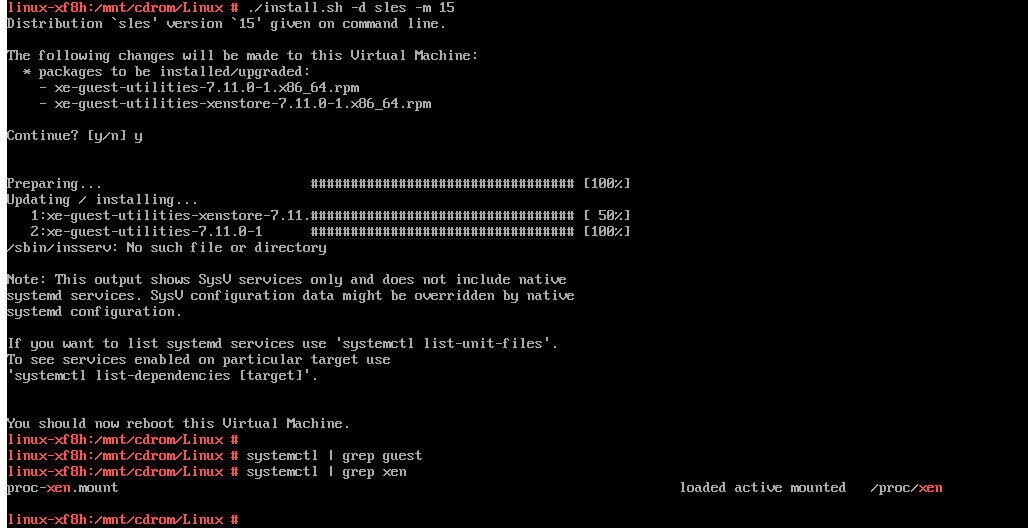
                @olivierlambert It wasn't but I had reinstalled it just now and this is the output:
                8cd7df8a-6e5a-4d28-bc46-cc38c3fbbb6b-image.png

                84bc3923-bb78-4323-b115-6e6b7a7efe0b-image.png

                It seems to changed the memory to dynamic on the XO Web but no icon still on the panel

                1 Reply Last reply
                Reply Quote 0
                • stormiS
                  stormi Vates 🪐 XCP-ng Team
                  last edited by

                  The name of the service is xe-linux-distribution.service if the installation script detected systemd, else /etc/init.d/xe-linux-distribution.

                  I 1 Reply Last reply
                  Reply Quote 0
                  • I
                    Ivan @stormi
                    last edited by

                    @stormi
                    I've installed xen-tools manually on openSuSE 15.1
                    can start manually

                    systemctl start xe-linux-distribution.service
                    

                    but can't enable and add to startupscript

                    systemctl enable xe-linux-distribution.service
                    xe-linux-distribution.service is not a native service, redirecting to systemd-sysv-install.
                    Executing: /usr/lib/systemd/systemd-sysv-install enable xe-linux-distribution
                    /sbin/insserv: No such file or directory
                    

                    Should I create systemctl startup script from scratch or possible can I copy somewhere?

                    1 Reply Last reply
                    Reply Quote 0
                    • stormiS
                      stormi Vates 🪐 XCP-ng Team
                      last edited by

                      First I'd try to see why it says that xe-linux-distribution.service is not a native service. Where's that file located and what does it contain?

                      I 1 Reply Last reply
                      Reply Quote 0
                      • I
                        Ivan @stormi
                        last edited by

                        @stormi It's located on /etc/init.d/xe-linux-distribution
                        and looks like it's SysV service, not systemctl, because I can not enable

                        xe-linux-distribution.service is not a native service, redirecting to systemd-sysv-install.
                        

                        Executing: /usr/lib/systemd/systemd-sysv-install enable xe-linux-distribution
                        /sbin/insserv: No such file or directory

                        1 Reply Last reply
                        Reply Quote 0
                        • stormiS
                          stormi Vates 🪐 XCP-ng Team
                          last edited by

                          Maybe /sbin/insserv is located elsewhere and needs a symlink, or maybe it's included in a package that you haven't installed?

                          I 1 Reply Last reply
                          Reply Quote 0
                          • I
                            Ivan @stormi
                            last edited by

                            @stormi said in XCP Guest Tools SUSE Linux:

                            /sbin/insserv
                            Thank you.

                            zypper in insserv-compat
                            

                            installation help

                            1 Reply Last reply
                            Reply Quote 0
                            • I
                              Ivan
                              last edited by

                              Looks like tools not work on OpenSuSE Tumbleweed

                              zypper se xe-guest-utilities-7.10.0-1.x86_64
                              

                              Loading repository data...
                              Reading installed packages...

                              S | Name | Type | Version | Arch | Repository
                              ---+-----------------------------+---------+----------+--------+------------------
                              i+ | xe-guest-utilities | package | 7.10.0-1 | x86_64 | (System Packages)
                              i+ | xe-guest-utilities-xenstore | package | 7.10.0-1 | x86_64 | (System Packages)

                              systemctl status xe-linux-distribution.service 
                              ā— xe-linux-distribution.service - LSB: Virtual Machine daemon providing host integration services
                                 Loaded: loaded (/etc/init.d/xe-linux-distribution; generated; vendor preset: disabled)
                                 Active: active (exited) since Wed 2019-11-06 22:47:57 AEDT; 54s ago
                                   Docs: man:systemd-sysv-generator(8)
                                Process: 1329 ExecStop=/etc/init.d/xe-linux-distribution stop (code=exited, status=0/SUCCESS)
                                Process: 1334 ExecStart=/etc/init.d/xe-linux-distribution start (code=exited, status=0/SUCCESS)
                              

                              But looks like xcp-ng center not show tools

                              TumbleweedIssueXenTools.png

                              1 Reply Last reply
                              Reply Quote 0
                              • stormiS
                                stormi Vates 🪐 XCP-ng Team
                                last edited by

                                Could you also check with the xe vm-param-list uuid=YOUR_VM_UUID command?

                                I 1 Reply Last reply
                                Reply Quote 0
                                • I
                                  Ivan @stormi
                                  last edited by

                                  @stormi said in XCP Guest Tools SUSE Linux:

                                  xe vm-param-list uuid=

                                  What's vm-param should I grep?

                                  1 Reply Last reply
                                  Reply Quote 0
                                  • stormiS
                                    stormi Vates 🪐 XCP-ng Team
                                    last edited by

                                    PV-drivers-detected

                                    1 Reply Last reply
                                    Reply Quote 0
                                    • I
                                      Ivan
                                      last edited by

                                      @stormi said in XCP Guest Tools SUSE Linux:

                                      PV-drivers-detected

                                      xe vm-param-list uuid=5e04f52a-e9b0-56c1-81dd-b274f3a23b64 | grep PV-drivers-detected
                                      
                                                     PV-drivers-detected ( RO): true
                                      
                                      1 Reply Last reply
                                      Reply Quote 0
                                      • stormiS
                                        stormi Vates 🪐 XCP-ng Team
                                        last edited by

                                        So don't trust XCP-ng Center on this, I'd say

                                        1 Reply Last reply
                                        Reply Quote 0

                                        Hello! It looks like you're interested in this conversation, but you don't have an account yet.

                                        Getting fed up of having to scroll through the same posts each visit? When you register for an account, you'll always come back to exactly where you were before, and choose to be notified of new replies (either via email, or push notification). You'll also be able to save bookmarks and upvote posts to show your appreciation to other community members.

                                        With your input, this post could be even better šŸ’—

                                        Register Login
                                        • First post
                                          Last post