XCP-NG vm's extremly slow
-
I tested it one VM2 that's on the ssd
dd if=/dev/zero of=/root/test bs=512 count=10000
10000+0 records in
10000+0 records out
5120000 bytes (5,1 MB, 4,9 MiB) copied, 0,0153181 s, 334 MB/s
and on VM3, also hdd
dd if=/dev/zero of=/root/test bs=512 count=10000
10000+0 records in
10000+0 records out
5120000 bytes (5,1 MB) copied, 0,00494598 s, 1,0 GB/s
and on VM4, hdd
#dd if=/dev/zero of=/root/test bs=512 count=10000
10000+0 records in
10000+0 records out
5120000 bytes (5,1 MB, 4,9 MiB) copied, 82,3517 s, 62,2 kB/s (stopped)
the difference is that the first VM and the last VM have running backups with rsync... VM2 and VM3 are on very low load at the moment.
it occurs when there is runing anything on the machines
-
@fred974 they have 6 - 10GB Ram, but it's not memory related. It's some kind of strange IO Problem that blocks the whole VM that must be some combination of things. The VMs worked without any problems on other hosts, but the Host itself doesn't have any problems (and because there are 2 of them hardware problems are very unlikley).
-
perhaps this helps.
dom0
mpstat -P ALL
Linux 4.19.0+1 (klartext1) 	16.06.2022 	_x86_64_	(12 CPU)

12:00:43     CPU    %usr   %nice    %sys %iowait    %irq   %soft  %steal  %guest  %gnice   %idle
12:00:43     all    0,58    0,00    0,89    0,03    0,00    0,37    0,39    0,00    0,00   97,74
12:00:43       0    0,57    0,00    1,14    0,02    0,00    1,50    0,38    0,00    0,00   96,39
12:00:43       1    0,58    0,00    0,85    0,06    0,00    0,07    0,40    0,00    0,00   98,04
12:00:43       2    0,57    0,00    0,85    0,04    0,00    0,11    0,39    0,00    0,00   98,03
12:00:43       3    0,57    0,00    0,85    0,02    0,00    0,26    0,39    0,00    0,00   97,91
12:00:43       4    0,55    0,00    0,86    0,02    0,00    0,49    0,38    0,00    0,00   97,69
12:00:43       5    0,61    0,00    0,88    0,03    0,00    0,17    0,39    0,00    0,00   97,91
12:00:43       6    0,60    0,00    0,94    0,03    0,00    0,92    0,40    0,00    0,00   97,11
12:00:43       7    0,56    0,00    0,84    0,02    0,00    0,05    0,40    0,00    0,00   98,13
12:00:43       8    0,56    0,00    0,84    0,02    0,00    0,29    0,40    0,00    0,00   97,89
12:00:43       9    0,57    0,00    0,84    0,02    0,00    0,15    0,40    0,00    0,00   98,03
12:00:43      10    0,56    0,00    0,85    0,02    0,00    0,33    0,40    0,00    0,00   97,83
12:00:43      11    0,63    0,00    0,91    0,02    0,00    0,09    0,40    0,00    0,00   97,94
vm1:
mpstat -P ALL
Linux 5.15.0-37-generic (backup1) 	16.06.2022 	_x86_64_	(12 CPU)

10:02:33     CPU    %usr   %nice    %sys %iowait    %irq   %soft  %steal  %guest  %gnice   %idle
10:02:33     all    0,16    0,01    0,06   28,98    0,00    0,03    0,05    0,00    0,00   70,72
10:02:33       0    0,08    0,01    0,02   12,98    0,00    0,00    0,01    0,00    0,00   86,89
10:02:33       1    0,30    0,02    0,09   42,83    0,00    0,00    0,02    0,00    0,00   56,74
10:02:33       2    0,18    0,01    0,07   32,57    0,00    0,00    0,02    0,00    0,00   67,15
10:02:33       3    0,20    0,01    0,09   47,56    0,00    0,04    0,08    0,00    0,00   52,01
10:02:33       4    0,16    0,01    0,05   28,91    0,00    0,00    0,01    0,00    0,00   70,85
10:02:33       5    0,14    0,01    0,04   20,90    0,00    0,00    0,01    0,00    0,00   78,90
10:02:33       6    0,16    0,02    0,04   22,59    0,00    0,00    0,03    0,00    0,00   77,17
10:02:33       7    0,08    0,01    0,03   17,02    0,00    0,00    0,01    0,00    0,00   82,85
10:02:33       8    0,08    0,00    0,03   17,85    0,00    0,00    0,01    0,00    0,00   82,02
10:02:33       9    0,09    0,01    0,04   18,09    0,00    0,00    0,03    0,00    0,00   81,74
10:02:33      10    0,31    0,01    0,13   47,49    0,00    0,26    0,37    0,00    0,00   51,43
10:02:33      11    0,12    0,01    0,05   39,03    0,00    0,00    0,02    0,00    0,00   60,76
very high io wait.... but low usr that should be higher because of running rsyncs on user level
-
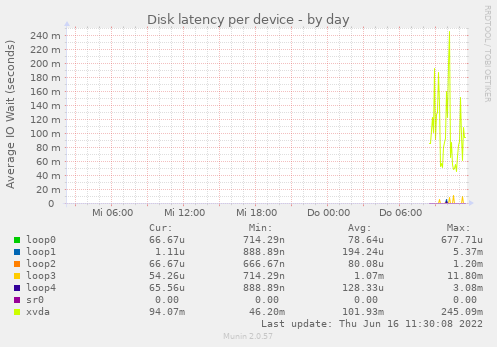
reported by munin on the slow VM. xvda has a latency ok 100ms. The problem occurs when there are many small file request like rsync does... and 100ms in sum is a lot. Any idea how I could debug the reason for this?
-
To me the issue is with a physical disk in your host, that's used then for your VM.
Having much latency on the
smartctlcommand isn't a good sign. -
actually it looks like that the 4TB on Server 1 really has hardware problems.... and the reason why there was the same effect on the other dom is that there was an mounted NFS Share of an machine on the first server..... and the disk errors on this machine where "transfered" to the other dom with the same affects (delaying the whole system).
I'm currently migrating all VMs von server1 to server2. I really hope that is the
solution for all. Currently rsync is not running on any machine... i will test this later when the VMs are transfered. -
That's very likely the issue yes

-
just wanted to tell the possible end of the story.... if anyone here ever has an simelar problem :-).
Currently it looks like that the Fan caused vibrations on the case that where transmitted to the hdd nearby.... the hdd is an SMR harddisk that seems to have problems with such vibrations.... that caused the problems on server1.
server2 had an nfs connection to a vds on server1. When IO was going to 100% because of the hdd error on server1 it caused exactly the same behavior on server2 (no idea why) even when there are no physical disk problems on this device.
Overall no XCP-NG problem, but such strange that it's hard to imagine what could cause this at the beginning :).
-
@Andi79 interesting results. It is known that vibrations can affect performance, but this is the worst I've heard of!
On that note I'd like to mention that SMR drives aren't very performant. As soon as write buffer fills and/or garbage collection kicks in, the performance goes down to a crawl.
-
Hahaha wow. Thanks a lot for the feedback, this is really interesting to know!
-
-
@fohdeesha lol :-). ok.... good to now :). Next optimization by decoupling harddisks and fans.... and always be quite on the datacenter :).



Hello! It looks like you're interested in this conversation, but you don't have an account yet.
Getting fed up of having to scroll through the same posts each visit? When you register for an account, you'll always come back to exactly where you were before, and choose to be notified of new replies (either via email, or push notification). You'll also be able to save bookmarks and upvote posts to show your appreciation to other community members.
With your input, this post could be even better 💗
Register Login