Question regarding copying of VMs within storage pool
-
So I've recently been blessed by building a second xcp-hypervisor. I'm trying to copy/recreate a VM on the second hypervisor which is located on the initial hypervisor.
I've added both the initial and second hypervisor to a pool. From within Xen Orchestra I selected the hypervisor I wanted to copy and selected the copy option and chose the destination to be the local zfs storage located on the second hypervisor. I waited about 30 min for VM to be copied.
Now what do I do? The copy operation completed -- how do I create the VM the second host using this copied image? Confused what to do at this point.
-
You are only listing running VMs in your screenshot.
-
The VM should be visible on the second host, likely in a "halted" state.
-
@olivierlambert said in Question regarding copying of VMs within storage pool:
The VM should be visible on the second host, likely in a "halted" state.
Not exactly what I'm seeing here -- in fact I don't see any evidence of any halted VM -- probably because I did something incorrectly.
On the second hypervisor I running a 1Gb nvme drive which was partitioned during the installation process with partitions of /var/log, /boot, /efi, /, and SWP.
I have a second 1Gb SATA drive which I added as a zfs storage pool accessible as /mnt/tank.
Within the zfs pool I can see the copied VM (aedbfce5-7365-4d16-b39c-0b3c93a210f6.vhd).
Do I need to create a VM on the second host using this particular .vhd file?
-
You mean 1TiB, right?
What did you precisely used to copy the VM? can you screenshot?
-
Sorry both are 1TB -- I'll correct my prior post to reflect
Here is how I copied the VM --
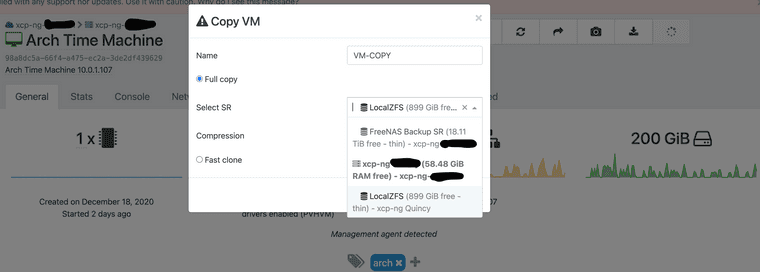
I choose the SR (zfs disk on hypervisor #2) and chose zstd for compression.
-
So you should have the VM listed in the Home view, as halted.
-
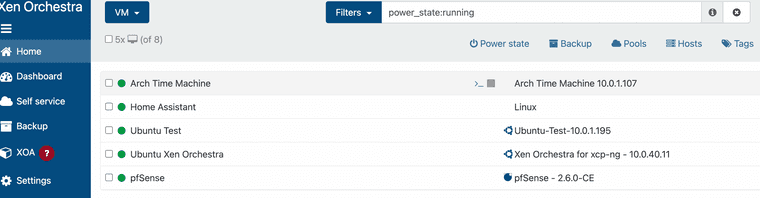
Here is my Home view screen -- the VM I'm trying to copy is called "Arch Time Machine". It's up and running on the original hypervisor. There are no running or halted VMs on the second hypervisor
-
You are only listing running VMs in your screenshot.
-
Well damn -- you're right.
Well VM now up and running. Just have to figure out how networking works in this new copied VM. Thanks for help.
-
 O olivierlambert marked this topic as a question on
-
O olivierlambert has marked this topic as solved on
Hello! It looks like you're interested in this conversation, but you don't have an account yet.
Getting fed up of having to scroll through the same posts each visit? When you register for an account, you'll always come back to exactly where you were before, and choose to be notified of new replies (either via email, or push notification). You'll also be able to save bookmarks and upvote posts to show your appreciation to other community members.
With your input, this post could be even better 💗
Register Login