Remote syslog broken after update/reboot? - Changing it away, then back fixes.
-
That's weird. Maybe @Team-XAPI-amp-Network could tell you the commands to check what's recorded in XAPI to see if it's a problem at XAPI or XO doing things weirdly.
-
Bad ping: it's @Team-XAPI-Network
-
@olivierlambert This was fixed by xenserver last year: https://github.com/xapi-project/xen-api/pull/6328
For XCP-ng, the team decided they didn't like the solution, and there's work on a better solution, but it's not ready yet
-
Good to know, maybe it's time to finish that at some point, let me ping @gregoire
-
We paused that update because it was likely to cause new problems the way the transition is handled. We at least needed time to ponder it. @rzr is on it among other things, and it's less important than, say, upgrading to openssl 3.
There's no need for PM intervention here IMO.
Moreover, I just checked again, none of the 8.3 updates is supposed to be overwriting
/etc/rsyslog.conf, where our XAPI currently writes the remote configuration. But we need to be ready the next time we want to make changes to that file.So I don't understand what led @majorp93 to losing their configuration. Could you describe what you updated, from which version, and what you identify as the moment when the configuration was removed?
-
@stormi Well I only reboot our XCP-ng hosts after updates have been applied. I configured remote syslog at the beginning of december as an attempt to fix /var/log partition reaching 100& usage (as described in this thread).
Remote syslog was working fine at that point.
When you guys released the december round of patches I applied them and as a result rebooted all hosts of the pool.
After checking our graylog server I can confirm that the XCP-ng pool stopped sending remote syslog data after the hosts had been rebooted.I then searched the forum, found this thread, was able to get remote syslog working again by re-applying the remote syslog IP addresses via XO as described by other users some time ago.
Due to the fact that the behavior of the systems looked exactly as what had been described in this thread earlier I assumed that the issue may not have been investigated / fixed yet.
//EDIT: regarding the question of package versions: I applied everything that you guys released in the december round of pachtes and had a patched system prior you releasing them.
I can not say if the "yum upgrade" or reboot is the exact moment where the remote syslog stopped working. -
@MajorP93 If it happens again for you (or anyone else reading this thread), please save the contents of
/etc/rsyslog.confjust after the lost remote syslog so that we may check whether it was overwritten or something else happened.Also, could you upload somewhere the file that contains your
yumlogs?/var/log/yum.logor any rotated version of that file/var/log/yum.log.1, etc. -
@stormi I have another XCP-ng pool running in our test environment / lab which does not (yet) have that round of patches applied.
I will try to reproduce the issue in that environment once I have the time to do so and let you know.And sure, if it happens again I will save the contents of the rsyslog.conf file.
yum.log is empty.
yum.log.1 contains:[19:01 xcpng01 log]# cat yum.log.1 Dec 19 17:02:14 Updated: xen-libs-4.17.5-23.1.xcpng8.3.x86_64 Dec 19 17:02:14 Updated: xcp-ng-release-presets-8.3.0-35.x86_64 Dec 19 17:02:16 Updated: xcp-ng-release-config-8.3.0-35.x86_64 Dec 19 17:02:17 Updated: xen-hypervisor-4.17.5-23.1.xcpng8.3.x86_64 Dec 19 17:02:17 Updated: xen-dom0-libs-4.17.5-23.1.xcpng8.3.x86_64 Dec 19 17:02:17 Updated: vhd-tool-25.33.1-2.1.xcpng8.3.x86_64 Dec 19 17:02:22 Updated: 2:qemu-4.2.1-5.2.15.1.xcpng8.3.x86_64 Dec 19 17:02:23 Updated: xen-tools-4.17.5-23.1.xcpng8.3.x86_64 Dec 19 17:02:23 Updated: xen-dom0-tools-4.17.5-23.1.xcpng8.3.x86_64 Dec 19 17:02:24 Updated: forkexecd-25.33.1-2.1.xcpng8.3.x86_64 Dec 19 17:02:24 Updated: qcow-stream-tool-25.33.1-2.1.xcpng8.3.x86_64 Dec 19 17:02:24 Updated: varstored-guard-25.33.1-2.1.xcpng8.3.x86_64 Dec 19 17:02:25 Updated: sm-fairlock-3.2.12-16.1.xcpng8.3.x86_64 Dec 19 17:02:26 Updated: sm-3.2.12-16.1.xcpng8.3.x86_64 Dec 19 17:02:26 Updated: message-switch-25.33.1-2.1.xcpng8.3.x86_64 Dec 19 17:02:27 Updated: xenopsd-25.33.1-2.1.xcpng8.3.x86_64 Dec 19 17:02:27 Updated: xapi-rrd2csv-25.33.1-2.1.xcpng8.3.x86_64 Dec 19 17:02:28 Updated: rrdd-plugins-25.33.1-2.1.xcpng8.3.x86_64 Dec 19 17:02:28 Updated: xenopsd-cli-25.33.1-2.1.xcpng8.3.x86_64 Dec 19 17:02:29 Updated: xenopsd-xc-25.33.1-2.1.xcpng8.3.x86_64 Dec 19 17:02:33 Updated: xapi-core-25.33.1-2.1.xcpng8.3.x86_64 Dec 19 17:02:34 Updated: varstored-1.2.0-3.4.xcpng8.3.x86_64 Dec 19 17:02:34 Updated: xapi-tests-25.33.1-2.1.xcpng8.3.x86_64 Dec 19 17:02:35 Updated: squeezed-25.33.1-2.1.xcpng8.3.x86_64 Dec 19 17:02:35 Updated: xcp-rrdd-25.33.1-2.1.xcpng8.3.x86_64 Dec 19 17:02:35 Updated: xcp-ng-release-8.3.0-35.x86_64 Dec 19 17:02:36 Updated: xapi-storage-script-25.33.1-2.1.xcpng8.3.x86_64 Dec 19 17:02:36 Updated: gpumon-24.1.0-71.1.xcpng8.3.x86_64 Dec 19 17:02:36 Updated: xsconsole-11.0.9.1-1.1.xcpng8.3.x86_64 Dec 19 17:02:40 Updated: xcp-ng-pv-tools-8.3-15.xcpng8.3.noarch Dec 19 17:02:40 Updated: amd-microcode-20251203-1.1.xcpng8.3.noarch Dec 19 17:02:40 Updated: sm-cli-25.33.1-2.1.xcpng8.3.x86_64 Dec 19 17:02:42 Updated: xcp-networkd-25.33.1-2.1.xcpng8.3.x86_64 Dec 19 17:02:42 Updated: varstored-tools-1.2.0-3.4.xcpng8.3.x86_64 Dec 19 17:02:42 Updated: xapi-xe-25.33.1-2.1.xcpng8.3.x86_64 Dec 19 17:02:42 Updated: wsproxy-25.33.1-2.1.xcpng8.3.x86_64 Dec 19 17:02:42 Updated: xo-lite-0.17.0-1.xcpng8.3.noarch Dec 19 17:02:43 Updated: xcp-featured-1.1.8-3.xcpng8.3.x86_64 Dec 19 17:02:43 Updated: xha-25.2.0-1.1.xcpng8.3.x86_64 Dec 19 17:02:43 Updated: xapi-nbd-25.33.1-2.1.xcpng8.3.x86_64 -
hi, yes I tried to play and tweak rsyslog recently (there are some changes in xcp-ng-rpm github), but I was unsure about customizations options.
Are you or anyone using rsyslog with customs rules ? if yes let me know how, it can help for our testing.
-
@rzr No I did not customize anything related to rsyslog on XO / XCP-ng side. No tweaking of rsyslog config file(s) or similar.
I just setup a graylog server, enabled the syslog udp input there and configured rsyslog via Xen Orchestra like so: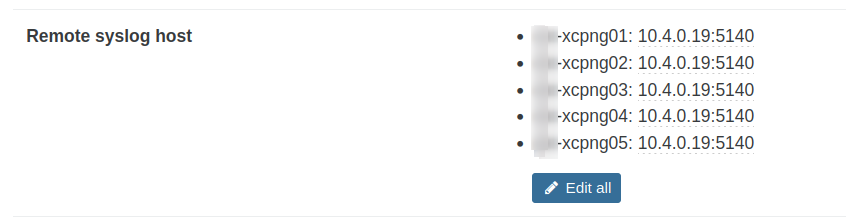
I consider this the most basic setup.
Also: AFAIK there are no UI options for rsyslog custom rules. Enabling it and setting IP address/port is basically all that can be done. I read that Vates recommends to not fiddle with config files on dom0 and view XCP-ng as an appliance.
So maybe custom rsyslog config does not need to get considered as long as no new GUI features for that are planned. -
I've been considering remote syslog too. Does enabling remote syslog remove local logging?
-
@MajorP93 Good to know that you have another pool to update. Then please also save the file prior to updating.
-
Did you set a system a custom locale settings ? please share ouput of
localecommand ? we are suspecting rsyslog issues -
@stormi Yes, I am currently working on replicating the issue in our test environment. I will report back once done.
@rzr I configured locale via XCP-ng ISO installer. This is my locale output:
[14:38 xcpng01 ~]# locale LANG=de_DE.UTF-8 LC_CTYPE="de_DE.UTF-8" LC_NUMERIC="de_DE.UTF-8" LC_TIME="de_DE.UTF-8" LC_COLLATE="de_DE.UTF-8" LC_MONETARY="de_DE.UTF-8" LC_MESSAGES="de_DE.UTF-8" LC_PAPER="de_DE.UTF-8" LC_NAME="de_DE.UTF-8" LC_ADDRESS="de_DE.UTF-8" LC_TELEPHONE="de_DE.UTF-8" LC_MEASUREMENT="de_DE.UTF-8" LC_IDENTIFICATION="de_DE.UTF-8" LC_ALL= -
@stormi I was able to replicate this issue in our test environment.
Applying of updates --> rsyslog still working.
Rebooting after applying the updates --> rsyslog not working, same issue as previously explained.I found out that rsyslog target IP address gets saved in /etc/rsyslog.d/xenserver.conf.
Here are the contents of the files in question:Before applying the updates via yum:
/etc/rsyslog.conf# rsyslog configuration file # For more information see /usr/share/doc/rsyslog-*/rsyslog_conf.html # If you experience problems, see http://www.rsyslog.com/doc/troubleshoot.html #### MODULES #### # The imjournal module bellow is now used as a message source instead of imuxsock. $ModLoad imuxsock # provides support for local system logging (e.g. via logger command) #$ModLoad imjournal # provides access to the systemd journal $ModLoad imklog # reads kernel messages (the same are read from journald) #$ModLoad immark # provides --MARK-- message capability # Provides UDP syslog reception #$ModLoad imudp #$UDPServerRun 514 # Provides TCP syslog reception #$ModLoad imtcp #$InputTCPServerRun 514 #### GLOBAL DIRECTIVES #### # Where to place auxiliary files $WorkDirectory /var/lib/rsyslog # Use default timestamp format $ActionFileDefaultTemplate RSYSLOG_TraditionalFileFormat # File syncing capability is disabled by default. This feature is usually not required, # not useful and an extreme performance hit #$ActionFileEnableSync on # Include all config files in /etc/rsyslog.d/ $IncludeConfig /etc/rsyslog.d/*.conf # Turn off message reception via local log socket; # local messages are retrieved through imjournal now. #$OmitLocalLogging on # File to store the position in the journal #$IMJournalStateFile imjournal.state #### RULES #### # Log all kernel messages to the console. # Logging much else clutters up the screen. #kern.* /dev/console # Log anything (except mail) of level info or higher. # Don't log private authentication messages! *.info;mail.none;authpriv.none;cron.none /var/log/messages # The authpriv file has restricted access. authpriv.* /var/log/secure # Log all the mail messages in one place. mail.* -/var/log/maillog # Log cron stuff cron.* /var/log/cron # Everybody gets emergency messages *.emerg :omusrmsg:* # Save news errors of level crit and higher in a special file. uucp,news.crit /var/log/spooler # Save boot messages also to boot.log local7.* /var/log/boot.log # ### begin forwarding rule ### # The statement between the begin ... end define a SINGLE forwarding # rule. They belong together, do NOT split them. If you create multiple # forwarding rules, duplicate the whole block! # Remote Logging (we use TCP for reliable delivery) # # An on-disk queue is created for this action. If the remote host is # down, messages are spooled to disk and sent when it is up again. #$ActionQueueFileName fwdRule1 # unique name prefix for spool files #$ActionQueueMaxDiskSpace 1g # 1gb space limit (use as much as possible) #$ActionQueueSaveOnShutdown on # save messages to disk on shutdown #$ActionQueueType LinkedList # run asynchronously #$ActionResumeRetryCount -1 # infinite retries if host is down # remote host is: name/ip:port, e.g. 192.168.0.1:514, port optional #*.* @@remote-host:514 # ### end of the forwarding rule ###/etc/rsyslog.d/xenserver.conf:
# Suppress duplicate messages and report "Last line repeated n times"
$RepeatedMsgReduction on

# Don't rate-limit messages - this isn't the right way to go about
# reducing log size!
$IMUXSockRateLimitInterval 0
$SystemLogRateLimitInterval 0

# Ensure critical and higher level errors are logged synchronously.
$ActionFileEnableSync on
$outchannel crit_log,/var/log/crit.log,104857600,/etc/cron.daily/logrotate
*.crit;mail.none;authpriv.none;cron.none		:omfile:$crit_log
$ActionFileEnableSync off

# Log crit to the console as well
*.crit                                          /dev/hvc0

# Corosync logs useful things at warning
if $programname == 'corosync' and $syslogseverity <= 4 then /dev/hvc0

# HTTP disk server backend used by XHA (LINSTOR SR).
# Redirected to a specific log file instead of daemon.log (facility 3).
$outchannel xcp_http_disk_server_log,/var/log/xcp-http-nbd-server.log,104857600,/etc/cron.daily/logrotate
if $syslogfacility == 3 and $programname == 'http-disk-server' then :omfile:$xcp_http_disk_server_log
& stop

# NBD server used by XHA (LINSTOR SR).
# Redirected to a specific log file instead of daemon.log (facility 3).
$outchannel xcp_nbd_http_server_log,/var/log/xcp-nbd-http-server.log,104857600,/etc/cron.daily/logrotate
if $syslogfacility == 3 and $programname == 'nbd-http-server' then :omfile:$xcp_nbd_http_server_log
& stop

# Log in specific file when a DRBD log is matched.
# Redirected to a specific log file instead of kern.log (facility 0).
$outchannel drbd_kern_log,/var/log/drbd-kern.log,104857600,/etc/cron.daily/logrotate
if $syslogfacility == 0 and re_match($msg, '^\\[[ ]*[0-9]+\\.[0-9]+\\] drbd([0-9]+)?:? ') then :omfile:$drbd_kern_log
& stop

# Log by facility.
$outchannel kern_log,/var/log/kern.log,104857600,/etc/cron.daily/logrotate
kern.*							:omfile:$kern_log

# dlm_controld logs to syslog local4
$outchannel daemon_log,/var/log/daemon.log,104857600,/etc/cron.daily/logrotate
daemon.*;local4.*					:omfile:$daemon_log

$outchannel user_log,/var/log/user.log,104857600,/etc/cron.daily/logrotate
user.*							:omfile:$user_log

# The authpriv file has restricted access.
$outchannel secure_log,/var/log/secure,104857600,/etc/cron.daily/logrotate
authpriv.*						:omfile:$secure_log

# Log all the mail messages in one place.
$outchannel mail_log,/var/log/maillog,104857600,/etc/cron.daily/logrotate
mail.*							:omfile:$mail_log

# Log cron stuff
$outchannel cron_log,/var/log/cron,104857600,/etc/cron.daily/logrotate
cron.*							:omfile:$cron_log

# Save boot messages also to boot.log
$outchannel boot_log,/var/log/boot.log,104857600,/etc/cron.daily/logrotate
local7.*						:omfile:$boot_log

# Xapi rbac audit log echoes to syslog local6
$outchannel audit_log,/var/log/audit.log,104857600,/etc/cron.daily/logrotate
local6.*						:omfile:$audit_log

# Xapi, xenopsd echo to syslog local5
$outchannel xensource_log,/var/log/xensource.log,104857600,/etc/cron.daily/logrotate
local5.*						:omfile:$xensource_log

# xenstore access to syslog local3
$outchannel xenstored_log,/var/log/xenstored-access.log,104857600,/etc/cron.daily/logrotate
local3.info						:omfile:$xenstored_log

# Storage Manager to syslog local2
$outchannel sm_log,/var/log/SMlog,104857600,/etc/cron.daily/logrotate
local2.info						:omfile:$sm_log

# Scheduled snapshots to syslog local1
$outchannel vmss_log,/var/log/VMSSlog,104857600,/etc/cron.daily/logrotate
local1.*						:omfile:$vmss_log

# xcp-rrdd-plugins (info and above) to local0
$outchannel xcp_rrdd_log,/var/log/xcp-rrdd-plugins.log,104857600,/etc/cron.daily/logrotate
local0.info						:omfile:$xcp_rrdd_log

# ignore default rules

*.* @10.10.160.27:5140
*.* ~
After applying the updates via yum:
/etc/rsyslog.conf:# rsyslog configuration file # For more information see /usr/share/doc/rsyslog-*/rsyslog_conf.html # If you experience problems, see http://www.rsyslog.com/doc/troubleshoot.html #### MODULES #### # The imjournal module bellow is now used as a message source instead of imuxsock. $ModLoad imuxsock # provides support for local system logging (e.g. via logger command) #$ModLoad imjournal # provides access to the systemd journal $ModLoad imklog # reads kernel messages (the same are read from journald) #$ModLoad immark # provides --MARK-- message capability # Provides UDP syslog reception #$ModLoad imudp #$UDPServerRun 514 # Provides TCP syslog reception #$ModLoad imtcp #$InputTCPServerRun 514 #### GLOBAL DIRECTIVES #### # Where to place auxiliary files $WorkDirectory /var/lib/rsyslog # Use default timestamp format $ActionFileDefaultTemplate RSYSLOG_TraditionalFileFormat # File syncing capability is disabled by default. This feature is usually not required, # not useful and an extreme performance hit #$ActionFileEnableSync on # Include all config files in /etc/rsyslog.d/ $IncludeConfig /etc/rsyslog.d/*.conf # Turn off message reception via local log socket; # local messages are retrieved through imjournal now. #$OmitLocalLogging on # File to store the position in the journal #$IMJournalStateFile imjournal.state #### RULES #### # Log all kernel messages to the console. # Logging much else clutters up the screen. #kern.* /dev/console # Log anything (except mail) of level info or higher. # Don't log private authentication messages! *.info;mail.none;authpriv.none;cron.none /var/log/messages # The authpriv file has restricted access. authpriv.* /var/log/secure # Log all the mail messages in one place. mail.* -/var/log/maillog # Log cron stuff cron.* /var/log/cron # Everybody gets emergency messages *.emerg :omusrmsg:* # Save news errors of level crit and higher in a special file. uucp,news.crit /var/log/spooler # Save boot messages also to boot.log local7.* /var/log/boot.log # ### begin forwarding rule ### # The statement between the begin ... end define a SINGLE forwarding # rule. They belong together, do NOT split them. If you create multiple # forwarding rules, duplicate the whole block! # Remote Logging (we use TCP for reliable delivery) # # An on-disk queue is created for this action. If the remote host is # down, messages are spooled to disk and sent when it is up again. #$ActionQueueFileName fwdRule1 # unique name prefix for spool files #$ActionQueueMaxDiskSpace 1g # 1gb space limit (use as much as possible) #$ActionQueueSaveOnShutdown on # save messages to disk on shutdown #$ActionQueueType LinkedList # run asynchronously #$ActionResumeRetryCount -1 # infinite retries if host is down # remote host is: name/ip:port, e.g. 192.168.0.1:514, port optional #*.* @@remote-host:514 # ### end of the forwarding rule ###/etc/rsyslog.d/xenserver.conf:
# Suppress duplicate messages and report "Last line repeated n times"
$RepeatedMsgReduction on

# Don't rate-limit messages - this isn't the right way to go about
# reducing log size!
$IMUXSockRateLimitInterval 0
$SystemLogRateLimitInterval 0

# Ensure critical and higher level errors are logged synchronously.
$ActionFileEnableSync on
$outchannel crit_log,/var/log/crit.log,104857600,/etc/cron.daily/logrotate
*.crit;mail.none;authpriv.none;cron.none		:omfile:$crit_log
$ActionFileEnableSync off

# Log crit to the console as well
*.crit                                          /dev/hvc0

# Corosync logs useful things at warning
if $programname == 'corosync' and $syslogseverity <= 4 then /dev/hvc0

# HTTP disk server backend used by XHA (LINSTOR SR).
# Redirected to a specific log file instead of daemon.log (facility 3).
$outchannel xcp_http_disk_server_log,/var/log/xcp-http-nbd-server.log,104857600,/etc/cron.daily/logrotate
if $syslogfacility == 3 and $programname == 'http-disk-server' then :omfile:$xcp_http_disk_server_log
& stop

# NBD server used by XHA (LINSTOR SR).
# Redirected to a specific log file instead of daemon.log (facility 3).
$outchannel xcp_nbd_http_server_log,/var/log/xcp-nbd-http-server.log,104857600,/etc/cron.daily/logrotate
if $syslogfacility == 3 and $programname == 'nbd-http-server' then :omfile:$xcp_nbd_http_server_log
& stop

# Log in specific file when a DRBD log is matched.
# Redirected to a specific log file instead of kern.log (facility 0).
$outchannel drbd_kern_log,/var/log/drbd-kern.log,104857600,/etc/cron.daily/logrotate
if $syslogfacility == 0 and re_match($msg, '^\\[[ ]*[0-9]+\\.[0-9]+\\] drbd([0-9]+)?:? ') then :omfile:$drbd_kern_log
& stop

# Log by facility.
$outchannel kern_log,/var/log/kern.log,104857600,/etc/cron.daily/logrotate
kern.*							:omfile:$kern_log

# dlm_controld logs to syslog local4
$outchannel daemon_log,/var/log/daemon.log,104857600,/etc/cron.daily/logrotate
daemon.*;local4.*					:omfile:$daemon_log

$outchannel user_log,/var/log/user.log,104857600,/etc/cron.daily/logrotate
user.*							:omfile:$user_log

# The authpriv file has restricted access.
$outchannel secure_log,/var/log/secure,104857600,/etc/cron.daily/logrotate
authpriv.*						:omfile:$secure_log

# Log all the mail messages in one place.
$outchannel mail_log,/var/log/maillog,104857600,/etc/cron.daily/logrotate
mail.*							:omfile:$mail_log

# Log cron stuff
$outchannel cron_log,/var/log/cron,104857600,/etc/cron.daily/logrotate
cron.*							:omfile:$cron_log

# Save boot messages also to boot.log
$outchannel boot_log,/var/log/boot.log,104857600,/etc/cron.daily/logrotate
local7.*						:omfile:$boot_log

# Xapi rbac audit log echoes to syslog local6
$outchannel audit_log,/var/log/audit.log,104857600,/etc/cron.daily/logrotate
local6.*						:omfile:$audit_log

# Xapi, xenopsd echo to syslog local5
$outchannel xensource_log,/var/log/xensource.log,104857600,/etc/cron.daily/logrotate
local5.*						:omfile:$xensource_log

# xenstore access to syslog local3
$outchannel xenstored_log,/var/log/xenstored-access.log,104857600,/etc/cron.daily/logrotate
local3.info						:omfile:$xenstored_log

# Storage Manager to syslog local2
$outchannel sm_log,/var/log/SMlog,104857600,/etc/cron.daily/logrotate
local2.info						:omfile:$sm_log

# Scheduled snapshots to syslog local1
$outchannel vmss_log,/var/log/VMSSlog,104857600,/etc/cron.daily/logrotate
local1.*						:omfile:$vmss_log

# xcp-rrdd-plugins (info and above) to local0
$outchannel xcp_rrdd_log,/var/log/xcp-rrdd-plugins.log,104857600,/etc/cron.daily/logrotate
local0.info						:omfile:$xcp_rrdd_log

# ignore default rules
*.*							~
After rebooting:
/etc/rsyslog.conf:# rsyslog configuration file # For more information see /usr/share/doc/rsyslog-*/rsyslog_conf.html # If you experience problems, see http://www.rsyslog.com/doc/troubleshoot.html #### MODULES #### # The imjournal module bellow is now used as a message source instead of imuxsock. $ModLoad imuxsock # provides support for local system logging (e.g. via logger command) #$ModLoad imjournal # provides access to the systemd journal $ModLoad imklog # reads kernel messages (the same are read from journald) #$ModLoad immark # provides --MARK-- message capability # Provides UDP syslog reception #$ModLoad imudp #$UDPServerRun 514 # Provides TCP syslog reception #$ModLoad imtcp #$InputTCPServerRun 514 #### GLOBAL DIRECTIVES #### # Where to place auxiliary files $WorkDirectory /var/lib/rsyslog # Use default timestamp format $ActionFileDefaultTemplate RSYSLOG_TraditionalFileFormat # File syncing capability is disabled by default. This feature is usually not required, # not useful and an extreme performance hit #$ActionFileEnableSync on # Include all config files in /etc/rsyslog.d/ $IncludeConfig /etc/rsyslog.d/*.conf # Turn off message reception via local log socket; # local messages are retrieved through imjournal now. #$OmitLocalLogging on # File to store the position in the journal #$IMJournalStateFile imjournal.state #### RULES #### # Log all kernel messages to the console. # Logging much else clutters up the screen. #kern.* /dev/console # Log anything (except mail) of level info or higher. # Don't log private authentication messages! *.info;mail.none;authpriv.none;cron.none /var/log/messages # The authpriv file has restricted access. authpriv.* /var/log/secure # Log all the mail messages in one place. mail.* -/var/log/maillog # Log cron stuff cron.* /var/log/cron # Everybody gets emergency messages *.emerg :omusrmsg:* # Save news errors of level crit and higher in a special file. uucp,news.crit /var/log/spooler # Save boot messages also to boot.log local7.* /var/log/boot.log # ### begin forwarding rule ### # The statement between the begin ... end define a SINGLE forwarding # rule. They belong together, do NOT split them. If you create multiple # forwarding rules, duplicate the whole block! # Remote Logging (we use TCP for reliable delivery) # # An on-disk queue is created for this action. If the remote host is # down, messages are spooled to disk and sent when it is up again. #$ActionQueueFileName fwdRule1 # unique name prefix for spool files #$ActionQueueMaxDiskSpace 1g # 1gb space limit (use as much as possible) #$ActionQueueSaveOnShutdown on # save messages to disk on shutdown #$ActionQueueType LinkedList # run asynchronously #$ActionResumeRetryCount -1 # infinite retries if host is down # remote host is: name/ip:port, e.g. 192.168.0.1:514, port optional #*.* @@remote-host:514 # ### end of the forwarding rule ###/etc/rsyslog.d/xenserver.conf:
# Suppress duplicate messages and report "Last line repeated n times"
$RepeatedMsgReduction on

# Don't rate-limit messages - this isn't the right way to go about
# reducing log size!
$IMUXSockRateLimitInterval 0
$SystemLogRateLimitInterval 0

# Ensure critical and higher level errors are logged synchronously.
$ActionFileEnableSync on
$outchannel crit_log,/var/log/crit.log,104857600,/etc/cron.daily/logrotate
*.crit;mail.none;authpriv.none;cron.none		:omfile:$crit_log
$ActionFileEnableSync off

# Log crit to the console as well
*.crit                                          /dev/hvc0

# Corosync logs useful things at warning
if $programname == 'corosync' and $syslogseverity <= 4 then /dev/hvc0

# HTTP disk server backend used by XHA (LINSTOR SR).
# Redirected to a specific log file instead of daemon.log (facility 3).
$outchannel xcp_http_disk_server_log,/var/log/xcp-http-nbd-server.log,104857600,/etc/cron.daily/logrotate
if $syslogfacility == 3 and $programname == 'http-disk-server' then :omfile:$xcp_http_disk_server_log
& stop

# NBD server used by XHA (LINSTOR SR).
# Redirected to a specific log file instead of daemon.log (facility 3).
$outchannel xcp_nbd_http_server_log,/var/log/xcp-nbd-http-server.log,104857600,/etc/cron.daily/logrotate
if $syslogfacility == 3 and $programname == 'nbd-http-server' then :omfile:$xcp_nbd_http_server_log
& stop

# Log in specific file when a DRBD log is matched.
# Redirected to a specific log file instead of kern.log (facility 0).
$outchannel drbd_kern_log,/var/log/drbd-kern.log,104857600,/etc/cron.daily/logrotate
if $syslogfacility == 0 and re_match($msg, '^\\[[ ]*[0-9]+\\.[0-9]+\\] drbd([0-9]+)?:? ') then :omfile:$drbd_kern_log
& stop

# Log by facility.
$outchannel kern_log,/var/log/kern.log,104857600,/etc/cron.daily/logrotate
kern.*							:omfile:$kern_log

# dlm_controld logs to syslog local4
$outchannel daemon_log,/var/log/daemon.log,104857600,/etc/cron.daily/logrotate
daemon.*;local4.*					:omfile:$daemon_log

$outchannel user_log,/var/log/user.log,104857600,/etc/cron.daily/logrotate
user.*							:omfile:$user_log

# The authpriv file has restricted access.
$outchannel secure_log,/var/log/secure,104857600,/etc/cron.daily/logrotate
authpriv.*						:omfile:$secure_log

# Log all the mail messages in one place.
$outchannel mail_log,/var/log/maillog,104857600,/etc/cron.daily/logrotate
mail.*							:omfile:$mail_log

# Log cron stuff
$outchannel cron_log,/var/log/cron,104857600,/etc/cron.daily/logrotate
cron.*							:omfile:$cron_log

# Save boot messages also to boot.log
$outchannel boot_log,/var/log/boot.log,104857600,/etc/cron.daily/logrotate
local7.*						:omfile:$boot_log

# Xapi rbac audit log echoes to syslog local6
$outchannel audit_log,/var/log/audit.log,104857600,/etc/cron.daily/logrotate
local6.*						:omfile:$audit_log

# Xapi, xenopsd echo to syslog local5
$outchannel xensource_log,/var/log/xensource.log,104857600,/etc/cron.daily/logrotate
local5.*						:omfile:$xensource_log

# xenstore access to syslog local3
$outchannel xenstored_log,/var/log/xenstored-access.log,104857600,/etc/cron.daily/logrotate
local3.info						:omfile:$xenstored_log

# Storage Manager to syslog local2
$outchannel sm_log,/var/log/SMlog,104857600,/etc/cron.daily/logrotate
local2.info						:omfile:$sm_log

# Scheduled snapshots to syslog local1
$outchannel vmss_log,/var/log/VMSSlog,104857600,/etc/cron.daily/logrotate
local1.*						:omfile:$vmss_log

# xcp-rrdd-plugins (info and above) to local0
$outchannel xcp_rrdd_log,/var/log/xcp-rrdd-plugins.log,104857600,/etc/cron.daily/logrotate
local0.info						:omfile:$xcp_rrdd_log

# ignore default rules
*.*							~
--> appearently after applying the updates my rsyslog target system got removed from /etc/rsyslog.d/xenserver.conf but this change got active after rebooting.
-
This post is deleted! -
@MajorP93 Thanks. That clarifies what happened. I wrongly thought that it was managed in
/etc/rsyslog.conf(which never gets overwritten), but it's in/etc/rsyslog.d/xenserver.conf, which can get overwritten if modified by an update. -
The fix was already high in the priority list anyway, but I'll try to make sure we don't postpone it more. Had I realized sooner, I would have made it so we'd release it earlier.
According to the package definitions, we even overwrite it each time we update the
xcp-ng-release-configpackage. I'm surprised that we haven't had more support requests.I'll see if we can release a quick fix that just leaves the file alone until we apply the change that will move the remote configuration to its own file.
-
There's a similar magic we've seen countless time with XO: you have a bug that nobody reports for years and suddenly it pops from various sources (or with many details so it's easy to spot), you think it's recently introduced, you check your diff and then after hours you realize it's there since a while

-
@stormi Thanks, that sounds great!
If there is something I can test / provide please let me know!





Hello! It looks like you're interested in this conversation, but you don't have an account yet.
Getting fed up of having to scroll through the same posts each visit? When you register for an account, you'll always come back to exactly where you were before, and choose to be notified of new replies (either via email, or push notification). You'll also be able to save bookmarks and upvote posts to show your appreciation to other community members.
With your input, this post could be even better 💗
Register Login