Backup to zfs pool mounted on host?
-
Hello & thanks anyone who can help
Setup:- XCP-NG "Main" with multiple VM's including XO-CE
- XCP-NG "Backup" (XCP-NG installed on 512GB SSD, 3 X 1TB drives configured as zfs pool at /mnt/zfs - mounted/viewable as local Storage Repository as 3.5TB)
GOAL: Backup the VM's from "Main" to the "Backup" /mnt/zfs Storage Pool .
Problem: I went into Settings/Remotes and created "Local" and the mount point to /mnt/zfs. It accepted that but assigned it a small size of 9.74 GiB Avail. Is there a way for it to have access to the whole 3.5TB the SR sees?
Do I need to install smb share on the "Backup" host then in XO-CE point to the share mount to access the full pool?
BTW: not sure if this is you or not but in https://xcp-ng.org/docs under storage-zfs there is a dead link to "http://www.zfsbuild.com/"
Sadly this is the most help I'm able to contribute but hey at least I read the manual
-
Hi,
The BR/remote is from Xen Orchestra perspective, not the host. Also, you should NOT backup anything to the host your are using, it defeats the very purpose of backups
-
Thanks @olivierlambert
Just to confirm 1. "Main" and 2. "Backup" are 2 physically different machines. Both running xcp-ngUltimately I would like to backup the vm's on the physical device 1. "Main" saving it to the physical device 2."Backup"'s zpool drive at /mnt/zfs/
How would I do that?
Also correct...I am not backing up to the same physical media that the vm is on.
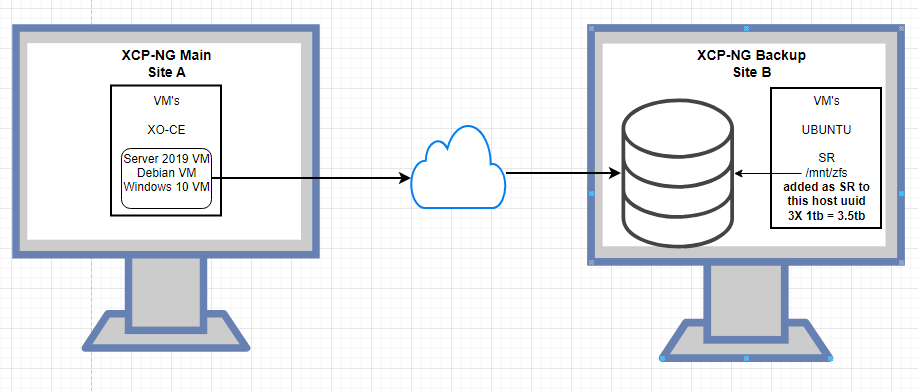
-
If your target is a SR (and NOT a BR), then what you do is not called "Backup" in XO, but Replication (full or incremental).
Target -> Backup mode:
- SR -> Replication (you can use it with retention to have a kind of backup too)
- BR (Backup Repository or "remote") -> Backup
Both can be full or incremental.
Note: you CAN'T and shouldn't use a host as a BR. A BR must be any NFS/SMB/S3 capable operating system, as long it's not XCP-ng.

Hello! It looks like you're interested in this conversation, but you don't have an account yet.
Getting fed up of having to scroll through the same posts each visit? When you register for an account, you'll always come back to exactly where you were before, and choose to be notified of new replies (either via email, or push notification). You'll also be able to save bookmarks and upvote posts to show your appreciation to other community members.
With your input, this post could be even better 💗
Register Login