XCP-ng
    • Categories
    • Recent
    • Tags
    • Popular
    • Users
    • Groups
    • Register
    • Login

    GPU support and Nvidia Grid vGPU

    Scheduled Pinned Locked Moved Compute
    34 Posts 10 Posters 21.7k Views 9 Watching
    Loading More Posts
    • Oldest to Newest
    • Newest to Oldest
    • Most Votes
    Reply
    • Reply as topic
    Log in to reply
    This topic has been deleted. Only users with topic management privileges can see it.
    • tjkreidlT
      tjkreidl Ambassador @msupport
      last edited by

      @msupport Many thanks for your write-up! Have you experienced any issues communicating with the NVIDIA license server?

      msupportM 1 Reply Last reply
      Reply Quote 0
      • F
        fatek
        last edited by

        I also used instructions from @msupport

        https://xcp-ng.org/forum/topic/8987/vgpu-nvidia-tesla-p4-xcp-ng-8-3-beta-2?_=1721015408249

        1 Reply Last reply
        Reply Quote 0
        • msupportM
          msupport @tjkreidl
          last edited by

          @tjkreidl
          Nvidia licence server works perfectly so far

          1 Reply Last reply
          Reply Quote 1
          • Tristis OrisT
            Tristis Oris Top contributor
            last edited by Tristis Oris

            i can't find where to get this new nvidia driver. Tesla V100.

            upd
            looks the only way is license portal https://nvid.nvidia.com/. sad.

            msupportM 1 Reply Last reply
            Reply Quote 0
            • msupportM
              msupport @Tristis Oris
              last edited by

              @Tristis-Oris
              The driver version 17.1 worked for me, 17.2 and 17.3 crashed the Windows drivers
              https://we.tl/t-VozEeV8TFB

              Tristis OrisT T 2 Replies Last reply
              Reply Quote 0
              • Tristis OrisT
                Tristis Oris Top contributor @msupport
                last edited by

                @msupport thank you. Will try to play with it.

                msupportM 1 Reply Last reply
                Reply Quote 0
                • msupportM
                  msupport @Tristis Oris
                  last edited by

                  @Tristis-Oris
                  The download will be available for 3 days...

                  1 Reply Last reply
                  Reply Quote 0
                  • M
                    mgformula1
                    last edited by olivierlambert

                    i have followed the documentation however for some reason the VMs wont power on with a vGPU profile attached. We are testing with NVidia M10 GPUs. I'm using xcp-ng 8.3 and NVidia host driver 17.1, also tried 17.2 and 17.3

                    This is the error

                    {
                      "id": "0m369opsm",
                      "properties": {
                        "method": "vm.start",
                        "params": {
                          "id": "b8c94655-5801-21ee-7eb0-788a58b57736",
                          "bypassMacAddressesCheck": false,
                          "force": false
                        },
                        "name": "API call: vm.start",
                        "userId": "2c8c735d-5369-4a91-8433-b9f94e6eb394",
                        "type": "api.call"
                      },
                      "start": 1730921023894,
                      "status": "failure",
                      "updatedAt": 1730921066138,
                      "end": 1730921066138,
                      "result": {
                        "code": "FAILED_TO_START_EMULATOR",
                        "params": [
                          "OpaqueRef:f3f7d9f6-9dc7-772e-ddfe-c1ed19f1aeff",
                          "vgpu",
                          "Device.Dm.start_vgpu: emulator failed to start for domain 1"
                        ],
                        "call": {
                          "method": "VM.start",
                          "params": [
                            "OpaqueRef:f3f7d9f6-9dc7-772e-ddfe-c1ed19f1aeff",
                            false,
                            false
                          ]
                        },
                        "message": "FAILED_TO_START_EMULATOR(OpaqueRef:f3f7d9f6-9dc7-772e-ddfe-c1ed19f1aeff, vgpu, Device.Dm.start_vgpu: emulator failed to start for domain 1)",
                        "name": "XapiError",
                        "stack": "XapiError: FAILED_TO_START_EMULATOR(OpaqueRef:f3f7d9f6-9dc7-772e-ddfe-c1ed19f1aeff, vgpu, Device.Dm.start_vgpu: emulator failed to start for domain 1)\n    at Function.wrap (file:///usr/local/lib/node_modules/xo-server/node_modules/xen-api/_XapiError.mjs:16:12)\n    at file:///usr/local/lib/node_modules/xo-server/node_modules/xen-api/transports/json-rpc.mjs:38:21\n    at runNextTicks (node:internal/process/task_queues:60:5)\n    at processImmediate (node:internal/timers:447:9)\n    at process.callbackTrampoline (node:internal/async_hooks:128:17)"
                    

                    host output
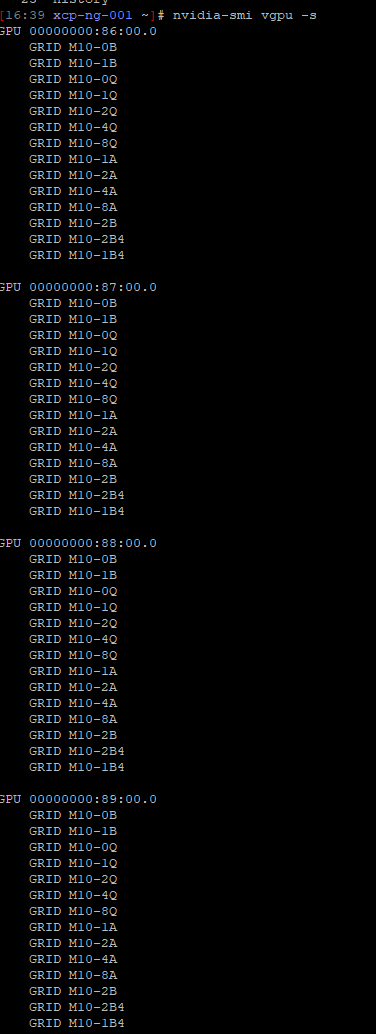
                    360af704-caaa-42d5-8e14-60e047d31103-image.png

                    M 1 Reply Last reply
                    Reply Quote 0
                    • M
                      mgformula1 @mgformula1
                      last edited by

                      i also performed a clean install of 8.2, same power on issue when a vGPU profile is attached.

                      1 Reply Last reply
                      Reply Quote 0
                      • T
                        timemaster5 @msupport
                        last edited by

                        @msupport said in GPU support and Nvidia Grid vGPU:

                        @Tristis-Oris
                        The driver version 17.1 worked for me, 17.2 and 17.3 crashed the Windows drivers
                        https://we.tl/t-VozEeV8TFB

                        May I ask for a re-up? For some reason, I don't see version 17 in my Nvidia Licensing Portal 😞 The latest is 16

                        Tristis OrisT 1 Reply Last reply
                        Reply Quote 0
                        • Tristis OrisT
                          Tristis Oris Top contributor @timemaster5
                          last edited by

                          @timemaster5 https://file.io/8aVNWXPX4uAT

                          T 1 Reply Last reply
                          Reply Quote 0
                          • T
                            timemaster5 @Tristis Oris
                            last edited by

                            @Tristis-Oris thanks a lot, but is says: The transfer you requested has been deleted. 😞 sorry for troubles

                            Tristis OrisT 1 Reply Last reply
                            Reply Quote 0
                            • Tristis OrisT
                              Tristis Oris Top contributor @timemaster5
                              last edited by

                              @timemaster5 omg. i suppose it removed by legal reasons. i can upload somewhere else, but have no idea.

                              T 1 Reply Last reply
                              Reply Quote 0
                              • T
                                timemaster5 @Tristis Oris
                                last edited by

                                @Tristis-Oris sharing my google drive link via chat... should be easy to upload it there

                                1 Reply Last reply
                                Reply Quote 0
                                • A
                                  ATSandrearicci
                                  last edited by

                                  Let me update the procedure with my experience:

                                  1. install XCP-NG 8.3
                                  2. download XenServer Driver Nvidia 16.9 (latest supported by y M60)
                                  3. unzip driver and copy host driver (NVIDIA-vGPU-xenserver-8-535.230.02.x86_64.iso) I used winscp to copy the driver to the tmp directory.
                                  4. download XenServer iso file (https://www.xenserver.com/downloads | XenServer8_2024-12-09.iso)
                                  5. copy the file (vgpu-7.4.16-1.xs8.x86_64.rpm) in the packages directory
                                  6. yum localinstall vgpu-7.4.16-1.xs8.x86_64.rpm
                                  7. yum localinstall NVIDIA-vGPU-xenserver-8-535.230.02.x86_64.rpm
                                  8. reboot
                                  9. install guest driver on the VM client (539.19_grid_win10_win11_server2019_server2022_dch_64bit_international.exe)

                                  I preferred to use yum localinstall to be able to remove or update packages faster.

                                  I have a question regarding vGPU, why i have profiles where i can have up to 4 heads? I don't have any option to add more than one display and i don't even understand how can i use them.
                                  Thanks for the procedure, i'm a total newbie with vGPu.

                                  msupportM 1 Reply Last reply
                                  Reply Quote 1
                                  • msupportM
                                    msupport @ATSandrearicci
                                    last edited by msupport

                                    @ATSandrearicci
                                    Check the compatibility
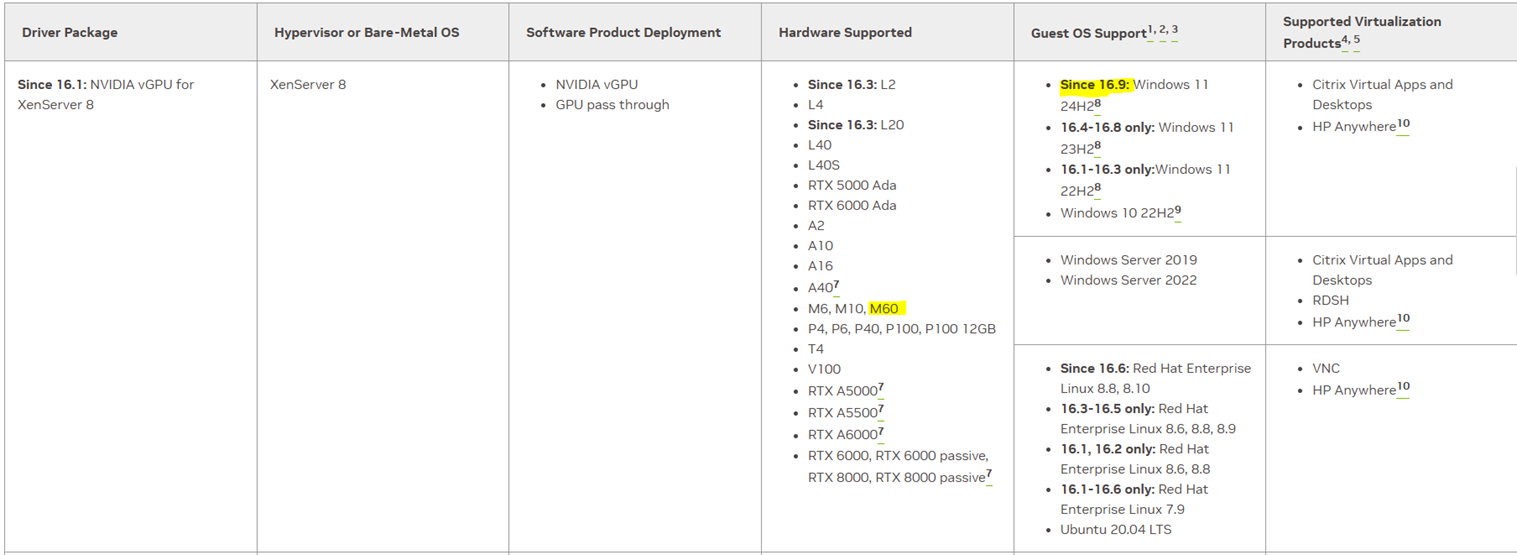
                                    0877c1cb-2ac5-4afb-a993-a96fd66c7474-image.png
                                    You must configure the license for the client on the license server:
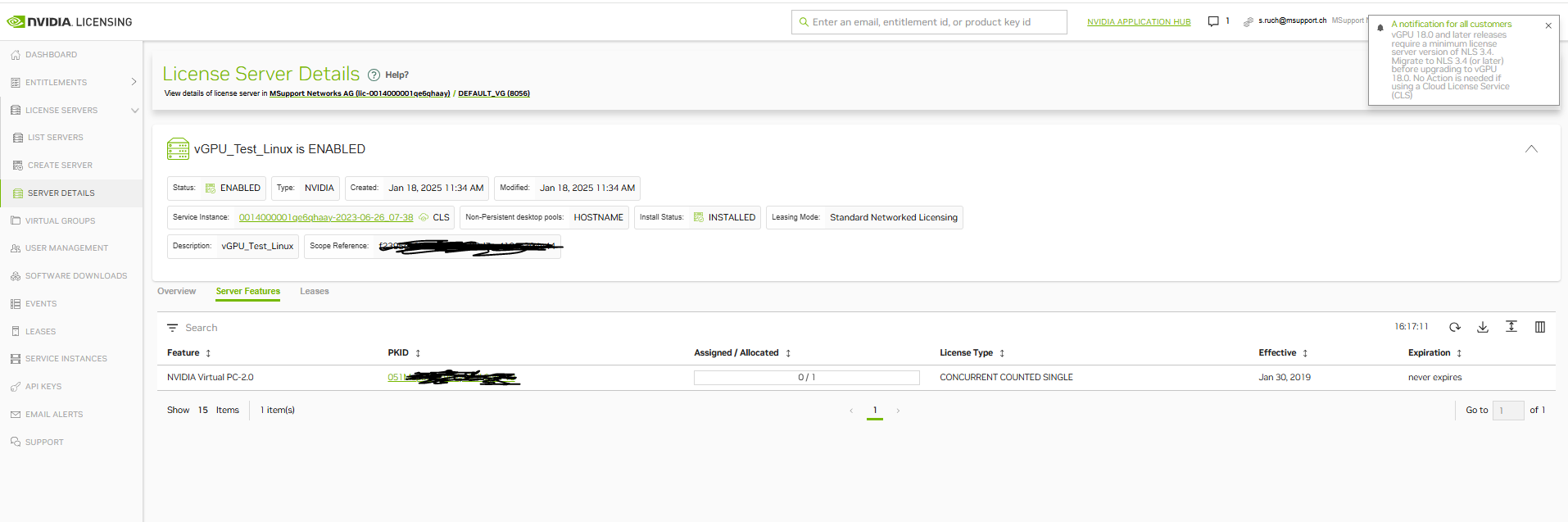
                                    01b3b16d-8f06-4fe9-94ce-87b5c1cc1fcf-image.png
                                    On the windows 11 client in the Nvidia control panel you have to specify the license server:
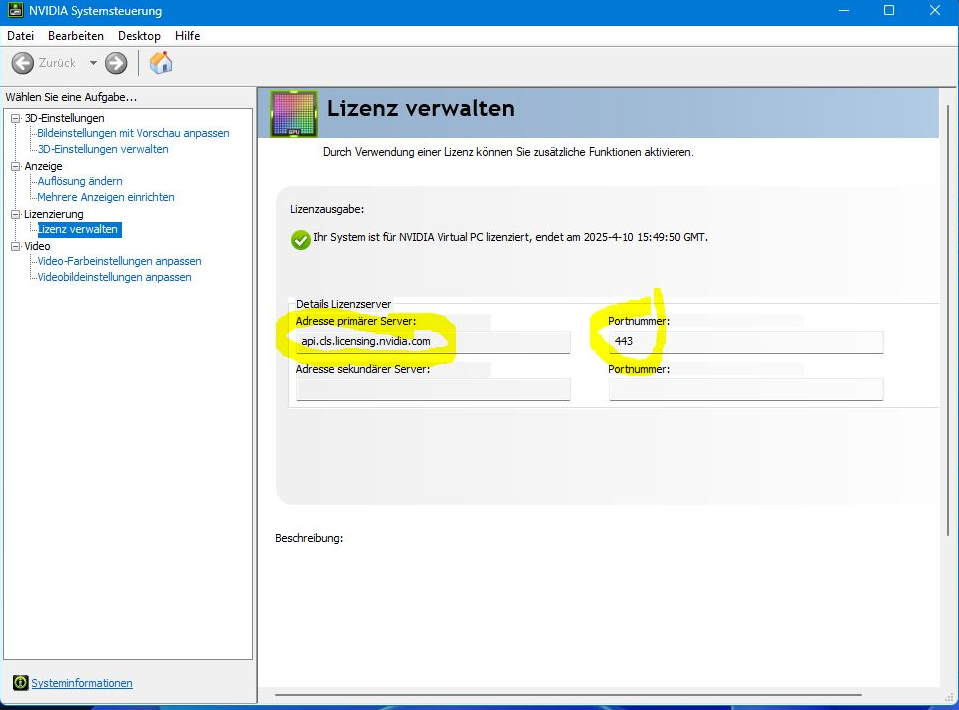
                                    8d883042-fc27-4678-8a05-e3c96b7a38a4-image.png
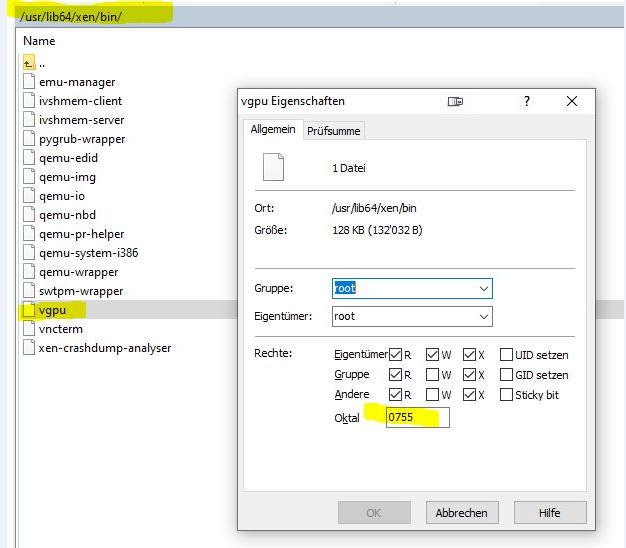
                                    Check the authorization on the file:
                                    796ee95b-956e-4e9e-b178-cf60e92a0c97-image.png

                                    1 Reply Last reply
                                    Reply Quote 0
                                    • olivierlambertO olivierlambert referenced this topic on

                                    Hello! It looks like you're interested in this conversation, but you don't have an account yet.

                                    Getting fed up of having to scroll through the same posts each visit? When you register for an account, you'll always come back to exactly where you were before, and choose to be notified of new replies (either via email, or push notification). You'll also be able to save bookmarks and upvote posts to show your appreciation to other community members.

                                    With your input, this post could be even better 💗

                                    Register Login
                                    • First post
                                      Last post