XCP-ng
    • Categories
    • Recent
    • Tags
    • Popular
    • Users
    • Groups
    • Register
    • Login

    import of Ubuntu

    Scheduled Pinned Locked Moved Solved Migrate to XCP-ng
    20 Posts 5 Posters 5.3k Views 3 Watching
    Loading More Posts
    • Oldest to Newest
    • Newest to Oldest
    • Most Votes
    Reply
    • Reply as topic
    Log in to reply
    This topic has been deleted. Only users with topic management privileges can see it.
    • gskgerG
      gskger Top contributor @bdacasc
      last edited by

      @bdacasc I think @Danp meant it is not recommended to not install the XCP guest tools. So installing the XCP guest tools is recommended an all OS. In that case (guest tools installed) you can keep Realtek as the NIC type, which is the default for the Ubuntu template.

      DanpD 1 Reply Last reply
      Reply Quote 0
      • B
        bdacasc @Danp
        last edited by bdacasc

        @Danp I have done the following:
        sudo apt remove open-vm-tools

        sudo rm -r /etc/vmware-tools
        sudo rm /etc/systemd/system/open-vm-tools.service
        sudo rm /etc/systemd/system/vmtoolsd.service
        sudo rm -r /etc/systemd/system/open-vm-tools.service.requires
        sudo rm -r /etc/vmware-tools

        sudo apt autoremove

        And still no IP

        gskgerG 1 Reply Last reply
        Reply Quote 0
        • DanpD
          Danp Pro Support Team @gskger
          last edited by

          @gskger said in import of Ubuntu:

          I think @Danp meant it is not recommended to not install the XCP guest tools.

          Correct 😉

          @bdacasc So, you've removed the vmware tools and installed the xcp tools? Have you rebooted the VM after uninstalling the vmware version?

          1 Reply Last reply
          Reply Quote 0
          • gskgerG
            gskger Top contributor @bdacasc
            last edited by gskger

            @bdacasc Are the IPs set static at OS level of the VMs or granted via DHCP?

            B 1 Reply Last reply
            Reply Quote 0
            • B
              bdacasc @gskger
              last edited by

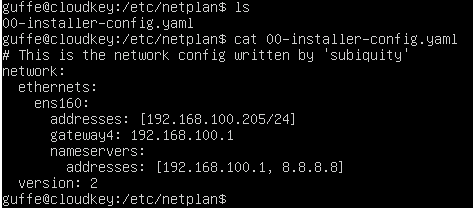
              @gskger Fixed IP via netplan

              15483e60-209e-478e-8d42-d8a7abfe22fe-image.png

              I gskgerG 2 Replies Last reply
              Reply Quote 0
              • I
                imaginapix @bdacasc
                last edited by imaginapix

                @bdacasc
                You have to change the interface name from ens160 to eth0 after migrating a Ubuntu VM from ESXi to XCP-NG.

                The file yopu need to edit is /etc/netplan/00-installer-config.yaml

                After that type:

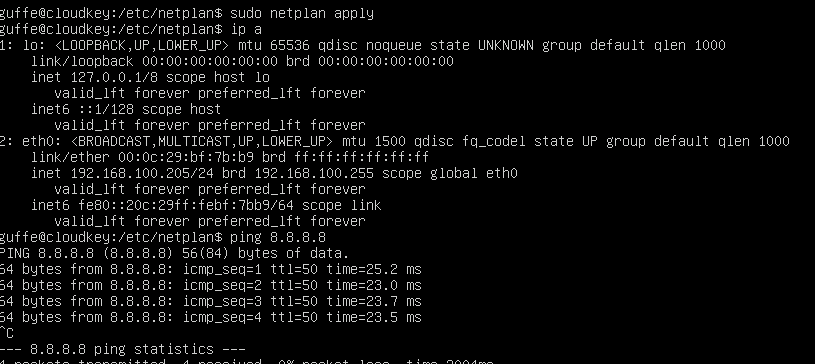
                sudo netplan apply

                With that the network should work again

                B 1 Reply Last reply
                Reply Quote 1
                • gskgerG
                  gskger Top contributor @bdacasc
                  last edited by

                  @bdacasc You need to update the interface name to eth0 as shown by ip a.

                  gskgerG 1 Reply Last reply
                  Reply Quote 0
                  • gskgerG
                    gskger Top contributor @gskger
                    last edited by gskger

                    To slow 😇 @imaginapix already answered

                    1 Reply Last reply
                    Reply Quote 0
                    • B
                      bdacasc @imaginapix
                      last edited by

                      @imaginapix

                      And the deed is done !

                      4ae6c126-8742-44ab-b29e-75cbe5cee170-image.png

                      B I 2 Replies Last reply
                      Reply Quote 0
                      • B
                        bdacasc @bdacasc
                        last edited by

                        Plenty Thx u all !

                        I can now ping !
                        Now You have teached me something !

                        Most greatfull for your help

                        1 Reply Last reply
                        Reply Quote 0
                        • I
                          imaginapix @bdacasc
                          last edited by imaginapix

                          @bdacasc

                          Glad to see everything is working now.

                          Just as a little background:
                          This problem is caused by the different way ESXi and XCP-NG handled devices. For Ubuntu this causes a difference in the network interface name, for other Linux variants this causes the disk device name to change from something like /dev/sda to /dev/xvda .

                          1 Reply Last reply
                          Reply Quote 0
                          • olivierlambertO
                            olivierlambert Vates 🪐 Co-Founder CEO
                            last edited by olivierlambert

                            Another win for our awesome community 😎 Thanks everyone, I'm really glad to see I'm less and less needed to get threads solved! It's a very good sign 🙂

                            edit: fear not, I'll be always around here 😉

                            1 Reply Last reply
                            Reply Quote 0
                            • olivierlambertO olivierlambert marked this topic as a question on
                            • olivierlambertO olivierlambert has marked this topic as solved on

                            Hello! It looks like you're interested in this conversation, but you don't have an account yet.

                            Getting fed up of having to scroll through the same posts each visit? When you register for an account, you'll always come back to exactly where you were before, and choose to be notified of new replies (either via email, or push notification). You'll also be able to save bookmarks and upvote posts to show your appreciation to other community members.

                            With your input, this post could be even better 💗

                            Register Login
                            • First post
                              Last post