XCP-ng 8.3 updates announcements and testing
-
Attached. Please rename it as tgz and extract it as I couldn't uploaded as an archive file.
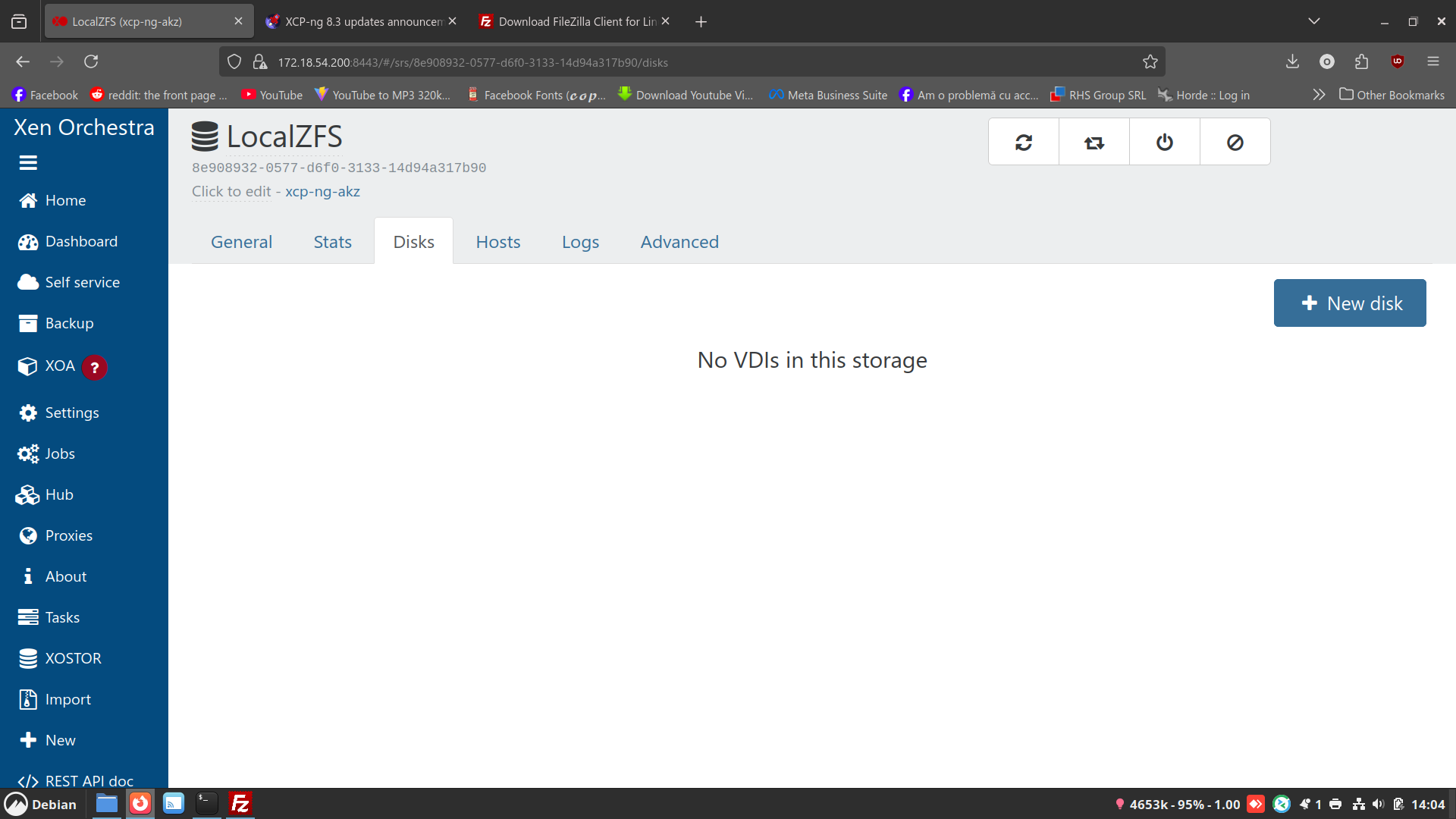
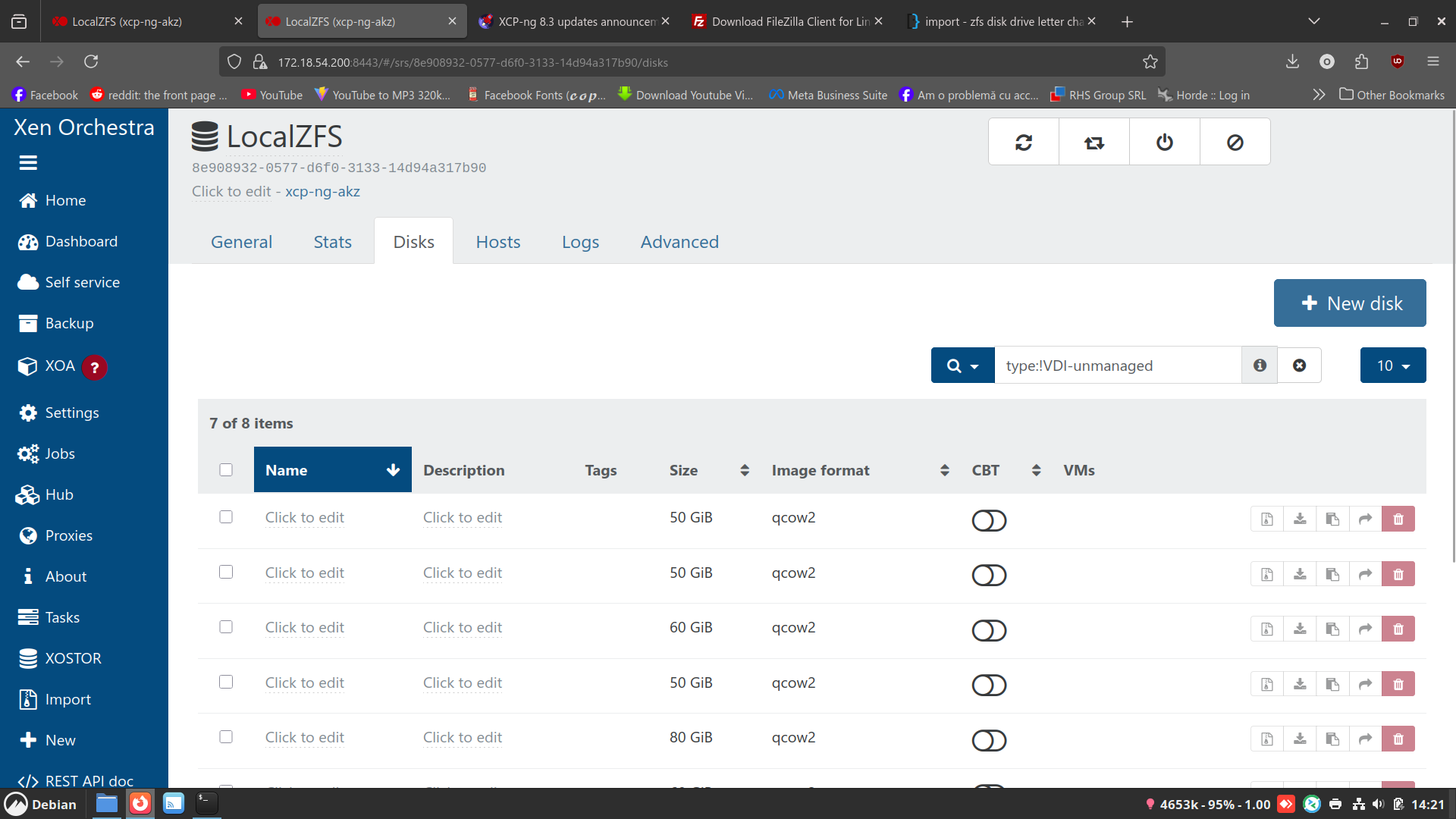
Strange thing the disks don't appear in xen orchestra but they are on the drive:
[14:04 xcp-ng-akz zfs]# ls -l
total 34863861
-rw-r--r-- 1 root root 393216 Dec 10 11:19 2b94bb8f-b44d-4c3d-9844-0b2c80e7d11c.qcow2
-rw-r--r-- 1 root root 16969367552 Dec 17 09:15 37c89d4e-93d0-4f47-a340-4add9fb91307.qcow2
-rw-r--r-- 1 root root 5435228160 Dec 16 18:41 67d7cb86-864b-4bfc-9ec6-f54dbb9c9f45.qcow2
-rw-r--r-- 1 root root 10212737024 Dec 17 09:37 740d3e10-ebc9-42a3-bc7c-849f6bcc0e61.qcow2
-rw-r--r-- 1 root root 2685730816 Dec 16 14:52 76dc4b94-ad88-4514-87ef-99357b93daaf.qcow2
-rw-r--r-- 1 root root 197408 Dec 10 11:19 8158436c-327a-4dcf-ba49-56e73006ed66.qcow2
-rw-r--r-- 1 root root 11897602048 Dec 17 10:09 e219112b-73b7-46a4-8fcb-4ee8810b3625.qcow2
-rw-r--r-- 1 root root 11566120960 Dec 10 09:51 f5d157cb-39df-482b-a39d-432a90d60e89.qcow2
-rw-r--r-- 1 root root 1984 Dec 10 11:02 filelog.txt[14:07 xcp-ng-akz zfs]# zfs list
NAME USED AVAIL REFER MOUNTPOINT
ZFS_Pool 33.3G 416G 33.2G /mnt/zfs
[14:07 xcp-ng-akz zfs]# zpool list
NAME SIZE ALLOC FREE CKPOINT EXPANDSZ FRAG CAP DEDUP HEALTH ALTROOT
ZFS_Pool 464G 33.3G 431G - - 5% 7% 1.00x ONLINE -
[14:07 xcp-ng-akz zfs]# zpool status
pool: ZFS_Pool
state: ONLINE
config:NAME STATE READ WRITE CKSUM ZFS_Pool ONLINE 0 0 0 sda ONLINE 0 0 0errors: No known data errors
-
@ovicz Hello,
From what I saw in your logs, you have a non QCOW2
smversion, it made the QCOW2 VDIs not available to the storage stack and the XAPI lost them.
If you update again while enabling the QCOW2 repo:yum update --enablerepo=xcp-ng-testing,xcp-ng-candidates,xcp-ng-qcow2A SR scan will make the VDI available to the XAPI. Though you will have to identify them and connect them to the VM manually, since this information was lost.
-
I added a warning to my initial announcement.
-
They appear now. I will try to identify them manually. Thanks for the tip.
-
Thanks for your feedback

-
Did the three hosts in my lab pool, nothing blew up so I guess that's good. Just nfs storage with a few windows VMs and a Debian 13 for XO from sources.
I think everything is now an efi boot, but no secure boot machines.
-
Working on my production system today and I noticed something new.
Three hosts in a pool, doing a Rolling Pool Update.
I'm seeing VMs migrate to both available hosts to speed things up, this is not the actions I've seen in the past. Just an interesting thing to see all three host go yellow while it is migrating.
OK, only happened to evac the third host, evac second host was back to the normal move everything to the same host (#3).
And not sure why, but the process start to finish on host 1 was faster than the other two, host 1 is coordinator.
Also of note, there seems to be no place to do a RPU from within XO6.
-
Thank you everyone for your tests and your feedback!
The updates are live now: https://xcp-ng.org/blog/2025/12/18/december-2025-security-and-maintenance-updates-for-xcp-ng-8-3-lts/
-
updates done on my two main servers and one dev box i happen to power on today. so far so good.
PS: Any way to get the following included on the next update for networking? I need it to run a scenario with opnsense vm. right now i have a script i run manually after rebooting the server.
ovs-ofctl add-flow xenbr3 "table=0, dl_dst=01:80:c2:00:00:03, actions=flood"
thanks
-
In regards to UEFI Secure boot in recent update.
from pool master host.
[19:09 xcp-ng-qhfpcnmb ~]# rpm -q varstored
varstored-1.2.0-3.4.xcpng8.3.x86_64
8.3 with varstored >= 1.2.0-3.4 Secure Boot is ready to use on new VMs without extra configuration. Simply activate Secure Boot on your VMs, and they will be provided with an appropriate set of default Secure Boot variables. We will keep updating the default Secure Boot variables with future updates from Microsoft. If you don't want this behavior, you can lock in these variables by using the Manually Install the Default UEFI Certificates procedure.So new vms nothing is needed to be done. But what about existing vms windows or linux? It it was stated I apologize if i missed it.
-
@acebmxer The Recommended actions section of the guest Secure Boot docs has been updated with our latest recommendations. In short, VMs existing prior to the varstored update will need to have their Secure Boot certificates updated with the Propagate certificates button.
-
@dinhngtu thank must have read that part with my eyes closed or something.

-
@marcoi I don't have enough context to reply. You should open a new thread to discuss it, with details about your needs (always better to explain the needs before the technical solution).
-
Is there any intent to publish the latest xcp-ng 'release' with an XOSTOR iso ? There's an iso for the non-XOSTOR version (xcp-ng-8.3.0-20250606.2.iso) released on 18 Dec 2025, but the latest iso with xostor comparability is xcp-ng-8.3.0-20250616-linstor-upgradeonly.iso released in 16 June 2025.
Reason for asking is the last incremental upgrade on 18th Dec partially failed on our pool master and so we need to do a 'clean' upgrade, however there are XOSTOR disks on that machine, and doing a network upgrade after a partial failure and regardless with xostor - is not advised / achievable.
Thank you!
-
@shorian Do you mean that you have hosts with XOSTOR that can't boot the installer due to broadcom drivers crashing? That's the only issue the updated ISO addresses.
-
@stormi All our hosts were fully patched. We then went through the upgrade of Dec 19th. Two (single server) pools updated fine, the master for the primary pool then failed after patching but on reboot - this machine happens to have XOSTOR so doing the upgrade manually and recovering via the ISO is not an option as the ISO is not XOSTOR compatible and the other options available to us (network update etc) are not permitted by the installer due to XOSTOR. We're not using the Broadcom drivers.
Installer recognises the old installation, that install was patched and it was the reboot after that caused the problem (no idea why or how) so reluctant to 'upgrade' to the previous install given the patch had completed except for the final reboot.
It might be that we can 'refresh' the install using the older version but was nervous of doing so given we'd end up with (potentially) a mash-up of versions of drivers versus data.
-
@stormi The original thread is here
https://xcp-ng.org/forum/topic/10374/xcp-with-opnsense-vm-running-att-bypass-is-vlan-0-network-possible/14?_=1766094991961 -
also noticed a new issue- seems like changes i had in the /etc/xensource/usb-policy.conf file for usb was lost during the upgrade.
I have some usb comm devices i use with a home assistant VM and they were gone post the upgrade.
anyway to make those change last post upgrade? Maybe make then options in gui so a config file can always be reflective of gui settings?
-
@stormi As a footnote to earlier message, we tried using the previous iso image (xcp-ng-8.3.0-20250616-linstor-upgradeonly.iso) to see if things would magically work out but it results in an unrecoverable error - "Cannot upgrade host with LINSTOR 1.29.2-1.e17_9, upgrade repository has versions 1.29.0-1.e17_9. Please make sure your pool is uptodate [sic - typo in error message] and use the latest dedicated ISO."
So yes, afraid I'm after an iso with 1.29.2...
-
@shorian I might have one for you. Can you open a new thread?





Hello! It looks like you're interested in this conversation, but you don't have an account yet.
Getting fed up of having to scroll through the same posts each visit? When you register for an account, you'll always come back to exactly where you were before, and choose to be notified of new replies (either via email, or push notification). You'll also be able to save bookmarks and upvote posts to show your appreciation to other community members.
With your input, this post could be even better 💗
Register Login