XCP-ng 8.3 updates announcements and testing
-
@olivierlambert Created new topic.
-
New update candidate for you to test!
A new update for the
Xenpackages is ready, which brings a significant improvement in live migration performance on AMD systems under heavy load, that we add to the previous batch of updates for a common publication.
Maintenance updates
xen: Improve migration performance on AMD systems under heavy load.
Test on XCP-ng 8.3
yum clean metadata --enablerepo=xcp-ng-testing,xcp-ng-candidates
yum update --enablerepo=xcp-ng-testing,xcp-ng-candidates
reboot
The usual update rules apply: pool coordinator first, etc.
Versions:
xen: 4.17.6-4.1.xcpng8.3
What to test
Normal use and anything else you want to test. If you have a pool with AMD processors, we're interested in your feedback regarding live migration under heavy load.
Test window before official release of the updates
~4/5 days
-
@gduperrey The new OpenSSL/SSH blocks existing/working RSA keys from older SSH clients. While you can still use a password for SSH, it will block old keys from working which will break things (not good for existing LTS installs). To maintain compatibility add
PubkeyAcceptedAlgorithms +ssh-rsato/etc/ssh/sshd_config -
@gduperrey Tested this on the same hosts i already have running the testing updates from earlier. No issues. Mixture of AMD and Intel.
-
@Andrew I just pinged Philippe (rzr) internally to ask him to look into this

-
@gduperrey The new OpenSSL/SSH blocks existing/working RSA keys from older SSH clients. While you can still use a password for SSH, it will block old keys from working which will break things (not good for existing LTS installs). To maintain compatibility add
PubkeyAcceptedAlgorithms +ssh-rsato/etc/ssh/sshd_configHi @andrew, thank you for your feedback, the fallback option you're suggesting will work but it will downgrade the security of your system, we suggested to update clients:
"Note that older ssh-clients (with weak ciphers) will need to update, if connection is rejected."
Let me make it more explicit that older keys should be also refreshed:
  ssh-keygen # To generate new $identity_file
  ssh-copy-id \
        -i $identity_file \
        -o HostKeyAlgorithms=+ssh-rsa \
        -o PubkeyAcceptedAlgorithms=+ssh-rsa \
        $user@$host
  ssh $user@$host
Ideally this can be done before the update, but let's us think if we have a better strategy to provide a smoother experience, meanwhile if anyone is curious please check:
https://www.openssh.org/releasenotes.html
https://www.openssh.org/txt/release-8.8
"We recommend enabling RSA/SHA1 only as a stopgap measure until legacy
implementations can be upgraded or reconfigured with another key type
(such as ECDSA or Ed25519)."https://datatracker.ietf.org/doc/html/rfc8332
As I understand, RSA is safe unless it was coupled with SHA1 hash function which was then decoupled in later versions (and then obsoleted in V_8_7_P1-4-g234475025 with https://github.com/openssh/openssh-portable/commit/2344750250247111a6c3c6a4fe84ed583a61cc11 "The use of RSA/SHA1 can be re-enabled by adding "ssh-rsa" to the
PubkeyAcceptedAlgorithms directives on the client and server.") .Regen keys will be needed, better sooner than later, meanwhile we could support weak
keysclients during a short (TBD) deprecation period.Update: I think I was able to reproduce the issue @andrew reported using a RSA key generated with
OpenSSH_5.1p1 Debian-6.maemo2, OpenSSL 0.9.8e 23 Feb 2007ssh-keygen -lf ~/.ssh/id_rsa.pub 2048 SHA256:abcde+0123456789012345678901234567890/vwxyz user@Nokia-N810-43-7 (RSA)Used along a later client (in a debian chroot jessie amd64) :
OpenSSH_6.7p1 Debian-5+deb8u4, OpenSSL 1.0.1t 3 May 2016While it worked as expected (in a debian chroot stretch amd64) : with:
OpenSSH_7.4p1 Debian-10+deb9u7, OpenSSL 1.0.2u 20 Dec 2019So to conclude using rsa keys need ssh-7+ while ssh6 can be used using stronger cypher like id_ed25519 (not rsa).
PS: this post may be updated
-
Although disabling
ssh-rsais the right thing to do from a security perspective, we'll see what we can do to smoothen the transition. -
Hi @andrew, thank you for your feedback, the fallback option you're suggesting will work but it will downgrade the security of your system, we suggested to update clients:
If users need to take action, I would rather recommend users to do something that raises the security floor, like generating new keys with newer, future-looking ciphers, like
ed25519:ssh-keygen -t ed25519 -C "<email>" for server in $servers do ; ssh-copy-id $server; done -
Hello,
After updating I get this: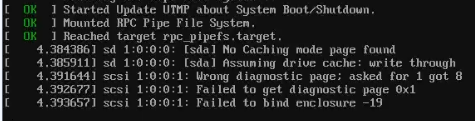
This seems harmless as I don't have and scsi drive attached. But these messages were not there before.
Other than that, the server seems to boot fine.
Regards,
PS:
I have updated once for several updates (not one by one) so this messages may also be there in previous updates and may not be related to this particular update. -
Wrong diagnostic page; asked for 1 got 8
Failed to get diagnostic page 0x1
Failed to bind enclosure -19
be there in previous updates and may not be related to this particular update.
I think you're right because the issue you are facing is reported by kernel itself (which was not updated), Can you please share more details about the hardware you're using (is any USB device involved ? try smartmon tools too) eventually post details in other sections of forum.
-
I think you're right because the issue you are facing is reported by kernel itself (which was not updated), Can you please share more details about the hardware you're using (is any USB device involved ? try smartmon tools too) eventually post details in other sections of forum.
@rzr
CPU is AMD Ryzen 7 7840HS in a mini pc.No USB involved in boot, but I do have an external USB HDD connected which is passed through to a VM (this should not effect boot)
What details are you looking for and where so you want me to post them ?
Update: I also tried on a AMD Ryzen 9 7945HX, which does not seem to have this message.
Do you think its USB related or motherboard/bios driver related ?
-
@gb.123 those scsi messages can be expected and ignored when a USB enclosure is connected, some USB enclosures do not emulate SCSI Enclosure Services (SES) very well, so the kernel complains when it queries them and gets nonsense back. USB passthrough devices are still visible and enumerated by dom0's kernel. If you remove the drive the messages will go away, but they can be safely ignored.
-
I took the opportunity to swap out the ssh keys on my hosts yesterday from the default rsa keys over to ed25519 keys. I used Ansible to copy the new key over before running another playbook to remove the old key. Having the ability to use Ansible to mange your hosts at scale is very slick!
-
Thank you everyone for your tests and your feedback!
The updates are live now: https://xcp-ng.org/blog/2026/03/10/march-2026-maintenance-updates-for-xcp-ng-8-3-lts/
-
@gduperrey On my pool master there are no updates available in yum repository (checked via "yum check-update").
Will it take some more time? -
Just a heads up that the updates to net-snmp-libs will break the lldpd package from epel. I know packages from epel aren't supported and are discouraged, but XCP-ng 9 can't come soon enough
. Time to boot up an ancient CentOS 7 VM and create a custom lldpd spec/rpm. -
@MajorP93 the diffusion of RPMs across different repositories around the world can take some time depending on your geographical location.
Sometimes a
yum clean metadatacan also help to clear the cache and better detect updates that have just arrived on certain repositories. -
@gduperrey After running "yum clean metadata && yum check-update" the package updates are shown. Thanks.
-
@gduperrey Updated 2 pools/2 hosts @home (via cli). 3 pools/5 hosts @office (via RPU).
No issue. -
Updated work servers 3 pools 6 host with Rolling Pool Update.






Hello! It looks like you're interested in this conversation, but you don't have an account yet.
Getting fed up of having to scroll through the same posts each visit? When you register for an account, you'll always come back to exactly where you were before, and choose to be notified of new replies (either via email, or push notification). You'll also be able to save bookmarks and upvote posts to show your appreciation to other community members.
With your input, this post could be even better 💗
Register Login