XCP-ng
    • Categories
    • Recent
    • Tags
    • Popular
    • Users
    • Groups
    • Register
    • Login

    XCP-ng 8.3 updates announcements and testing

    Scheduled Pinned Locked Moved News
    431 Posts 47 Posters 168.6k Views 61 Watching
    Loading More Posts
    • Oldest to Newest
    • Newest to Oldest
    • Most Votes
    Reply
    • Reply as topic
    Log in to reply
    This topic has been deleted. Only users with topic management privileges can see it.
    • G Offline
      gb.123
      last edited by gb.123

      Hello,
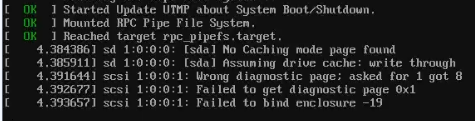
      After updating I get this:

      xcp-ng-error.png

      This seems harmless as I don't have and scsi drive attached. But these messages were not there before.

      Other than that, the server seems to boot fine.

      Regards,

      PS:
      I have updated once for several updates (not one by one) so this messages may also be there in previous updates and may not be related to this particular update.

      rzrR 1 Reply Last reply Reply Quote 0
      • rzrR Offline
        rzr Vates 🪐 XCP-ng Team @gb.123
        last edited by rzr

        @gb.123 said:

        Wrong diagnostic page; asked for 1 got 8
        Failed to get diagnostic page 0x1
        Failed to bind enclosure -19
        

        be there in previous updates and may not be related to this particular update.

        I think you're right because the issue you are facing is reported by kernel itself (which was not updated), Can you please share more details about the hardware you're using (is any USB device involved ? try smartmon tools too) eventually post details in other sections of forum.

        G 1 Reply Last reply Reply Quote 0
        • G Offline
          gb.123 @rzr
          last edited by

          @rzr said:

          I think you're right because the issue you are facing is reported by kernel itself (which was not updated), Can you please share more details about the hardware you're using (is any USB device involved ? try smartmon tools too) eventually post details in other sections of forum.

          @rzr
          CPU is AMD Ryzen 7 7840HS in a mini pc.

          No USB involved in boot, but I do have an external USB HDD connected which is passed through to a VM (this should not effect boot)

          What details are you looking for and where so you want me to post them ?

          Update: I also tried on a AMD Ryzen 9 7945HX, which does not seem to have this message.

          Do you think its USB related or motherboard/bios driver related ?

          fohdeeshaF 1 Reply Last reply Reply Quote 1
          • fohdeeshaF Offline
            fohdeesha Vates 🪐 Pro Support Team @gb.123
            last edited by

            @gb.123 those scsi messages can be expected and ignored when a USB enclosure is connected, some USB enclosures do not emulate SCSI Enclosure Services (SES) very well, so the kernel complains when it queries them and gets nonsense back. USB passthrough devices are still visible and enumerated by dom0's kernel. If you remove the drive the messages will go away, but they can be safely ignored.

            F 1 Reply Last reply Reply Quote 3
            • F Offline
              flakpyro @fohdeesha
              last edited by

              I took the opportunity to swap out the ssh keys on my hosts yesterday from the default rsa keys over to ed25519 keys. I used Ansible to copy the new key over before running another playbook to remove the old key. Having the ability to use Ansible to mange your hosts at scale is very slick!

              1 Reply Last reply Reply Quote 1
              • gduperreyG Offline
                gduperrey Vates 🪐 XCP-ng Team
                last edited by

                Thank you everyone for your tests and your feedback!

                The updates are live now: https://xcp-ng.org/blog/2026/03/10/march-2026-maintenance-updates-for-xcp-ng-8-3-lts/

                M M 2 Replies Last reply Reply Quote 2
                • M Offline
                  MajorP93 @gduperrey
                  last edited by

                  @gduperrey On my pool master there are no updates available in yum repository (checked via "yum check-update").
                  Will it take some more time?

                  gduperreyG 1 Reply Last reply Reply Quote 0
                  • B Offline
                    bnerickson
                    last edited by

                    Just a heads up that the updates to net-snmp-libs will break the lldpd package from epel. I know packages from epel aren't supported and are discouraged, but XCP-ng 9 can't come soon enough 🙂. Time to boot up an ancient CentOS 7 VM and create a custom lldpd spec/rpm.

                    1 Reply Last reply Reply Quote 1
                    • gduperreyG Offline
                      gduperrey Vates 🪐 XCP-ng Team @MajorP93
                      last edited by

                      @MajorP93 the diffusion of RPMs across different repositories around the world can take some time depending on your geographical location.

                      Sometimes a yum clean metadata can also help to clear the cache and better detect updates that have just arrived on certain repositories.

                      M 1 Reply Last reply Reply Quote 1
                      • M Offline
                        MajorP93 @gduperrey
                        last edited by

                        @gduperrey After running "yum clean metadata && yum check-update" the package updates are shown. Thanks.

                        1 Reply Last reply Reply Quote 1
                        • M Offline
                          manilx @gduperrey
                          last edited by

                          @gduperrey Updated 2 pools/2 hosts @home (via cli). 3 pools/5 hosts @office (via RPU).
                          No issue.

                          1 Reply Last reply Reply Quote 1
                          • A Offline
                            acebmxer
                            last edited by

                            Updated work servers 3 pools 6 host with Rolling Pool Update.

                            1 Reply Last reply Reply Quote 1
                            • Mitchel-APDM Offline
                              Mitchel-APD
                              last edited by

                              Just updated 1 pool with 3 hosts.
                              SNMP did not work anymore, config file was not changed.
                              Got the following error: Authorization Error (SNMP error # 16)
                              Did a yum downgrade net-snmp*

                              From:

                              • net-snmp.x86_64 1:5.9.3-8.1.xcpng8.3
                              • net-snmp-agent-libs.x86_64 1:5.9.3-8.1.xcpng8.3
                              • net-snmp-libs.x86_64 1:5.9.3-8.1.xcpng8.3

                              To:

                              • net-snmp.x86_64 1:5.7.2-52.1.xcpng8.3
                              • net-snmp-agent-libs.x86_64 1:5.7.2-52.1.xcpng8.3
                              • net-snmp-libs.x86_64 1:5.7.2-52.1.xcpng8.3

                              After a service restart, SNMP worked immediately.

                              rzrR semarieS 2 Replies Last reply Reply Quote 2
                              • rzrR Offline
                                rzr Vates 🪐 XCP-ng Team @Mitchel-APD
                                last edited by

                                @Mitchel-APD said:

                                Just updated 1 pool with 3 hosts.
                                SNMP did not work anymore, config file was not changed.
                                Got the following error: Authorization Error (SNMP error # 16)

                                Thank you for your feedback, we're going to investigate, I see that there are many changes between both versions:

                                https://github.com/net-snmp/net-snmp/compare/v5.7.2...v5.9.3

                                1 Reply Last reply Reply Quote 0
                                • semarieS Offline
                                  semarie @Mitchel-APD
                                  last edited by

                                  @Mitchel-APD how do you auth on SNMP ? v1, v2, v3 ? and if v3, which authProtocol/privProtocol do you use ?

                                  Mitchel-APDM 1 Reply Last reply Reply Quote 0
                                  • Mitchel-APDM Offline
                                    Mitchel-APD @semarie
                                    last edited by

                                    @semarie Hi,

                                    We are using SNMPv3 with SHA AES

                                    semarieS 1 Reply Last reply Reply Quote 0
                                    • semarieS Offline
                                      semarie @Mitchel-APD
                                      last edited by

                                      @Mitchel-APD SHA1 ? I am looking if it is still supported/activated-by-default. I saw that 5.8 added SHA-2 family for RFC-7860 compliance

                                      semarieS 1 Reply Last reply Reply Quote 0
                                      • semarieS Offline
                                        semarie @semarie
                                        last edited by

                                        SHA`is SHA1. so I assume it is that.
                                        And it seems to be still accepted in authProtocol parameter.

                                        1 Reply Last reply Reply Quote 0
                                        • semarieS Offline
                                          semarie
                                          last edited by

                                          after testing (with net-snmp-utils 5.9.3), I have no problem with snmpv3 and SHA/AES.

                                          On my testing host, snmpd server (OpenBSD):

                                          • User: user1
                                          • auth: AES with password123
                                          • priv: AES with 321drowssap

                                          From XCP-ng 8.3, with net-snmp-utils 5.9.3:
                                          $ snmpbulkwalk -v3 -a SHA -A password123 -l authPriv -x AES -X 321drowssap -u user1 192.168.1.80

                                          so the net-snmp client itself seems fine with SHA/AES.

                                          could you share more elements ?

                                          Mitchel-APDM 1 Reply Last reply Reply Quote 1
                                          • Mitchel-APDM Offline
                                            Mitchel-APD @semarie
                                            last edited by Mitchel-APD

                                            @semarie Hi,

                                            Thanks for your help, I just created the user with the net-snmp-create-v3-user command, and definded SHA-256.

                                            SNMP now works like before.

                                            net-snmp-create-v3-user -ro -A verrysecureauthenticationpassword-a SHA-256 -X verrysecureprivacypassword--x AES snmpusername

                                            
                                            1 Reply Last reply Reply Quote 1

                                            Hello! It looks like you're interested in this conversation, but you don't have an account yet.

                                            Getting fed up of having to scroll through the same posts each visit? When you register for an account, you'll always come back to exactly where you were before, and choose to be notified of new replies (either via email, or push notification). You'll also be able to save bookmarks and upvote posts to show your appreciation to other community members.

                                            With your input, this post could be even better 💗

                                            Register Login
                                            • First post
                                              Last post