Hi everyone,
I’m hoping someone might be able to help me with something related to the Slack notifications generated by the Backup‑Reports plugin in Xen Orchestra.
We’re really glad to see Slack support built into XO, as our company relies heavily on Slack for day‑to‑day system alerts and operational visibility. Having backup reports appear directly in Slack has been very helpful for our workflow and would welcome expansion of the options available.
At the moment, I’ve found that adding <!channel> into the backup job title does trigger a proper Slack channel alert. It notifies everyone in the channel correctly, which is great — but placing mention syntax inside the job title isn’t ideal for keeping job names tidy or easy to manage long‑term.
Here’s an example of how it looks today (where @channel appears in the job name):
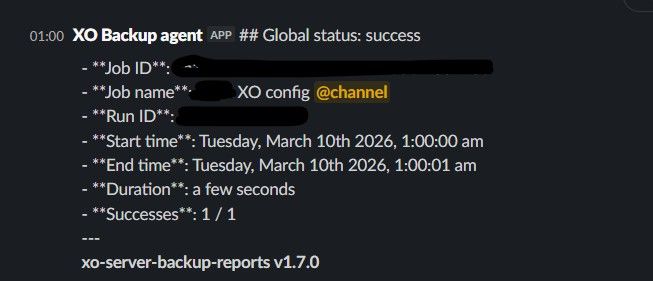

Because Slack Incoming Webhooks normally support mention formats like:
<!channel>
<!here>
<@USERID>
I was wondering if there is currently a way to include these inside the actual Slack message body produced by the Backup‑Reports plugin. That would make it much easier to highlight failed backups or other important events, without needing to modify the job title itself.
If this isn’t currently possible, would it be feasible in the future to add a small custom message field or template area that only appears when Slack alerts are enabled? Even a simple prefix or suffix option would allow mention syntax to be placed cleanly above the report content.
I may have missed an existing option, so any guidance or suggestions would be very welcome.
Thanks very much for your help!