Same behavior:
Tools from the ubuntu repo 7.20 don't work on Ubuntu 24.04 (but they work on ubuntu 22.04.
But manually installing the tools from the cdrom (version 7.30) work fine
 B
Offline
B
Offline
Same behavior:
Tools from the ubuntu repo 7.20 don't work on Ubuntu 24.04 (but they work on ubuntu 22.04.
But manually installing the tools from the cdrom (version 7.30) work fine
@probain said in Epyc VM to VM networking slow:
I ran these tests now that newer updates have been released for 8.3-beta.
Results are as below:
- iperf-sender -> iperf-receiver: 5.06Gbit/s
- iperf-sender -> iperf-receiver -P4: 7.53Gbit/s
- host -> iperf-receiver: 7.83Gbit/s
- host -> iperf-receiver -P4: 13.0Gbit/s
Host (dom0):
- CPU: AMD EPYC 7302P
- Sockets: 1
- RAM: 6.59GB (dom0) / 112GB for VMs
- MotherBoard: H12SSL-i
- NIC: X540-AT2 (rev 01)
xl info -n
host                   : xcp
release                : 4.19.0+1
version                : #1 SMP Mon Jun 24 17:20:04 CEST 2024
machine                : x86_64
nr_cpus                : 32
max_cpu_id             : 31
nr_nodes               : 1
cores_per_socket       : 16
threads_per_core       : 2
cpu_mhz                : 2999.997
hw_caps                : 178bf3ff:7ed8320b:2e500800:244037ff:0000000f:219c91a9:00400004:00000780
virt_caps              : pv hvm hvm_directio pv_directio hap gnttab-v1 gnttab-v2
total_memory           : 114549
free_memory            : 62685
sharing_freed_memory   : 0
sharing_used_memory    : 0
outstanding_claims     : 0
free_cpus              : 0
cpu_topology           :
cpu:    core    socket     node
  0:       0        0        0
  1:       0        0        0
  2:       1        0        0
  3:       1        0        0
  4:       4        0        0
  5:       4        0        0
  6:       5        0        0
  7:       5        0        0
  8:       8        0        0
  9:       8        0        0
 10:       9        0        0
 11:       9        0        0
 12:      12        0        0
 13:      12        0        0
 14:      13        0        0
 15:      13        0        0
 16:      16        0        0
 17:      16        0        0
 18:      17        0        0
 19:      17        0        0
 20:      20        0        0
 21:      20        0        0
 22:      21        0        0
 23:      21        0        0
 24:      24        0        0
 25:      24        0        0
 26:      25        0        0
 27:      25        0        0
 28:      28        0        0
 29:      28        0        0
 30:      29        0        0
 31:      29        0        0
device topology        :
device           node
No device topology data available
numa_info              :
node:    memsize    memfree    distances
   0:    115955      62685      10
xen_major              : 4
xen_minor              : 17
xen_extra              : .4-3
xen_version            : 4.17.4-3
xen_caps               : xen-3.0-x86_64 hvm-3.0-x86_32 hvm-3.0-x86_32p hvm-3.0-x86_64
xen_scheduler          : credit
xen_pagesize           : 4096
platform_params        : virt_start=0xffff800000000000
xen_changeset          : d530627aaa9b, pq 7587628e7d91
xen_commandline        : dom0_mem=6752M,max:6752M watchdog ucode=scan dom0_max_vcpus=1-16 crashkernel=256M,below=4G console=vga vga=mode-0x0311
cc_compiler            : gcc (GCC) 11.2.1 20210728 (Red Hat 11.2.1-1)
cc_compile_by          : mockbuild
cc_compile_domain      : [unknown]
cc_compile_date        : Thu Jun 20 18:17:10 CEST 2024
build_id               : 9497a1ec7ec99f5075421732b0ec37781ba739a9
xend_config_format     : 4
VMs - Sender and Receiver
- Distro: Ubuntu 24.04
- Kernel: 6.8.0-36-generic #36-Ubuntu SMP PREEMPT_DYNAMIC
- vCPUs: 32
- RAM: 4GB
have you tested without the 8.3 updates? The results seem still low. Any improvement?
hi @olivierlambert ! it's the nomenclature @bleader used in the report table, sorry for the misunderstanding:
https://xcp-ng.org/forum/post/67750
v2m 1 thread: throughput / cpu usage from xentop³
v2m 4 threads: throughput / cpu usage from xentop³
h2m 1 thread: througput / cpu usage from xentop³
h2m 4 threads: througput / cpu usage from xentop³
it's vm to vm and host (dom0) to vm.
Btw I'm super happy to do any more test that could help, with different kernels, OS's, xcp ng versions... whatever you need.
PS: vm to host resulted in unreachable host even though I could ping from vm to host just fine, I checked the iptables are blocked for the iperf port but open to ping, but I didn't want to mess with dom0.
Posting my results:
XCP ng stable 8.2, up-to-date.
Epyc 7402 (1 socket)
512GB RAM 3200Mhz
Supermicro h12ssl-i
No cpu pinning
VM's: Ubuntu 22.04 Kernel 6.5.0-41-generic
v2m 1 thread: 3.5Gb/s - Dom0 140%, vm1 60%, vm2 55%
v2m 4 threads: 9.22Gb/s - Dom0 555%, vm1 320%, vm2 380%
h2m 1 thread: 10.4Gb/s - Dom0 183%, vm1 180%, vm2 0%
h2m 4 thread: 18.0Gb/s - Dom0 510%, vm1 490%, vm2 0%
host                   : xcp-ng-7402
release                : 4.19.0+1
version                : #1 SMP Tue Jan 23 14:12:55 CET 2024
machine                : x86_64
nr_cpus                : 48
max_cpu_id             : 47
nr_nodes               : 1
cores_per_socket       : 24
threads_per_core       : 2
cpu_mhz                : 2800.047
hw_caps                : 178bf3ff:7ed8320b:2e500800:244037ff:0000000f:219c91a9:00400004:00000500
virt_caps              : pv hvm hvm_directio pv_directio hap shadow
total_memory           : 524149
free_memory            : 39528
sharing_freed_memory   : 0
sharing_used_memory    : 0
outstanding_claims     : 0
free_cpus              : 0
cpu_topology           :
cpu:    core    socket     node
  0:       0        0        0
  1:       0        0        0
  2:       1        0        0
  3:       1        0        0
  4:       2        0        0
  5:       2        0        0
  6:       4        0        0
  7:       4        0        0
  8:       5        0        0
  9:       5        0        0
 10:       6        0        0
 11:       6        0        0
 12:       8        0        0
 13:       8        0        0
 14:       9        0        0
 15:       9        0        0
 16:      10        0        0
 17:      10        0        0
 18:      12        0        0
 19:      12        0        0
 20:      13        0        0
 21:      13        0        0
 22:      14        0        0
 23:      14        0        0
 24:      16        0        0
 25:      16        0        0
 26:      17        0        0
 27:      17        0        0
 28:      18        0        0
 29:      18        0        0
 30:      20        0        0
 31:      20        0        0
 32:      21        0        0
 33:      21        0        0
 34:      22        0        0
 35:      22        0        0
 36:      24        0        0
 37:      24        0        0
 38:      25        0        0
 39:      25        0        0
 40:      26        0        0
 41:      26        0        0
 42:      28        0        0
 43:      28        0        0
 44:      29        0        0
 45:      29        0        0
 46:      30        0        0
 47:      30        0        0
device topology        :
device           node
No device topology data available
numa_info              :
node:    memsize    memfree    distances
   0:    525554      39528      10
xen_major              : 4
xen_minor              : 13
xen_extra              : .5-9.40
xen_version            : 4.13.5-9.40
xen_caps               : xen-3.0-x86_64 hvm-3.0-x86_32 hvm-3.0-x86_32p hvm-3.0-x86_64
xen_scheduler          : credit
xen_pagesize           : 4096
platform_params        : virt_start=0xffff800000000000
xen_changeset          : 708e83f0e7d1, pq 9a787e7255bc
xen_commandline        : dom0_mem=8192M,max:8192M watchdog ucode=scan dom0_max_vcpus=1-16 crashkernel=256M,below=4G console=vga vga=mode-0x0311
cc_compiler            : gcc (GCC) 4.8.5 20150623 (Red Hat 4.8.5-28)
cc_compile_by          : mockbuild
cc_compile_domain      : [unknown]
cc_compile_date        : Thu Apr 11 18:03:32 CEST 2024
build_id               : fae5f46d8ff74a86c439a8b222c4c8d50d11eb0a
xend_config_format     : 4
@xerxist have you tried with the 8.3 beta of XCP-ng? I believe it's got a newer kernel maybe?
@xerxist my ubuntu 22.04 install came with kernel 5.15, i have it updated regularly but it doens't update the kernel it seems. But newer fresh installs of ubuntu 22.04 install a newer kernel. I'll check out if the kernel needs to be manually updated
@xerxist in BIOS mode, i would say it was the default for my ubuntu VM
@xerxist are you using Plex in docker or native install?
@adriangabura Gigabyte B760M Gaming X / DDR4 / MicroATX
I got it working!
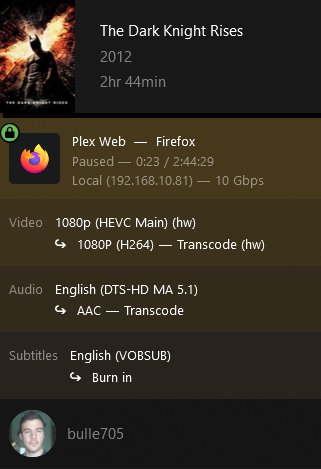
Pic while transcoding with plex

Plex info:
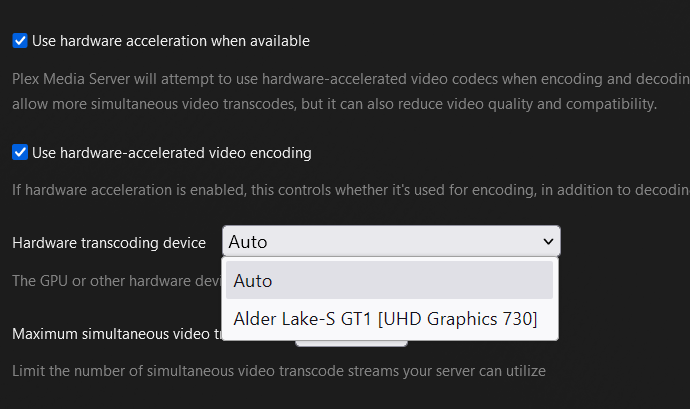
Detected:
For future reference if anyone finds this with google:
I had to " sudo chmod -R 777 /dev/dri" inside the Ubuntu VM, otherwise it didnt work.
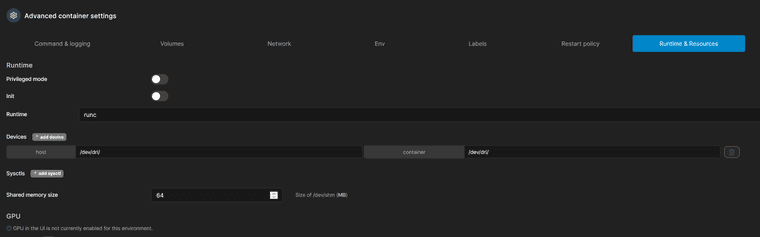
I'm using binhex plex docker image, I have to add the device to the container. It's really easy with portainer:
The "/dev/dri/" part is the important
PS: @olivierlambert there is a typo in the xcp docs, a space is missing in Step 5:
https://docs.xcp-ng.org/compute/#5-put-this-pci-device-into-your-vm

This copy/pastes as:
xe vm-param-set other-config:pci=0/0000:04:01.0uuid=<vm uuid>
It should be:
xe vm-param-set other-config:pci=0/0000:04:01.0 uuid=<vm uuid>
@bullerwins Update. The VM recognized the intel GPU:
intel_gpu_top

lspci -k | grep -EA2 'VGA|3D'
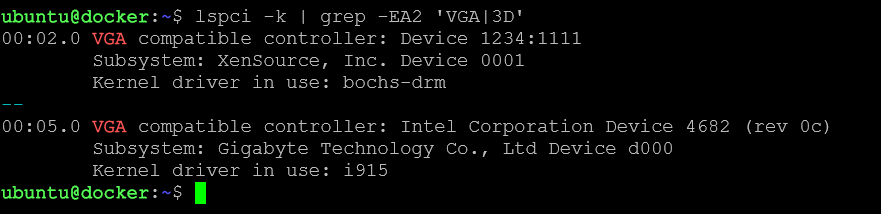
I will test with Plex Encoding
@olivierlambert I tried but getting this error when turning on the VM
INTERNAL_ERROR(xenopsd internal error: (Failure
"Error from xenguesthelper: Populate on Demand and PCI Passthrough are mutually exclusive"))
Not sure what it means
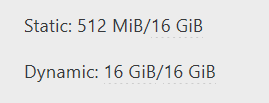
EDIT: after googleing it seems that static and dynamic memory has to be the same:
@olivierlambert I'm not sure as it not like a discrete GPU in a dedicated PCIe slot as it's integrated into the CPU. The model I'm testing in particular is an Intel 12400.
This is the lspci output
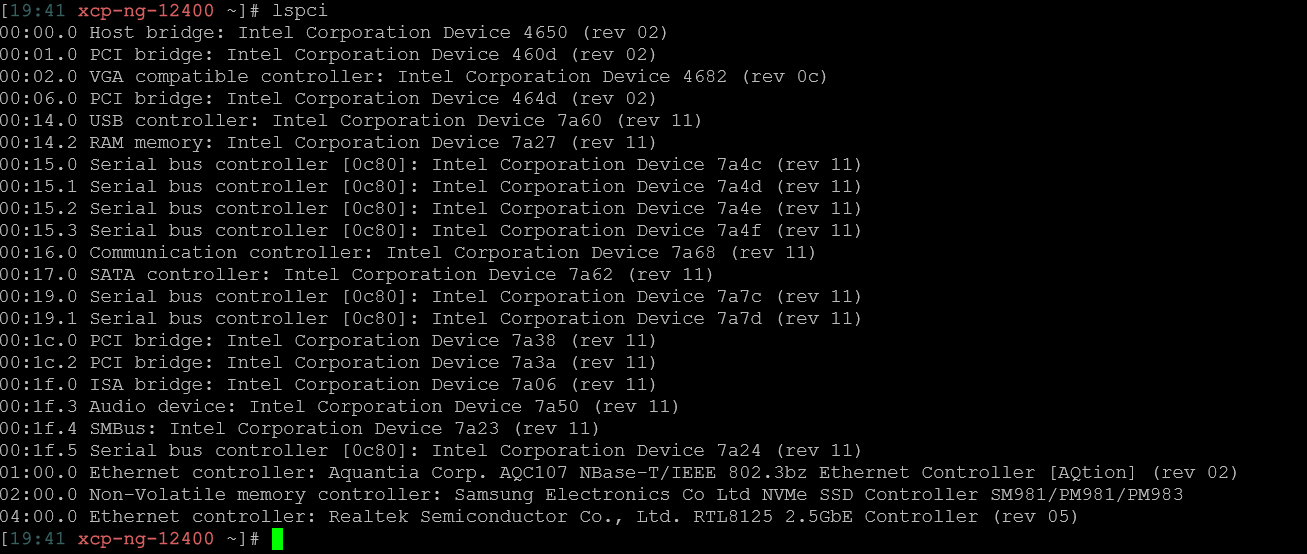
It looks like there is a VGA there. Should I try this guide? https://docs.xcp-ng.org/compute/
Hi!
I've searched this topic but only found old threads without any clear solution, or using the Windows Center tool which is no longer supported.
Is there any guide on how to pass the Intel iGPU to a VM in order to use it for example for plex encoding? CLI is fine
@olivierlambert
I declared the minimum just in case:
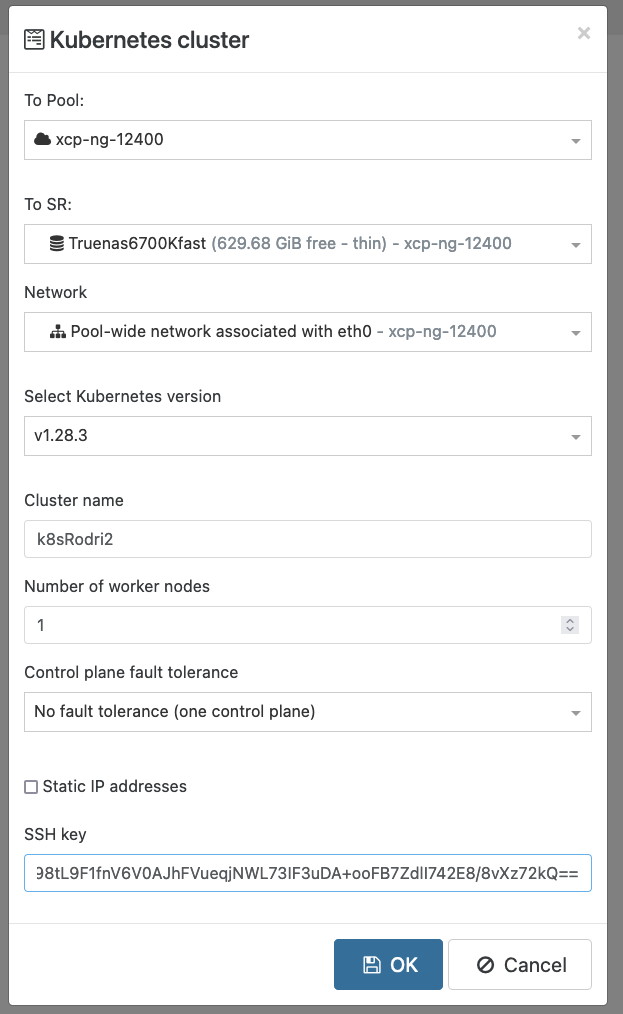
I rebooted the server and this time I didn't get any error (it seems there was a task stuck from previous attempts).
It has created the master node, but no worker node.
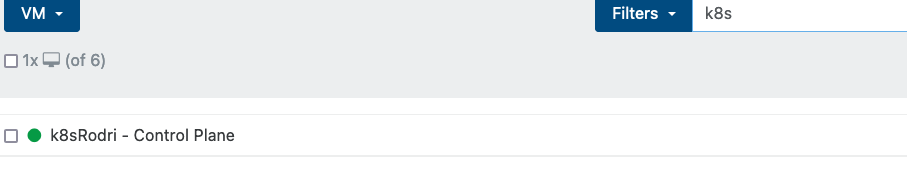
I didn't get a green confirmation message, the "create" button it's stuck spinning.
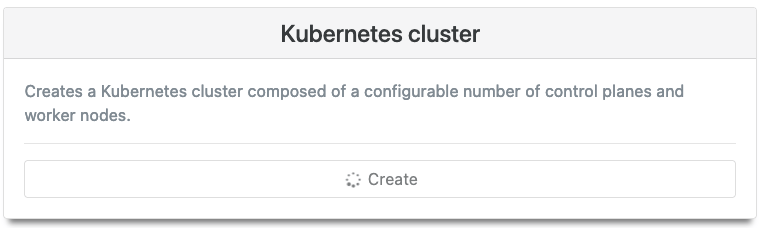
It's been like this for 15min.
This is the console output for the master node:
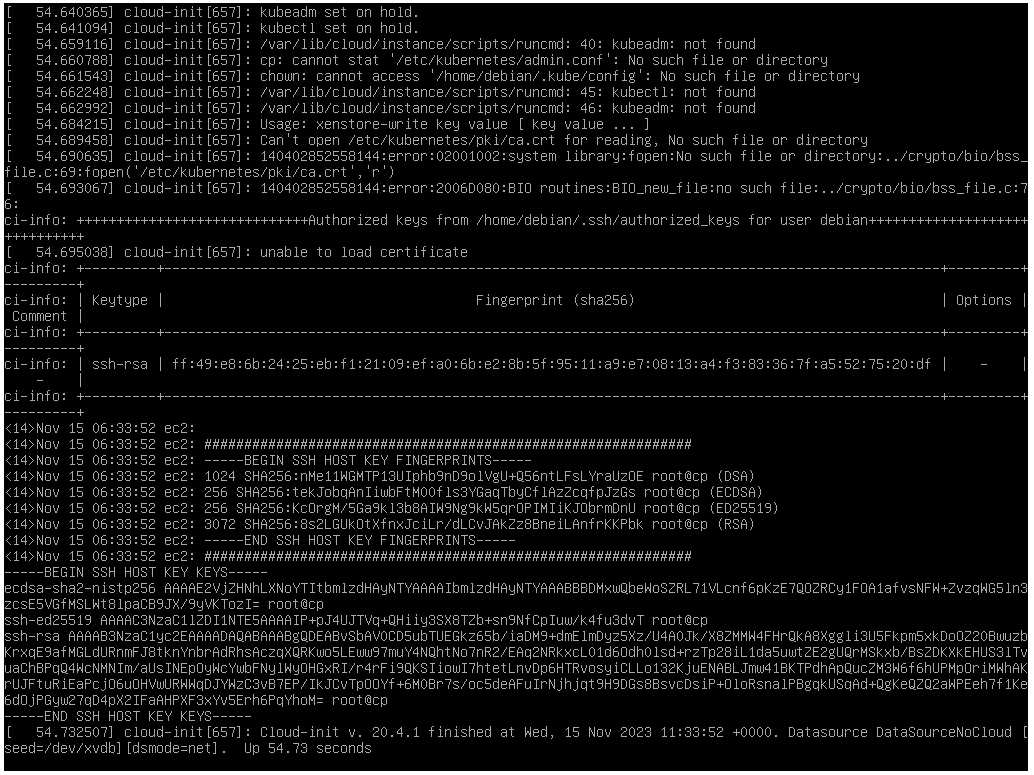
I'm not sure where to look to see if there is any progress creating the worker node of if it has failed somewhere
Thanks a lot for the help!
Hi!
I'm trying to deploy a k8s cluster but getting a "500 internal error" this is the log.
Is there maybe a minimum requirement for free RAM/Disk that I'm not meeting? Is there anywhere where I can check the recipe config file or something similar to check it?
The target SR free space is 350GB
This are the host stats
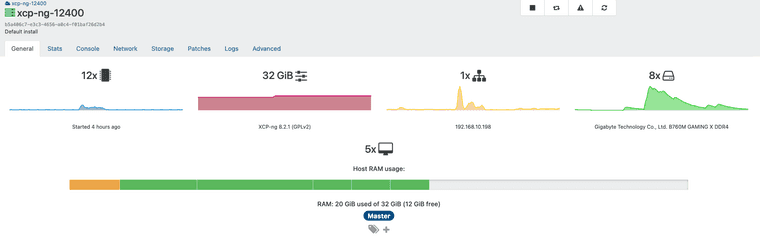
Error log file (i've only taken out the pub key):
xoa.recipe.createKubernetesCluster
{
  "clusterName": "k8sRodri",
  "controlPlanePoolSize": 1,
  "k8sVersion": "1.28.3-00",
  "nbNodes": 1,
  "network": "fe86cad9-df93-deb8-0f56-afe8e453b8e0",
  "sr": "a1316ff3-b8ad-fdd8-4bb3-4ed660bbdb8b",
  "sshKey": "AAAAB3xx[censored]xxxx2kQ=="
}
{
  "originalUrl": "https://192.168.10.198/import/?sr_id=OpaqueRef%3A3cec6886-1be2-4dce-b152-1e190fd8aa5b&session_id=OpaqueRef%3A3c71c7f9-27ce-470d-b5a5-524f0f73f887",
  "url": "https://192.168.10.198/import/?sr_id=OpaqueRef%3A3cec6886-1be2-4dce-b152-1e190fd8aa5b&session_id=OpaqueRef%3A3c71c7f9-27ce-470d-b5a5-524f0f73f887",
  "pool_master": {
    "uuid": "b5a406c7-e3c3-4656-a0c4-f01baf26d2b4",
    "name_label": "xcp-ng-12400",
    "name_description": "Default install",
    "memory_overhead": 655278080,
    "allowed_operations": [
      "vm_migrate",
      "provision",
      "vm_resume",
      "evacuate",
      "vm_start"
    ],
    "current_operations": {},
    "API_version_major": 2,
    "API_version_minor": 16,
    "API_version_vendor": "XenSource",
    "API_version_vendor_implementation": {},
    "enabled": true,
    "software_version": {
      "product_version": "8.2.1",
      "product_version_text": "8.2",
      "product_version_text_short": "8.2",
      "platform_name": "XCP",
      "platform_version": "3.2.1",
      "product_brand": "XCP-ng",
      "build_number": "release/yangtze/master/58",
      "hostname": "localhost",
      "date": "2023-10-18",
      "dbv": "0.0.1",
      "xapi": "1.20",
      "xen": "4.13.5-9.37",
      "linux": "4.19.0+1",
      "xencenter_min": "2.16",
      "xencenter_max": "2.16",
      "network_backend": "openvswitch",
      "db_schema": "5.603"
    },
    "other_config": {
      "agent_start_time": "1700030285.",
      "boot_time": "1700030236.",
      "rpm_patch_installation_time": "1699202788.539",
      "iscsi_iqn": "iqn.2023-07.com.example:aa9ef3b7"
    },
    "capabilities": [
      "xen-3.0-x86_64",
      "hvm-3.0-x86_32",
      "hvm-3.0-x86_32p",
      "hvm-3.0-x86_64",
      ""
    ],
    "cpu_configuration": {},
    "sched_policy": "credit",
    "supported_bootloaders": [
      "pygrub",
      "eliloader"
    ],
    "resident_VMs": [
      "OpaqueRef:9758ce9f-bfc4-49d4-a5c9-92ac9457fe64",
      "OpaqueRef:3da033b8-1a94-4e56-bed5-0edda49315ab",
      "OpaqueRef:8e78839e-826f-429f-bb8b-ac6141fe7abe",
      "OpaqueRef:b11b30e1-353a-42c1-b5d4-1c7e44c5ff24",
      "OpaqueRef:2f0bea77-1af8-4e25-a9a5-1b8758732343"
    ],
    "logging": {},
    "PIFs": [
      "OpaqueRef:d44da9d7-0dff-4919-b891-dc6342f73570"
    ],
    "suspend_image_sr": "OpaqueRef:9f3db79f-b06d-4ef9-adc2-df280d476d3c",
    "crash_dump_sr": "OpaqueRef:9f3db79f-b06d-4ef9-adc2-df280d476d3c",
    "crashdumps": [],
    "patches": [],
    "updates": [],
    "PBDs": [
      "OpaqueRef:feb86773-f35c-41b0-8e37-741c6a315613",
      "OpaqueRef:7619d6a7-db7c-4670-97cc-f4fc0fd06ec4",
      "OpaqueRef:5a1a4090-0602-4298-a837-fd718dc689a8",
      "OpaqueRef:561f9549-a6e9-41be-b711-1619bc54e309",
      "OpaqueRef:537ce3e9-f134-4de3-8274-06675517b111",
      "OpaqueRef:3088a871-d7ab-4011-94f0-d961dff9eb36",
      "OpaqueRef:19d98d1e-5166-4b88-b861-d5fe2335fc16",
      "OpaqueRef:07b0be80-9c78-4216-9745-02cd9ebe8b9a"
    ],
    "host_CPUs": [
      "OpaqueRef:0d0e820a-1785-450c-be71-2ba3bafd6185",
      "OpaqueRef:aeb53d4a-2a40-4713-b8a3-647ddf4820d1",
      "OpaqueRef:d5630f42-a5b6-4226-8611-4b2ff3204c2c",
      "OpaqueRef:27f06ef0-3a1b-48c0-b93b-435a91da639e",
      "OpaqueRef:267853ae-f85f-44b8-b07a-7d0233f84110",
      "OpaqueRef:057190e0-b7db-474b-b9e2-27f78c271cf3",
      "OpaqueRef:ac60e622-673e-47dd-8abb-66a8a4ab4ede",
      "OpaqueRef:66aa9e2d-65b0-4ba0-b3ef-0881d41f3ab6",
      "OpaqueRef:f441c719-c49f-4b75-be34-98701e36d684",
      "OpaqueRef:50cd74cb-bd30-48b0-b67e-62b2589b7fef",
      "OpaqueRef:0fe4767c-a5bd-46f8-a02c-a505d3313f1b",
      "OpaqueRef:29cadecc-d48f-4ad1-b95b-db6baab5a41e"
    ],
    "cpu_info": {
      "cpu_count": "12",
      "socket_count": "1",
      "vendor": "GenuineIntel",
      "speed": "2496.126",
      "modelname": "12th Gen Intel(R) Core(TM) i5-12400",
      "family": "6",
      "model": "151",
      "stepping": "2",
      "flags": "fpu de tsc msr pae mce cx8 apic sep mca cmov pat clflush acpi mmx fxsr sse sse2 ss ht syscall nx rdtscp lm constant_tsc rep_good nopl nonstop_tsc cpuid pni pclmulqdq monitor est ssse3 fma cx16 sse4_1 sse4_2 movbe popcnt aes xsave avx f16c rdrand hypervisor lahf_lm abm 3dnowprefetch cpuid_fault ssbd ibrs ibpb stibp ibrs_enhanced fsgsbase bmi1 avx2 bmi2 erms rdseed adx clflushopt clwb sha_ni xsaveopt xsavec xgetbv1 gfni vaes vpclmulqdq rdpid arch_capabilities",
      "features_pv": "1fc9cbf5-f6f83203-2991cbf5-00000123-00000007-218c0329-00400700-00000000-00001000-ac000400-00000000-00000000-00000000-00000001-00000000-00000000-0408e167-00000000-00000000-00000000-00000000-00000000",
      "features_hvm": "1fcbfbff-f7fa3223-2d93fbff-00000523-0000000f-219c07ab-0040070c-00000000-00001000-bc000400-00000000-00000000-00000000-00000001-00000000-00000000-0408e167-00000000-00000000-00000000-00000000-00000000",
      "features_hvm_host": "1fcbfbff-f7fa3223-2c100800-00000121-0000000f-219c07ab-0040070c-00000000-00001000-bc000400-00000000-00000000-00000000-00000001-00000000-00000000-0408e163-00000000-00000000-00000000-00000000-00000000",
      "features_pv_host": "1fc9cbf5-f6f83203-28100800-00000121-00000007-218c0329-00400700-00000000-00001000-ac000400-00000000-00000000-00000000-00000001-00000000-00000000-0408e163-00000000-00000000-00000000-00000000-00000000"
    },
    "hostname": "xcp-ng-12400",
    "address": "192.168.10.198",
    "metrics": "OpaqueRef:ab7679c5-31e0-4975-8e72-ca800ad31e02",
    "license_params": {
      "restrict_vswitch_controller": "false",
      "restrict_lab": "false",
      "restrict_stage": "false",
      "restrict_storagelink": "false",
      "restrict_storagelink_site_recovery": "false",
      "restrict_web_selfservice": "false",
      "restrict_web_selfservice_manager": "false",
      "restrict_hotfix_apply": "false",
      "restrict_export_resource_data": "false",
      "restrict_read_caching": "false",
      "restrict_cifs": "false",
      "restrict_health_check": "false",
      "restrict_xcm": "false",
      "restrict_vm_memory_introspection": "false",
      "restrict_batch_hotfix_apply": "false",
      "restrict_management_on_vlan": "false",
      "restrict_ws_proxy": "false",
      "restrict_vlan": "false",
      "restrict_qos": "false",
      "restrict_pool_attached_storage": "false",
      "restrict_netapp": "false",
      "restrict_equalogic": "false",
      "restrict_pooling": "false",
      "enable_xha": "true",
      "restrict_marathon": "false",
      "restrict_email_alerting": "false",
      "restrict_historical_performance": "false",
      "restrict_wlb": "false",
      "restrict_rbac": "false",
      "restrict_dmc": "false",
      "restrict_checkpoint": "false",
      "restrict_cpu_masking": "false",
      "restrict_connection": "false",
      "platform_filter": "false",
      "regular_nag_dialog": "false",
      "restrict_vmpr": "false",
      "restrict_vmss": "false",
      "restrict_intellicache": "false",
      "restrict_gpu": "false",
      "restrict_dr": "false",
      "restrict_vif_locking": "false",
      "restrict_storage_xen_motion": "false",
      "restrict_vgpu": "false",
      "restrict_integrated_gpu_passthrough": "false",
      "restrict_vss": "false",
      "restrict_guest_agent_auto_update": "false",
      "restrict_pci_device_for_auto_update": "false",
      "restrict_xen_motion": "false",
      "restrict_guest_ip_setting": "false",
      "restrict_ad": "false",
      "restrict_nested_virt": "false",
      "restrict_live_patching": "false",
      "restrict_set_vcpus_number_live": "false",
      "restrict_pvs_proxy": "false",
      "restrict_igmp_snooping": "false",
      "restrict_rpu": "false",
      "restrict_pool_size": "false",
      "restrict_cbt": "false",
      "restrict_usb_passthrough": "false",
      "restrict_network_sriov": "false",
      "restrict_corosync": "true",
      "restrict_zstd_export": "false",
      "restrict_pool_secret_rotation": "false"
    },
    "ha_statefiles": [],
    "ha_network_peers": [],
    "blobs": {},
    "tags": [],
    "external_auth_type": "",
    "external_auth_service_name": "",
    "external_auth_configuration": {},
    "edition": "xcp-ng",
    "license_server": {
      "address": "localhost",
      "port": "27000"
    },
    "bios_strings": {
      "bios-vendor": "American Megatrends International, LLC.",
      "bios-version": "F11",
      "system-manufacturer": "Gigabyte Technology Co., Ltd.",
      "system-product-name": "B760M GAMING X DDR4",
      "system-version": "Default string",
      "system-serial-number": "Default string",
      "baseboard-manufacturer": "Gigabyte Technology Co., Ltd.",
      "baseboard-product-name": "B760M GAMING X DDR4",
      "baseboard-version": "x.x",
      "baseboard-serial-number": "Default string",
      "oem-1": "Xen",
      "oem-2": "MS_VM_CERT/SHA1/bdbeb6e0a816d43fa6d3fe8aaef04c2bad9d3e3d",
      "oem-3": "Default string",
      "hp-rombios": ""
    },
    "power_on_mode": "",
    "power_on_config": {},
    "local_cache_sr": "OpaqueRef:9f3db79f-b06d-4ef9-adc2-df280d476d3c",
    "chipset_info": {
      "iommu": "false"
    },
    "PCIs": [
      "OpaqueRef:c3ccbcef-757c-426e-a6c0-71ca59c392a8",
      "OpaqueRef:b634af83-c4f6-44c7-be28-aad0158d2b72",
      "OpaqueRef:2d18b304-b03a-45d7-9378-4055cddf68a0",
      "OpaqueRef:16189584-ccdd-4b31-acfd-28ccd80a0c9e",
      "OpaqueRef:0dc37b73-b7f5-4c67-a55e-18ae3c7e2588"
    ],
    "PGPUs": [
      "OpaqueRef:1b9f4c3b-1136-4670-969a-4d8e72946a43"
    ],
    "PUSBs": [],
    "ssl_legacy": false,
    "guest_VCPUs_params": {},
    "display": "enabled",
    "virtual_hardware_platform_versions": [
      0,
      1,
      2
    ],
    "control_domain": "OpaqueRef:2f0bea77-1af8-4e25-a9a5-1b8758732343",
    "updates_requiring_reboot": [],
    "features": [],
    "iscsi_iqn": "iqn.2023-07.com.example:aa9ef3b7",
    "multipathing": false,
    "uefi_certificates": "",
    "certificates": [],
    "editions": [
      "xcp-ng"
    ],
    "https_only": false
  },
  "SR": {
    "uuid": "a1316ff3-b8ad-fdd8-4bb3-4ed660bbdb8b",
    "name_label": "Local storage",
    "name_description": "",
    "allowed_operations": [
      "vdi_enable_cbt",
      "vdi_list_changed_blocks",
      "unplug",
      "plug",
      "pbd_create",
      "vdi_disable_cbt",
      "update",
      "pbd_destroy",
      "vdi_resize",
      "forget",
      "vdi_clone",
      "vdi_data_destroy",
      "scan",
      "vdi_snapshot",
      "vdi_mirror",
      "vdi_create",
      "vdi_destroy",
      "vdi_set_on_boot"
    ],
    "current_operations": {},
    "VDIs": [
      "OpaqueRef:e711b1d9-8a68-4774-9625-92d50da403e1",
      "OpaqueRef:9c46f21b-23d4-4aa4-9cfe-a047f7309fab"
    ],
    "PBDs": [],
    "virtual_allocation": 42949672960,
    "physical_utilisation": 31253938176,
    "physical_size": 448251158528,
    "type": "ext",
    "content_type": "user",
    "shared": false,
    "other_config": {
      "dirty": "",
      "i18n-original-value-name_label": "Local storage",
      "i18n-key": "local-storage"
    },
    "tags": [],
    "sm_config": {
      "devserial": "scsi-3500a075110f7b66d"
    },
    "blobs": {},
    "local_cache_enabled": true,
    "introduced_by": "OpaqueRef:NULL",
    "clustered": false,
    "is_tools_sr": false
  },
  "message": "500 Internal Error",
  "name": "Error",
  "stack": "Error: 500 Internal Error
    at Object.assertSuccess (/usr/local/lib/node_modules/xo-server/node_modules/http-request-plus/index.js:144:19)
    at httpRequestPlus (/usr/local/lib/node_modules/xo-server/node_modules/http-request-plus/index.js:211:22)
    at Xapi.putResource (/usr/local/lib/node_modules/xo-server/node_modules/xen-api/src/index.js:508:22)
    at Xapi._importVm (file:///usr/local/lib/node_modules/xo-server/src/xapi/index.mjs:677:19)
    at Xapi.importVm (file:///usr/local/lib/node_modules/xo-server/src/xapi/index.mjs:799:48)
    at Xoa._downloadAndInstallHubXva (/usr/local/lib/node_modules/xo-server-xoa/src/index.js:702:16)
    at Xoa.createCluster (/usr/local/lib/node_modules/xo-server-xoa/src/recipes/kubernetes-cluster.js:235:18)
    at Api.#callApiMethod (file:///usr/local/lib/node_modules/xo-server/src/xo-mixins/api.mjs:417:20)"
}
@olivierlambert Thanks for the answer!
So, could I maybe deploy a XOA Free VM, use the hub to deploy the recipe, and then switch back to my normal VM with XO from sources to manage everything? or does the HUB recipe require some sort of GUI that would not be available in the XO from sources?
Hi!
I'm currently using XO Built from sources in my homelab to run a few VM's. Working great! But I want to test a deployment of a kubernetes cluster in my homelab before using it at work.
I've seen that the easiest way to deploy a K8s cluster in XCP-ng would be to use the Hub recipes, but I see that the hub is only available for XOA (not for xo built from sources).
My question is. Is the Hub available for the XOA Free version? Am I able to use the XOA free account at the same time as XO built from sources? I'm a bit confused here.
If not, any other recommendation to easily deply a kubernetes cluster? 1 master, 2-3 nodes is enough. Just to avoid having to create the VM's myself from scratch
Thanks!
Just updated to lastest commit https://github.com/vatesfr/xen-orchestra/commit/4bd5b38aeb9d063e9666e3a174944cbbfcb92721
It's fixed now. Working wonderfully. Thanks!
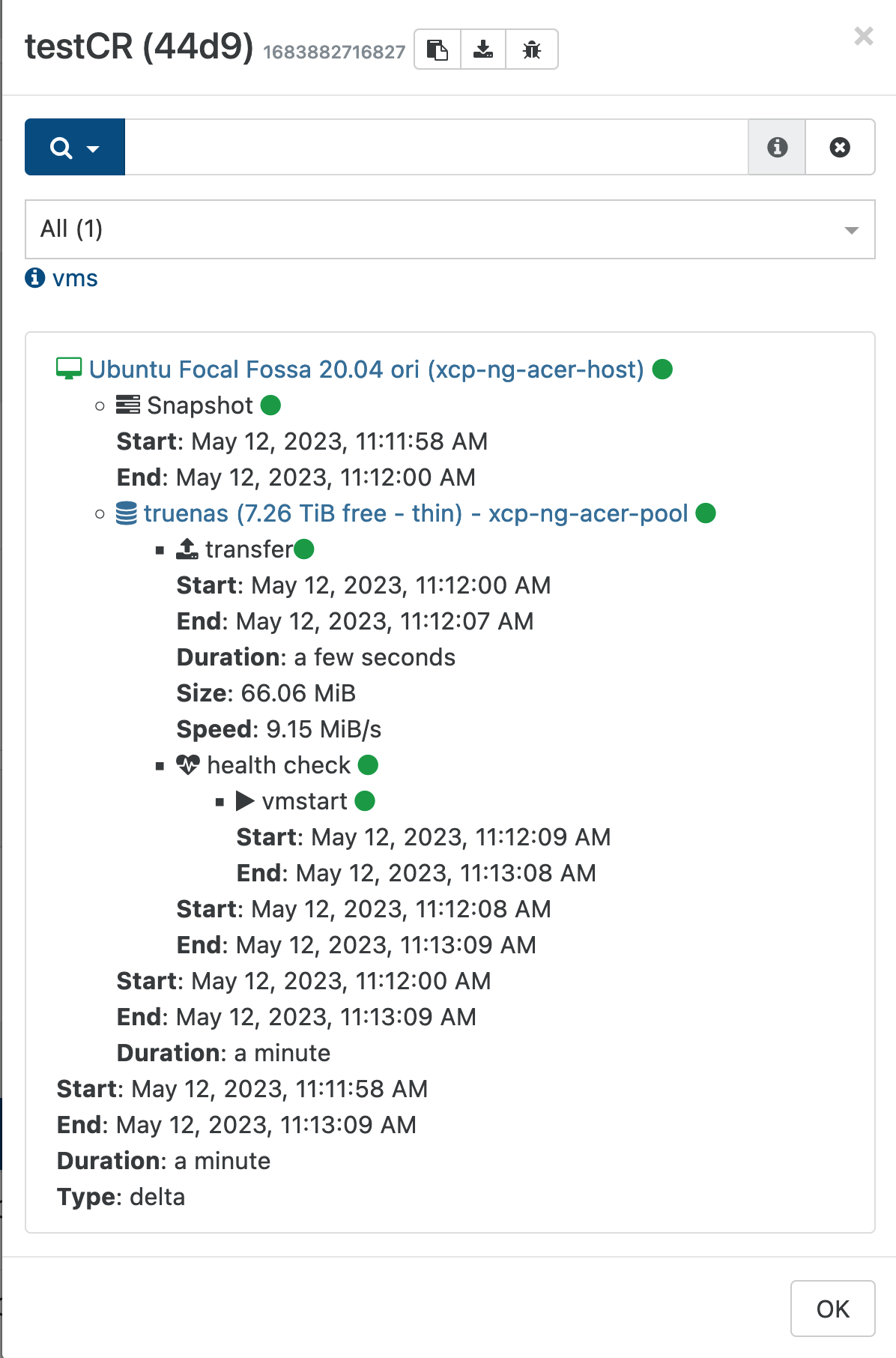
@florent said in Continuous Replication health check fails:
@bullerwins nice catch, the fix is trivial with such a detailled error : https://github.com/vatesfr/xen-orchestra/pull/6830
nice! as soon as it's merges I'll update it and check. I'm so happy if this report helped you guys in any way!