No reply to this topic but just seen same thing.
And same "workaround" : disabling vTPM at VM creation from template to avoid crashing.
I can confirm that XOA want to add a second vTPM, any fix ?
No reply to this topic but just seen same thing.
And same "workaround" : disabling vTPM at VM creation from template to avoid crashing.
I can confirm that XOA want to add a second vTPM, any fix ?
Hi,
After deleting certs in /etc/stunnel/certs on every hosts, and start/stop sdn-controller plugin on XOA, things came back to normal.
Have a good day.
Ah... so I missed the fix by one commit and two hours...
I can confirm it resolve it.
Thanks!
@olivierlambert Hi,
Thank you,
Finally, we have to go ahead and I disconnect manually all ISOs from VMs in "disk" tab (it won't let me disconnect from SR list...), disconnect the SR, forget it and re-add it.
After that, all ISO are now recognize like... ISOs !
Don't know what appened when the upgrade to XO6 was made...
Hi,
That's the wired thing, no error in logs...
But I found why : I have "profile" scope in my OIDC configuration for a while, it seems to broke SSO in last version. Without it, it works.
Thank you
@olivierlambert Hi,
Thank you,
Finally, we have to go ahead and I disconnect manually all ISOs from VMs in "disk" tab (it won't let me disconnect from SR list...), disconnect the SR, forget it and re-add it.
After that, all ISO are now recognize like... ISOs !
Don't know what appened when the upgrade to XO6 was made...
Hi,
Back from holidays, giving some news... But bad news !
After updating to the last commit, same error.
In the drop down list, only two ISOs shown with admin account (guest-tools and another one).
After investigating, thoses files are the only ones without this icon :

All other ISOs are shown with it, as if it were snapshots !
Other problem : we are not able to upload an ISO :
  "message": "OPERATION_NOT_ALLOWED(HVM CDROMs cannot be hotplugged/unplugged, only inserted or ejected)",
  "name": "XapiError",
  "stack": "XapiError: OPERATION_NOT_ALLOWED(HVM CDROMs cannot be hotplugged/unplugged, only inserted or ejected)
Same message if I want to disconnect a disk from a VM.
I repeat that we don't touch this SR from a while, we have just updated XO from the sources...
Hi,
Since XO6 as come default web portal, we aren't able to see ISOs names when deploying a VM, example with a federated user :
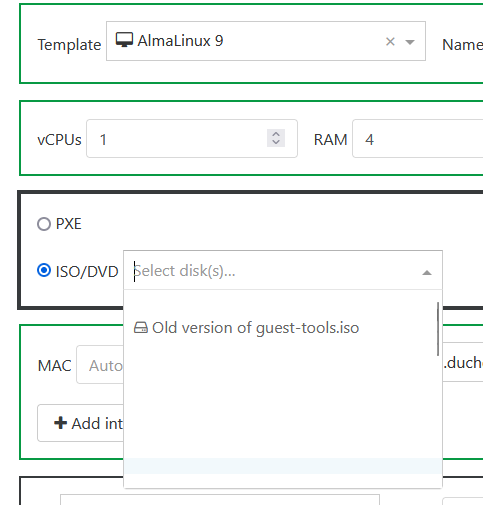
Lines are blank, but ISOs are here ! If I clic on a blank line, one ISO is really selected and boot is OK.
Maybe we can made a game with it in our school  "Find the right ISO"
With admin, it's not the same :
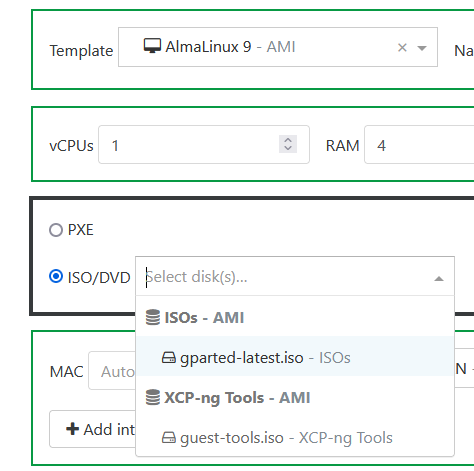
I can see ISO.. but just one of the 24 really on this SR (I can see all of them in SR view).
Hi,
That's the wired thing, no error in logs...
But I found why : I have "profile" scope in my OIDC configuration for a while, it seems to broke SSO in last version. Without it, it works.
Thank you
Hi,
Just pulled the last commit and see that v6 become the "default" endpoint.
Unfortunatly, I have to rollback, any user can connect, SSO (oidc) is broken, I think it's not fully implemented yet ?
callback URL give a "Internal Server Error"; adding "/v5" make a loop with login screen...
There is any trick to diable v6 by default ? Or make OIDC works ?
Thank you and have a good day
Hi,
Can we "recompute" access rights to VMs in self-service ?
We use it for IT exams in our school. We created the spaces upstream and created the VMs with only the teacher.
Then we added the student and activated VM sharing.
It seems that activating sharing does not apply to VMs that have already been created. Why ?
Is it possible to change this ? Launch a command that rescan ACLs?
@bleader Hi,
After a restart of the entire host, port 6640 is now listed when I trigger ss.
But, unfortunatly, tunnels are not working, every VM on this host loose connection to other in the same sdn network.
Exemple with an ping between two hosts :
2025-10-09T12:22:54.781Z|00026|tunnel(handler1)|WARN|receive tunnel port not found (arp,tun_id=0x1f1,tun_src=192.0.0.1,tun_dst=192.0.0.3,tun_ipv6_src=::,tun_ipv6_dst=::,tun_gbp_id=0,tun_gbp_flags=0,tun_tos=0,tun_ttl=64,tun_erspan_ver=0,gtpu_flags=0,gtpu_msgtype=0,tun_flags=key,in_port=33,vlan_tci=0x0000,dl_src=56:30:10:5c:4d:ad,dl_dst=ff:ff:ff:ff:ff:ff,arp_spa=192.168.10.10,arp_tpa=192.168.10.20,arp_op=1,arp_sha=56:30:10:5c:4d:ad,arp_tha=00:00:00:00:00:00)
2025-10-09T12:22:54.781Z|00027|ofproto_dpif_upcall(handler1)|INFO|Dropped 61 log messages in last 59 seconds (most recently, 1 seconds ago) due to excessive rate
2025-10-09T12:22:54.781Z|00028|ofproto_dpif_upcall(handler1)|INFO|received packet on unassociated datapath port 33
If I migrate the VM on the third host to another, network came back.
This is very strange, because the network I've choose to test it is one of firt of all created, not last one, so it have worked before, and not now. I don't understand why and what to do...
Hi,
After deleting certs in /etc/stunnel/certs on every hosts, and start/stop sdn-controller plugin on XOA, things came back to normal.
Have a good day.
@olivierlambert
Iiiiiiii can't really say this...
After the end of creation, I see only VM 1, 3 and 4... No VM2
In logs, again : "TOO_MANY_STORAGE_MIGRATES", seems VM 4 started migrating before VM2 ends...
So, you're right, put custom template on the same storage is the best solution.
Right, I've now understand all of this stuff !
And since it's explained so well, I can also explain it to users (and especially teachers).
And I imagine that if I don't use "Fast Clone", it's a VM copy (not migrate), it will work but take much more time...
Thank you again.
EDIT : forget it, I've tested multiVM deployement fo the same template to local SR without Fast Clone. A VMcopy is made, and after that, an Async.VM.migrate_send to the local SR. I can see that only 3 migration are done at the same time, the fourth one is "blinking" in task list until one finish, and then start.