• Install mono on XCP-ng

    2
    0 Votes
    2 Posts
    52 Views
    P
    @isdpcman-0 said in Install mono on XCP-ng: Our RMM tools will run on CentOS but fail to install because they are looking for mono to be on the system. How can I install Mono on an XCP-ng host so we can install our monitoring/management tools? Reply I think it is advised to consider hosts as appliances and not install any external packages (repos are disabled for that purpose, that's probably your issue for installing anything) even in case of clusters of many hosts in a pool, you should deploy same packages on all hosts to expect compliancy between hosts... better use SNMP to monitor you hosts ? or standard installed packages ?
  • 0 Votes
    6 Posts
    65 Views
    olivierlambertO
    Ah nice!
  • How to Install XCP-ng Guest Tools on Rocky Linux 10?

    7
    0 Votes
    7 Posts
    177 Views
    stormiS
    @gduperrey said in How to Install XCP-ng Guest Tools on Rocky Linux 10?: but I don't have a release date yet, even for testing Actually it's already available as xcp-ng-pv-tools in the xcp-ng-incoming repository. What Gaël means is that we haven't run CI on it yet, so we haven't moved the package to the testing repository yet, which is when we usually invite users to test. However here I'm able to say that there's no risk in installing it now for testing, with: yum update xcp-ng-pv-tools --enablerepo=xcp-ng-incoming,xcp-ng-ci,xcp-ng-testing,xcp-ng-candidates (the testing repos will only be enabled for the time of the command, not permanently)
  • Wazuh OVA appliance : how to make it work !

    4
    2
    6 Votes
    4 Posts
    725 Views
    X
    Thanks a lot for this In few months ago I have found your topic to try wazuh, and it is working good. After some error on my home lab, I need to install all again and remember your topic. On my installation, I just need to set /dev/xvda1 (if I just put /dev/xvda, VM not start). My home lab is on ProLiant DL360 Gen9.
  • Dynamic Memory Increase says VM needs to reboot

    6
    1
    0 Votes
    6 Posts
    76 Views
    olivierlambertO
    Yes, and then Xen will reduce the RAM if there's not enough available to boot a new VM (reducing down to dynamic min). Static means it can't be changed live, while dynamic can.
  • VM trying to add serial console to examine boot process.

    5
    0 Votes
    5 Posts
    157 Views
    K
    So I actually posted these findings to the ZFSBootMenu Discussion github: https://github.com/zbm-dev/zfsbootmenu/discussions/787 Looks like they have tested ZBM against KVM but not Xen. Can Xen not handle a kernel being kexec'd?
  • Xen 4.21

    2
    0 Votes
    2 Posts
    114 Views
    G
    @Forza I keep hoping to see an Alpha or Beta of XCP-ng 9 soon, but I think there is still a lot of work to be done on the host side and on the Xen Orchestra 6 side.
  • Single or Dual CPU Hosts - Any reasons to choose one over the other?

    4
    0 Votes
    4 Posts
    176 Views
    P
    @Bill.Oliver license-wise should be the same. now I think virtualisation gurus here could try to explain you what are the challenges with numa and dual sockets i have notions, but couldnt explain quite the optimisation in xen
  • PCI device doesn't show in XO or xe pci-list

    27
    1 Votes
    27 Posts
    3k Views
    N
    @andriy.sultanov Hi, I am having the same issue. Many PCIe USB cards aren't showing up in XO. Any updates if/when this might be fixed? Being able to configure PCIe passthough from the web UI is a really useful new feature and it would be really cool to be able to fully make use if it. Below as requested my list of items that don't show up: 00:00.0 "Host bridge [0600]" "Advanced Micro Devices, Inc. [AMD] [1022]" "Starship/Matisse Root Complex [1480]" "ASUSTeK Computer Inc. [1043]" "Device [8808]" 00:00.2 "IOMMU [0806]" "Advanced Micro Devices, Inc. [AMD] [1022]" "Starship/Matisse IOMMU [1481]" "ASUSTeK Computer Inc. [1043]" "Device [8808]" 00:01.0 "Host bridge [0600]" "Advanced Micro Devices, Inc. [AMD] [1022]" "Starship/Matisse PCIe Dummy Host Bridge [1482]" "" "" 00:01.1 "PCI bridge [0604]" "Advanced Micro Devices, Inc. [AMD] [1022]" "Starship/Matisse GPP Bridge [1483]" "" "" 00:01.2 "PCI bridge [0604]" "Advanced Micro Devices, Inc. [AMD] [1022]" "Starship/Matisse GPP Bridge [1483]" "" "" 00:02.0 "Host bridge [0600]" "Advanced Micro Devices, Inc. [AMD] [1022]" "Starship/Matisse PCIe Dummy Host Bridge [1482]" "" "" 00:03.0 "Host bridge [0600]" "Advanced Micro Devices, Inc. [AMD] [1022]" "Starship/Matisse PCIe Dummy Host Bridge [1482]" "" "" 00:03.1 "PCI bridge [0604]" "Advanced Micro Devices, Inc. [AMD] [1022]" "Starship/Matisse GPP Bridge [1483]" "" "" 00:03.2 "PCI bridge [0604]" "Advanced Micro Devices, Inc. [AMD] [1022]" "Starship/Matisse GPP Bridge [1483]" "" "" 00:04.0 "Host bridge [0600]" "Advanced Micro Devices, Inc. [AMD] [1022]" "Starship/Matisse PCIe Dummy Host Bridge [1482]" "" "" 00:05.0 "Host bridge [0600]" "Advanced Micro Devices, Inc. [AMD] [1022]" "Starship/Matisse PCIe Dummy Host Bridge [1482]" "" "" 00:07.0 "Host bridge [0600]" "Advanced Micro Devices, Inc. [AMD] [1022]" "Starship/Matisse PCIe Dummy Host Bridge [1482]" "" "" 00:07.1 "PCI bridge [0604]" "Advanced Micro Devices, Inc. [AMD] [1022]" "Starship/Matisse Internal PCIe GPP Bridge 0 to bus[E:B] [1484]" "" "" 00:08.0 "Host bridge [0600]" "Advanced Micro Devices, Inc. [AMD] [1022]" "Starship/Matisse PCIe Dummy Host Bridge [1482]" "" "" 00:08.1 "PCI bridge [0604]" "Advanced Micro Devices, Inc. [AMD] [1022]" "Starship/Matisse Internal PCIe GPP Bridge 0 to bus[E:B] [1484]" "" "" 00:14.0 "SMBus [0c05]" "Advanced Micro Devices, Inc. [AMD] [1022]" "FCH SMBus Controller [790b]" -r61 "ASUSTeK Computer Inc. [1043]" "Device [87c0]" 00:14.3 "ISA bridge [0601]" "Advanced Micro Devices, Inc. [AMD] [1022]" "FCH LPC Bridge [790e]" -r51 "ASUSTeK Computer Inc. [1043]" "Device [87c0]" 00:18.0 "Host bridge [0600]" "Advanced Micro Devices, Inc. [AMD] [1022]" "Matisse/Vermeer Data Fabric: Device 18h; Function 0 [1440]" "" "" 00:18.1 "Host bridge [0600]" "Advanced Micro Devices, Inc. [AMD] [1022]" "Matisse/Vermeer Data Fabric: Device 18h; Function 1 [1441]" "" "" 00:18.2 "Host bridge [0600]" "Advanced Micro Devices, Inc. [AMD] [1022]" "Matisse/Vermeer Data Fabric: Device 18h; Function 2 [1442]" "" "" 00:18.3 "Host bridge [0600]" "Advanced Micro Devices, Inc. [AMD] [1022]" "Matisse/Vermeer Data Fabric: Device 18h; Function 3 [1443]" "" "" 00:18.4 "Host bridge [0600]" "Advanced Micro Devices, Inc. [AMD] [1022]" "Matisse/Vermeer Data Fabric: Device 18h; Function 4 [1444]" "" "" 00:18.5 "Host bridge [0600]" "Advanced Micro Devices, Inc. [AMD] [1022]" "Matisse/Vermeer Data Fabric: Device 18h; Function 5 [1445]" "" "" 00:18.6 "Host bridge [0600]" "Advanced Micro Devices, Inc. [AMD] [1022]" "Matisse/Vermeer Data Fabric: Device 18h; Function 6 [1446]" "" "" 00:18.7 "Host bridge [0600]" "Advanced Micro Devices, Inc. [AMD] [1022]" "Matisse/Vermeer Data Fabric: Device 18h; Function 7 [1447]" "" "" 02:00.0 "PCI bridge [0604]" "Advanced Micro Devices, Inc. [AMD] [1022]" "Matisse Switch Upstream [57ad]" "" "" 03:01.0 "PCI bridge [0604]" "Advanced Micro Devices, Inc. [AMD] [1022]" "Matisse PCIe GPP Bridge [57a3]" "" "" 03:02.0 "PCI bridge [0604]" "Advanced Micro Devices, Inc. [AMD] [1022]" "Matisse PCIe GPP Bridge [57a3]" "" "" 03:03.0 "PCI bridge [0604]" "Advanced Micro Devices, Inc. [AMD] [1022]" "Matisse PCIe GPP Bridge [57a3]" "" "" 03:04.0 "PCI bridge [0604]" "Advanced Micro Devices, Inc. [AMD] [1022]" "Matisse PCIe GPP Bridge [57a3]" "" "" 03:05.0 "PCI bridge [0604]" "Advanced Micro Devices, Inc. [AMD] [1022]" "Matisse PCIe GPP Bridge [57a3]" "" "" 03:06.0 "PCI bridge [0604]" "Advanced Micro Devices, Inc. [AMD] [1022]" "Matisse PCIe GPP Bridge [57a3]" "" "" 03:08.0 "PCI bridge [0604]" "Advanced Micro Devices, Inc. [AMD] [1022]" "Matisse PCIe GPP Bridge [57a4]" "" "" 03:09.0 "PCI bridge [0604]" "Advanced Micro Devices, Inc. [AMD] [1022]" "Matisse PCIe GPP Bridge [57a4]" "" "" 03:0a.0 "PCI bridge [0604]" "Advanced Micro Devices, Inc. [AMD] [1022]" "Matisse PCIe GPP Bridge [57a4]" "" "" 05:00.0 "USB controller [0c03]" "Renesas Technology Corp. [1912]" "uPD720201 USB 3.0 Host Controller [0014]" -r03 -p30 "Renesas Technology Corp. [1912]" "uPD720201 USB 3.0 Host Controller [0014]" 06:00.0 "USB controller [0c03]" "Renesas Technology Corp. [1912]" "uPD720201 USB 3.0 Host Controller [0014]" -r03 -p30 "Renesas Technology Corp. [1912]" "uPD720201 USB 3.0 Host Controller [0014]" 07:00.0 "USB controller [0c03]" "Renesas Technology Corp. [1912]" "uPD720201 USB 3.0 Host Controller [0014]" -r03 -p30 "Renesas Technology Corp. [1912]" "uPD720201 USB 3.0 Host Controller [0014]" 09:00.0 "USB controller [0c03]" "Renesas Technology Corp. [1912]" "uPD720201 USB 3.0 Host Controller [0014]" -r03 -p30 "Renesas Technology Corp. [1912]" "uPD720201 USB 3.0 Host Controller [0014]" 0a:00.0 "Non-Essential Instrumentation [1300]" "Advanced Micro Devices, Inc. [AMD] [1022]" "Starship/Matisse Reserved SPP [1485]" "ASUSTeK Computer Inc. [1043]" "Device [8808]" 0a:00.1 "USB controller [0c03]" "Advanced Micro Devices, Inc. [AMD] [1022]" "Matisse USB 3.0 Host Controller [149c]" -p30 "ASUSTeK Computer Inc. [1043]" "Device [8808]" 0a:00.3 "USB controller [0c03]" "Advanced Micro Devices, Inc. [AMD] [1022]" "Matisse USB 3.0 Host Controller [149c]" -p30 "Advanced Micro Devices, Inc. [AMD] [1022]" "Device [148c]" 10:00.0 "Non-Essential Instrumentation [1300]" "Advanced Micro Devices, Inc. [AMD] [1022]" "Starship/Matisse PCIe Dummy Function [148a]" "ASUSTeK Computer Inc. [1043]" "Device [8808]" 11:00.0 "Non-Essential Instrumentation [1300]" "Advanced Micro Devices, Inc. [AMD] [1022]" "Starship/Matisse Reserved SPP [1485]" "ASUSTeK Computer Inc. [1043]" "Device [8808]" 11:00.1 "Encryption controller [1080]" "Advanced Micro Devices, Inc. [AMD] [1022]" "Starship/Matisse Cryptographic Coprocessor PSPCPP [1486]" "ASUSTeK Computer Inc. [1043]" "Device [8808]" 11:00.3 "USB controller [0c03]" "Advanced Micro Devices, Inc. [AMD] [1022]" "Matisse USB 3.0 Host Controller [149c]" -p30 "ASUSTeK Computer Inc. [1043]" "Device [87c0]" 11:00.4 "Audio device [0403]" "Advanced Micro Devices, Inc. [AMD] [1022]" "Starship/Matisse HD Audio Controller [1487]" "ASUSTeK Computer Inc. [1043]" "Device [8733]" Most important ones being the PCIe USB cards: 05:00.0, 06:00.0, 07:00.0, 09:00.0. Thanks for looking into fixing this.
  • Windows 11 WSL2 is not supported with your current machine configuration

    6
    0 Votes
    6 Posts
    877 Views
    S
    @acebmxer thank you for testing and confirming! For those who try this... NOTE WSL 1 has the issue of throwing the error Failed to take /etc/passswd lock: Invalid argument https://bugs.launchpad.net/ubuntu/+source/systemd/+bug/2069555/comments/12 Here is a fix sudo sed -i -e '/systemd-sysusers/s/.conf$/.conf || true/' /var/lib/dpkg/info/*.postinst sudo apt --fix-broken install
  • How many guest IRQs is too many?

    2
    0 Votes
    2 Posts
    165 Views
    olivierlambertO
    Hi, Let me ask @Team-Hypervisor-Kernel
  • Epyc VM to VM networking slow

    264
    0 Votes
    264 Posts
    194k Views
    TeddyAstieT
    @Maelstrom96 said in Epyc VM to VM networking slow: What is the exact kernel patch that is required for the xen-platform-pci-bar-uc=false fix to work on a Linux guest? We're looking at potentially compiling our own kernel with the xen-netfront.c patch, and we would like to see about adding the other part of the Kernel code needed for the Grant table fix. Patch is in Linux since 5.19-rc. You also find it in some stable branches like 5.15. Otherwise, you can check this patch https://lore.kernel.org/xen-devel/ea4945df138527ed63e711cb77e3b333f7b3a4c9.1751633056.git.teddy.astie@vates.tech/
  • Coral TPU PCI Passthrough

    42
    0 Votes
    42 Posts
    14k Views
    andSmvA
    Hey, sorry guys. Didn't have time to advance on that. I promise will put something to test during november.
  • Gather CPU utilization of host as variable for prometheus exporter

    13
    0 Votes
    13 Posts
    4k Views
    S
    Related: https://xcp-ng.org/forum/topic/9160/xen-orchestra-prometheus-backup-metrics/10
  • Cannot Install Windows 10 in New VM

    36
    1
    0 Votes
    36 Posts
    3k Views
    M
    @dinhngtu No, I haven't tried those. The host reboot appeared to fix the original issue and I had forgotten about them when I was troubleshooting the restart yesterday. I'll do a bit more playing around with this in a few days and report back.
  • [dedicated thread] Dell Open Manage Appliance (OME)

    Solved
    91
    1
    0 Votes
    91 Posts
    29k Views
    AtaxyaNetworkA
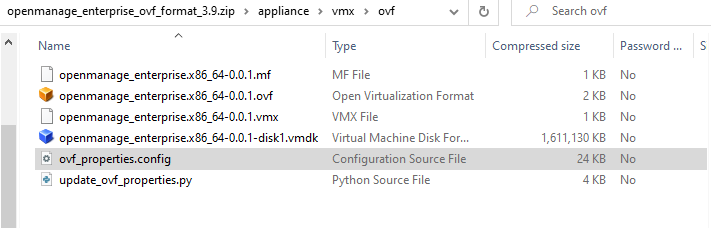
    New version release ! A new patch version of the OME appliance is now available [image: 1761814461561-606721a0-e549-47b3-8b69-55d7b233d21f-image-resized.png] What I changed: Add xen-blkfront and xen-netfront driver Add guest tool (so RAM/network is reported, soft shutdown is working) /dev/sd* is replaced by /dev/xvd* Remove grub password Change admin and root password SSH is now enabled SElinux is working correctly DHCP is enabled by default As usual, please send a DM if you want the link to the vhd Feedback is welcome !
  • xenstore: could not write path attr/eth0.401/ip

    1
    1
    0 Votes
    1 Posts
    170 Views
    No one has replied
  • Kioxia CM7 PCIe pass-through crash

    11
    0 Votes
    11 Posts
    820 Views
    olivierlambertO
    Happy to get your logs to get on the bottom of this. Sadly, we don't have a CM7 around so we cannot reproduce. Thank you very much for the feedback!
  • 0 Votes
    32 Posts
    24k Views
    P
    @Forza Yes it can This is how I do it https://xcp-ng.org/forum/topic/10834/apcupsd-install/9
  • Non-server CPU compatibility - Ryzen and Intel

    116
    0 Votes
    116 Posts
    90k Views
    L
    Hi, I don't know if my question can be part of this thread. I apologize in advance... I bought a new system based on "AMD Ryzen 9 9950X" installed on "ASUS PRIME B850-PLUS-CSM". My target is to install two VM: linux based Ubuntu; Windows 11 In a possible future, I would like to install a graphic card for windows 11 CAD applications... I would like to ask if xcp-ng can run this environment... Thank you Claudio