Second (and final) Release Candidate for QCOW2 image format support
-
(co-written with @dthenot)
QCOW2 RC2 release notes
Hello everyone,
We’re happy to publish the second and last release candidate for QCOW2 support in XCP-ng 8.3, before general availability.
It allows to use the QCOW2 open format (from Qemu) for virtual disks (VDIs) instead of the VHD format, and overcome the limitations imposed by the latter. The most important one being a size limit of 2 TiB per virtual disk.
Adding support for QCOW2 to XCP-ng 8.3 has been a 1.5 year journey, mobilizing many developers of the XCP-ng team.
There was a double challenge :
- Add the new feature, for those among you who really need large disks.
- Maintain the strong reliability of the current VHD support, that is what you are using now in production.
We managed to offer support for this new format without requiring to destroy and re-create your existing storage repositories. However, adding this QCOW2 support had a large impact on the codebase. More than you would usually want on a LTS product.
That’s why we invested a lot of energy, time, and resources on QA. So that we can offer this feature without affecting XCP-ng’s stability.
We need the final touch now, that is: feedback from the community.
The most important test is also the simplest: update your labs (and/or less important pools) from the testing repository, and verify that it all works as expected. VMs, snapshots, live migration, making backups, restoring backups… You don’t need to actually use the new QCOW2 format for your tests to be extremely useful.
Then, you can also start using the new disk format if you wish so (see below).
The new packages versions are:For those of you who took part in the previous betas and RC
First, a big thank you! Then, important information about this RC2.
End of the dedicated repository
You can now remove the dedicated repository file,
/etc/yum.repos.d/xcp-ng-qcow2.repo. Future updates will follow the normal pattern.VHD by default
You will notice one major difference: the default for image format has gone back to being VHD, rather than QCOW2.
Your QCOW2 VDIs will still work after the update, but, by default, migrating a VDI to a SR will try to create a VHD instead of a QCOW2 (and will cause migration to fail if the VDI is bigger than 2TiB).You can change this behaviour by defining QCOW2 as the preferred image format for the target SR. See below.
Image format management (VHD, QCOW2)
This update introduces the concept of image formats. The two possible image formats are now
vhd(our historical format) andqcow2.- Each storage repository (except LINSTOR and SMB) supports both image formats.
- SRs will create any new disk as VHD by default, in order to retain the same behaviour as before the update.
Exception: Xen Orchestra will automatically try to create a QCOW2 disk if the virtual size is bigger than 2TiB. - During a storage migration from a SR to another SR, the destination format is chosen by the destination SR, following the same rules as for the creation of a new disk (this can be used to convert from one format to another).
If you want all new VDIs to be created as QCOW2 disks on a SR, you can set its
preferred-image-formatson your SR.Configuring a SR’s
preferred-image-formatsNew SRs
Configuring the preferred image format for new SRs can be done in Xen Orchestra’s SR creation form.
You can also still add the parameter at the SR creation on the command line with
xe:device-config:preferred-image-formats=qcow2
Example:xe sr-create name-label="test-lvmsr" type=lvm device-config:device=/dev/nvme1n1 device-config:preferred-image-formats=qcow2Existing SRs
To tell an existing SR that it must prefer the
qcow2image format for new disks, it is necessary to unplug, destroy, recreate and re-plug its PBD with the added parameter in the device-config: https://docs.xcp-ng.org/storage/#-how-to-modify-an-existing-sr-connection
In order to unplug the PBD, any VMs with a VDI on the SR will have to be stopped, or the VDI moved temporarily to another SR.This operation will not affect the contents of the SR. The PDB object represents the connection to the SR.
Why is it plural?
Don’t mind the
sat the end ofpreferred-image-formatsfor now. At the moment, only the first element of the list is used in most cases.
One exception: if you define the preferred image formats asvhd, qcow2and attempt to create a new disk with size > 2TiB, Xen Orchestra will automatically select QCOW2 as the format. This is the default for SRs without a configured preferred image format.Creating a QCOW2 Virtual Disk (VDI) directly
Without changing the preferred image format of the whole SR, you can also directly create a QCOW2 VDI. This is not exposed in Xen Orchestra yet.
Use the
xe vdi-createcommand withsm-config:image-format=qcow2.Example:
xe vdi-create sr-uuid=<SR UUID> virtual-size=5TiB name-label="My QCOW2 VDI" sm-config:image-format=qcow2What’s interesting to know
What is notable:
- The current maximum limit is 16 TiB per VDI. We could technically go beyond, but we’re only testing up to 16 TiB at the moment.
- We are using the default cluster size from Qemu, which is 64KiB. It is possible to create a VDI with bigger cluster size, see the FAQ for info.
- Of interest to the users of the
largeblockSR, QCOW2 is working on drives with blocksize >512B. The limitation for devices with blocksize of 4KiB is only for VHD. As such it is possible to use a normal SR instead oflargeblockif you configurepreferred-image-formatsto be QCOW2. - For backups jobs containing QCOW2 images, NBD need to be active on the backup job in XO.
What is not supported:
- QCOW2 image format for LINSTOR SRs (XOSTOR)
- QCOW2 image format for SMB SRs
What is coming soon:
- A way to select the destination format for a migration is being added in XAPI. Currently, the format is only decided by the preferred format of the destination SR
- We have ongoing work to improve performances of the storage stack in general (not just for QCOW2).
Known issues
- Snapshot of RAW VDIs are not working (if working it would create a VHD or QCOW2 image with the parent being the RAW VDI)
- Migrating a > 2TiB VDI towards a SR whose preferred image format is not
qcow2(it will attempt to create a VDI, and fail) - We have identified a problem with BIOS VMs when the boot disk is almost exactly 2TiB, 4TiB, 8TiB or 16TiB big. Having the disk being 1MiB bigger or smaller will allow the VM to boot. If you encounter this issue, resizing again with a bit more (minimum 1MiB) should make the disk boot again.
How to install
The update is provided as a regular update candidate in the testing repository. There are other update candidates being published at the same time. You can see what's in the update by looking at the announcement: https://xcp-ng.org/forum/topic/9964/xcp-ng-8-3-updates-announcements-and-testing/432
You can update from the testing repository:
yum clean metadata --enablerepo=xcp-ng-testing,xcp-ng-candidates
yum update --enablerepo=xcp-ng-testing,xcp-ng-candidates
A reboot is necessary after the update.
Time window for the tests
We’re aiming for a general release in about two weeks, maybe three. Given the tight timeline, your feedback will be especially valued!
-
 R rzr referenced this topic on
-
Here's a work in progress version of the FAQ that will go with the release.
QCOW2 FAQ
What storage space available do I need to have on my SR to have large QCOW2 disks to support snapshots?
Depending on a thin or thick allocated SR type, the answer is the same as VHD.
A thin allocated is almost free, just a bit of data for the metadata of a few new VDI.For thick allocated, you need the space for the base copy, the snapshot and the active disk.
Must I create new SRs to create large disks?
No. Most existing SR will support QCOW2. LinstorSR and SMBSR (for VDI) does not support QCOW2.
Can we have multiples different type of VDIs (VHD and QCOW2) on the same SR?
Yes, it’s supported, any existing SR (unless unsupported e.g. linstor) will be able to create QCOW2 beside VHD after installing the new
smpackageWhat happen in Live migration scenarios?
preferred-image-formatson the PBD of the master of a SR will choose the destination format in case of a migration.source preferred-image-format VHD or no format specified preferred-image-format qcow2 qcow2 >2 TiB X qcow2 qcow2 <2 TiB vhd qcow2 vhd vhd qcow2 Can we create QCOW2 VDI from XO?
XO hasn’t yet added the possibility to choose the image format at the VDI creation.
But if you try to create a VDI bigger than 2TiB on a SR without any preferred image formats configuration or if preferred image formats contains QCOW2, it will create a QCOW2.Can we change the cluster size?
Yes, on File based SR, you can create a QCOW2 with a different cluster size with the command:
qemu-img create -f qcow2 -o cluster_size=2M $(uuidgen).qcow2 10G
xe sr-scan uuid=<SR UUID> # to introduce it in the XAPI
The
qemu-imgcommand will print the name, the VDI is<VDI UUI>.qcow2from the output.We have not exposed the cluster size in any API call, which would allow you to create these VDIs more easily.
Can you create a SR which only ever manages QCOW2 disks? How?
Yes, you can by setting the
preferred-image-formatsparameter to onlyqcow2.Can you convert an existing SR so that it only manages QCOW2 disks? If so, and it had VHDs, what happens to them?
You can modify a SR to manage QCOW2 by modifying the
preferred-image-formatsparameter of the PBD’sdevice-config.Modifying the PBD necessitates to delete it and recreate it with the new parameter. This implies stopping access to all VDIs of the SR on the master (you can for shared SR migrate all VMs with VDIs on other hosts in the pool and temporarily stop the PBD of the master to recreate it, the parameter only need to be set on the PBD of the master).
If the SR had VHDs, they will continue to exist and be usable but won’t be automatically transformed in QCOW2.
Can I resize my VDI above 2 TiB?
A disk in VHD format can’t be resized above 2 TiB, no automatic format change is implemented.
It is technically possible to resize above 2 TiB following a migration that would have transferred the VDI to QCOW2.Is there any thing to do to enable the new feature?
Installing updated packages that supports QCOW2 is enough to enable the new feature (packages: xapi, sm, blktap). Creating a VDI bigger than 2 TiB in XO will create a QCOW2 VDI instead of failing.
Can I create QCOW2 disks lesser than 2 TiB?
Yes, but you need to create it manually while setting
sm-config:image-format=qcow2or configure preferred image formats on the SR.Is QCOW2 format the default format now? Is it the best practice?
We kept VHD as the default format in order to limit the impact on production. In the future, QCOW2 will become the default image format for new disks, and VHD progressively deprecated.
What’s the maximum disk size?
The current limit is set to 16 TiB. It’s not a technical limit, it’s a limit that we corresponds to what we tested. We will raise it progressively in the future.
We’ll be able to go up to 64 TiB before meeting a new technical limit related to live migration support, that we will adress at this point.
The theoretical maximum is even higher. We’re not limited by the image format anymore.
Can I import without modification my KVM QCOW2 disk in XCP-ng?
No. You can import them, but they need to be configured to boot with the drivers like in this documentation: https://docs.xcp-ng.org/installation/migrate-to-xcp-ng/#-from-kvm-libvirt
You can just skip the conversion to VHD.So it should work depending on different configuration.
-
This is not exposed in Xen Orchestra yet.
When will it likely be available in the GUI?
-
@abudef I don't know. I forwarded the question.
-
After upgrading from the QCOW2 beta to this set of packages, I'm running into a pretty severe bug: my QCOW2 disks still exist and are available, but have largely disappeared from the XO UI and many of the lower-level tools.
In the XO5 storage UI, the disks appear, but their names and descriptions are lost, and even though they are currently attached to running VMs, the system doesn't recognize this:
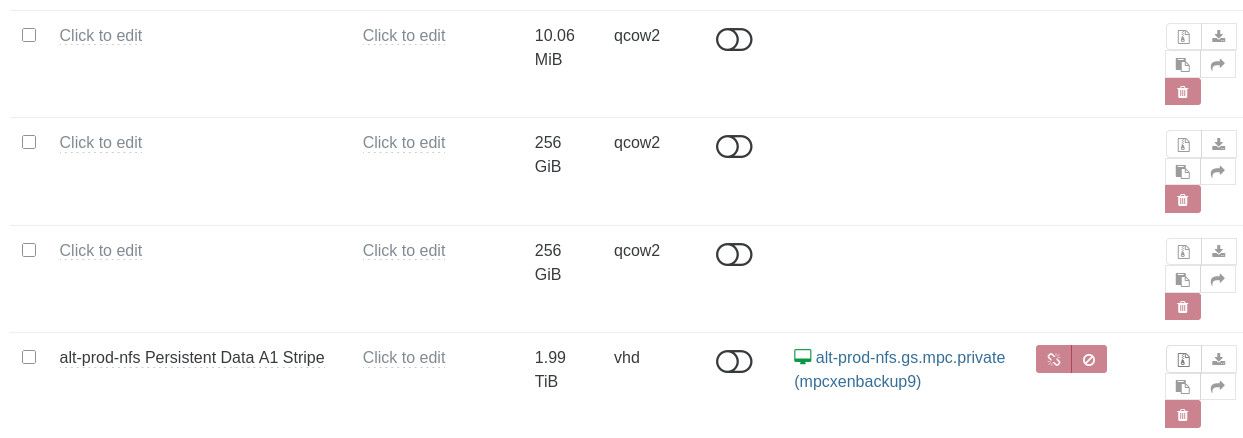
If I try to assign a new name to one of the VDIs as an experiment, I get a "VDI does not exist" error, even though
xe vdi-listdoes show all of these VDIs.On the other hand, I have running VMs where QCOW2 VDIs are attached and mounted, but the
xe vm-disk-listcommand doesn't show them.I see that there's a new batch of updates from a few days ago — any chance they will address this?
-
@abudef we'll add it in the near-term (June hopefully) as QCOW2 support is a major update in the VMS stack !
-
@pkgw Would it be possible to open a ticket and a support tunnel so that @Team-Storage can look at it?
-
@pkgw Our initial theory is that you might have applied updates at some point which had replaced the
smpackage with one that didn't support qcow2. Then a next update would have brought it back, but the metadata lost. -
I just published, in the
xcp-ng-testingrepository, what is hopefully the very last round of fixes before the feature goes live.You’ll have about three days to share your feedback if you’d like to be part of this final sprint
 .
.Details at https://xcp-ng.org/forum/post/104961
-
@stormi That is quite possible. I'll open a ticket for further investigation.
-
This is it, it's now out!
https://xcp-ng.org/blog/2026/05/05/qcow2-is-now-ga-in-xcp-ng/
-
@stormi XCP-ng QCOW2 vs. VHD Performance Feedback on NVMe
First of all, I would like to thank the team for all the hard work in bringing QCOW2 support to a production-ready state. It is a very welcome feature.I have performed some quick I/O benchmarks comparing the new QCOW2 format against the traditional VHD. In my tests, QCOW2 appears significantly slower than VHD on my hardware.
Test Environment
Hypervisor: Dell PowerEdge R420CPU: Intel Xeon E5-2470 v2
Storage: Intel SSDPELKX010T8 NVMe
VM OS: Debian 13
VM Specs: 2 vCPUs, 1GB RAM
Setup: One 10GB VHD and one 10GB QCOW2 disk, both pre-filled from /dev/random.
Methodology
I used a custom test suite available here: https://vm01.unsoft.hu/~ventura/fio/fio_test_20250408.tar.gz
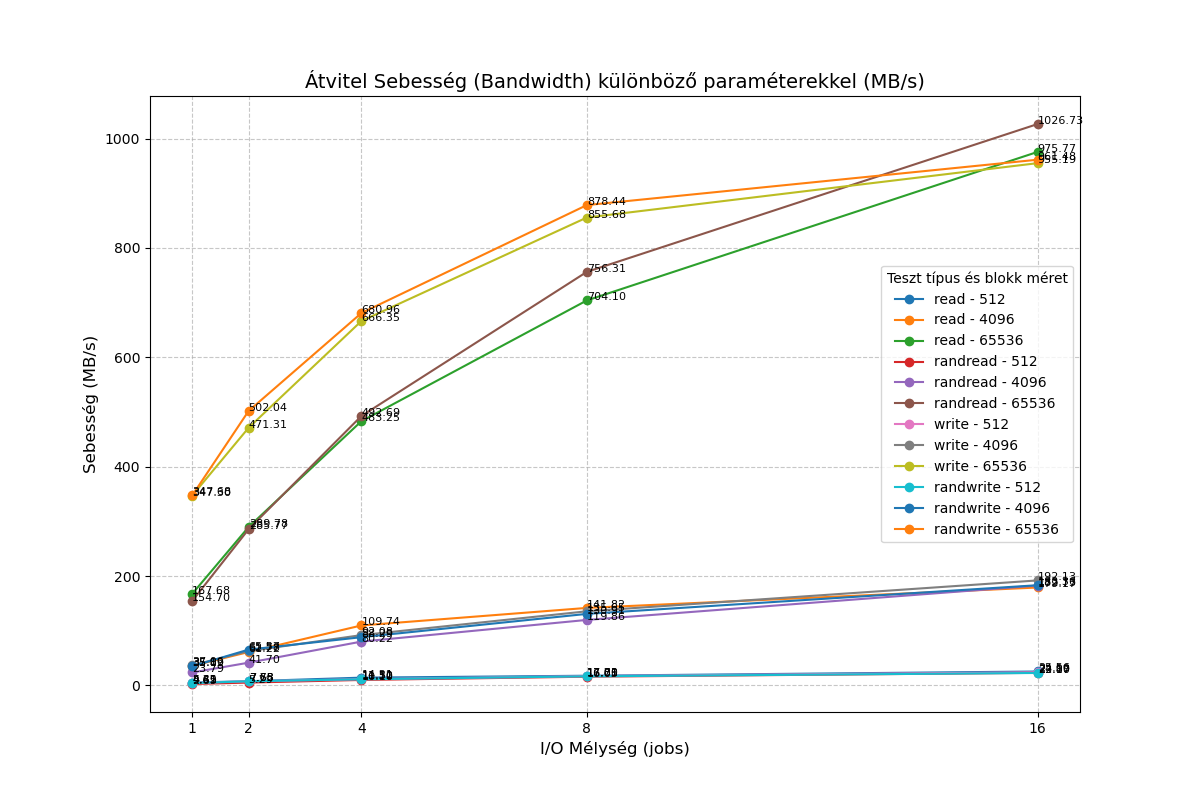
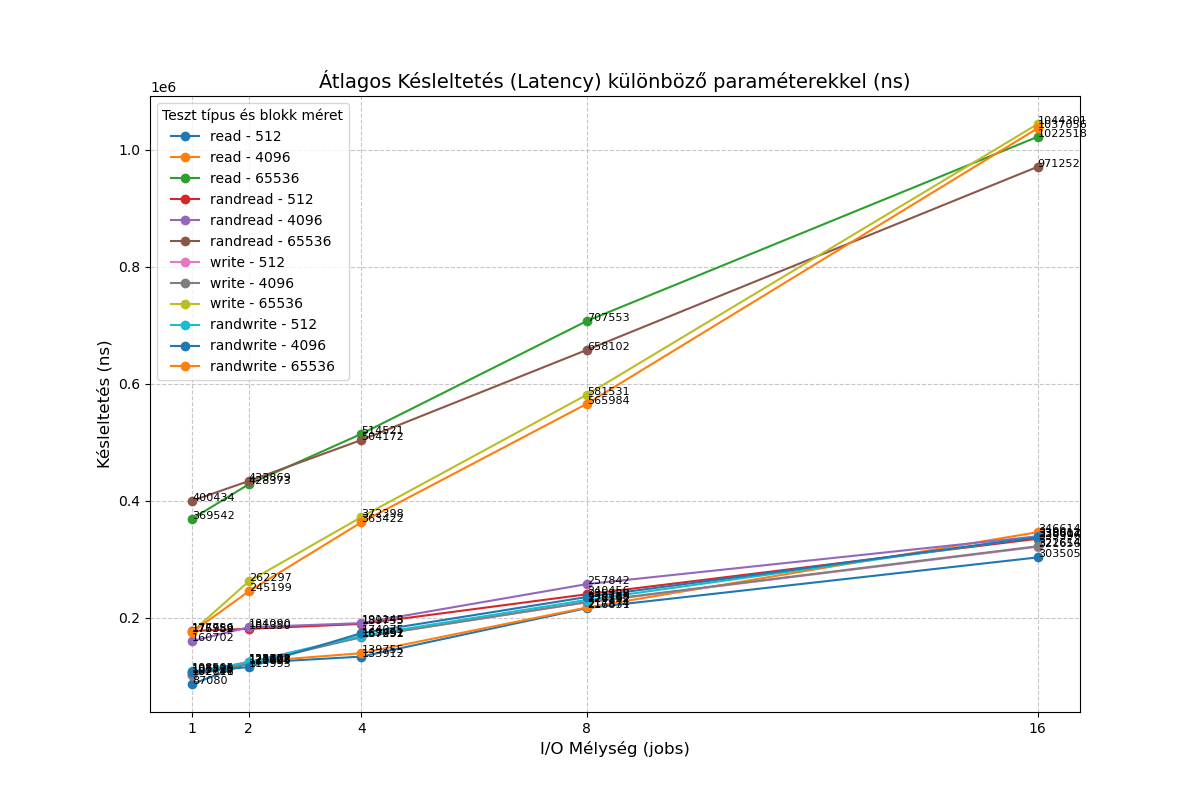
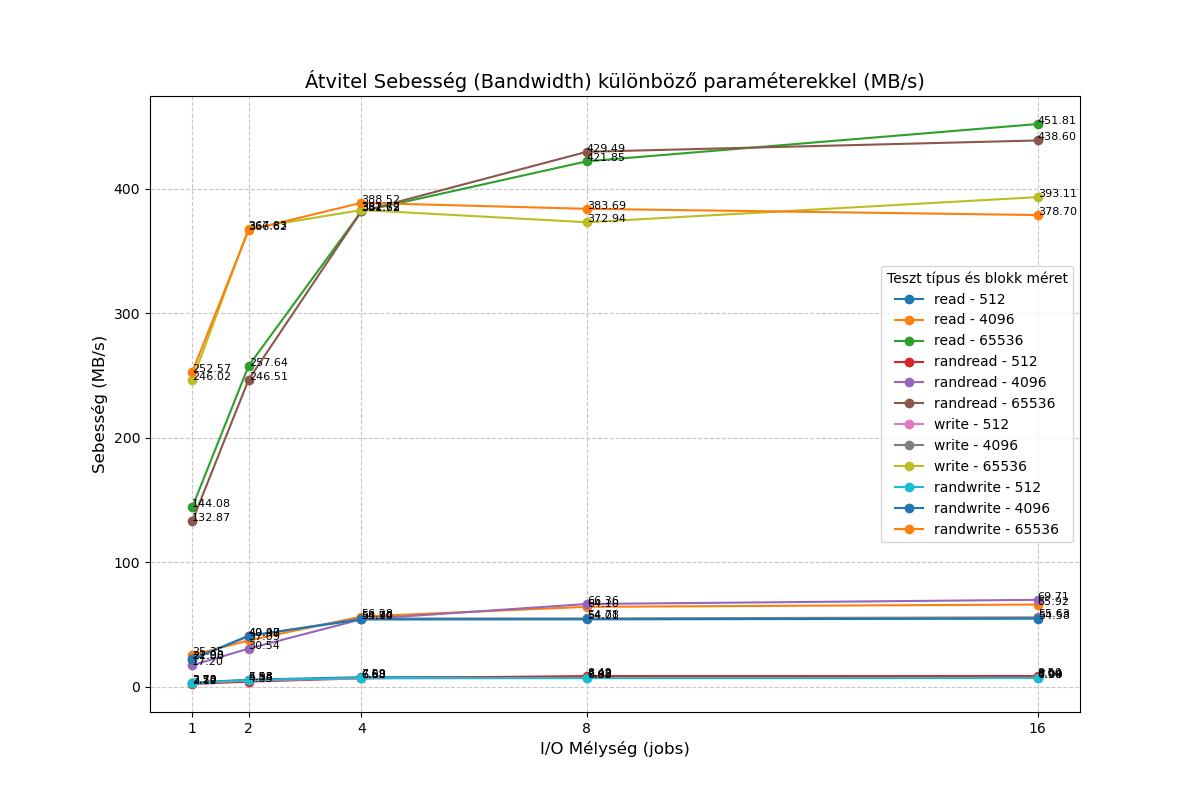
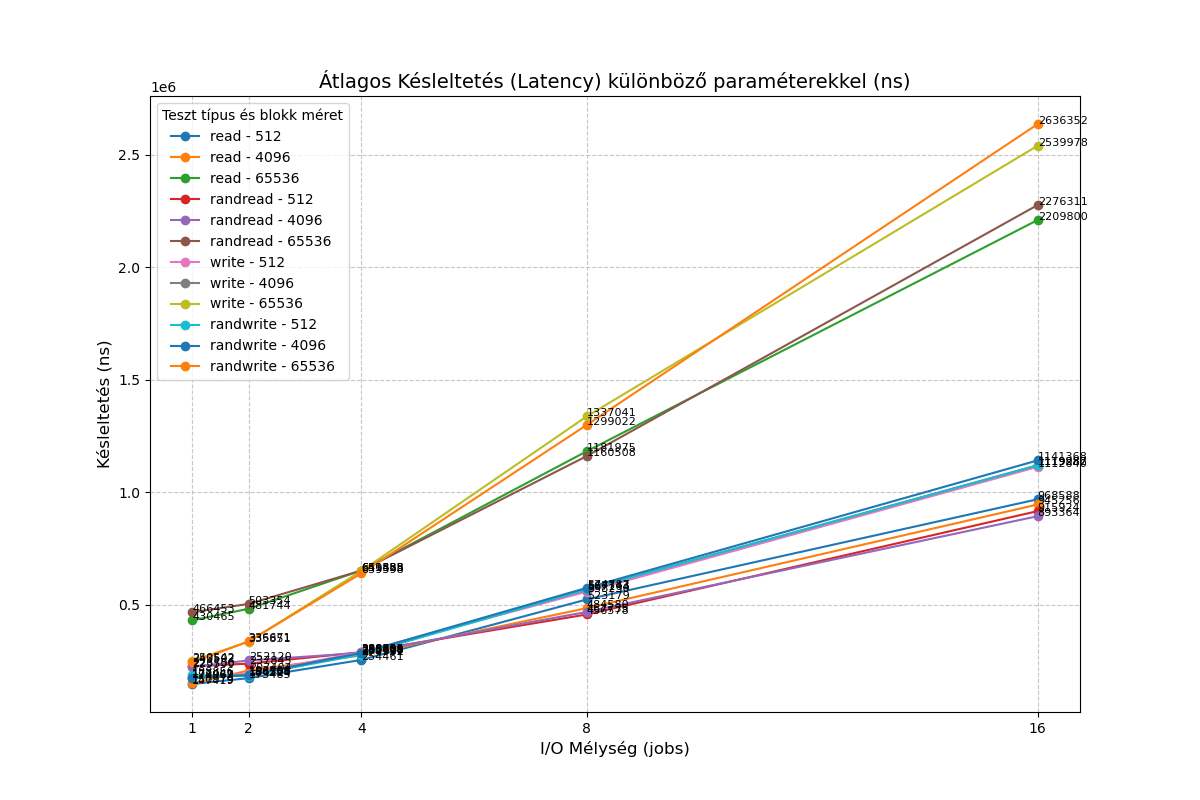
I also ran a simplefio loop with the following results:
VHD:root@Debian-13-CloudInit-20250810:/mnt/vhd# for mode in read write; do for jobs in 1 16; do for bs in 4 64; do for t in "" rand; do printf "%2i qd %2ik % 4s " $jobs $bs $t; fio --name=random-write --rw=$t$mode --bs=${bs}k --numjobs=1 --size=1g --iodepth=$jobs --runtime=10 --time_based --direct=1 --ioengine=libaio|grep -e BW -e runt ; done; done; done; done 1 qd 4k read: IOPS=9625, BW=37.6MiB/s (39.4MB/s)(376MiB/10001msec) 1 qd 4k rand read: IOPS=5414, BW=21.2MiB/s (22.2MB/s)(212MiB/10001msec) 1 qd 64k read: IOPS=2657, BW=166MiB/s (174MB/s)(1661MiB/10001msec) 1 qd 64k rand read: IOPS=2575, BW=161MiB/s (169MB/s)(1610MiB/10001msec) 16 qd 4k read: IOPS=45.7k, BW=178MiB/s (187MB/s)(1785MiB/10001msec) 16 qd 4k rand read: IOPS=45.9k, BW=179MiB/s (188MB/s)(1794MiB/10001msec) 16 qd 64k read: IOPS=16.7k, BW=1041MiB/s (1092MB/s)(10.2GiB/10001msec) 16 qd 64k rand read: IOPS=16.7k, BW=1042MiB/s (1093MB/s)(10.2GiB/10001msec) 1 qd 4k write: IOPS=8842, BW=34.5MiB/s (36.2MB/s)(345MiB/10001msec); 0 zone resets 1 qd 4k rand write: IOPS=8880, BW=34.7MiB/s (36.4MB/s)(347MiB/10001msec); 0 zone resets 1 qd 64k write: IOPS=6095, BW=381MiB/s (399MB/s)(3810MiB/10001msec); 0 zone resets 1 qd 64k rand write: IOPS=6006, BW=375MiB/s (394MB/s)(3755MiB/10001msec); 0 zone resets 16 qd 4k write: IOPS=49.3k, BW=193MiB/s (202MB/s)(1928MiB/10001msec); 0 zone resets 16 qd 4k rand write: IOPS=47.3k, BW=185MiB/s (194MB/s)(1848MiB/10001msec); 0 zone resets 16 qd 64k write: IOPS=14.3k, BW=891MiB/s (934MB/s)(8910MiB/10001msec); 0 zone resets 16 qd 64k rand write: IOPS=15.5k, BW=966MiB/s (1013MB/s)(9663MiB/10001msec); 0 zone resetsQCOW2
root@Debian-13-CloudInit-20250810:/mnt/qcow2# for mode in read write; do for jobs in 1 16; do for bs in 4 64; do for t in "" rand; do printf "%2i qd %2ik % 4s " $jobs $bs $t; fio --name=random-write --rw=$t$mode --bs=${bs}k --numjobs=1 --size=1g --iodepth=$jobs --runtime=10 --time_based --direct=1 --ioengine=libaio|grep -e BW -e runt ; done; done; done; done
 1 qd  4k        read: IOPS=5866, BW=22.9MiB/s (24.0MB/s)(229MiB/10001msec)
 1 qd  4k rand   read: IOPS=4000, BW=15.6MiB/s (16.4MB/s)(156MiB/10001msec)
 1 qd 64k        read: IOPS=2229, BW=139MiB/s (146MB/s)(1394MiB/10001msec)
 1 qd 64k rand   read: IOPS=2161, BW=135MiB/s (142MB/s)(1351MiB/10001msec)
16 qd  4k        read: IOPS=16.9k, BW=66.2MiB/s (69.4MB/s)(662MiB/10001msec)
16 qd  4k rand   read: IOPS=17.6k, BW=68.8MiB/s (72.1MB/s)(688MiB/10001msec)
16 qd 64k        read: IOPS=7244, BW=453MiB/s (475MB/s)(4529MiB/10002msec)
16 qd 64k rand   read: IOPS=6994, BW=437MiB/s (458MB/s)(4372MiB/10002msec)
 1 qd  4k        write: IOPS=5551, BW=21.7MiB/s (22.7MB/s)(217MiB/10001msec); 0 zone resets
 1 qd  4k rand   write: IOPS=5159, BW=20.2MiB/s (21.1MB/s)(202MiB/10001msec); 0 zone resets
 1 qd 64k        write: IOPS=4024, BW=252MiB/s (264MB/s)(2515MiB/10001msec); 0 zone resets
 1 qd 64k rand   write: IOPS=4027, BW=252MiB/s (264MB/s)(2517MiB/10001msec); 0 zone resets
16 qd  4k        write: IOPS=14.5k, BW=56.8MiB/s (59.6MB/s)(568MiB/10002msec); 0 zone resets
16 qd  4k rand   write: IOPS=14.0k, BW=54.7MiB/s (57.4MB/s)(547MiB/10001msec); 0 zone resets
16 qd 64k        write: IOPS=6360, BW=398MiB/s (417MB/s)(3976MiB/10002msec); 0 zone resets
16 qd 64k rand   write: IOPS=6090, BW=381MiB/s (399MB/s)(3807MiB/10002msec); 0 zone resets
I would be interested to know if I'm overlooking something, or if the qcow2 format simply provides lower performance compared to VHD for the time being?
-
Might be interesting to test a different cluster size and see the impact

https://docs.xcp-ng.org/storage/qcow2_faq/#can-we-change-the-qcow2-cluster-size
-
Might be interesting to test a different cluster size and see the impact
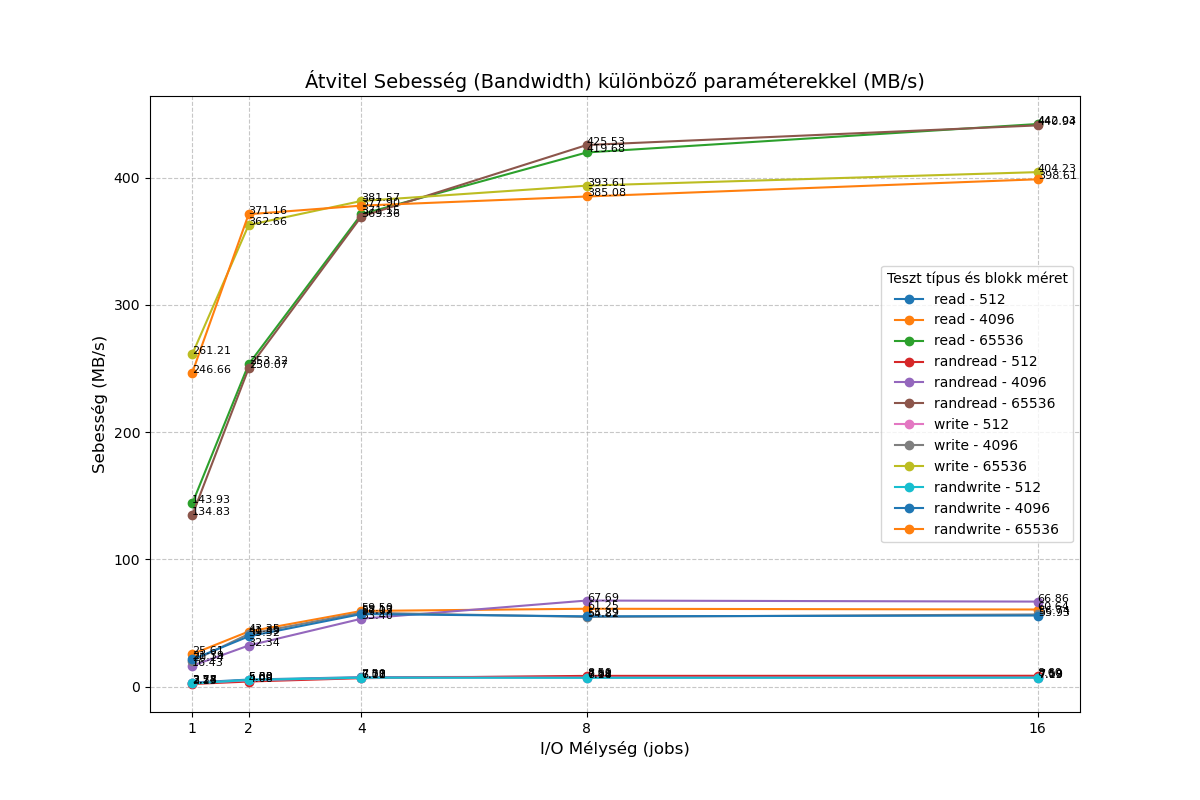
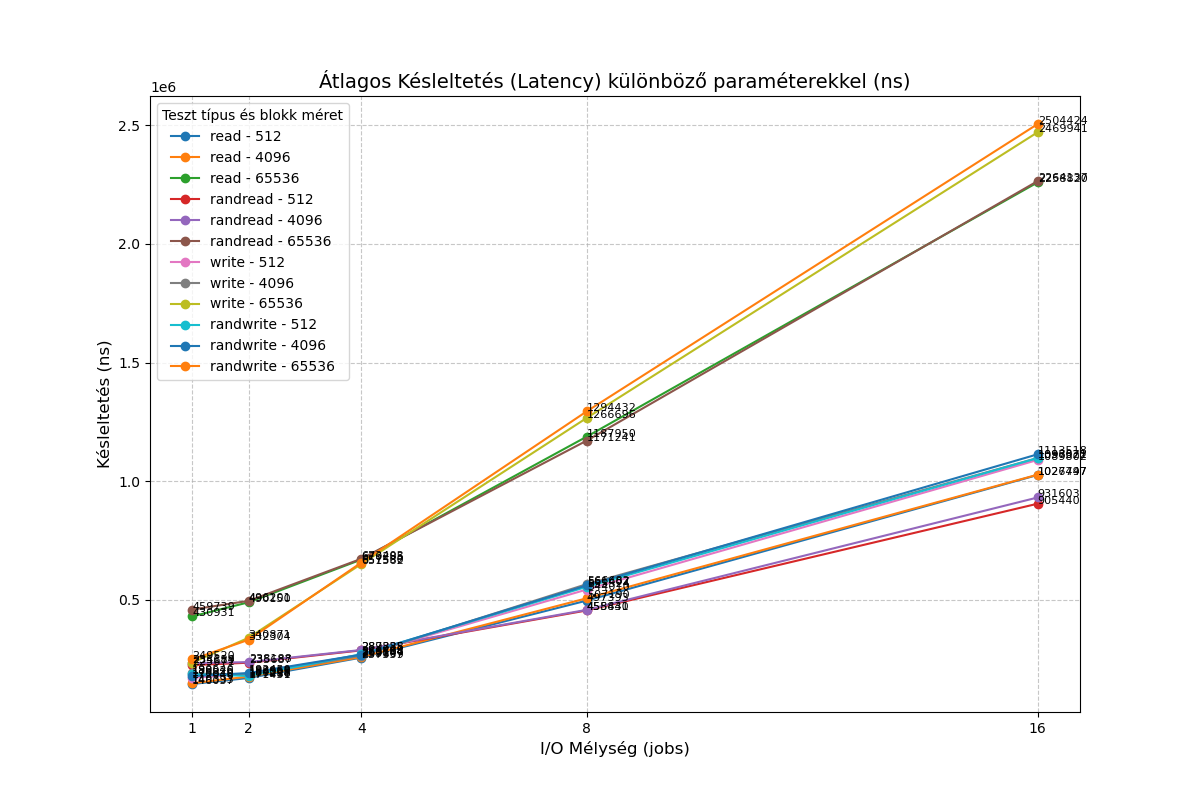
I tested it with a cluster size of 2 megabytes, and nothing changed
-
@bogikornel I've also found that the I/O performance is somewhat lower in general.
Some of my profiling made it seem like the VHD backends were doing their low-level I/O with much bigger blocks than QCOW2 ... would that depend on the cluster size?
-
@pkgw I tested it with a cluster size of 2 megabytes. I got similar results to those with the default size.





Hello! It looks like you're interested in this conversation, but you don't have an account yet.
Getting fed up of having to scroll through the same posts each visit? When you register for an account, you'll always come back to exactly where you were before, and choose to be notified of new replies (either via email, or push notification). You'll also be able to save bookmarks and upvote posts to show your appreciation to other community members.
With your input, this post could be even better 💗
Register Login