XO Backup Error: VDI_IN_USE(OpaqueRef:.., destroy)
-
@itservices Can you create a new backup job with just this VM and see if it's able to create a new chain?
-
Hi @DustinB
The VM could be backed up successfully with the same warning about the "disk parent":
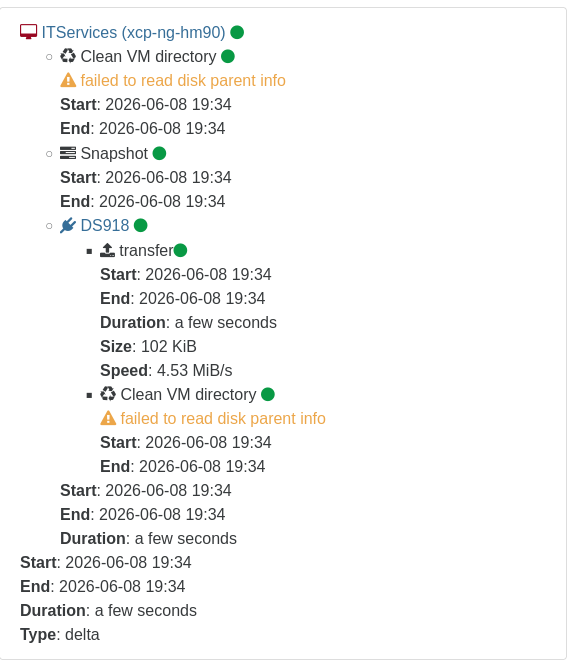
The backup log:
{
  "data": {
    "mode": "delta",
    "reportWhen": "never"
  },
  "id": "1780940083480",
  "jobId": "8326600e-9863-4afa-b724-ae493f564ec8",
  "jobName": "ITServices-Detla-Test",
  "message": "backup",
  "scheduleId": "98f60867-3ac9-4ec5-b0fc-c3fe5520dc1b",
  "start": 1780940083480,
  "status": "success",
  "tasks": [
    {
      "id": "0mq5hqsy6-9uqj9yfb22",
      "start": 1780940085774,
      "status": "success",
      "tasks": [
        {
          "id": "0mq5hqsyx-i5pdr4zkson",
          "start": 1780940085801,
          "status": "success",
          "warnings": [
            {
              "data": {
                "path": "/xo-vm-backups/011114a9-b622-92eb-581f-36f961efe622/vdis/21bbca2a-59ad-4fa2-bb73-f60c1e9216e7/63a73be5-96ff-4c25-b7dd-c93284719916/20260608T150007Z.vhd",
                "error": {}
              },
              "message": "failed to read disk parent info"
            }
          ],
          "end": 1780940085910,
          "result": {
            "merge": false,
            "size": 0
          },
          "message": "clean-vm"
        },
        {
          "id": "0mq5hqtyu-9l484fbage",
          "start": 1780940087094,
          "status": "success",
          "end": 1780940087947,
          "result": "396960d5-93e9-670e-e8b5-345283148c0f",
          "message": "snapshot"
        },
        {
          "id": "0mq5hqumk-7yfetdkltc2",
          "start": 1780940087948,
          "status": "success",
          "tasks": [
            {
              "id": "0mq5hqvn3-wfuuk0sz1mi",
              "start": 1780940089263,
              "status": "success",
              "end": 1780940089285,
              "result": {
                "size": 104448
              },
              "message": "transfer",
              "data": {
                "progress": 100
              }
            },
            {
              "id": "0mq5hr0dj-1l495zk6iys",
              "start": 1780940095399,
              "status": "success",
              "warnings": [
                {
                  "data": {
                    "path": "/xo-vm-backups/011114a9-b622-92eb-581f-36f961efe622/vdis/21bbca2a-59ad-4fa2-bb73-f60c1e9216e7/63a73be5-96ff-4c25-b7dd-c93284719916/20260608T150007Z.vhd",
                    "error": {}
                  },
                  "message": "failed to read disk parent info"
                }
              ],
              "end": 1780940095573,
              "result": {
                "merge": true,
                "size": 0
              },
              "message": "clean-vm"
            }
          ],
          "end": 1780940095590,
          "message": "export",
          "data": {
            "id": "442a4fc2-70ff-474d-aae9-88d0249ef5f2",
            "isFull": false,
            "type": "remote"
          }
        }
      ],
      "end": 1780940095590,
      "message": "backup VM",
      "data": {
        "id": "011114a9-b622-92eb-581f-36f961efe622",
        "type": "VM",
        "name_label": "ITServices",
        "progress": 0
      }
    }
  ],
  "end": 1780940095591,
  "infos": [
    {
      "data": {
        "vms": [
          "011114a9-b622-92eb-581f-36f961efe622"
        ]
      },
      "message": "vms"
    }
  ]
}
I am using "smart mode" for backup jobs. The standalone job went through with and without "smart mode".
Removing the tag from the VM in question and adding it again did not help. I have also deleted the snapshot linked to the backup job and retried, with no change in behavior.
The VM is shutdown and I only turn it on when I need to. During backup it is usually not running.
Thanks again.
Regards,
Marc -
@itservices Hi,
It seems the parent of the backup chain is not found (a delta backup links to another delta and another, until you have a full backup, it seems a backup on this chain is missing).
Can you restart a backup chain to have a full backup? You can do it by reducing the retention in your backup job. -
Hi @pierrebrunet.
Thanks for the tip.
Didn't help, unfortunately. Same error message regarding VDI_IN_USE.
Regards,
Marc -
@itservices It may be a storage or a xo issue. You can try to restart xo-server and retry the backup. If it is solved, it was an issue with xo-server not freeing your vdi. If it still happens, it will be a storage issue
-
I have restarted XO as well as my NAS several times since Saturday.
Still no change.
Regards,
Marc -
The problem still persists with commit e376a.
After installation of updates to XenOrchestra I reboot the VM. Still no backup on this one VM possible.
For now I have created a separate backup job which seems to be working.
Regards,
Marc -
Commit 1ba82 did change something. It transferred the VDI but then fails with the VDI_IN_USE on that particular machine.
Regards,
Marc -
Problem still persists with commit e9b66.
Thanks for the support!
Regards,
Marc -
@itservices Hi,
We did not forget you, working on it! -

I am giving a short "report", when there is new version out and I have tested it.
Nice weekend @y'all
Regards,
Marc -
Problem still present in commit 04deb.
Here is the log from the XO6 interface:
"XapiError: VDI_IN_USE(OpaqueRef:ce1e2c1b-9b52-d813-88fc-18513a51306f, destroy)\n
at XapiError.wrap (file:///opt/xo/xo-builds/xen-orchestra-202606131310/packages/xen-api/_XapiError.mjs:16:12)\n
at default (file:///opt/xo/xo-builds/xen-orchestra-202606131310/packages/xen-api/_getTaskResult.mjs:13:29)\n
at Xapi._addRecordToCache (file:///opt/xo/xo-builds/xen-orchestra-202606131310/packages/xen-api/index.mjs:1078:24)\n
at file:///opt/xo/xo-builds/xen-orchestra-202606131310/packages/xen-api/index.mjs:1112:14\n
at Array.forEach (<anonymous>)\n
at Xapi._processEvents (file:///opt/xo/xo-builds/xen-orchestra-202606131310/packages/xen-api/index.mjs:1102:12)\n
at Xapi._watchEvents (file:///opt/xo/xo-builds/xen-orchestra-202606131310/packages/xen-api/index.mjs:1275:14)\n
at process.processTicksAndRejections (node:internal/process/task_queues:104:5)"
Thanks for your assistance ! ! !
Regards,
Marc -
@itservices Can you check your health dashboard where you should see " Unhealthy VDIs" ? If there are too many VDI in it, they need to be coalesced before restarting a backup.
-
Hi @pierrebrunet.
I have deleted the "parentless" VDIs and snapshots.
So the "Unhealthy VDI" page is empty for me.
So everytime I retry with the VM in question it is creating a new (full) backup-chain.
Regards,
Marc -
Quick Update:
Was looking good with commit cf26d.
After the transfer completed the VDI of that particular VM was still in use, according to XO.
So still failure on the job.
Regards,
Marc -
With commit caa17 the transfer did not happen again and fails the with the known message.
Regards,
Marc -
@itservices
Can you export your logs withxen-bugtool --yestoallplease? If you prefer to avoid exporting everything, we especially need/var/log/xensource.logand/var/log/SMlog
@Team-Storage do you have an idea about the source of the issue? -
With commit c74a8 the problem is still present but the transfer was completed again.
Unfortunately my installation does not recognize the "xen-bugtool" command. And both log files are not present.
Is this something that needs enabling after install of XCP-NG?
Unfortunately and unnoticed my syslog-server did not receive any messages from XCP-NG in the last 30 days.
Other inputs work

**Edit:
I have deleted and re-added the syslog-server with port and now logs are being send to Graylog.**
Thanks for your assistance y'all.
Regards,
Marc -
@itservices Hi, xen-bugtools is in xcp-ng hosts. You can directly get the logs from the hosts if you don't have the command.
-
Evening @pierrebrunet
My bad.
I am now on commit b440f and the issue persist.
I have written you a message with the link to the file.
Regards,
Marc

Hello! It looks like you're interested in this conversation, but you don't have an account yet.
Getting fed up of having to scroll through the same posts each visit? When you register for an account, you'll always come back to exactly where you were before, and choose to be notified of new replies (either via email, or push notification). You'll also be able to save bookmarks and upvote posts to show your appreciation to other community members.
With your input, this post could be even better 💗
Register Login