-
Hello all,
Version 9.2.350 Release of the Windows guest tools has been released.
Download the latest release here: https://github.com/xcp-ng/win-pv-drivers/releases
It will be integrated into the XCP-ng built-in tools ISO after a test period of 2 weeks.
This major release brings a new Windows guest agent with many new features, plus multiple other improvements.
To download XenClean, click here. The installer downloads also includes a copy of XenClean and XenBootFix. It is not necessary to run XenClean when upgrading from previous versions of the XCP-ng Windows guest tools, unless prompted by the installer. Remember to carefully read XenClean docs before use.
Note: Always download the latest XenClean/XenBootFix from https://github.com/xcp-ng/win-pv-drivers/releases
Before installing
Thank you for using our Windows PV tools. Please carefully read the instructions below.
- It is not necessary to run XenClean when upgrading from previous versions of the XCP-ng Windows guest tools, unless prompted by the installer.
- Not compatible with the "Manage Citrix PV drivers via Windows Update" option. You must disable this option before installing.
Changes since 9.1.200
- NEW: Overhauled Windows guest agent with many new features:
- Supports configuring guest IP addresses from within the host using
xe vif-configure-ipv4andxe vif-configure-ipv6. - Session agent now gains a tray icon and About dialog.
- Improved clipboard sync stability and accuracy.
- Better reporting of OS versions.
- Time sync is now integrated with W32Time. NTP is now the only recommended setup for time sync on XCP-ng Windows guests.
- Supports configuring guest IP addresses from within the host using
- Improved: Update XSTDVGA to v0.1.211.1039; improve compatibility.
- Improved: Better reporting of IPv6 addresses.
- Fixed: Better network stability during high load.
- Fixed: Storage driver bug fixes.
- Fixed: Better installer resilience when the offboard task is pending.
Help / Community support
If you encounter installation/uninstallation errors, please try again with one of the following commands:
For installing:
msiexec.exe /i XenTools-x64.msi /log install.log

For uninstalling:
msiexec.exe /x XenTools-x64.msi /log uninstall.log
Please include this log along with the file
C:\Windows\INF\setupapi.dev.login your bug report. These files will help us troubleshoot any installation issues.Additionally, please report any errors or BSOD you encounter during testing of this release. Your feedback is very appreciated.
- Discussion: https://xcp-ng.org/forum (preferred)
- Issue Tracker: https://github.com/xcp-ng/xcp/issues
- IRC: #xcp-ng and #xcp-ng-dev on irc.freenode.net
Full Changelog: https://github.com/xcp-ng/win-pv-drivers/compare/v9.1.200...v9.2.350
Original build: https://github.com/xcp-ng/win-pv-drivers/actions/runs/31088530595 -
Let me ask a question... Since the ability to set IP has been given in xe commands, will we be getting this ability through XO in the future? That would be really nice and would also help prevent shifting IP address when the driver updates.
Also what about NTP timing, if it is joined to a windows domain, will it still work using the domain controller as the time reference? I assume yes, but worth asking.
I normally have my hosts sync to GPS ntp server, the AD guests also sync to same ntp server, and all clients and member servers sync to AD (physical or virtual).
-
@Greg_E NTP sync assist will work with any W32Time time sources, AD or external.
-
@dinhngtu Thank you for the nice update. Just wondering, is it/will it be possible to disable the tray icon somehow (if an additional icon in the tray is not desired)? Even a persistent reg entry would be fine if too much hassle to add option to installer.
-
@clip Just right-click the icon and select Hide, which will stick across reboots for you. You can also set this via Registry (using GP preference if you wish):
Windows Registry Editor Version 5.00 [HKEY_CURRENT_USER\SOFTWARE\XCP-ng\XenPlus] "ShowTrayIcon"=dword:00000000 -
@dinhngtu Fantastic - thank you for thinking of and including that!
-
@dinhngtu Thank you, is it possible to set globally for all (new and existing) users when unable to use GPP?
-
@yomeyo For now, there's no easy way to set for everyone without GPP. You can modify the setting for existing users via
HKEY_USERSand future users by editing theC:\Users\Default\NTUSER.DAThive. -
@yomeyo For now, there's no easy way to set for everyone without GPP. You can modify the setting for existing users via
HKEY_USERSand future users by editing theC:\Users\Default\NTUSER.DAThive.@dinhngtu Thanks for pointing out the ShowTrayIcon key under HKCU\SOFTWARE\XCP-ng\XenPlus.
Since a full Group Policy Administrative Template (ADMX/ADML) option isn't available right now to natively enforce this across fleets of VMs, modifying individual user profiles or loading NTUSER.DAT can be a bit fragile for automated deployments. As a cleaner stopgap, could we implement a cascading fallback check directly inside the Xen Guest Agent binary?
The logic would look like this when the agent checks whether to draw the icon:
Check HKLM (System-Wide Enforced Policy):
HKLM\SOFTWARE\XCP-ng\XenPlus -> "ShowTrayIcon"
If this key exists (e.g., set to 0), the agent respects it globally for all users and ignores everything else. Fallback to HKCU (Per-User Choice).
If the HKLM key is absent, the agent falls back to the existing user-level path:
HKCU\SOFTWARE\XCP-ng\XenPlus -> "ShowTrayIcon"
If this path is also absent, it defaults to showing the icon (1). Adding this hierarchical lookup is usually just a few extra lines of code in the agent's initialisation routine. It completely removes the need for sysadmins to hack the default profile template, making it incredibly easy to hide the icon universally via a single standard command (like reg add HKLM...) during an automated deployment script or MDM push. Let me know if that's something feasible to roll into a minor update for the Guest Agent!
Implementing this will also lay the foundation groundwork for a later group policy enforcement, of this setting.
@yomeyo I’ve requested an addition to the Windows PV tools which would make a good stop gap, until they can add group policy support.
-
@dinhngtu Along with my above request, can we please have the option of an integration with the Windows Event Log?
Having this integration would drastically help with managing fleets of Windows or Windows Server-based VMs, as managing and monitoring flat log files across dozens of machines is very difficult. If the guest agent could log its status, version handshakes, and errors directly to a dedicated Event Log source, sysadmins could easily ingest those flags using standard centralized monitoring tools.
-
@john.c I'll consider adding relevant GPOs for this. There's no real complexity difference compared to normal Registry settings.
As for event logs, what information do you need? The various guest agents already report via Event Log exclusively.
-
@john.c I'll consider adding relevant GPOs for this. There's no real complexity difference compared to normal Registry settings.
As for event logs, what information do you need? The various guest agents already report via Event Log exclusively.
@dinhngtu That is fantastic news regarding the GPOs—having native administrative template support will be a huge win for enterprise deployments!
Regarding the Event Logs, my apologies for the ambiguity; I am aware the agents use Event Logs internally. The issue from a fleet management perspective is that when everything is running normally, the logs are quiet, but when a breakdown happens (like a VM losing its IP reporting, or an auto-update breaking xenflt), finding why it failed from a central monitoring system is difficult.
To make the Event Logs highly actionable for SIEMs, monitoring agents, and automated alerting, having explicit Event IDs for the following critical lifecycle and failure states would be incredibly useful:
- Management Lifecycle & Heartbeats
- Service Lifecycle: Distinct Event IDs for a clean initialisation/handshake with the hypervisor vs. an unexpected service termination.
- IP/Network Metrics Reporting: An error or warning Event ID raised if the agent fails to bind to the guest network stack or fails to transmit the IP metrics to Xen Orchestra after a specific timeout window.
- Backup & VSS Operations
- Quiesced Snapshots: Dedicated Event IDs tracking when a VSS / quiesced snapshot request is received from the host, whether it succeeded, or a specific error ID if it times out or fails (which often causes backup failures on the XO side).
- Driver & Filtering Health
- UpperFilters Validation: A warning or error Event ID if the agent detects that its driver filters (like XENFLT) are missing from the registry or have been overwritten by a Windows Update cycle.
- Upgrade & Missing Tool States
- “Installed but Inactive" Detection: An alert Event ID if the agent service is running but cannot detect active underlying PV drivers. This is critical for catching scenarios where major Windows or Windows Server feature updates silently strip out driver components without running a proper uninstaller, leaving sysadmins caught flat-footed with a broken stack.
Providing explicit, documented Event IDs for these states would allow sysadmins to build standard Windows Scheduled Tasks or monitoring rules (e.g., automatically restarting the Xen Guest Agent service the moment a specific "Failed to report metrics" Event ID is caught).
-
@john.c The new XenPlus guest agent emits relevant warnings/errors in the Application event log whenever a failure happens somewhere in its communication with the hypervisor. This was not documented in the release, but it's much improved over the previous 9.1.200 guest agent. Right now events aren't assigned IDs yet (but you can filter by source)
-
I've updated from 9.1.200.0 to 9.2.350.0 on a Windows Server 2022 VM and encountered this during the update.
I clicked OK:
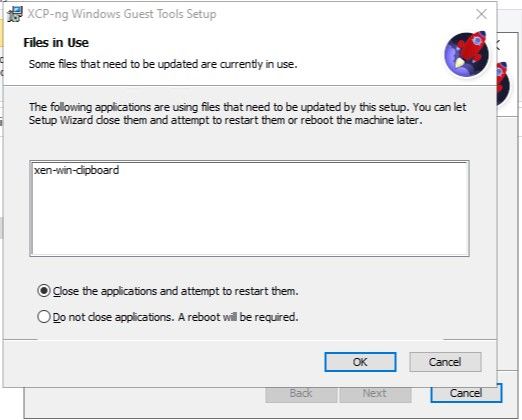
I clicked OK:
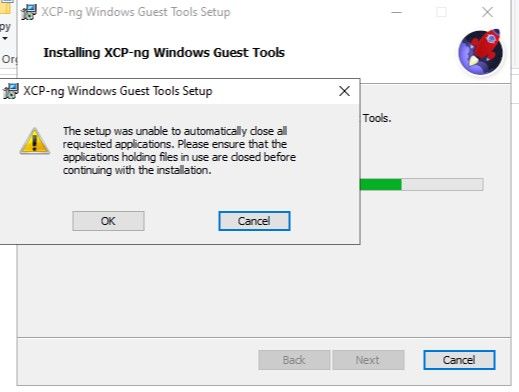
I clicked on Finish and after that on Yes to restart the VM.
Now, after the update, every time I log out a user session, I see an event by XenPlus being logged to the event log:
Category: XenPlus.Features.ClipboardFeature EventId: 0 Failed to serve client 6 Exception: System.IO.EndOfStreamException: IO_EOF_ReadBeyondEOF at System.IO.Stream.<ReadAtLeastAsyncCore>d__48.MoveNext() + 0x1f2 --- End of stack trace from previous location --- at System.Runtime.CompilerServices.PoolingAsyncValueTaskMethodBuilder`1.StateMachineBox`1.System.Threading.Tasks.Sources.IValueTaskSource.GetResult(Int16) + 0x23 at XenPlus.Features.ClipboardFeature.<ServeClientLoopAsync>d__26.MoveNext() + 0xb0d --- End of stack trace from previous location --- at XenPlus.Features.ClipboardFeature.<ServeClientAsync>d__27.MoveNext() + 0x45d -
@yomeyo It's a client shutdown being misreported as a client error. I'll fix this in the next release.
The warning on upgrade should be harmless and you can simply close the application/click OK as you've done.
-
@dinhngtu When creating GPOs if you have an non-policy setting for all users in the settings area for the agent config. The policy based registry settings can go into “Software\Policies”, for the appropriate HKEY and keys.
In which case the policy based registry entries supersede the non-policy ones, when considering also the HKLM vs HKU and HKCU cascade.
Also a disabling of user configuration of the managed setting(s) along with display of a message like “At least some of these settings are managed by the organisation”.
-
@dinhngtu Just wanted to pass along some feedback from trialing the newest version (9.2.350) -- in case it's helpful.
When comparing to the previous version (9.1.200 -- and earlier versions as well) on Windows 11 Pro VM (with latest updates), this new version results in noticeably slower VM restart and shutdown times (at least when monitored via xenadmin [on Windows] and xenadminqt [on Linux]).
... Just remembered I updated XCP-ng at the same time to the latest iteration, perhaps the slowdown may be related to that.
-
@clip This often happens with Driver Verifier enabled, what do
verifier /querysettingsandverifier /querysay? -
@dinhngtu Further trialing showed this issue is confined to one host and all its VMs (including Linux ones) - please consider this issue resolved and not related to Windows PV tools (incidentally, in this particular case there were no verified drivers enabled and no drivers currently verified on the Windows VMs). Apologies for mistaking this as a Windows PV tools issue.
-
Has anyone had their antivirus go crazy with this version? I am getting tons of messages saying this file has a virus:
"C:\Program Files\XCP-ng\Windows PV Drivers\xenplus\xenplus.exe"
Hello! It looks like you're interested in this conversation, but you don't have an account yet.
Getting fed up of having to scroll through the same posts each visit? When you register for an account, you'll always come back to exactly where you were before, and choose to be notified of new replies (either via email, or push notification). You'll also be able to save bookmarks and upvote posts to show your appreciation to other community members.
With your input, this post could be even better 💗
Register Login