Veeam 13.1 Rocky9 Linux Appliance: Potential Data Loss with CBT and Workers with Expired Tokens
-
I have sent detailed log files from XCP-NG, Veeam, and Windows related to the incident to Veeam; the issue has already been escalated, and it appears to be a major problem.
We're already in touch with Olga from the Veeam teamRegards
Micha
Hello,
Thank you for contacting Veeam Technical Support! My name is Olga and I will be assisting you with the case from now on.
Thank you for sharing the logging and the analysis! I will now review the data provided and I will keep you posted on the findings and the next steps.
Have a nice day,
Olga Demidova,
Customer Support Engineer,
Veeam Technical Support.Previous Communication
2026-08-06 14:11:22 UTC - system Generated Message
servicenow_email_separator_e8dd76512b2e031caf56f5f7f891bfa7_c79268ad93ea47508575fcffb903d6e9
---Do not reply below this line---
Hello,
thank you for uploading!
I provided the files to our R&D team. They will need some time to review everything and I will revert to you as soon as I have any updates.
Best regards,
Viktoria Nesmiyanova
Technical Customer Support - EMEA
Veeam SoftwarePrevious Communication
Hello team,
hope my email finds you well!
I would like to inform you that we are actively researching the logs and details with R&D team. I will update you on the investigation status on a regular basis and will let you know as soon as I have any news.
Thank you!
Best regards,
Viktoria Nesmiyanova
Technical Customer Support - EMEA
Veeam Software
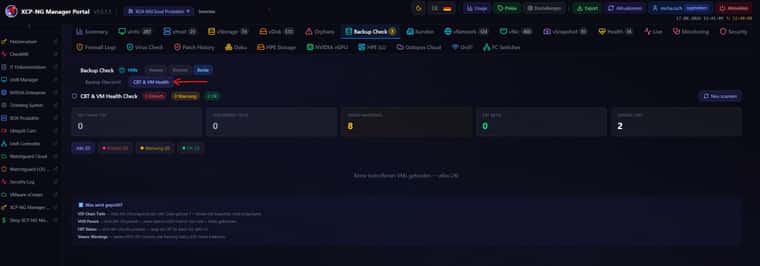
Unfortunately, we still haven't received a response from Veeam. We have now integrated the CBT & VM Health button, which checks the following:
CBT & VM Health Check
What is checked (4 checks):- VDI Chain Depth — XOA API: Number of snapshots per VDI. Chain > 1 = Veeam has not cleaned up snapshots
- VHD Parent — XOA API: VDI.parent — if parent UUID is not in the VDI list = chain broken (critical)
- CBT Status — XOA API: VDI.cbt_enabled — indicates whether Changed Block Tracking is active
- Veeam Warnings — Veeam REST API: Sessions with a warning status (CBT reset indicator)
thank you for your patience!
The R&D team is still investigating the issue and to proceed further they need to have additional information. Here is the list:-
Logs from DC1-XCP-PROD-01 (10.71.1.11)
Files: /var/log/SMlog*, /var/log/xensource.log*, /var/log/daemon.log*, for Aug 3-8 (including rotated/.gz files). -
The output of the commands, executed on any XEN host:
xe message-list name="failed to unpause tapdisk" params=all
yum list installed sm xapi -
Output of the below command executed for each affected VM disk:
xe vdi-param-get uuid=<vdi> param-name=sm-config
VDI UUID should be available in the the storage view. Here is the screenshot from my lab fro the reference: -
Details about NTFS corruption: how was it confirmed?
Please let us know if any of the following info is available: chkdsk output, Windows error codes, disk going read-only, SQL errors, etc. If anything is saved to the files, please attach them to the case. -
Windows event logs and SQL Server ERRORLOG from affected VMs for the period of August 1st - August 8th.
Here is the KB on exporting Windows Event logs (please make sure to include LocaleMetaData): https://www.veeam.com/kb1873
Additionally, could you please clarify the following points about affected VMs?
- Do the guests have XCP-ng drivers installed, or generic ones?
- Timeline: when was each VM's problem first noticed, and was it force-restarted before restoring from backup?
Also, we would like to ask for your cooperation and not to remove any orphaned disks or leftover snapshots, since this could greatly support our investigation.
Currently our developers suspect that the issue might be due to the storage cleaning process freezes VM disks briefly during backup, and sometimes fails to un-freeze them. This theory is not fully confirmed as of now, but for the time being we'd recommend to consider those changes, that may decrease the probability of that happening: - Increase Windows disk timeout inside affected VMs (registry: HKLM\SYSTEM\CurrentControlSet\Services\Disk\TimeOutValue).
- Configure the backup jobs to process less VMs located on the same storage simultaneously.
Please let me know if you have any questions and I will be happy to address them.
Thank you!
Best regards,
Viktoria Nesmiyanova
Technical Customer Support - EMEA
Veeam Software
Previous Communication
2026-08-17 15:26:13 UTC - Viktoria Nesmiyanova Additional Comments
Hello Sacha,
I would like to inform you that R&D team needs a bit more time for investigation. I will keep you informed on the updates from them.Thank you!
Best regards,
In the meantime, we have installed the Windows version of Veeam 13.1 (latest version 13.1.1.18), which has been working without any issues so far. It is possible that the problem only occurs with the Linux Rocky 9 version.
-
I have also opened a support ticket with Veeam. Well trying to... Issue with my account preventing me to and working to fix that issue.
Veeam forum did make this statment about CBT and snapshots -
- There is one known snapshot issue that I'm guessing could possibly have this side-effect (noted in the release notes BTW). We take standard Xen snapshots for CBT but then immediately rename them with our own naming convention. We've noticed that sometimes this rename operation returns success status even if it fails. In this case I can see how this might throw this sort of error but again best to confirm w/support
Veeam support ticket - 08188639
Update from Veeam -
Thanks for the update
I'm currently checking with my team and I will update as soon as possible, what I noticed in the debug logs is the following API failing
\Backup\Plugins\XEN\Backup\Backup Job 1\Delilah ArcDC02 with debug enable
2026-08-07 20:05:04.067 00006 DEBUG | [BackupService]:  <== Request localhost:19000, IsTaskFinished, body: {"taskId":"491371d9-4699-4087-b549-9862d2188177"}
2026-08-07 20:05:04.067 00006 DEBUG | [BackupService]:  ==> Response localhost:19000, IsTaskFinished, success, duration: 0.1404 msec, body: false
2026-08-07 20:05:04.843 00019 INFO  | [XenRpcClient]: Start ListChangedBlocks
2026-08-07 20:05:04.843 00019 DEBUG | [XenRpcClient]: <== Request https://192.168.20.3/Async.VDI.list_changed_blocks, body: ["OpaqueRef:b77ca409-d438-d97e-d8c3-f212647ad469","OpaqueRef:8c83f698-8836-3b4c-1506-8e97315aae1f"]
2026-08-07 20:05:04.845 00019 DEBUG | [XenRpcClient]: ==> Response https://192.168.20.3/Async.VDI.list_changed_blocks code: "OK", duration: 2 msec, body:{"opaque_ref":"OpaqueRef:c9389aa3-552a-0aa4-a5bc-f9b4f7a40e98"}
2026-08-07 20:05:04.845 00019 DEBUG | [XenRpcClient]: <== Request https://192.168.20.3/task.get_record, body: ["OpaqueRef:c9389aa3-552a-0aa4-a5bc-f9b4f7a40e98"]
2026-08-07 20:05:04.847 00019 DEBUG | [XenRpcClient]: ==> Response https://192.168.20.3/task.get_record code: "OK", duration: 2 msec, body:{"uuid":"72b5eb58-5053-d77a-9ee9-089ffaed4541","name_label":"Async.VDI.list_changed_blocks","name_description":"","allowed_operations":["cancel"],"current_operations":{},"created":"2026-08-08T00:05:04Z","finished":"1970-01-01T00:00:00Z","status":"pending","resident_on":"OpaqueRef:05e44734-86d0-c9f6-5079-25633df7bf06","progress":0.0,"type":"<none/>","result":"","error_info":[],"other_config":{},"subtask_of":"OpaqueRef:NULL","subtasks":[],"backtrace":"()","opaque_ref":null}
2026-08-07 20:05:04.848 00019 DEBUG | [XenRpcClient]: Current task Async.VDI.list_changed_blocks:72b5eb58-5053-d77a-9ee9-089ffaed4541. Status: "pending" Progress: 0
2026-08-07 20:05:06.848 00018 DEBUG | [XenRpcClient]: <== Request https://192.168.20.3/task.get_record, body: ["OpaqueRef:c9389aa3-552a-0aa4-a5bc-f9b4f7a40e98"]
2026-08-07 20:05:06.850 00018 DEBUG | [XenRpcClient]: ==> Response https://192.168.20.3/task.get_record code: "OK", duration: 1 msec, body:{"uuid":"72b5eb58-5053-d77a-9ee9-089ffaed4541","name_label":"Async.VDI.list_changed_blocks","name_description":"","allowed_operations":[],"current_operations":{},"created":"2026-08-08T00:05:04Z","finished":"2026-08-08T00:05:05Z","status":"failure","resident_on":"OpaqueRef:05e44734-86d0-c9f6-5079-25633df7bf06","progress":1.0,"type":"<none/>","result":"","error_info":["SR_BACKEND_FAILURE_460","","Failed to calculate changed blocks for given VDIs. [opterr=Source and target VDI are unrelated]",""],"other_config":{},"subtask_of":"OpaqueRef:NULL","subtasks":[],"backtrace":"(((process xapi)(filename lib/backtrace.ml)(line 210))((process xapi)(filename ocaml/xapi/storage_utils.ml)(line 150))((process xapi)(filename ocaml/xapi/message_forwarding.ml)(line 141))((process xapi)(filename ocaml/libs/xapi-stdext/lib/xapi-stdext-pervasives/pervasiveext.ml)(line 24))((process xapi)(filename ocaml/libs/xapi-stdext/lib/xapi-stdext-pervasives/pervasiveext.ml)(line 39))((process xapi)(filename ocaml/xapi/rbac.ml)(line 228))((process xapi)(filename ocaml/xapi/rbac.ml)(line 238))((process xapi)(filename ocaml/xapi/server_helpers.ml)(line 78)))","opaque_ref":null}
2026-08-07 20:05:06.850 00018 DEBUG | [XenRpcClient]: Current task Async.VDI.list_changed_blocks:72b5eb58-5053-d77a-9ee9-089ffaed4541. Status: "failure" Progress: 1
2026-08-07 20:05:06.850 00018 DEBUG | [XenRpcClient]: <== Request https://192.168.20.3/task.destroy, body: ["OpaqueRef:c9389aa3-552a-0aa4-a5bc-f9b4f7a40e98"]
2026-08-07 20:05:06.851 00018 DEBUG | [XenRpcClient]: ==> Response https://192.168.20.3/task.destroy code: "OK", duration: 0.735 msec, body:""
2026-08-07 20:05:06.851 00018 ERROR | [XenRpcClient]: Failed ListChangedBlocks. Error: [Task 72b5eb58-5053-d77a-9ee9-089ffaed4541 (Async.VDI.list_changed_blocks) failed: . SR_BACKEND_FAILURE_460. . Failed to calculate changed blocks for given VDIs. [opterr=Source and target VDI are unrelated].
Veeam.Vbf.Common.Exceptions.ExceptionWithDetail: [Task 72b5eb58-5053-d77a-9ee9-089ffaed4541 (Async.VDI.list_changed_blocks) failed: . SR_BACKEND_FAILURE_460. . Failed to calculate changed blocks for given VDIs. [opterr=Source and target VDI are unrelated].
 ---> Failed to calculate changed blocks for given VDIs.
   --- End of inner exception stack trace ---
   at Veeam.XenBackup.RestClient.XenRpcClient.GetTaskResult(XenRef`1 taskRef, CancellationToken cancellationToken)
   at Veeam.XenBackup.RestClient.XenRpcClient.<>c__DisplayClass94_0.<<ListChangedBlocksAsync>b__0>d.MoveNext()
--- End of stack trace from previous location ---
   at Veeam.Vbf.Common.Helper.Retry.RetryHelper.ExecuteActionAsync[T](Func`2 asyncAction, String description, ILogger logger, LogLevel logLevel, CancellationToken cancellationToken)
2026-08-07 20:05:06.851 00018 INFO  | [XenRpcClient]: Retry after 10 sec. Retry 6/10 for ListChangedBlocks
There is a XEN forum and guide from him, but I need to check internally as first
CBT: the thread to centralize your feedback | XCP-ng and XO forum
https://xcp-ng.org/forum/topic/9268/cbt-the-thread-to-centralize-your-feedback/364
RegardsUpdate -
Veeam came back and suggested I power off the vms with the warrning and power back on. This cleared the error for 2 out of the 4 vms. 1 vm still showed the error the other vm i was not able to power off at that time.
@olivierlambert - From veeam...
After checking with my team, is it possible if you can engage XEN support on this, I checked some of the XEN forum including the KB article about how to troubleshoot CBT errors, seems to be a clean metadata that can be done from their side Troubleshoot Changed Block Tracking | Develop for XenServer
CBT: the thread to centralize your feedback | XCP-ng and XO forum
Regards
Looks like our issue may be different at the end even with involving CBT... Let me know if i should continue in a new post. Support ticket created - Ticket#7762393
-
-
Last Message from Veeam:
Veeam Support - Case # 08187386thank you for your email!
We are currently waiting for R&D team conclusion, and a bit more time is required for the investigation. I am sorry for the possible inconveniences here!
Best regards,
Viktoria Nesmiyanova
Technical Customer Support - EMEA
Veeam Software -
 P poddingue marked this topic as a question on
-
@msupport We're testing Veeam now. From what I read, I thought CBT was supposed to be disabled in XCP as Veeam uses it's own CBT engine, is that not correct?
Also, is it normal for the SR to show a bunch of veeamsnap files for all the VDI's it backed up? I was under the impression Veeam was supposed to remove those when the backup was complete, but perhaps one of them needs to stay for tracking?
-
To test your theory out on my issue i just tried to disable CBT on XOA side and one vm gave me this error...
vdi.set
{
  "id": "11286a97-b773-4ec4-a0b7-464ab87254ca",
  "cbt": false
}
{
  "code": "UUID_INVALID",
  "params": [
    "VDI",
    "a52fe4ab-edc2-4975-a118-f6db84435379"
  ],
  "call": {
    "duration": 1,
    "method": "VDI.get_by_uuid",
    "params": [
      "* session id *",
      "a52fe4ab-edc2-4975-a118-f6db84435379"
    ]
  },
  "message": "UUID_INVALID(VDI, a52fe4ab-edc2-4975-a118-f6db84435379)",
  "name": "XapiError",
  "stack": "XapiError: UUID_INVALID(VDI, a52fe4ab-edc2-4975-a118-f6db84435379)
    at Function.wrap (file:///usr/local/lib/node_modules/xo-server/node_modules/xen-api/_XapiError.mjs:16:12)
    at file:///usr/local/lib/node_modules/xo-server/node_modules/xen-api/transports/json-rpc.mjs:38:21
    at runNextTicks (node:internal/process/task_queues:64:5)
    at processImmediate (node:internal/timers:452:9)
    at process.callbackTrampoline (node:internal/async_hooks:130:17)"
}
Another vm..
vdi.set
{
  "id": "966fe072-4865-48a2-867a-0eb59b23dcc7",
  "cbt": false
}
{
  "code": "UUID_INVALID",
  "params": [
    "VDI",
    "d6662a49-0d65-4c4b-a8fa-cddd42ab4cd5"
  ],
  "call": {
    "duration": 1,
    "method": "VDI.get_by_uuid",
    "params": [
      "* session id *",
      "d6662a49-0d65-4c4b-a8fa-cddd42ab4cd5"
    ]
  },
  "message": "UUID_INVALID(VDI, d6662a49-0d65-4c4b-a8fa-cddd42ab4cd5)",
  "name": "XapiError",
  "stack": "XapiError: UUID_INVALID(VDI, d6662a49-0d65-4c4b-a8fa-cddd42ab4cd5)
    at Function.wrap (file:///usr/local/lib/node_modules/xo-server/node_modules/xen-api/_XapiError.mjs:16:12)
    at file:///usr/local/lib/node_modules/xo-server/node_modules/xen-api/transports/json-rpc.mjs:38:21
    at runNextTicks (node:internal/process/task_queues:64:5)
    at processImmediate (node:internal/timers:452:9)
    at process.callbackTrampoline (node:internal/async_hooks:130:17)"
}
Update - after backup completed with warnings i looked back and CBT was re-enabled in XOA. Did not help with my Veeam issues.
-
@msupport - Looks like veeam is still working with your on your issues. While veeam has pushed me off to vates / xen.
@poddingue - Any updates from Vates about these issues? Is it possible the least patches just pushed might help with either mine or @msupport's issue?
Update - Just got a reply back from veeam ...
As per internal testing, I’m escalation this to the next tier
Regards
-
Nothing from our side that I can pass on, sorry.
Two public things I can point at, neither of which I've tested against your case: the updates that went live yesterday list tapdisk crash fixes among the storage changes (https://xcp-ng.org/blog/2026/08/18/august-2026-updates-1-for-xcp-ng-8-3-lts/), and there's an open PR on tapdisk picking up a cbtlog disk during commit and failing early because that driver has no commit action (https://github.com/xcp-ng/blktap/pull/17).
I'm reading a changelog and a PR body rather than reproducing anything, so treat both as leads.
@msupport, Danp's three questions from 6 August are still open (guest OS, guest tools, VHD or QCOW2), and filling those in is probably worth more than anything I can add here.
@dsauce, I don't know the answer to yours about CBT and the leftover veeamsnap VDIs, and I'd rather say so than guess on a thread about data loss. -
@Danp
We encountered these issues with 4 VMs running different versions of Windows (2019–2022); one VM had the Rust Guest Agent, while the others had the Xen drivers. All VMs used VHD disks. -
our solution to the problem
we want to share a post-incident analysis of a data-loss event on XCP-ng 8.3 LTS (shared block storage over FC, Veeam B&R 13.1 with CBT enabled on the pool) — consolidated from our own incident, topic 12402, the CBT feedback thread 9268, and the still-open blktap PR #17. The pieces fit together into one coherent failure chain, and we believe it may be worth a sticky/KB article.
A note on the trigger, to be fair and complete: in our case the interrupted jobs (step 2) were caused by expired/invalid worker tokens on the XCP-ng hosts, so the backups died mid-run with the locks in place. We consider that our availability problem. However, an interrupted backup must never be able to damage production VM data — cleaning up VDI locks on job abort is the hypervisor's job, and that is the part that turned a backup hiccup into guest data loss.Failure chain (as we understand it)
Veeam backup job with CBT runs and sets locks on VDIs —
paused: true+host_OpaqueRef:xxx: RWentries in the VDIsm_config(XAPI state.db).
The job is interrupted (timeout / crash / restart). The locks are never cleaned up → stalepaused: trueremains in sm_config. These entries are MRO, soxe vdi-param-removecan't clear them.
A later leaf coalesce / commit runs into a cbtlog disk: per PR #17,tapdisk_vbd_first_imagereturns the cbtlog disk ontd_commit, and the cbtlog driver has no commit action → commit fails early. Result: broken VDI chains, CBT metadata VDIs without a vhd parent, hundreds of orphaned VDIs, and .cbtlog files hanging coalesces (as reported in thread 9268).
SR rescan believes a GC is already running and aborts; a host reboot was the only way to force the coalesce through (also reported in 9268).
Storage cleaning freezes the VM disk briefly, but the un-freeze fails on the stale lock →failed to unpause tapdisk ... VMs using this tapdisk have lost access to the corresponding disk(s).
The guest keeps writing on a frozen/lost disk → NTFS corruption inside the guest and, in our case, actual SQL Server data loss.
Step 5 matches exactly the theory Veeam R&D is currently investigating ("storage cleaning freezes VM disks briefly during backup and sometimes fails to un-freeze them"). The stalepaused:truelock appears to be the missing "why" behind the failed unpause.What helped us recover
Patching the stale lock out of XAPI state.db (stop xapi, backup state.db, remove
paused+host_OpaqueRefentries from the affected VDI's sm_config, start xapi).
Then: reset CBT on the affected VDIs and trigger a full backup so CBT re-initializes cleanly — otherwise the next interrupted job re-creates the same situation.
For the coalesce backlog: with the affected VMs powered off and CBT disabled, snapshot-create-then-delete to kick the GC, watch SMlog, iterate. (Same recipe a user documented in 9268.)
27.08.2026 | Veeam identified this issue:
For all three: A disk refresh operation failed because a disk was in the “paused” state; for SQL03, there was also a failed unpause. This is a strong indication that the XCP-ng Storage API (VDI pause/unpause during the snapshot) is the crux of the problem here. -
Veeam scheduled a remote call with me and pulled more log files. Of coarse when we ran the backup job twice in a row both times al vms were successful. Veeam needs to baby sit our backups :). The call was cut short do to internet going down. I have uploaded the logs and waiting to hear back.
Update - Veeam took alot more logs from Veeam and from xcp-ng pool.
Their response back -
I've got someone else getting similiar results, so I'm providing both of your logs to get some insights. Basically when you see the error, it's because something happened to the bitmap we left behind on the previous run and so next run, we re-read the entire disk. I've not found anything super clear to what's going wrong with the bitmap and why its gone, even from the Xen server logs, so I'm hoping from QA's eyes might see what I might be missing. I will keep you posted if they have any details.
Update 8.26.26 -
I just wanted to provide an update, the QA team is still checking stuff, but they did advised the following.
They noticed for the disks, they show there are configured XO native backups:
ie.
xo:backup:deltaChainLength: 4; xo:backup:contentKey: 4bce47c7-04bb-44ae-a687-c35c9cfbb2b2;
xo:backup:job: e3616a64-6b83-4bd0-80b1-00523678e909; xo:backup:includeNonNbdQcow2Fix: true; xo:backup:schedule: 3488baee-fe48-4acb-a5d0-e728fe28efa1;
xo:backup:vm: 5703adef-d804-6b15-ba2f-7b3357a711bb; xo:backup:datetime: 20260819T01:00:33ZI believe you said the native XO Backup was disabled, can you re-confirm if that is accurate, and provide a screenshot for XO's Job and backup list to verify.
QA did confirm that native XO Backups can cause issues as it treats the objects as two different chains and so that's why a CBT comparison can fail. QA says they are looking into ways to change how the comparison works in a future update, and expects it to help if in situations if there are native backups, but asked if the Native backup can be verified as disabled for now.I have respnded stating that Veeam backup is only used for Windows based vms. Backup in Xen Orchestra is only used for linux base vms.
-
I have received a very long update back from Veeam on my backup issues....
There appears to be another user with similar setup / issue not sure if that user is the OP this post specifically...
Hello,
Thank you for your patience. The QA team has finished the analysis, and I am going to outline the details as below:
1. CBT Inconsistency Issue
Whenever you see the Warning about CBT showing:
2026-08-16 17:37:27.459 00079 ERROR | [XenRpcClient]: Failed ListChangedBlocks. Error: [Task 291af3d7-28c1-15a9-7f13-c6a1a12283e9 (Async.VDI.list_changed_blocks) failed: . SR_BACKEND_FAILURE_460. . Failed to calculate changed blocks for given VDIs. [opterr=Source and target VDI are unrelated].We can go to the previous run and see that we get reports that the CBT of the previous snapshot is inconsistent and thus removed by XCP:
2026-08-16 09:54:34.120 00004 ERROR | [XenBackupManager]: Failed to retain the data for the snapshot 5a17fb31-2616-4e72-a85c-e235883c8c91
Veeam.Vbf.Common.Exceptions.ExceptionWithDetail: [Task 39c0f25f-e811-ee45-1b0b-e4a9ca9839ae (Async.VDI.data_destroy) failed: . VDI_NO_CBT_METADATA. OpaqueRef:a005d328-6da0-b8b7-34ef-0607ed44c2ed
The team has been reviewing and testing, and this is what they see. We send the request for the snapshot to be created, and it is sent to the coordinator:
xcp-ng-vyadytknAug 16 09:50:08 xcp-ng-vyadytkn SM: [1555017][MainThread] vdi_clone: introduced VDI: OpaqueRef:a005d328-6da0-b8b7-34ef-0607ed44c2ed (5a17fb31-2616-4e72-a85c-e235883c8c91)CBT shows as open and reading fine:
Aug 16 09:50:08 xcp-ng-vyadytkn SM: [1555017][MainThread] ['/usr/sbin/cbt-util', 'set', '-n', '/var/run/sr-mount/7911c9c5-5f20-01e1-8b8d-39c6a98a2704/5a17fb31-2616-4e72-a85c-e235883c8c91.cbtlog', '-f', '1']
Aug 16 09:50:08 xcp-ng-vyadytkn SM: [1555017][MainThread]   pread SUCCESS
But look at how on
xcp-ng-host2the CBT gets marked as inconsistent by XCP, even though it's open and reading:Aug 16 09:51:05 xcp-ng-host2 SM: [1683689][MainThread] Changed Block Tracking metadata is inconsistent for disk 5a17fb31-2616-4e72-a85c-e235883c8c91.The Breakdown:
xcp-ng-vyadytknwas the coordinator—the one we talk to, who then passes everything around to the hosts.xcp-ng-host2was the host that the VM resided on at that time.xcp-ng-host2is marking the CBT as inconsistent and deleting the snapshot CBT log, which means we cannot reference it on the next run. We do not see anything else interacting with the CBT besides that host.
This matches exactly what we see with another client running the same setup. The team successfully replicated the environment, which is configured as follows:
- VM storage is NFS.
- The VM is running on a host that is not the coordinator.
They have been able to reproduce this behavior occasionally, and the working theory is that the VM host keeps its own tracking separate from the coordinator. Part of the backup process requires the VM host to issue a pause/resume via a process called
tapdisk. When it resumes, it pushes a data cache (likely inside the NFS cache), overwriting the CBT reference held by the coordinator server. It acts as a race condition—whoever pushes the CBT data last wins. If the VM host pushes last, it breaks what the coordinator is sending.Next Steps for CBT:
The team is working to raise this issue directly with Vates so they can address the race condition. We ask that you also open a Vates ticket if possible to help draw more attention to the bug. We are trying to find ways to code around this race condition in the future, but there are currently no ETAs or guarantees.
2. Synthetic Full Failures (
Delilah_ArcFS01)In addition to the CBT bug, the team discovered a separate issue. Recently, the synthetic fulls for
Delilah_ArcFS01have been failing. This appears to be related to the NFS repository:[30.08.2026 00:43:22.856] <24> [0007] Error (1) Failed to execute full transform task [30.08.2026 00:43:22.856] <24> [0007] Error (1) Agent: Failed to process method {Transform.CompileFIB}: NfsFileEx was already stopped. File: [Host:, Mount: [/volume1/veeam], Disk: [Delilah ArcFS01 Backup/Delilah ArcFS01 Backup_2026-08-29T232336.vib], Type: [nfs3 (1)]] (Veeam.Backup.Common.CCppComponentException) [30.08.2026 00:43:22.856] <24> [0007] Error (1) in c++: Failed to execute command Command: READ, Offset: 2523136, Data size: 659456, Chunk size: 131072 [30.08.2026 00:43:22.856] <24> [0007] Error (1) in c++: Failed to read file: Offset: 2523136, Block size: 659456, File: Path: [Host:, Mount: [/volume1/veeam], Disk: [Delilah ArcFS01 Backup/Delilah ArcFS01 Backup_2026-08-29T232336.vib], Type: [nfs3 (1)]], Handle: [01000702080061030000000007fffd5f65840fb20000000000000000150061038a2f7c0b0400610379207c0b], Read chunk size: 131072, Write chunk size: 131072, Read only: trueBecause it continuously fails during the synthetic full, it eventually causes the snapshot to be lost when retries fail. The team will change this logic in a future update.
Action Items for the NFS Issue:
To help prevent these snapshot loss failures, could you please provide the logs from the repository NFS (192.168.20.91)?- Export the logs from the Veeam server and select the repository host.
- Provide the results of running this command directly on the Repository host:
journalctl --since "30 days ago" > journal_repo.logTemporary Workaround:
If you can, please temporarily switch to active fulls instead of synthetic fulls to help stabilize the job.Please let me know if you have any questions, and if you are able to raise that ticket with Vates.
They also just responded back with this statment...
Regarding the second part of the last email with the noticed Synthetic full issue, I actually would like you to also make this registry entry on the Veeam server and keep synthetic fulls enabled to see if it helps with that issue:
Path: HKEY_LOCAL_MACHINE\SOFTWARE\Veeam\Veeam Backup and Replication Name: Nfs3CommandWaitTimeoutSec Type: DWORD Value (In Decimal): 86400 -
@acebmxer Very interesting. Thanks for sharing! I will wait until Veeam issued a new (hotfix) release before evaluating Veeam as a replacement for Xen Orchestra Backup.
-
Just recieved another update from veeam...
Regarding the general earlier errors:
Warning : Failed to use CBT: [Task e75c4247-2ee1-7b51-088c-b970ace60f3d (Async.VDI.list_changed_blocks) failed: . SR_BACKEND_FAILURE_460. . Failed to calculate changed blocks for given VDIs. [opterr=Source and target VDI are unrelated]Our QA team did hear back from Vates support, who says its tied to a recent bug they've found with blktap calls: https://github.com/xapi-project/blktap/pull/444
Our QA engineer hasn't heard back yet on ETA when it will be pushed out in a general release yet though


Hello! It looks like you're interested in this conversation, but you don't have an account yet.
Getting fed up of having to scroll through the same posts each visit? When you register for an account, you'll always come back to exactly where you were before, and choose to be notified of new replies (either via email, or push notification). You'll also be able to save bookmarks and upvote posts to show your appreciation to other community members.
With your input, this post could be even better 💗
Register Login