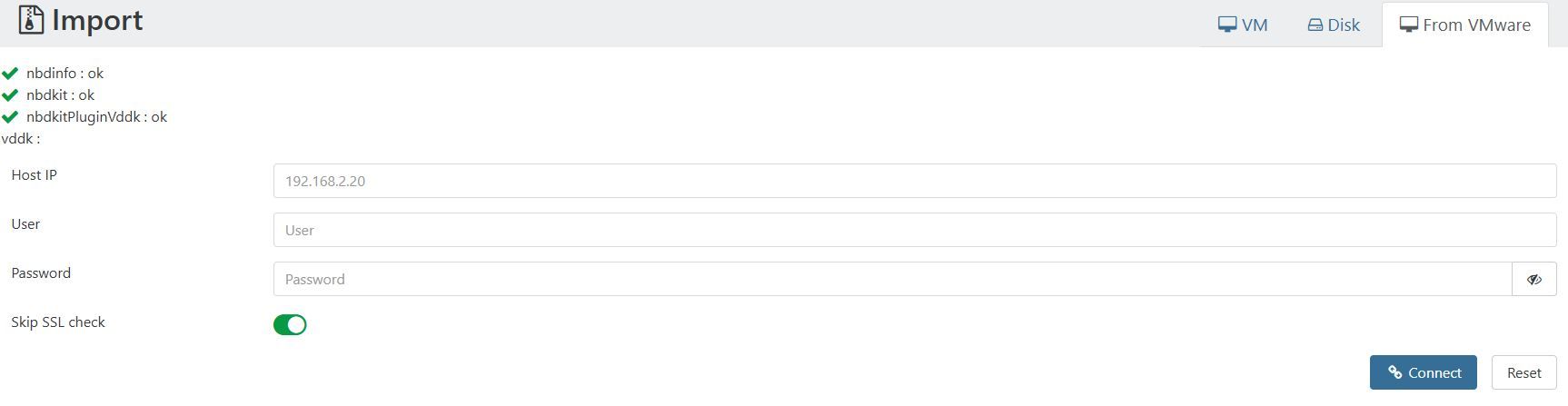
XOA 5.110 - Import from VMWare shows "vddk:" without ok or checkmark status
-
Is it clear in our doc @Danp to make a snapshot on the VM we want to live migrate, and ourselves? (ie it's not done via the V2V automatically?)
-
@olivierlambert said in XOA 5.110 - Import from VMWare shows "vddk:" without ok or checkmark status:
Is it clear in our doc @Danp to make a snapshot on the VM we want to live migrate, and ourselves? (ie it's not done via the V2V automatically?)
I was also performing tests with the new V2V VDDK feature and noticed that it is required to manually create snapshots on VMWare side.
I was wondering: is there any particular reason that V2V is not creating the snapshots automatically?
I think if it would create the snapshots automatically it would be a great improvement and make the feature more intuitive to use.
Another thing that I noticed:
after successful migration by V2V VDDK tool the resulting VM on XCP-ng side has 2 snapshots:

Are they required? Can they be deleted automatically by V2V feature?In the old V2V implementation (without VDDK) I did not have these snapshots after successful migration.
Anyways: thank you so much for this great product, I am currently preparing the migration of our internal infrastructure from VMWare to the Vates stack and am feeling great so far about the product and the community!
-
@MajorP93 said in XOA 5.110 - Import from VMWare shows "vddk:" without ok or checkmark status:
I was wondering: is there any particular reason that V2V is not creating the snapshots automatically?
I agree, question for @florent
edit: and about the snapshots on destination too, I wonder if it's normal

-
@olivierlambert said in XOA 5.110 - Import from VMWare shows "vddk:" without ok or checkmark status:
Is it clear in our doc @Danp to make a snapshot on the VM we want to live migrate, and ourselves? (ie it's not done via the V2V automatically?)
I believe so, although I know that @florent stated that they need to be updated.
@MajorP93 said in XOA 5.110 - Import from VMWare shows "vddk:" without ok or checkmark status:
after successful migration by V2V VDDK tool the resulting VM on XCP-ng side has 2 snapshots:
Are they required? Can they be deleted automatically by V2V feature?IDK if this will be more automated in the future, but you can easily remove these snapshots following the V2V migration.
-
Ok so wanted to post an update.
With a snapshot created, importing from VMWare will allow the snapshot disks to be imported, but once that's done, the source VM never shuts down and the import process just hangs (have to eventually just stop the task from XOA). Within ESXI, the tasks shows whenever XOA reached out with the last task name of "Nfc Get Vm Files" listed (see image). Is there a reason why creating the VM and inputting the snapshot disks work, but nothing happens afterwards? I've even tried to re-create a Debian version of my XOA just in case maybe building the nbdkit and libnbd manually on my Ubuntu XOA caused the issue, but the Debian version has the same issue including the vddk not showing a green checkmark with an ok status at the top. Someone with a working import, can they confirm if the VDDK is supposed to show an 'ok' status or is it fine with the blank status after the ':'? I've downloaded the "VMware-vix-disklib-9.0.0.0.24742305.x86_64.tar.gz" and dragged it into the XOA window and clicked on the button to import it so that should work.

-
@Andrw0830 For me V2V also shows a blank status for VDDK and I am using version 9.0 of the .tar.gz aswell.
Import of VMs from ESXi works fine and VM get’s shut down on the ESXi side automatically. I do have the little quirks mentioned before though. -
@MajorP93 said in XOA 5.110 - Import from VMWare shows "vddk:" without ok or checkmark status:
@Andrw0830 For me V2V also shows a blank status for VDDK and I am using version 9.0 of the .tar.gz aswell.
Import of VMs from ESXi works fine and VM get’s shut down on the ESXi side automatically. I do have the little quirks mentioned before though.Thanks for the information. Do you use ESXi Free or paid license? Just wondering if it's paid then that might be why as I've heard before that ESXi free starting with 6.7, didn't allow warm migration and I remember trying to use Starwind's V2V converter a year ago and it wouldn't work with ESXi 6.7 with the free license installed. That was to import an image into VMWare not to export one so not sure if the license limitation would still effect that.
-
@Andrw0830 I am using paid version of ESXi / vSphere.
The free version of ESXi has so many limitations that I consider it pretty much unusable / only usable for very limited basic tests.
It would not suprise me if your issue is due to the license limitations within ESXi. -
Does anyone have the VDDK library available? I need it for migration. If anyone can share it or guide me on where I can obtain it, I would really appreciate the help. Thank you!
-
 P poddingue marked this topic as a question on
-
Does anyone have the VDDK library available? I need it for migration. If anyone can share it or guide me on where I can obtain it, I would really appreciate the help. Thank you!
@malik.talha Sorry, but it’s going to be hard to find someone with this who is willing to PM it to you, given that the library is proprietary, alongside the strict licensing and other terms of having it (both new and old). The new terms have restricted the file to much tighter access requirements.
CRITICAL WARNING: Please do not accept or use shared copies of VDDK from unknown sources. Because VDDK contains closed-source, precompiled binaries, it is impossible to see if it has been tampered with. These libraries run with high privileges (often as root or via sudo). A compromised, malicious copy could completely infect your new XCP-ng/XO setup and exfiltrate data from your existing VMware environment during the migration. If you must use a shared file from a trusted peer, always verify its official SHA-256 hash against Broadcom's public release notes before running it!
Anyway, Vates’ staff are of the position that we must respect VMware (Broadcom)’s decision and actions for VDDK. So finding someone willing to send you a copy is likely impossible! You’ll likely need to wait for a solution to be officially developed by Vates, unless you’re willing to help with its development and/or testing.
Are you a company, government organisation or a nonprofit in the middle of a VMware to Vates migration? If so, it may be worth checking your contract with Broadcom and the entitlements you currently hold with them.
If you are willing to help with the solution’s development and/or testing, please contact @Poddingue or @danp for the latest updates and access.
https://xcp-ng.org/forum/topic/12460/broadcom-removed-public-access-to-vddk-download-links
@olivierlambert It maybe worth doing a blog post about this current situation, what do you think?
-
@olivierlambert To expand on why a blog post would be highly valuable right now, here is what it could address to help the community:
Why we need it:
- Centralises the narrative: It stops fragmented, repeating threads on the forum and gives users one official truth to reference.
- Reinforces trust and security: Highlighting the dangers of third-party VDDK sharing positions Vates as a security-first organisation.
- Manages expectations: It gives the community clear guidance on whether they should wait for a native Vates solution or look into temporary alternatives.
What it should cover:
- The Situation: A brief summary of Broadcom removing public VDDK downloads and what that means for migrations.
- The Security Risk: A firm warning against downloading unverified binaries from unknown sources.
- The Vates Stance & Vision: Reiterate compliance with Broadcom’s licensing, and outline Vates' long-term roadmap or alternatives for VMware migrations without relying on VDDK.
- Call to Action: How enterprise, government and nonprofit users can check their existing Broadcom contracts, and how developers can join the official testing/development effort.
-
Hi,
It's nice to suggest something, but we can't communicate just today about it, but be assured that we have stuff in the pipes to answer exactly all of this
-
Hi,
It's nice to suggest something, but we can't communicate just today about it, but be assured that we have stuff in the pipes to answer exactly all of this
Hello Olivier,
Understood completely on the timing—I appreciate that communications like this need to be perfectly aligned with the development cycle. It’s incredibly reassuring to hear that there is already a solution in the pipes!
As someone who has been around the community since 2021, I’m more than happy to help keep the forum threads constructive and patient in the meantime.
When the time comes, if you need any early testing, feedback, or GitHub contributions to help vet whatever you have planned, please feel free to loop me in. I’d be glad to help out.
Looking forward to the announcement!
Best,
John


Hello! It looks like you're interested in this conversation, but you don't have an account yet.
Getting fed up of having to scroll through the same posts each visit? When you register for an account, you'll always come back to exactly where you were before, and choose to be notified of new replies (either via email, or push notification). You'll also be able to save bookmarks and upvote posts to show your appreciation to other community members.
With your input, this post could be even better 💗
Register Login