V2V migrated VMs don't autostart
-
I'm at the moment doing alot of test with V2V (applause on getting rid of the vddk-dependency btw
 )
)However, what I'm noticing is that the migrated VMs don't automatically start when the import has completed. This is contrary to current documentation.
Is this a potential bug? Or am I missing something obvious?
PS: The imports are all sucessfull. It's just the auto-start part that I'm noticing doesn't work.
Cheers!
Commit: dc573
Template used for testig is: Rocky Linux 9
-
J jr-m4 marked this topic as a question on
-
@jr-m4 Hi there... A warm VMware V2V migration should indeed start up by itself, so I'm not sure what you are experiencing is normal. This is documented, as you've probably seen, at: https://xcp-ng.org/blog/2022/10/19/migrate-from-vmware-to-xcp-ng/
That said, in addition, if you want your imported VMs to start up automatically every time your XCP-ng server or pool boots up, you have to enable the Auto Power On / Auto Start configuration.
For this to work, it must be enabled at both the Pool level and the individual VM level.
Method using Xen Orchestra (Recommended):
Go to the VM tab, select your imported VM, and navigate to the Advanced view.
Toggle the Auto power on switch to ON. (XO will handle configuring both the host pool and the VM flags for you).Or alternatively, via the bash shell:
--> Get your Pool UUID
xe pool-list--> Set the auto_poweron parameter to true
xe pool-param-set uuid=<POOL_UUID> other-config:auto_poweron=trueEnable Autostart on the Imported VM:
--> Get your VM UUID
xe vm-list name-label="Your_Imported_VM"--> Set the VM param to true
xe vm-param-set uuid=<VM_UUID> other-config:auto_poweron=true -
Thanks for your long post. I hope someone else will find it helpfull.
However, I am pretty much reporting that the autostart after importing with V2V might be buggy at best or broken at worst. Not the autostart after boot part (that works).
Cheers
-
Further testing:
Testing with newer commit: 27882fb1dcd24fc5257835e60b3fa1002e4e885c
Still same results.I've tried with both original VM powered on, and off. No change in end-result. The VM imports properly. But it doesn't power on automatically as expected after the import has completed. Manual powering on is then needed to be performed.
I'm only importing 1 VM at a time. And I've tried with the field
Number of VMs to import in parallelboth at the default value of2and reduced to1. No change in behaviour from this either. -
@jr-m4 I think this may be two doc pages disagreeing rather than a bug, though I could be wrong.

The XCP-ng docs say the VM is started after the transfer (How it works), but the XO V2V guide says to start the VM yourself once the migration is complete (step-by-step procedure).
I had a look at the import code on master, and at the end it only removes the start lock it puts on the VM during the transfer.

I couldn't find anything that boots it. Was it the XCP-ng page you had in mind? If auto-start is supposed to happen, @Team-XO-Backend will know, and if not, that page needs fixing.
-
Thanks for taking a look.
Yes it is this part that tells me that it should start the VM automatically once the import has completed.
"After the transfer, the VM on XCP-ng side is started:"
Followed by, "This process is fully automated, without any human intervention after it starts on step 1."
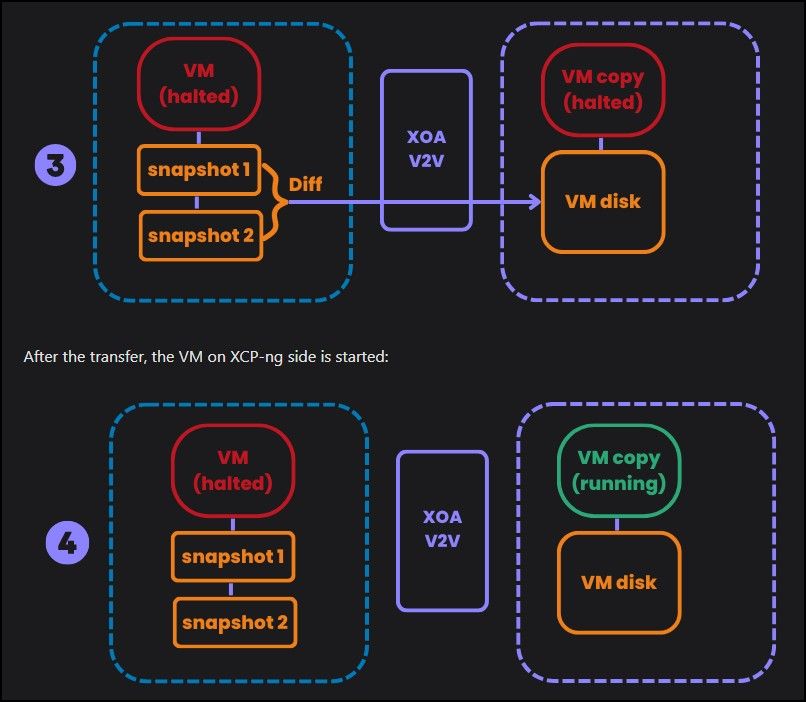
https://docs.xcp-ng.org/installation/migrate-to-xcp-ng/But my findings/experience is that the VM does not start once the import/transfer has completed.
So either the docs are wrong. Or the function is not behaving as intended. I'm acctually fine either way. As long as I know what to expect. However, I would like to have it auto-start the VMs after transfer completion. Which would make the procedure "Fully automated".
Update:
Am I assuming correctly that "the XO V2V guide says to start the VM yourself once the migration is complete " you're reffering to, is part of the "test migration"-procedure? Not the acctual production mgiration?
Because:"Final migration Run the production migration When you're ready for the final migration: Shut down the source VM completely. Start the V2V migration in Xen Orchestra with the Stop source option enabled. This ensures the final sync happens while the VM is powered off, and prevents any inconsistencies."In my mind doesn't state that the VM should be started manually post-transfer.
Great thanks in advance for discussing!
Cheers!


Hello! It looks like you're interested in this conversation, but you don't have an account yet.
Getting fed up of having to scroll through the same posts each visit? When you register for an account, you'll always come back to exactly where you were before, and choose to be notified of new replies (either via email, or push notification). You'll also be able to save bookmarks and upvote posts to show your appreciation to other community members.
With your input, this post could be even better 💗
Register Login