Installed on 3xDell PowerEdge R350 in HA. And so far, I haven't noticed anything out of the ordinary.
J
Offline
-
RE: XCP-ng 8.3 updates announcements and testing
-
RE: Building from source, now introduces local changes in typed-router.d.ts?
I noticed you merged https://github.com/vatesfr/xen-orchestra/pull/9787
I just tried it. And it does seem to fix my original issue!
Thank you! I am always impressed by you guys. Making testing and reporting upstream (to you guys) a good experience!
-
RE: Backblaze as Remote error Unsupported header 'x-amz-checksum-mode' received for this API call.
I submitted this as a GitHub issue last week.
TL;DR: Backblaze aparently doesn't support those flags that are enabled by default
"Backblaze does not yet accept these headers, so we recommend downgrading to AWS Javascript 3.x SDK version 3.728.0." -
RE: Enable Maintenance Mode = Host Not Enough Memory
@poddingue
Our HA-pool is a 3 host system, yes.I'll add a note about our plans to go paid in that feedback-item. Thanks for the tip.
In the meantime, I'm testing and reporting as much as I can. In order to hopefully help the product be better for all.Cheers!
-
RE: Enable Maintenance Mode = Host Not Enough Memory
Huh.. Good catch.
I set all of the VMs torestart, and now it does make maintenance mode possible, on the host.However, when we go into licensed/paid production (soon tm). It would be an absolute nightmare to try and find one VM that might not be on the right HA-plan... And it does kind of feel that Maintenance-mode should be compatible with whatever HA-plan is chosen regardless.
Perhaps there could be a way to assign a global/pool-wide HA-plan along with enabling HA alltogether?
Update: Shining light on that there is already a feedback-item, wishing for this kind of mass-operation for HA.
https://feedback.vates.tech/posts/45/bulk-operation-for-setting-vm-ha-option -
RE: [V2V] Without VDDK problems
Thanks for a fantasticly quick answer, and detailed as well. I will test this immediately!
Update:
I can confirm that this was indeed the problem! -
RE: [Solved] SR_SOURCE_SPACE_INSUFFICIENT - Problems enabling HA
Thanks again for your input and recomendations! I'll verify that this is solved by having the LUN expanded to 8GB instead. Afterwards I'll mark your answer as the solution!
-
RE: Rolling Snapshot not cleaning up old snapshots, regardless of retention is set to.
@olivierlambert
I've finally had time to sit down and do some more troubleshooting.
It seems that the issue is somehow tied to the backup-jobs themselves.
Deploying XOA and subsequently importing XO-config from my XOCE instance. I continued to see several issues between both instances.
These issues pretty much went away, when I re-did the backup-jobs from scratch. And are now much more in-line with what I'm excepting to see. This was done on both XOA Stable, Latest and XOCEI am no longer able to repoduce this at all.
So my guess is that a bug of some sort got introduced with this being a constantly updated from source instance.Marking as solved. As I don't believe there is much more to do at this time.
-
RE: A VM without any data on disk, passes Health Check - Bug?
Thanks for taking a look on your end as well.
I would like to point out that the line from the docs is quite deffinitive. If there are gotchas, such as UEFI affecting things. Then this either should be documented. Or better yet, that outlier of an edge-case probably should be addressed.One scenario I'm envisioning is that a disk is faulty for some reason, and this goes unoticed due to the VM being rarely used. And since no backup-errors are given, this might go unoticed for quite some time. The Health Check passing is a false signal in that case.
These are my two-cents. And I confirm that this is an edge-case, and even unlikely one. But a theoretical greater than zero risk anyways.
Thank you
-
RE: VM vCPU allocation
@McHenry
Differences could be things such as:- Amount of cores between hosts for migrations
- Guarantee performance between guests. So that they don't affect each other as much.
Same with overprovisioning dynamic RAM
-
RE: A VM without any data on disk, passes Health Check - Bug?
Thanks for taking a look on your end as well.
I would like to point out that the line from the docs is quite deffinitive. If there are gotchas, such as UEFI affecting things. Then this either should be documented. Or better yet, that outlier of an edge-case probably should be addressed.One scenario I'm envisioning is that a disk is faulty for some reason, and this goes unoticed due to the VM being rarely used. And since no backup-errors are given, this might go unoticed for quite some time. The Health Check passing is a false signal in that case.
These are my two-cents. And I confirm that this is an edge-case, and even unlikely one. But a theoretical greater than zero risk anyways.
Thank you
-
A VM without any data on disk, passes Health Check - Bug?
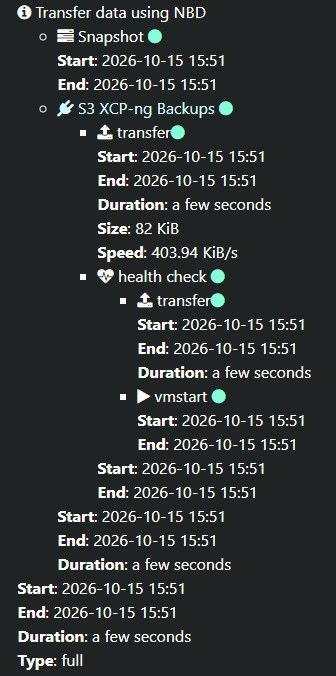
After doing some reshuffling and having to re-create a couple of VMs. I have two with newly created disks, that don't contain any data yet.
Upon doing some checks on the backup-schedules, I notice that these two passed the latest Delta-backup Health Check. However, as I mentioned earlier. These don't have data on their disks, and hence no Guest-Tools can be installed."A VM without guest tools will fail its health check."
source: https://docs.xen-orchestra.com/backups-and-dr/backup-features-and-settings#backup-health-check
-
RE: Support for newer Emulex LPe37xxx amd LPe36xxx Fiber channel adapters on XCP-ng 8.3 - your testing is needed
Third update:
It looks more and more that I had goofed something up in my testing. So please disregard everything in the post below.
The driver does work to make our LPe37000/LPe38000 series FC-cards work. Which is nice. Thanks!~~Good morning
So I might've found an issue with this driver release. That I'm trying to troubleshoot and collect data on.
We have two LUNs presented to our dev-pool (
xcp-dev), running onR650xs. When I have attached one LUN toxcp-devI can't see the other LUN.
This works on our older R350sRemoving the attached LUN, makes a LUN visible again. But now we're getting some strange behaviour. And looking into if it is misconfigured from the Dell Powerstore, or if it is on the host(s) itself.~~
Details:
multipath is enabledHost on
xcp-dev98:00.0 Fibre Channel [0c04]: Emulex Corporation LPe37000/LPe38000 Series 32Gb/64Gb Fibre Channel Adapter [10df:f500] (rev 11) Subsystem: Emulex Corporation Device [10df:f522] Kernel driver in use: lpfc Kernel modules: lpfc14 98:00.1 Fibre Channel [0c04]: Emulex Corporation LPe37000/LPe38000 Series 32Gb/64Gb Fibre Channel Adapter [10df:f500] (rev 11) Subsystem: Emulex Corporation Device [10df:f522] Kernel driver in use: lpfc Kernel modules: lpfc14Update:
~~After managing to revert my previous tests and forget the existing (wrong) LUN fromxcp-dev. I can now confirm a problem.There are three LUNs. Let's call them 101, 102, 103
When I attach one LUN (103) to
xcp-dev, I am no longer able to see the other LUNs. That means I can't add a second one. I am expecting to be able to see102available.However, on
old-dev, that has two LUNs attached already (101 & 102). It can see103as expected.~~host on
old-dev02:00.0 Fibre Channel [0c04]: Emulex Corporation LPe12000 Series 8Gb Fibre Channel Adapter [10df:f100] (rev 03) Subsystem: Emulex Corporation LPe12000 Series 8Gb Fibre Channel Adapter [10df:f100] Kernel driver in use: lpfc Kernel modules: lpfc 02:00.1 Fibre Channel [0c04]: Emulex Corporation LPe12000 Series 8Gb Fibre Channel Adapter [10df:f100] (rev 03) Subsystem: Emulex Corporation LPe12000 Series 8Gb Fibre Channel Adapter [10df:f100] Kernel driver in use: lpfc Kernel modules: lpfcSecond Update:
This might be unrelated. Seems that we're having weird behaviour with the LUNs in general. Please disregard the statement above for now -
RE: [V2V] Without VDDK problems
Thanks for a fantasticly quick answer, and detailed as well. I will test this immediately!
Update:
I can confirm that this was indeed the problem! -
RE: [V2V] Without VDDK problems
Looking into
journcelctlon the XO-server, after I enabled CBT-tracking on the VM (using this KB from Broadcom https://knowledge.broadcom.com/external/article/315370/enabling-or-disabling-changed-block-trac.html). I get the following:The initial V2V-snapshot on vmware is created as expected. So there is communication between XO and vmware (vcenter-host)
Oct 02 13:24:33 hostname-xo-server xo-server[55639]: 2026-10-02T11:24:33.361Z xo:vmware-explorer:esxi INFO got the data map from the change tracking of the host { Oct 02 13:24:33 hostname-xo-server xo-server[55639]: blocks: 16, Oct 02 13:24:33 hostname-xo-server xo-server[55639]: bytes: 20912799744, Oct 02 13:24:33 hostname-xo-server xo-server[55639]: diskPath: 'vm-name_1/vm-name.vmdk', Oct 02 13:24:33 hostname-xo-server xo-server[55639]: full: true, Oct 02 13:24:33 hostname-xo-server xo-server[55639]: seconds: 0, Oct 02 13:24:33 hostname-xo-server xo-server[55639]: vmId: 'vm-1169935' Oct 02 13:24:33 hostname-xo-server xo-server[55639]: } Oct 02 13:24:44 hostname-xo-server xo-server[55639]: 2026-10-02T11:24:44.496Z vates:nbd-client:stdio WARN the nbd server process exited unexpectedly { Oct 02 13:24:44 hostname-xo-server xo-server[55639]: error: Error: the nbd server process exited (code: 1, signal: null) Oct 02 13:24:44 hostname-xo-server xo-server[55639]: at ChildProcess.<anonymous> (file:///opt/xen-orchestra/@vates/nbd-client/NbdStdioClient.mjs:107:21) Oct 02 13:24:44 hostname-xo-server xo-server[55639]: at ChildProcess.wrapper (node:events:639:12) Oct 02 13:24:44 hostname-xo-server xo-server[55639]: at ChildProcess.emit (node:events:514:28) Oct 02 13:24:44 hostname-xo-server xo-server[55639]: at ChildProcess.patchedEmit [as emit] (/opt/xen-orchestra/@xen-orchestra/log/configure.js:52:17) Oct 02 13:24:44 hostname-xo-server xo-server[55639]: at Process.ChildProcess._handle.onexit (node:internal/child_process:295:12) { Oct 02 13:24:44 hostname-xo-server xo-server[55639]: code: 'NBD_SERVER_EXITED', Oct 02 13:24:44 hostname-xo-server xo-server[55639]: exitCode: 1, Oct 02 13:24:44 hostname-xo-server xo-server[55639]: signal: null, Oct 02 13:24:44 hostname-xo-server xo-server[55639]: command: '/opt/xen-orchestra/@xen-orchestra/vmware-explorer/vectura/vectura', Oct 02 13:24:44 hostname-xo-server xo-server[55639]: stderr: 'vectura: data plane: could not connect: timed out\n' Oct 02 13:24:44 hostname-xo-server xo-server[55639]: } Oct 02 13:24:44 hostname-xo-server xo-server[55639]: } Oct 02 13:24:44 hostname-xo-server xo-server[55639]: 2026-10-02T11:24:44.526Z xo:api WARN username-1 | vm.importMultipleFromEsxi(...) [17s] =!> Error: stream has ended without data, was looking for 8 bytes -
[V2V] Without VDDK problems
First of all. Thanks for putting alot of effort into getting migrations to work without VDDK. https://github.com/vatesfr/xen-orchestra/pull/10421
However. I did a new provisioning of an XO-source instance. And wanted to test it without any hanging dependencies from previously installed vddk's.
Now I'm getting met with failed import-attempts.
Attempts with my previous XO instance, on the same commit: b59c8 works just fine. Except the VMs not starting automatically after import (discussed in separate thread: https://xcp-ng.org/forum/post/108686)
vm.importMultipleFromEsxi { "concurrency": 2, "host": "vcenter-host", "network": "72471fb1-58fd-d2d1-9a1e-46aea05374b4", "password": "* obfuscated *", "sr": "4d58d7f1-087a-bc7b-a957-e8f8be8b1f77", "sslVerify": false, "stopOnError": true, "stopSource": true, "template": "37e7a3b9-8c45-c7f2-7d09-249a935dd33d-1a647cf9-99c1-4e9c-b3b4-6b9989c530be", "user": "obfuscated", "vms": [ "vm-1169935" ] } { "succeeded": {}, "message": "stream has ended without data, was looking for 8 bytes", "name": "Error", "stack": "Error: stream has ended without data, was looking for 8 bytes at readChunkStrict (/opt/xen-orchestra/@vates/read-chunk/index.js:83:13)" } ´´´ -
RE: XCP-ng 8.3 updates announcements and testing
Installed on 3xDell PowerEdge R350 in HA. And so far, I haven't noticed anything out of the ordinary.
-
RE: Enable Maintenance Mode = Host Not Enough Memory
@poddingue
Our HA-pool is a 3 host system, yes.I'll add a note about our plans to go paid in that feedback-item. Thanks for the tip.
In the meantime, I'm testing and reporting as much as I can. In order to hopefully help the product be better for all.Cheers!
-
RE: Enable Maintenance Mode = Host Not Enough Memory
Huh.. Good catch.
I set all of the VMs torestart, and now it does make maintenance mode possible, on the host.However, when we go into licensed/paid production (soon tm). It would be an absolute nightmare to try and find one VM that might not be on the right HA-plan... And it does kind of feel that Maintenance-mode should be compatible with whatever HA-plan is chosen regardless.
Perhaps there could be a way to assign a global/pool-wide HA-plan along with enabling HA alltogether?
Update: Shining light on that there is already a feedback-item, wishing for this kind of mass-operation for HA.
https://feedback.vates.tech/posts/45/bulk-operation-for-setting-vm-ha-option -
Enable Maintenance Mode = Host Not Enough Memory
Doing some more testing, where I wished to place one Host in maintenance mode. I was then met with
HOST_NOT_ENOUGH_FREE_MEMORY.
The pool is a 3 host pool in HA, with load balancing enabled.My guess is that when trying to enable Maintenance mode. It tries to migrate ALL VMs on that host, to ONE single Host on the receiving end. And then it exhausts the amount of available memory.
What I had to do, was manually disable load balancing. And manually migrate VMs to the two other hosts, to distribute them. This worked.
What I expected to have happened:
The evacuation of the host going into Maintenance mode, would be distributing the VMs in a smarter fashion. So that their workload would fit in the pooled resources available.Commit: 2f846
XCP-NG: Fully updated as of writinghost.setMaintenanceMode { "id": "<obfuscated>", "maintenance": true } { "code": "HOST_NOT_ENOUGH_FREE_MEMORY", "params": [ "OpaqueRef:<obfuscated>" ], "task": { "uuid": "c3a83a2d-003d-ac0f-48b8-79a905c9e557", "name_label": "Async.host.evacuate", "name_description": "", "allowed_operations": [], "current_operations": {}, "created": "20260929T07:46:40Z", "finished": "20260929T07:46:40Z", "status": "failure", "resident_on": "OpaqueRef:<obfuscated>", "progress": 1, "type": "<none/>", "result": "", "error_info": [ "HOST_NOT_ENOUGH_FREE_MEMORY", "OpaqueRef:<obfuscated>" ], "other_config": {}, "subtask_of": "OpaqueRef:NULL", "subtasks": [], "backtrace": "(((process xapi)(filename ocaml/xapi/xapi_host.ml)(line 629))((process xapi)(filename hashtbl.ml)(line 159))((process xapi)(filename hashtbl.ml)(line 165))((process xapi)(filename hashtbl.ml)(line 170))((process xapi)(filename ocaml/xapi/xapi_host.ml)(line 625))((process xapi)(filename ocaml/libs/xapi-stdext/lib/xapi-stdext-pervasives/pervasiveext.ml)(line 24))((process xapi)(filename ocaml/libs/xapi-stdext/lib/xapi-stdext-pervasives/pervasiveext.ml)(line 39))((process xapi)(filename ocaml/xapi/rbac.ml)(line 228))((process xapi)(filename ocaml/xapi/rbac.ml)(line 238))((process xapi)(filename ocaml/xapi/server_helpers.ml)(line 78)))" }, "message": "HOST_NOT_ENOUGH_FREE_MEMORY(OpaqueRef:<obfuscated>)", "name": "XapiError", "stack": "XapiError: HOST_NOT_ENOUGH_FREE_MEMORY(OpaqueRef:<obfuscated>) at XapiError.wrap (file:///opt/xen-orchestra/packages/xen-api/_XapiError.mjs:16:12) at default (file:///opt/xen-orchestra/packages/xen-api/_getTaskResult.mjs:13:29) at Xapi._addRecordToCache (file:///opt/xen-orchestra/packages/xen-api/index.mjs:1358:24) at file:///opt/xen-orchestra/packages/xen-api/index.mjs:1392:14 at Array.forEach (<anonymous>) at Xapi._processEvents (file:///opt/xen-orchestra/packages/xen-api/index.mjs:1382:12) at Xapi._watchEvents (file:///opt/xen-orchestra/packages/xen-api/index.mjs:1589:14)" }Update: Edited title, since it would suggest Load Balancing was the problem. It isn't. It's the assignment of migration target(s) that is the issue (imho)