Install XO from sources.
-
-
install_xen_orchestra v0.9.0 — install optional server plugins with
--custom-pluginsSince the v0.7.2 post there's been a safety-net release (v0.8.0) and a new feature (v0.9.0). Everything from v0.8.0 through v0.9.0, in one place.
v0.8.0: VM snapshots before update/rebuild, and every RHEL template is now buildable
--updateand--rebuildnow take a normal XO API snapshot of the XO VM itself before touching anything, on top of the existing file backup — it shows up in XO's own UI under the VM's Snapshots tab like any other. Old ones get pruned automatically (keeps 3, or 14 days, whichever you set) so they don't pile up and trip XO's own Health-view warnings. This only works when XO itself is a Xen guest; bare metal just keeps the file backup as before.Also new: a
--statuscommand that gives a read-only summary — version, how far behind master, service state, TLS cert expiry, disk/swap, backup and snapshot counts — and a--list-backupsto see what's there without going through a restore. TLS certs now get a warning once they're under 30 days from expiring, wherever that check would previously only surface as a failed connection.Rocky Linux 8, 9 and 10 dropped their "Coming Soon..." tag and build now — same
tpl_prep_rhelscript the AlmaLinux and CentOS Stream rows already use, since it's the same family. Every row in the template catalogue builds something now.Rest of v0.8.0 was a security hardening pass — checksum-verifying the Node.js download, no more passwords on the command line for the XO Proxy helper, tightened file permissions on
config.tomland the swap file — worth a look at the CHANGELOG if you're running this on anything you care about.v0.9.0:
--custom-plugins— install optional xo-server plugins with one commandXO has a plugin system (
xo-server-auth-ldap,xo-server-load-balancer, that kind of thing) but nothing installs one for you — you're expected to drop it undernode_modulesby hand and restart the service.--custom-plugins(new menu entry too) does that part: pick a plugin, it gets copied to/usr/local/lib/node_modules/<name>— outside/opt/xen-orchestra, so--update's rebuild never touches it — andxo-serverrestarts to pick it up. Run it again and anything already installed shows pre-checked; uncheck to remove, check something new to install, leave one checked to refresh it if this repo's copy has changed since. Configuration itself still happens the normal way, in XO's own Settings > Plugins.Two plugins ship to start:
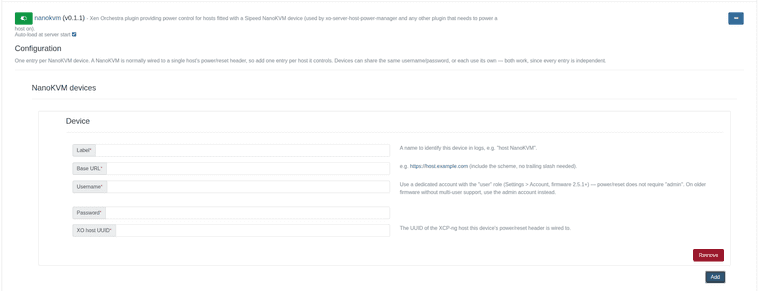
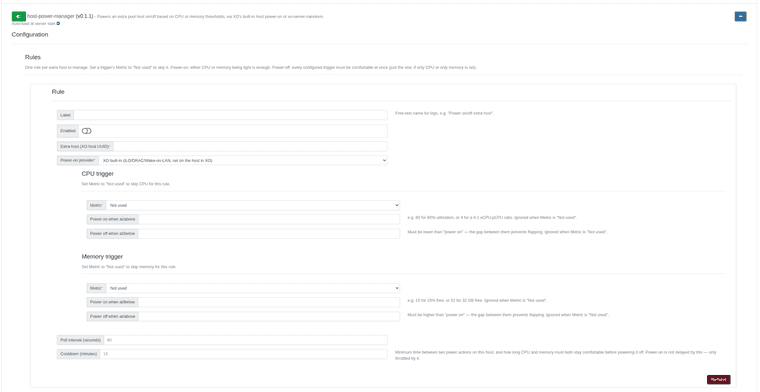
xo-server-nanokvm— power control for a host fitted with a Sipeed NanoKVM, over its REST API.xo-server-host-power-manager— powers an extra pool host on when CPU or memory gets tight, and powers it back off (evacuated first, same path as XO's own maintenance mode) once it isn't needed. Power-on can go through NanoKVM or XO's built-in iLO/DRAC/Wake-on-LAN.
Docs: docs/custom-plugins.md
The host-power-manager plugin got the most testing this round, and threw up a few real bugs against a live pool: saving its settings while it was already running silently killed every rule's timer until the next
xo-serverrestart, its CPU/memory numbers disagreed with XO's own dashboard because it was excluding the managed host from the pool total, and there was no way to build a CPU-only or memory-only rule since both thresholds were required. All three are fixed, and power-off is now HA-aware — it defers to XAPI's own failover check and just leaves the host running and retries later rather than forcing an evacuation that would break your HA plan.Repo: https://github.com/acebmxer/install_xen_orchestra
As always, let me know if you try either plugin out or hit anything.
-
Small update — I split the custom plugins out of this project into their own repo, for anyone who just wants the plugins without pulling in the whole install script:
https://github.com/acebmxer/xo-plugins
Same deal as always — use at your own risk, review the code before running it on anything that matters. The two plugins in there are also still shipped inside this install script's Custom Plugins menu, kept in sync automatically — this repo just exists for people who don't want the rest of the project.
xo-server-nanokvm
This one's probably the more useful of the two for a lot of people. If you've got a host with no iLO/DRAC/IPMI — most consumer/prosumer boards, a lot of homelab gear — and you've wired up a Sipeed NanoKVM to the power header, this plugin lets Xen Orchestra power that host back on through the NanoKVM's own API. Same interface the NanoKVM web UI itself uses to press the button, just done from XO.
On its own it doesn't decide when to turn a host on, it just gives XO a way to do it. Pairs with the other plugin below for that, or you could call it from your own automation if you wanted.
Worth knowing: it can only press the button, it has no way to know if the host is actually on or off, so it only handles power-on. Powering off goes through XO's normal shutdown, which is a clean OS shutdown and evacuates VMs first — no reason to route that through the NanoKVM.
Setup is a config entry per host: label, the NanoKVM's URL, a login, and which XO host it's wired to. Recommend making it a dedicated
user-role account on the NanoKVM rather than admin — that role already has power/reset access without giving the plugin anything to storage/network settings on the KVM itself.xo-server-host-power-manager
This is the one that actually decides when to act. Point it at an "extra" host in the pool and give it CPU and/or memory thresholds — when the rest of the pool is under pressure it powers that host on, and once things calm down for a while it powers it back off. Power-on can go through XO's built-in methods or through the NanoKVM plugin above, your choice per rule.
Powering off always goes through XO's own host shutdown — it evacuates the running VMs first, and if HA is on and doesn't have room to cover it, XAPI just refuses and the plugin backs off and tries again later rather than forcing anything.
It's deliberately quick to scale up and slow to scale down (needs both CPU and memory comfortable for a full cooldown period before it'll power a host off) so it's not flapping a host on and off over a short spike.
Both have a Test button in their config page that actually tells you something useful, unlike XO's own generic "test plugin" popup — check
journalctl -u xo-serverright after clicking it to see what it found.As always, happy to hear feedback or find out I've broken something.
-
@acebmxer Even with the credentials present in the configuration file, the process still prompts for sudo permissions, which will not be visible or actionable when running as a cron job.
-
Sorry for any confusion. Hope this clears it up.
The credentials in
xo-config.cfgare only for logging into Xen Orchestra (the pre-update task check and VM snapshot). There is no setting for a sudo password, and the script won't run as root, so sudo will still ask.To run it from cron, the account running the script needs passwordless sudo. Run this as that user:
echo "$USER ALL=(ALL) NOPASSWD:ALL" | sudo tee /etc/sudoers.d/xo-cron
sudo chmod 440 /etc/sudoers.d/xo-cron
sudo visudo -c
Then add
--non-interactiveso it doesn't stop to ask anything:0 3 * * * cd /path/to/install_xen_orchestra && ./install-xen-orchestra.sh --update --non-interactiveKeep in mind this gives that account full sudo with no password. Use at your own risk.
I've pushed this to the
devbranch, including a new Scheduled Updates (cron) section in the README. To try it before it reachesmain, switch your copy todev:cd /path/to/install_xen_orchestra git fetch origin git checkout devTo go back later, run
git checkout main.Scheduled Updates (cron)
--updatecan run unattended from cron. Two things are needed:-
Passwordless sudo for the account that runs the script. The script
refuses to run as root and callssudothroughout, and there is no config
setting for a sudo password. Run this as that account:echo "$USER ALL=(ALL) NOPASSWD:ALL" | sudo tee /etc/sudoers.d/xo-cron sudo chmod 440 /etc/sudoers.d/xo-cron sudo visudo -cThis gives the account full sudo with no password.
-
--non-interactive, so the update never stops to ask anything:0 3 * * * cd /path/to/install_xen_orchestra && ./install-xen-orchestra.sh --update --non-interactive >> "$HOME/xo-update.log" 2>&1
Set
XO_API_TOKEN(or the user/password pair) inxo-config.cfg.
Without it, a non-interactive run skips the
running task check instead of
prompting for credentials. -
-
@acebmxer Thank you for your help and prompt response. I truly appreciate it!
-
No problem. Let me know if you still encounter any issues.
-
Update - changes are live in the dev branch now.
So figured out the update / switching branches for the proxy by connecting the proxy to my xoa free account. That triggered the available update to next version. From there I found the command that needs to be ran on the proxy to switch back and forth...

Latest branch

stable branch

Backup job ran sucessful.
2026-10-09T17_48_25.447Z - backup NG.txt
After the proxy has been deployed...
The proxy has been registered with your Xen Orchestra instance.
You can manage it from the Xen Orchestra web interface.Next: register the proxy's updater and move it to the 'latest' channel.
- On the pool master (IP), set a password for the proxy's 'xoa' user
(choose your own) and reboot the proxy VM:
xe vm-param-set uuid=UUID xenstore-data:vm-data/system-account-xoa-password='<your password>'
xe vm-reboot uuid=UUID - SSH to the proxy as 'xoa' (IP) and run:
sudo xoa-updater register- This registers it with your vates account.
sudo xoa-updater configure-channel xo-proxy-appliance-latest- set tolatestorstable
sudo xoa-updater upgrade- This can be ran via the UI or this command. Both need to be done twice to do the upgrade and/or downgrade.
register needs a free xen-orchestra.com account; see the README.
And host connected via proxy.

- On the pool master (IP), set a password for the proxy's 'xoa' user
-
Hiya,
I'm trying to update XO from sources, running on my home lab, from version (xo commit a846a and master commit 1fca2) built on 27 October 2026 to the latest version. But I'm running into 2 errors because of missing modules.
Is this a known issue?
@xen-orchestra/web:build: @xen-orchestra/web:build: src/modules/pool/form/use-pool-existing-host-form.unit.test.ts(7,33): error TS2307: Cannot find module '@/test/mount-with-select.ts' or its corresponding type declarations. @xen-orchestra/web:build: src/modules/pool/form/use-pool-existing-host-form.unit.test.ts(8,70): error TS2307: Cannot find module '@/test/select.ts' or its corresponding type declarations. @xen-orchestra/web:build: src/modules/vdi/components/drawer/NewVdiDrawer.unit.test.ts(12,70): error TS2307: Cannot find module '@/test/select.ts' or its corresponding type declarations. @xen-orchestra/web:build: src/modules/vdi/components/drawer/VdiAttachDrawer.unit.test.ts(12,70): error TS2307: Cannot find module '@/test/select.ts' or its corresponding type declarations. @xen-orchestra/web:build: src/modules/vif/components/drawer/NewVifDrawer.unit.test.ts(10,46): error TS2307: Cannot find module '@/test/select.ts' or its corresponding type declarations. @xen-orchestra/web:build: error Command failed with exit code 2. @xen-orchestra/web:build: info Visit https://yarnpkg.com/en/docs/cli/run for documentation about this command. @xen-orchestra/web:build: ERROR: "type-check" exited with 2. @xen-orchestra/web:build: error Command failed with exit code 1. @xen-orchestra/web:build: info Visit https://yarnpkg.com/en/docs/cli/run for documentation about this command. ERROR @xen-orchestra/web#build: command (/opt/xo/xo-builds/xen-orchestra-202611241056/@xen-orchestra/web) /tmp/yarn--1795517949536-0.39518520952471614/yarn run build exited (1) -
Yeah I got the same error this morning, Vates had 1 PR that move the files while the following PR still refferenced those files... the new commit just fixed it... if you do a restore to bring your XO back you can update again and it should work. I just updated mine just now...
[SUCCESS] Generated static files in "build-embed".
[INFO] Use `npm run serve` command to test your build locally.
Done in 35.35s.
[SUCCESS] Xen Orchestra built successfully
[INFO] Build verification passed: dist — all JS chunks present.
[INFO] Build verification passed: dist — all JS chunks present.
[INFO] Creating systemd service...
[INFO] Keeping the 5410 MB heap size set with --adjust-memory
[SUCCESS] Systemd service created and enabled
[INFO] Starting xo-server service...
[INFO] Waiting for Xen Orchestra to become ready (up to 60s)...
[INFO]   Not ready yet (attempt 1/10), retrying in 6s...
[SUCCESS] Xen Orchestra is ready (HTTPS on port 443)
[SUCCESS] Update completed successfully!
[INFO] New commit: 82dabbf0cd19

Hello! It looks like you're interested in this conversation, but you don't have an account yet.
Getting fed up of having to scroll through the same posts each visit? When you register for an account, you'll always come back to exactly where you were before, and choose to be notified of new replies (either via email, or push notification). You'll also be able to save bookmarks and upvote posts to show your appreciation to other community members.
With your input, this post could be even better 💗
Register Login